





Arbadacarba
Members
-
Joined
-
Last visited
Everything posted by Arbadacarba
-
Everything back online and ran parity check... No issues... Not sure what the initial cause really was
-
I ended up deleteing the VFIO file entirely and starting fresh... Worked
-
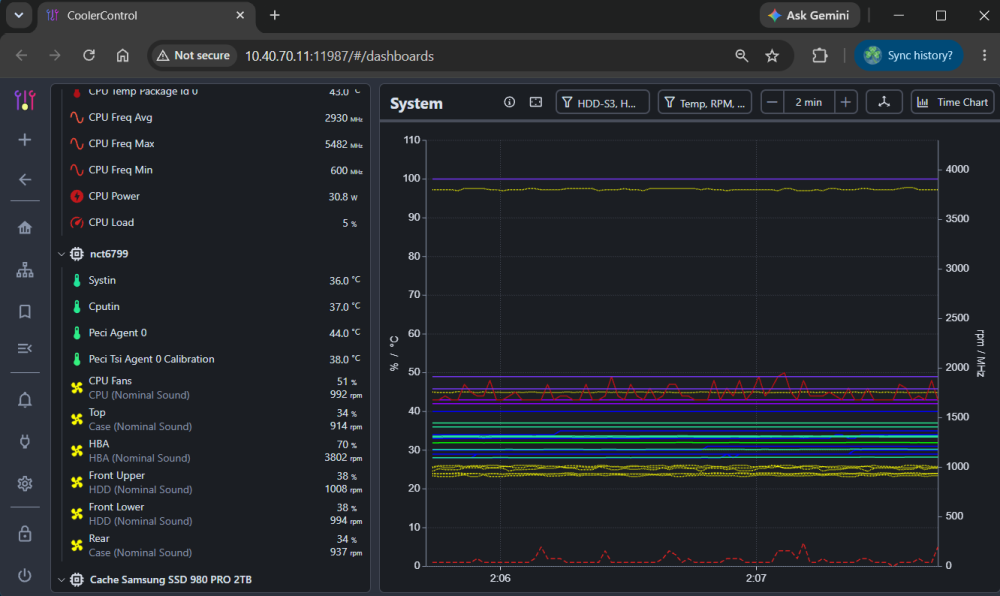
Further, if you are keeping the system in your office, I'd recommend Coolercontrol (Docker) to let you adjust cooling and sound.
-
You might also consider running two of the SSD's striped with regular backups to the aforementioned 12TB. That would be excellent for your active editing. Not that I know much about editing, but that'e what I've done for my VMs
-
So, having looked I just have to hit save and ... Nope, hadn't noticed the "ACKNOWLEDGE ALL PCI CHANGES" button... Totally obvious if you expected to see that button... The message could say to look for that? Thank you
-
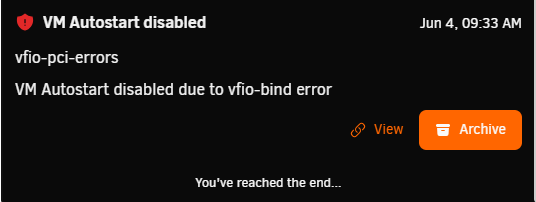
I've been playing, replacing some components and reconfiguring others... But I've clearly messed something up. I have two VMs that autostart at startup: One that uses the Network card (Upgraded) to run the router, and another to run home assistant. Once I log in I can just start the two VMs and they seem to be working fine. I also have a gaming VM that uses a Dedicated SSD, a USB card, and Video card. But it gets launched as needed (Sure wish I could let the server use that Video card when the Gaming machine isn't in use.) I guess I could completely wipe out the vfio-bind and rebuild, but if there error is coming from the config of a virtual machine that might not fix it. Thanks jupiter-diagnostics-20260609-0825.zip
-
Maybe leave it off and run a parity check?
-
Good point, is there a test I can run other than just going about my business for a week?
-
So I replaced a couple of drives with new 26TB drives, and am encountering a problem I've never seen before... I'm getting the occasional read error... But I'm not seeing anything in SMART reports. I had to move massive quantities of small files around in order to remove the old drives and install the new ones, so now I'm moving files back around to balance the drives out a bit. I'm not even certain these are happening on the new drives, I think I've had a few on each, and have had one on the cache drive which I know is 6 months old or so. I did upgrade to 7.3 but I'm pretty sure the first one happened before the upgrade. Any thoughts? jupiter-diagnostics-20260527-1446.zip
-
Is it just me? or is anyone else finding that making changes to the docker with Edit does NOT result in a modification to the configuration.py file? I feel like if I had done everything right the first time, it would have worked off the bat. Instead I had to use VI to edit the file inside the docker console until I got it right.
-
It may also be windows being weird with credentials... (assuming you are using windows on the laptop) Take a look at the credential manager and manually add an entry for the different addresses that you use... I've run into that on a few systems, and found adding a credential for both the numbered address and the dns name helps.
-
Common Script: gged in. What am I doing wrong that it won't let me put anything in here? I've seen that the black theme might be an issue but I can't seem to make it whatever it wants to see. My goal is to make in run a script from user scripts when a drive is plu

-
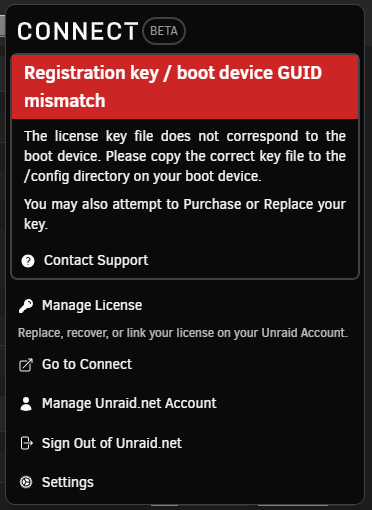
OK, Tried a reboot and got a bigger version of the image above... I wonder? Pulled the USB Drive I had plugged in... and System is back... Dangit... that is an unraid thumb drive that I created for something...
-
What on earth just happened: I'm playing with the idea of using a AV in a Docker to scan external drives (Thumb Drives) that are of questionable provenance... I have at least one that I suspect may have some kind of virus that transferred from a Windows machine that I pulled some data from. I installed the ClamAV docker and was about to see if I could point it at the unassigned drives folder to scan anything I mount in there... Then I tried mounting a drive and got a failure to mount... OK, lets try another one... Neither of these are suspect, I was really just trying to get the mount location right for the Docker I was configuring... All of a sudden I get this: and my fans spin up as my array goes offline... WTH? Anyone have any thoughts before I reboot my server? jupiter-diagnostics-20260421-1429.zip
-
Looking through that I'm impressed at how I think the scripts work... but at the same time I might not be able to take advantage of it since it doesn't have all the features that I need... So we can create scripts - Bash or PHP etc. That depending on the folder they are located in, can run when the referenced VM makes transition to Start, or Stop... but there is no provision to call a script when it is paused? Hmm. so I pause the VM when the AMP input switches to t different source so that wehn it gets switched back it comes up faster... So the script would not run in that case and my cooling system would continue to act as if the temps were remaining the same. What about the network hooks? Could a script be triggered when the VM loses connection? It mentions being unplugged, and when I pause the VM it vanishes from my network... Thanks
-
That's why I was wondering if you can call a bash script from the hooks file Thanks for your help Simon... Did you mean to add a link in the previous post?

-
Ya, the bash thing was dumb... I've got some of it working in php, but I can't figure out how to get it to act if I PAUSE the vm... I've got it working if I stop it but that's only half the plan... If I create an additional script does it have to be in PHP? or can it be bash? I thought I had a way to detect pause in bash. Arbadacarba
-
Might help if my addition hadn't been written in bash I guess...
-
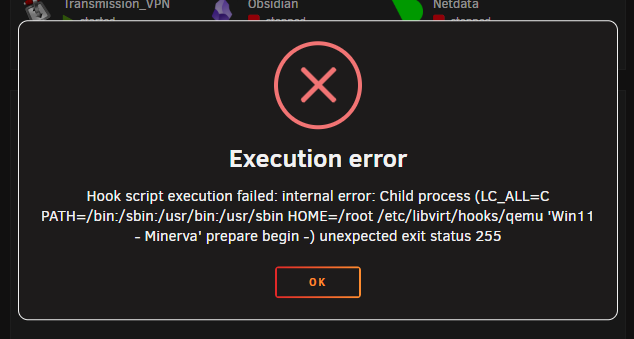
As part of my project to send GPU stats over to CoolerControl to help adjust case fans when the GPU ramps up, I want to either Delete or Modify the txt files that the VM creates in the /tmp directory so that if they spike on shutdown (of the VM) I don't get stuck with LOUD fans for longer than necessary. I have the script that I want to add to the /ets/libvirt/hooks/qemu file: # Routine to delete the sensor txt values created to monitor the GPU on Minerva (VM) GUEST_NAME="$1" ACTION="$2" ID="$3" if [ "$GUEST_NAME" == "Win11 - Minerva" ]; then if [ "$ACTION" == "stopped" ] || [ "$ACTION" == "paused" ]; then # Example action: remove specific files in /tmp rm -f /tmp/gpu_*.txt # Or remove a directory # rm -rf /tmp/your_vm_files/ fi fiBut when I add that: #!/usr/bin/env php <?php if (!isset($argv[2]) || $argv[2] != 'start') { exit(0); } $strXML = file_get_contents('php://stdin'); $doc = new DOMDocument(); $doc->loadXML($strXML); $xpath = new DOMXpath($doc); $args = $xpath->evaluate("//domain/*[name()='qemu:commandline']/*[name()='qemu:arg']/@value"); for ($i = 0; $i < $args->length; $i++){ $arg_list = explode(',', $args->item($i)->nodeValue); if ($arg_list[0] !== 'vfio-pci') { continue; } foreach ($arg_list as $arg) { $keypair = explode('=', $arg); if ($keypair[0] == 'host' && !empty($keypair[1])) { vfio_bind($keypair[1]); break; } } } # Routine to delete the sensor txt values created to monitor the GPU on Minerva (VM) GUEST_NAME="$1" ACTION="$2" ID="$3" if [ "$GUEST_NAME" == "Win11 - Minerva" ]; then if [ "$ACTION" == "stopped" ] || [ "$ACTION" == "paused" ]; then # Example action: remove specific files in /tmp rm -f /tmp/gpu_*.txt # Or remove a directory # rm -rf /tmp/your_vm_files/ fi fi exit(0); // end of script function vfio_bind($strPassthruDevice) { // Ensure we have leading 0000: $strPassthruDeviceShort = str_replace('0000:', '', $strPassthruDevice); $strPassthruDeviceLong = '0000:' . $strPassthruDeviceShort; // Determine the driver currently assigned to the device $strDriverSymlink = @readlink('/sys/bus/pci/devices/' . $strPassthruDeviceLong . '/driver'); if ($strDriverSymlink !== false) { // Device is bound to a Driver already if (strpos($strDriverSymlink, 'vfio-pci') !== false) { // Driver bound to vfio-pci already - nothing left to do for this device now regarding vfio return true; } // Driver bound to some other driver - attempt to unbind driver if (file_put_contents('/sys/bus/pci/devices/' . $strPassthruDeviceLong . '/driver/unbind', $strPassthruDeviceLong) === false) { file_put_contents('php://stderr', 'Failed to unbind device ' . $strPassthruDeviceShort . ' from current driver'); exit(1); return false; } } // Get Vendor and Device IDs for the passthru device $strVendor = file_get_contents('/sys/bus/pci/devices/' . $strPassthruDeviceLong . '/vendor'); $strDevice = file_get_contents('/sys/bus/pci/devices/' . $strPassthruDeviceLong . '/device'); // Attempt to bind driver to vfio-pci if (file_put_contents('/sys/bus/pci/drivers/vfio-pci/new_id', $strVendor . ' ' . $strDevice) === false) { file_put_contents('php://stderr', 'Failed to bind device ' . $strPassthruDeviceShort . ' to vfio-pci driver'); exit(1); return false; } return true; } But when I try to run the VM I get: [Hook script execution failed: internal error: Child process (LC_ALL=C PATH=/bin:/sbin:/usr/bin:/usr/sbin HOME=/root /etc/libvirt/hooks/qemu 'Win11 - Minerva' prepare begin -) unexpected exit status 255] Is there a simple answer as to where I've gone wrong? Thank You Arbadacarba
-
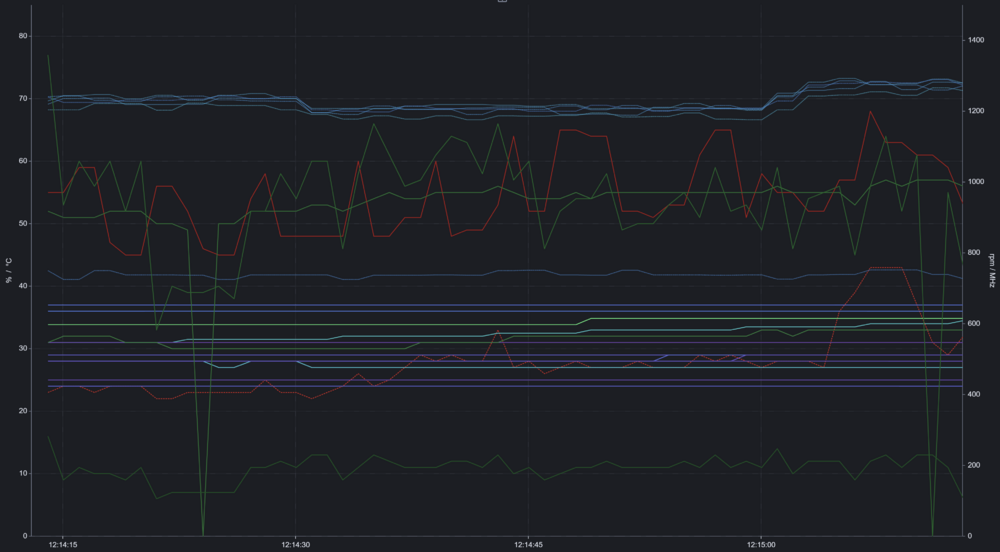
Scenario: I have an Unraid server with a 5090 GPU passed through to a Gaming VM that is connected to the TV in the living room. My Son and I play games on the TV, but I also work in the room where the server is located. I recently replaced a bunch of system components and ended up with a server beside my desk that is VERY loud at times... with big jumps in fan noise for no apparent reason. I also have a bit of OCD when it comes to being able to see data and have my system operate in a way that I want it to... (I even have a SmartHome temperature sensor stuck ito the inside of my case so that I can monitor general changes that way) History: I've tried a bunch of different tools to control the fans: Dynamix System Temperature Dynamix System Autofan PWM Fan FanCtrl Plus And never found one that would quite do what I wanted... My server goes months without restarting so I don't want to adjust it in the BIOS and reboot to fine tune things... Then I came across CoolerControl... And WOW I have been super happy playing with that... I've got it so my system responds to heat in a reasonable way and I can see why it does what it does so that I can fine tune it further. One thing I have been looking for is to bring the GPU Fan and Temps into the same ecosystem. I've looked around and found nothing that would work for that until... CoolerControl can use a text file as a sensor Nvidia has a couple of CLI tools that report data about the GPU Gemini can write Python scripts... So now I have a Python Script being started by Task Scheduler, A shared /tmp folder in Unraid, and a graph that shows me the Temperature info (and more: Fan Speed (%), GPU Load, Memory Load) in a graph with all the other relevant (and some irrelevant) data. Now, while I can't control the fans on the GPU from here, I can have them and the GPU temp affect the Case Fans to expel extra heat when they start working overtime. Some of the numbers are a bit weird because they are all interpreted as temperature so I have things displayed as percentages out of a hundred (labeled at degrees C) Thought I would share in case anyone else wants this. NVML-Stats.py
-
Will do thanks
-
Seems like I can leave it running in chrome as well... So it's just doing something funny to edge... UPDATE - It's not just CoolerControl that is doing it... I suspect the issue is with Edge not CoolerControl
-
But is there a daemon for windows that can pass things back to coolercontrol? If my second system were a linux machine I understand I could pass sensor data back to a single instance can't I? Please understand... I LOVE this thing. In less than 2 days I've been able to fine tune my fans in the server that sits next to my desk so that it is nearly silent 90% of the time... and spins up correctly when it needs additional cooling. Thank You SO much. Another thing though: I've noticed that if I'm watching youtube videos they stop and stutter when I have the CoolerControl graph open... I run a little tablet monitor on my desk to show me stats and such and I've had it running since I installed this to monitor and adjust the cooling system. I generally let videos run in a window and have been suffering a lot of buffering that wasn't there before. I just noticed that if I close the Graph Tab it instantly recovers and starts up again as soon as I go back to the graph.. I just launched the graph on the tablet natively not acting as a monitor for the PC and it seems fine... So I guess it's not a server issue but rather something in Edge... Thanks Again
-
OK, how about a way to include a temperature from a Windows VM? As a way to add the GPU temp and fan speeds to the list so that in the event of a hot running GPU I can spin up the case throughput fans? I have my Case fans running off the cpu to some extent but also have them spinning up if a drive gets hot... Would be great to add the GPU into the mix. I also have a USB thermistor that I have been wanting to get into the mix as well... But I haven't tried very hard yet.
-
Figured out what I was doing wrong... I had more than one UI window open and needed to close them all and restart the Docker




