





kamhighway
Members
-
Joined
-
Last visited
Everything posted by kamhighway
-
@dlandon, No worries. Your plugin is quite useful even without the ability to format a drive. @tmchow I posted instructions on page 31 of this thread for how to format a drive as XFS from the command line.
-
When the plugin installs, does it install parted without its dependencies? Is that the problem?
-
Thank you for chasing this bug down. Now we know the problem is not the size of the drive or whether its is a spinner or an ssd. Is there a terminal command we can use to add the missing library?
-
@dlandon, I've already formatted the drive from the command line and have moved my files back on to it. I would love to help troubleshoot, but I don't have another SSD that I could test with.
-
@dlandon I clicke on the pre-clear icon in UD to pre-clear my 480GB SSD. I also have Joe L's script in /boot but I did not use it this time. When the pre-clear finished, I did see the FS was changed to 'precleared'. I then clicked on 'Format' which appeared from the log to format the SSD. However, the button labeled 'Format' changed to 'Format failed' and I was not able to mount the SSD.
-
@scottc Thank you.
-
How does one find out the full number for a previous plex version. On the Plex download page (https://plex.tv/downloads/1/archive) they list the version number i.e. 0.9.16.4 and a date. However, the docker seems to need a version in the format of "0.9.12.16.1509-8e31408". Where can I find the rest of the version number?
-
@dlandon I guess that explains it. I did not realize UD was designed for spinners only. Thanks for helping me get to the bottom of this. Update: For anyone else who wants to use an SSD as an unassigned device, here's what worked. First, here is a link to a webpage that helped me. http://ask.xmodulo.com/create-mount-xfs-file-system-linux.html Essentially, you log into your unraid server via terminal and use two commands. 1) sudo fdisk /dev/sdX where the "X" is replaced with the correct letter for the drive you want to format. UD reports it in the first column. This command requires that you make a few entries. See the webpage linked above for an example. 2) sudo mkfs.xfs -f /dev/sdX1 again where the "X" is replaced, same as above. When this command is finished, UD will see the drive as formatted and will allow you to mount it.
-
@dlandon Yes, the drive I am trying to format is an SSD. Is UD not able to format an SSD?
-
@dlandon The image I uploaded above shows the four squares which I have clicked to no avail. I have a second drive listed in UD and when I clicked on the serial number for the second drive, the line with the four squares appears, only this time the four squares are blue and clickable. Hovering over the four blue squares brings up a tooltip that says "File System Check". Question: What determines whether the four squares are clickable? In my case, for sda (the ssd formated BTRFS) they are not clickable, but for sdg (a WD 5TB HD formated as xfs) they are. Since I could not get rid of the partition on sda, I clicked on the preclear icon thinking it would clear the partition and test the drive. After preclearing the ssd, the Mount button has changed to Format, which is what I wanted. However, clicking on Format, choosing XFS, and entering Yes in the dialog box results in the Format button changing to Format failed. The UD Log shows these entries which look like it repartitioned the drive. Apr 11 13:39:49 Clearing partition table of disk '/dev/sda'. Apr 11 13:39:49 Reloading disk '/dev/sda' partition table. Apr 11 13:39:49 Creating a 'msdos' partition table on disk '/dev/sda'. Apr 11 13:39:49 Creating a primary partition on disk '/dev/sda'. Apr 11 13:39:49 Formatting disk '/dev/sda' with 'xfs' filesystem. Apr 11 13:39:49 Reloading disk '/dev/sda' partition table. I am running UD version 2016.03.26. I thought I would try with this version because Jonathanm's post said he was unable to format a precleared drive with version 2016.04.09.
-
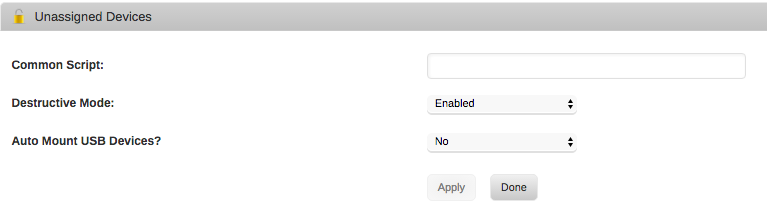
This is what I see after clicking on the red X to remove the partition and then clicking on the device serial number. Clicking on the four little squares does not seem to do anything. UD_Log.txt

-
@dlandon I've got destructive mode turned on. I click on the red X and type Yes to confirm deleting the partition. The line under the SSD's entry that lists the partition goes away. However, when I click on the SSD's entry the partition seems to still be there and I don't see a button labeled "format" anywhere. I'm sure I'm missing something.
-
Can UD reformat a drive? I have an SSD formated as BTRFS that used to be my cache drive and is now an unassigned device. I would like to format it as xfs and use it keep my VMs. Thank you.
-
@hernandito I am seeing the "Format Failed" message exactly as you described.
-
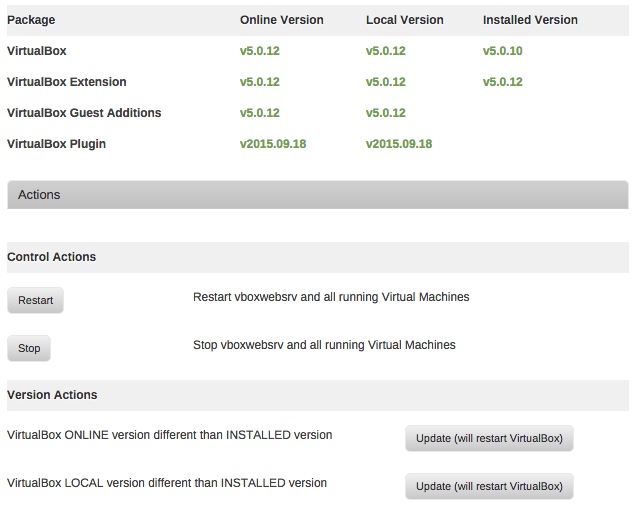
I've clicked on both update buttons and the status page now looks like I've got 5.0.12 as the local copy, but this same status page still says I'm still running 5.0.10 of VirtualBox. Shouldn't this say 5.0.12?
-
@dmacias, I'd like to suggest that you add a button that will open the IPMI's web interface. This would make it easy to be sure you are reaching the right IPMI page for the machine. If you have more than one machine to administer, it can be confusing which IP is the right one for the machine you are working on.
-
I've got Virtualbox running well, except that after rebooting the unraid server, phpmyvirtualbox comes up but shows no vms saved so I have to readd the vms after each reboot. Is there a setting I am not seeing?
-
@theone Thanks for this info. I thought this setting might have been the reason that my virtualbox vms do not survive a reboot. Guess it is something else. Update: I'm not sure what fixed my problem, but virtualbox vms are now saving their state and surviving a reboot just fine.
-
@dmacias, Nice tool. Working fine on a supermicro X9SCM motherboard. I sometimes use supermicro's IPMI tool to restart the computer and watch the bootup process through their iKVM tools. It's nice to be able to read the sensors right from Unraid. Thanks again.
-
In the "Mount and Startup" options, what is the field labeled "VirtualBox symbolic link (part of install package) - Change from default /boot/custom/vbox:" supposed to point to? I have my virtualbox vms at /mnt/cache/appdata/virtualbox. Is this where I should be pointing the Virtualbox symbolic link?
-
Thank you Squid
-
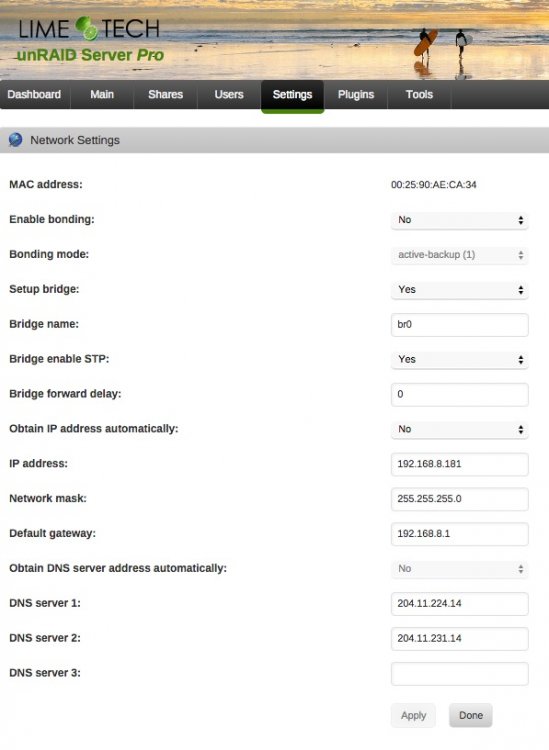
Here's a screenshot of the network settings page.
-
/config/plugins/community.applications does not exist on the flash drive. Diagnostics: https://www.dropbox.com/s/w71i4izqzh7vjic/tower-diagnostics-20150221-0741.zip?dl=0
-
DNS settings are identical to my primary unraid server. I reentered the info anyway and rebooted. Still getting same error messages.
-
Can't install community applications plugin on fresh Unraid 6.1.6 install. Here is the log: plugin: installing: https://raw.githubusercontent.com/Squidly271/community.applications/master/plugins/community.applications.plg plugin: downloading https://raw.githubusercontent.com/Squidly271/community.applications/master/plugins/community.applications.plg plugin: downloading: https://raw.githubusercontent.com/Squidly271/community.applications/master/plugins/community.applications.plg ... done Warning: simplexml_load_file(): /tmp/plugins/community.applications.plg:1: parser error : Document is empty in /usr/local/emhttp/plugins/dynamix.plugin.manager/scripts/plugin on line 193 Warning: simplexml_load_file(): in /usr/local/emhttp/plugins/dynamix.plugin.manager/scripts/plugin on line 193 Warning: simplexml_load_file(): ^ in /usr/local/emhttp/plugins/dynamix.plugin.manager/scripts/plugin on line 193 Warning: simplexml_load_file(): /tmp/plugins/community.applications.plg:1: parser error : Start tag expected, '<' not found in /usr/local/emhttp/plugins/dynamix.plugin.manager/scripts/plugin on line 193 Warning: simplexml_load_file(): in /usr/local/emhttp/plugins/dynamix.plugin.manager/scripts/plugin on line 193 Warning: simplexml_load_file(): ^ in /usr/local/emhttp/plugins/dynamix.plugin.manager/scripts/plugin on line 193 plugin: xml parse error Seems like something is missing?

