





C_James
Members
-
Joined
-
Last visited
-
Hey Is anyone else having the 50% CPU usage spike that doesn't go down until you stop qbittorrent?
-
Hey so just updating to state that i got unraid to work. my usb backup was a version 6.8 something and the usb tool wasnt adding all the files so probably had issues do to a misconfig. Copied the files over manually and it booted fine. Ive also sorted the nginx problem i was having so i am back up and running. soo ill mark this as solved.
-
I would, but I've managed to get it to work. I'm not sure why, but the USB creator tool with the backup zip wasn't copying everything from the backup zip. So I copied the backup files over, and it's working.
-
Ah I misread it. But im still having some issues. So i have the backup of the usb from connect and its on a new usb. for some reason im getting either ipv4 not set OR the static ip i set on the old usb and even after deleting the device on the router so it shouldnt be giving it the old ip with the new IP .149. im not able to connect.
-
Hey, So my usb boot drive died last night, and while reading changing-the-flash-device it states to add the drives in the array and cache in the same order as they were in. while i believe i have the correct order for the array the cache i have no clue. Please help.
-
No worries. sky fact 4 doesnt show up in the search atm.
-
Hi so sky factory 4 is reported to be blacklisted on unraid. Is there a reason for that?

-
Ye i worked it out. recconfiged tdarr node and tdarr and all sorted. still not sure what in the config made it go to the logs when /temp did have a folder made for it. but saying that i did have /temp inside of tdarr input / output folder. eg. /tdarr inside that was input output and temp. inside input was film/ tv and inside output was the same. strange really
-
How do you upgrade these to newer versions? sky factory 4 is on 4.2.4 with newer versions mods than this.
-
Hey. so got two questions. I see you can add an email to users. is there a way of adding a smtp email to this? also is made to be multi user? if so how do you go around inviting someone?
-
Has anyone else came across tdarr node really filling up docker image? ever since i started using tdar my docker image has doubled in size twice. like according to containor size on the docker menu tdarr is using over 30gb and over 30gb Writable.
-
Hey Im wondering. has anyone elses normal java minecraft server for 1.17 and 1.17.1 died? like mine os will simply not start a server with 1.17plus .jar set?
-
Some times its worth clearing the web browser cache. so might be worth clearing the cache and trying to connect again.
-
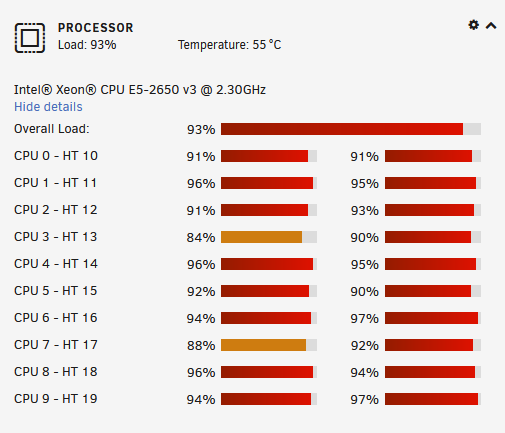
running handbrake now so here a screenshot.
-
im saying usage. that my bad. was typing the reply while in and out of a siege game. and okay. 81c does seem a little high for not all of the cores. i would check in case temps or reapply the thermal paste. 90 c is where ryzen thermal slows down.

