





BurntOC
Members
-
Joined
-
Last visited
Everything posted by BurntOC
-
NOTE: I posted this in the binhex-qbittorrent thread as well. This one gets more traffic but if I get to an answer in either I'll post the update in both for others who may run across the issue in the future. I finally had the chance to set this and the binhex-qbittorent containers for evaluation as they're the last major containers I wanted I'd not gotten around to yet. Most everything looks good, but whenever I launch either container I get this in the logs: Warning: `/config/wireguard/wg0.conf' is world accessible I've seen some people include that in their log captures here, but I've not found the resolution. I thought that deleting perms.txt and restarting the containers would address, but the behavior is the same. Whether I delete perms.txt or leave it as be, it changes the 600 permissions I'd set on the file manually back to 755. Can someone help me resolve this?
-
I finally had the chance to set this and the binhex-delugevpn containers for evaluation as they're the last major containers I wanted I'd not gotten around to yet. Most everything looks good, but whenever I launch either container I get this in the logs: Warning: `/config/wireguard/wg0.conf' is world accessible I've seen some people include that in their log captures here, but I've not found the resolution. I thought that deleting perms.txt and restarting the containers would address, but the behavior is the same. Whether I delete perms.txt or leave it as be, it changes the 600 permissions I'd set on the file manually back to 755. Can someone help me resolve this?
-
I couldn't leave well enough alone and I tried to install VM Backup from CA over the version I'd installed per my posts a few days ago. It failed, as the poster above indicated, with various issues from the one he/she described to a md5 check on a file it pulled. AND, I started seeing the problem you're desribing above. Unfortunately, if I delete the plugin out of /config/plugins it still won't let me go back to my previous version either. I'm going to try to delete the vmbackup folder out of plugins and just leave it be until @JTok has some time to put that new version out. Too many hiccups at the moment.
-
Thanks for this. I know this is a weird issue but if I remove VirtIO Drivers ISO from my VM then it starts crashing within a minute - two at the most. Over and over. If I put that back, it works fine. I know it shouldn't do that, but it does, and it doesn't matter whether I store the ISO on the array or on a UA drive, the VM Backup script gives this error and fails if that ISO is in the settings: /tmp/vmbackup/scripts/default/user-script.sh: line 424: vdisk_types["$vdisk_path"]: bad array subscript Would it be difficult to add a toggle to ignore those, or make it do that by default as most people wouldn't want those included anyway?
-
Last update of the day. I found others with this issue in the thread, and it lead me to believe it was dying on an ISO I still had mounted and/or the SSD I pass through directly by-id. I wanted to keep the latter if possible, so I removed the VirtIO Drivers ISO and ran it again and the backup appears to have completed just fine. Haven't tried a restore, but it looks really promising. EDIT - adding that normal backup of this VM was about 107 GB in size, but with zstandard it is 39 GB. That sounds a little too small, but there are no errors thrown. EDIT2 - welp, now the VM BSODs a lot. Re-adding the Virtio Drivers ISO in the VM settings seems to have stabilized it, but the VM Backup script is failing again with the error above.
-
I just had a chance to config and attempt a backup. I'd had this working in the past, though I'm pretty sure I'd tweaked a few things because of open issues mentioned in the OP and throughout the thread. FWIW, my initial backup attempt with the latest version and basically stock mostly works (at least there are few errors), but this single error seems to be bypassing the actual backup: 2021-03-01 10:12:49 information: /mnt/user/_backups_unraid1/VMs/GamingPC exists. continuing. /tmp/vmbackup/scripts/default/user-script.sh: line 424: vdisk_types["$vdisk_path"]: bad array subscript
-
@Roman Melnik @CS01-HS Okay, I got the new version installed on 6.9 RC2 and I expanded my comfort zone a bit to boot. Here's how I did it - anyone following these steps is doing so at their own risk. Step 1 - went to OP's beta Github repo for this here. Step 2 - forked a copy for me to edit Step 3 - edited the vmbackup.plg file to change the max to 6.13 (in my case, arbitrary just to get me through the next several revs hopefully official support will resume) Step 4 - downloaded the zip of the repository files, extracted the zip, and copied the files to /boot/temp Step 5 - Used Install Plugins to browse to /boot/temp and selected the vmbackup.plg file. Step 6 - Done. VM Backup is back in my Settings area.
-
Ah, I should've been more patient, probably. Thankfully it's just a single VM I don't mess with much except for gaming, LOL. Sent from my GM1915 using Tapatalk
-
I probably screwed up the process somehow, but using the link wouldn't complete because of a URL error somewhere in the script. I foolishly uninstalled my existing version and I tried the v21 and v22 file URLs and I couldn't get that either. I will probably try downloading them to install locally b/c I want to get it back. If that fails, can the dev post the steps needed to bypass that check for those of us that are willing to take the risk until a tested version is available?
-
Update - saw an update in Unraid and applied it and it wouldn't start. Based on this line in the log, I realized it was probably failing because my password had a % character in it. I changed it to remove that, updated the config.ini and it works now. Initiating Locast2Plex v0.6.1 Opening and Verifying Configuration File. /app/config/config.ini Loading Configuration File: /app/config/config.ini Traceback (most recent call last): File "/app/main.py", line 49, in <module> config = get_config(script_dir, opersystem, args) File "/app/lib/user_config.py", line 10, in get_config return UserConfig(script_dir, opersystem, args).data File "/app/lib/user_config.py", line 52, in __init__ self.import_config() File "/app/lib/user_config.py", line 75, in import_config for (each_key, each_val) in self.config_handler.items(each_section): File "/usr/local/lib/python3.8/configparser.py", line 859, in items return [(option, value_getter(option)) for option in orig_keys] File "/usr/local/lib/python3.8/configparser.py", line 859, in <listcomp> return [(option, value_getter(option)) for option in orig_keys] File "/usr/local/lib/python3.8/configparser.py", line 855, in <lambda> value_getter = lambda option: self._interpolation.before_get(self, File "/usr/local/lib/python3.8/configparser.py", line 395, in before_get self._interpolate_some(parser, option, L, value, section, defaults, 1) File "/usr/local/lib/python3.8/configparser.py", line 442, in _interpolate_some raise InterpolationSyntaxError( configparser.InterpolationSyntaxError: '%' must be followed by '%' or '(', found: '%restofpassword
-
Not so fast, says Plex..... So I set up a recording for this afternoon and I accessed Plex at dinner to watch it. There's no recording, but a triangle next to it in the "DVR Scheduler". Two shows for tomorrow show scheduled, but I expect they'd fail. When I try to watch live TV, I get a dialog box "Playback Error: Could not tune channel. Please check your tuner or antenna." Looks like it could be something with l2p. I see this in the logs for the l2p container: 192.168.70.20 - - [12/Nov/2020 04:20:59] "GET /watch/1075?X-Plex-Token=redacted HTTP/1.1" 200 - ---------------------------------------- Exception happened during processing of request from ('192.168.70.20', 56744) Traceback (most recent call last): File "/usr/lib/python3.8/socketserver.py", line 316, in _handle_request_noblock self.process_request(request, client_address) File "/usr/lib/python3.8/socketserver.py", line 347, in process_request self.finish_request(request, client_address) File "/usr/lib/python3.8/socketserver.py", line 360, in finish_request self.RequestHandlerClass(request, client_address, self) File "/usr/lib/python3.8/socketserver.py", line 720, in __init__ self.handle() File "/usr/lib/python3.8/http/server.py", line 427, in handle self.handle_one_request() File "/usr/lib/python3.8/http/server.py", line 415, in handle_one_request method() File "/app/main.py", line 127, in do_GET ffmpeg_proc = subprocess.Popen(["ffmpeg", "-i", channelUri, "-codec", "copy", "-f", "mpegts", "pipe:1"], stdout=subprocess.PIPE) File "/usr/lib/python3.8/subprocess.py", line 854, in __init__ self._execute_child(args, executable, preexec_fn, close_fds, File "/usr/lib/python3.8/subprocess.py", line 1637, in _execute_child self.pid = _posixsubprocess.fork_exec( TypeError: expected str, bytes or os.PathLike object, not bool ---------------------------------------- 192.168.70.20 - - [12/Nov/2020 04:21:00] "GET /discover.json HTTP/1.0" 200 - 192.168.70.20 - - [12/Nov/2020 04:21:00] "GET /lineup_status.json HTTP/1.0" 200 - UPDATE: So I found others with similar issues, and one of the investigation steps was to go to http://plex_accessible_ip:plex_accessible_port in a browser. This showed the IP:port:port. I removed the port from my config.ini (which may have been key to getting the tuner into Plex to begin with), restarted the container, and now I can watch live TV - on about half my local HD channels. I'm not sure why this would be the case unless there is some sort of transcoding issue going on as most all my stuff is Direct Play, but at least it's progress. Baby steps.... UPDATE2: Back into Plex again I noticed a message about a new tuner detected, a SiliconDust Locast device. I figured wth, I'll go through DVR setup again. It seems like more channels are playing nice now (and it still only shows the SiliconDust Locast device), so maybe it's just temperamental.
-
I think you're right. I did delete the uuid in the config.ini and I also added the port to the ip entry so that I had 192.168.100.15:6077 vs just the IP even though I'm using the default port. I'm not sure if that helped, but I went back into Plex, readded the tuner, and for the LA Broadcast I just selected the 12 or so HD channels I cared about and it finished successfully.
-
Added it into config.ini and I can see from the logs that switches it from ip-based location finding just fine. Unfortunately I still can't save DVR in Plex. I've tried LA broadcast OTA, which is what it selects first, and also Locast LA OTA and both error out.
-
Looks like I'm really close, with no errors on container start and the Tuner shows up in Plex and starts through the setup process including scanning and returning channels, but when I try to save my channel list it gives me: There was a problem saving your DVR. Please try again. Maybe I need the zip override. Can you tell me where to add this? Config.ini or docker variables?
-
Port was correct, but though I'd tested http vs https earlier with no effect (of course because port isolation was probably blocking it in any case), I just tried switching it to https and it works. I have had Hass pulling a cert with the LetsEncrypt addon and I had it set to access via HTTPS. I'm tempted to leave it for now. As I understand it, I'm doing SSL to Swag, but it's doing HTTP to the proxied hosts in most cases per the template default, right? And there would be some risk of something else on the same subnet trying to sniff the unencrypted traffic, but in this case I'm doing SSL to swag and then also to the proxied server so the full path is encrypted, right? If not, I will leave these other connections be, as I was going to look into usings HTTPS with them as well.
-
So I verified that I had port isolation enabled on both the Unifi switch port connected to that Unraid network and the port the Pi is connected to. Disabling it on the Pi port allowed swag to ping the Pi, but I am still getting the Nginx gateway error. The isolation observation and the lack of entries in the logs confirms this is transiting port to port without the firewall seeing it, but it's even more puzzling as to why it still isn't working...
-
Fair observation. I thought about including it originally but if the connectivity is there, it seems like this would be some well-known trick that I don't know about. To that point, your question is a great one to which I believed the answer was "Yes, I've tested it.". But if so I'd have been wrong, as checking right now it is not getting a response. I'm up to 15 other devices that are working just fine across the other 2 situations I included in my initial post on this. Since it is working for other servers in that same domain it would seem like the traffic should have no problems getting from my Unraid server to the firewall headed to the Pi, but clearly I do. Here's my proxy, in any event (I use hassio.mydomain.me and the device is on 192.168.60.4 in this example): server { listen 443 ssl; listen [::]:443 ssl; server_name hassio.*; include /config/nginx/ssl.conf; client_max_body_size 0; # enable for ldap auth, fill in ldap details in ldap.conf #include /config/nginx/ldap.conf; # enable for Authelia #include /config/nginx/authelia-server.conf; location / { # enable the next two lines for http auth #auth_basic "Restricted"; #auth_basic_user_file /config/nginx/.htpasswd; # enable the next two lines for ldap auth #auth_request /auth; #error_page 401 =200 /ldaplogin; # enable for Authelia #include /config/nginx/authelia-location.conf; include /config/nginx/proxy.conf; resolver 127.0.0.11 valid=30s; # set $upstream_app homeassistant; set $upstream_app 192.168.60.4; set $upstream_port 8123; set $upstream_proto http; proxy_pass $upstream_proto://$upstream_app:$upstream_port; } }
-
So I've gotten it all operating fine - EXCEPT Home Assistant Supervised on my Pi. I still get the 502 Gateway error and I don't see it even trying to proxy request to the Pi. I know there are some pointers to ensure the Hass instance accepts the proxy, but why the heck would it not even be forwarding the proxy requests like it does the other dozen servers and containers I'm running just fine?
-
I just got this container set up yesterday morning and man, it is so great. I have a handful of my containers proxied already, but I've hit a snag that I can't figure out and I'm hoping someone can help. These 5-7 other servers I'm trying to proxy fall into 3 categories: On this Unraid server, but assigned to a different network and VLAN On my other Unraid server On a Raspberry Pi I'm hoping that some sort of editing the configuration files and also my OPNsense firewall rules will solve items #2 and #3. I'm wondering if #1 acts differently, though, and if so how I am supposed to make those proxyable by Swag. Here are a few more details if you can help guide me I would appreciate it. Swag and currentlly proxied containers - br1.60, network 192.168.60.0/24 Non-working containers - br0.20, network 192.168.20.0/24 Thanks for any help. UPDATE: So getting item 1 handled turned out to be easier than I feared. By using an IP for upstream app it worked great. I thought then that #3 would be easy, but it's not working. Specifically, I'm trying to get to my Hass (Home Assistant Supervised) on it, which is available when I hit it directly via its 192.168.60.X:8123 address. If I try to hit it via the proxy I get the Nginx default page and I don't see any traffic trying to proxy from the swag IP to the hass server. It's like it isn't recognizing the hass.mydomain.me even though I edited the conf to reflect that subdomain name of hass and the app IP. Any ideas as to what could be up there?
-
I have many of the same errors others are reporting after installing this plugin. While I appreciate the efforts of the original dev, and I recognize it is marked as alpha beta, when such potentially risky issues are identified it seems like it should also be flagged with a warning in some way. I'd have been fine using the userscript version, but I wasn't noticing these errors on my headless rig. Anyway, I've uninstalled it for now and I hope maybe it will get fixed someday. EDIT - Feeling more strongly about this after I see it marked beta now....
-
Man, this is awesome. Any chance you or someone else here is willing to maintain this at least semi-officially over time? I'm using Duplicacy, which is great, but I have a GS license and I feel more comfortable with the flexibility of GS (I am using the Duplicacy web gui which is sparse) and being able to access my backup files (I'm really using that, not actual sync) outside of the app (vs snapshots) in a crisis.
-
I'd created a post in the support forum but after doing more searches maybe I'm actually seeing a bug here. There is some background info here, but basically I'd been running rock solid for weeks with no problems. I started trying to use a Windows VM converted from a physical machine and pass my GTX 1050 Ti through. While that all appeared to work fine as well, now my Unraid server becomes non-responsive. Sometimes this happens late in the day, sometimes the next morning, but it is pretty consistent and I can't access the web GUI, ssh, and usually even the local display. I've run at least one pass of memtest and had 0 errors in that run as well. I've attached a diagnostics zip here as well, but here's what caught my eye today: unraid-diagnostics-20200830-0953.zip
-
Following up on my previous post as I'm still troubleshooting. With Wireguard implemented this way, is it effectively bridged as an additional IP network on the first/lowest physical interface?
-
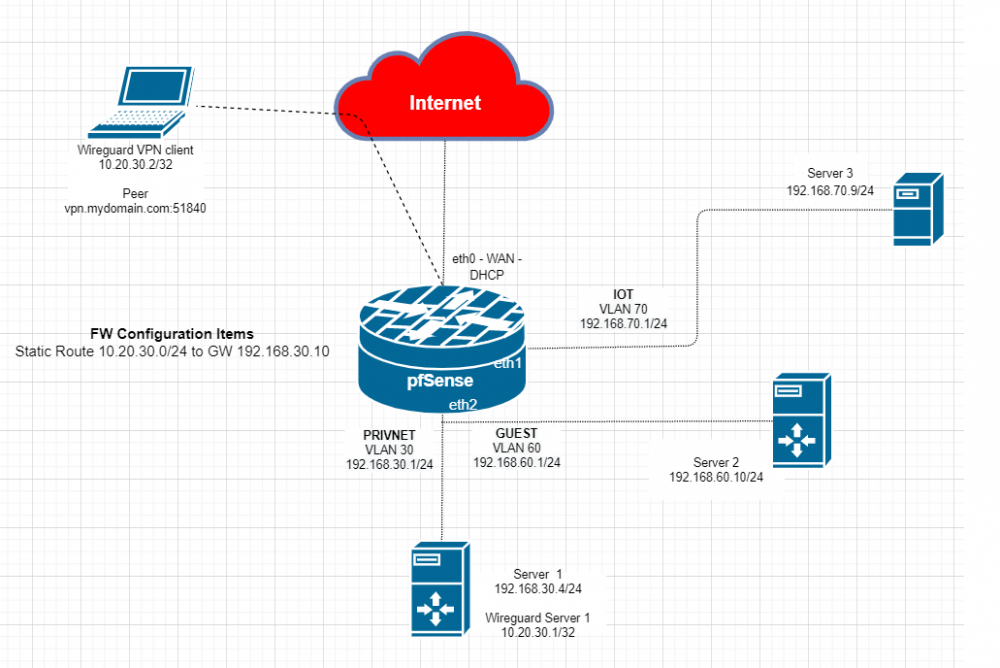
After getting my Wireguard tunnel up pretty quickly I’ve been trying for about a week to get to where I could access something else beyond the Unraid server GUI – especially hosts in other subnets on my network. I’ve had no success whatsoever after that initial setup. After seeing a bunch of replies to my Wireguard VPN client being dropped with TCP:SA – a symptom of asymmetric routing – I went to Reddit and asked about it in the Wireguard and pfSense groups. Since everyone seems to agree that my pfSense setup looks right, I realized I should probably actually come here as it seems to be something about Wireguard on Unraid that I need to address. I hope you can help. A simple network is below. I think this is how the communications are going if I try to access Server 2 at 192.168.60.10 from my Wireguard VPN client 10.20.30.2: 1. VPN Client (10.20.30.2) wants to talk to Server 2 (192.168.60.1). 2. It sends it to its default GW, which I take it is the Unraid Server 1 host interface (192.168.30.4) 3. Unraid server 1 rewrites the source header and sends it to [email protected]. pfSense. 4. pfSense forwards the request to Server [email protected]. 5. Server 2 sees request from 10.20.30.2 and replies but pfSense drops it as TCP:SA When I try to access the web GUI on Server 2 and run a capture on the VLAN30 pfSense interface I can see 10.20.30.2 talking to all sorts of stuff outside my firewall (dang chatty phone apps) but nothing going to Server 2. Nothing there. I can see Server 2 trying to respond on the VLAN60 pfSense interface, and the TCP:SA drops. FWIW, I can ping Server 2 via the Wireguard tunnel, and a traceroute shows 2 hops - the WG tunnel endpoint address of 10.20.30.1 and then Server 2 192.168.60.10. If it is not some weirdness with pfSense allowing crosstalk between VLANs on that same physical interface without logging it then it must be something about the way Unraid and Wireguard are handling it. Any help would be appreciated.
-
Thank you. I'm clear on it now, and I'm happy to report I was able to get a basic setup working this way with traefik and another with NPM and dockergen.


