





je82
Members
-
Joined
-
Last visited
Everything posted by je82
-
Recycle bin works but it doesn't seem to log anything or see whats in the .Recycle Bin folder for me, maybe this is bugged now? Edit: To shed some light on my issue, i noticed today that my unraid was sending errors whenever i was accessing data over SMB such as "smbd_calculate_access_mask_fsp" . ended up looking and around and found that the recycle bin wasn't working properly, i uninstalled recycle bin, installed a version from my last backup which was a few version ago, then i verified that the recycle bin was working by deleting some dummy files and looking into .recycle bin in the share, once this worked i upgraded the plugin to the most recent version, tested deleting a dummy file again to verify it works, and now it seems to work, now when i go to the interface in the recycle bin i can also see the data in the recycle bin folders so it appears all is functional after this finnicky process and the smb error "smbd_calculate_access_mask_fsp" went away as well.
-
Ive had my unraid server for years, i havent changed a single thing but today i started noticing a strange smb error: access_mask_fsp: Access denied on file to anything i browse on the shares from unraid, yet i can access everything as normal, i haven't noticed any issues only that the syslog is spammed with this error. Server has been error free for years, running Version: 6.11.5 , unraid is not exposed to the public internet, and i have not changed any settings with either SMB or any of my shares. I did the most obvious thing and tried to reboot, that didn't help, still getting these errors. Is it so that windows update can have caused an update to the clients samba making it cause this issue with the older unraid smb versions? I have tried 3 different windows machines and all seem to cause the error to appear in the log. Any ideas would be welcome, thank you Mar 15 19:04:03 NAS smbd[26342]: smbd_calculate_access_mask_fsp: Access denied on file Media/Test/SharedFile.mp4: rejected by share access mask[0x001F00A9] orig[0x0012019F] mapped[0x0012019F] reject[0x00000116]
-
Interesting, i did upgrade via the interface and the interface did notify me it was done upgrading and requiring a reboot so i did, i have previously upgraded manually by just replacing the *bz files on the usb over smb. Good to know that it was probably pretty simple to solve, i might try my luck updating at a later time when i have more time to deal with eventual problems, thanks for the help.
-
Sorry i downgraded before i had time to do diagnostics, but i captured this log during the error if it can be any clue to what may have happened, the upgrade went fine, and booting unraid was error free, it happened when i mounted the array after typing my xfs encrypted password, i simply just demounted everything and shut it down and went to restore from backup because i didn't actually have time to resolve the issues at that time. Dec 17 22:48:49 NAS kernel: md: unRAID driver removed Dec 17 22:48:49 NAS emhttpd: shcmd (591): /sbin/modprobe md-mod super=/boot/config/super.dat Dec 17 22:48:49 NAS root: modprobe: FATAL: Module md-mod not found in directory /lib/modules/6.1.118-Unraid Dec 17 22:48:49 NAS emhttpd: shcmd (591): exit status: 1 Dec 17 22:48:49 NAS emhttpd: Device inventory: Dec 17 22:48:49 NAS emhttpd: ST12000VN0008-2JH101_ZHZ0N2G3 (sdm) 512 23437770752 Dec 17 22:48:49 NAS emhttpd: WDC_WD121KRYZ-01W0RB0_5PK8RJ8B (sdj) 512 23437770752 Dec 17 22:48:49 NAS emhttpd: TOSHIBA_HDWG21C_20M0A084FP8G (sdk) 512 23437770752 Dec 17 22:48:49 NAS emhttpd: WDC_WD121KRYZ-01W0RB0_5PK8Y41B (sdh) 512 23437770752 Dec 17 22:48:49 NAS emhttpd: ST12000VN0007-2GS116_ZJV2ZREA (sdg) 512 23437770752 Dec 17 22:48:49 NAS emhttpd: ST12000NM001G-2MV103_WL208842 (sdd) 512 23437770752 Dec 17 22:48:49 NAS emhttpd: TOSHIBA_HDWG21C_29G0A003FP8G (sde) 512 23437770752 Dec 17 22:48:49 NAS emhttpd: Samsung_SSD_870_EVO_1TB_S6PUNM0T420275J (sdb) 512 1953525168 Dec 17 22:48:49 NAS emhttpd: ST12000VN0007-2GS116_ZJV1T8QS (sdf) 512 23437770752 Dec 17 22:48:49 NAS emhttpd: ST12000VN0007-2GS116_ZJV2ZQVR (sdc) 512 23437770752 Dec 17 22:48:49 NAS emhttpd: ST16000NE000-2RW103_ZL2PXKS1 (sdn) 512 31251759104 Dec 17 22:48:49 NAS emhttpd: Micron_7450_MTFDKBA800TFS_2328428C3699 (nvme0n1) 512 1562824368 Dec 17 22:48:49 NAS emhttpd: Micron_7450_MTFDKBA800TFS_2328428C36B6 (nvme1n1) 512 1562824368 Dec 17 22:48:49 NAS emhttpd: ST8000VN0022-2EL112_ZA1EKX8Z (sdo) 512 15628053168 Dec 17 22:48:49 NAS emhttpd: ST12000VN0007-2GS116_ZJV2ZQGK (sdl) 512 23437770752 Dec 17 22:48:49 NAS emhttpd: TOSHIBA_HDWG21C_20M0A098FP8G (sdi) 512 23437770752 Dec 17 22:48:49 NAS emhttpd: SanDisk_Ultra_Fit_4C530000070715103045-0:0 (sda) 512 30031872 Dec 17 22:48:49 NAS emhttpd: error: mdcmd, 4179: No such file or directory (2): open Dec 17 22:48:49 NAS emhttpd: error: mdcmd, 4179: No such file or directory (2): open Dec 17 22:48:49 NAS emhttpd: error: mdcmd, 4179: No such file or directory (2): open Dec 17 22:48:49 NAS emhttpd: error: mdcmd, 4179: No such file or directory (2): open Dec 17 22:48:49 NAS emhttpd: error: mdcmd, 4179: No such file or directory (2): open Dec 17 22:48:49 NAS emhttpd: error: mdcmd, 4179: No such file or directory (2): open Dec 17 22:48:49 NAS emhttpd: error: mdcmd, 4179: No such file or directory (2): open Dec 17 22:48:49 NAS emhttpd: error: mdcmd, 4179: No such file or directory (2): open Dec 17 22:48:49 NAS emhttpd: error: mdcmd, 4179: No such file or directory (2): open Dec 17 22:48:49 NAS emhttpd: error: mdcmd, 4179: No such file or directory (2): open Dec 17 22:48:49 NAS emhttpd: error: mdcmd, 4179: No such file or directory (2): open Dec 17 22:48:49 NAS emhttpd: error: mdcmd, 4179: No such file or directory (2): open Dec 17 22:48:49 NAS emhttpd: error: mdcmd, 4179: No such file or directory (2): open Dec 17 22:48:49 NAS emhttpd: error: mdcmd, 4179: No such file or directory (2): open Dec 17 22:48:49 NAS emhttpd: error: mdcmd, 4179: No such file or directory (2): open Dec 17 22:48:49 NAS emhttpd: error: mdcmd, 4179: No such file or directory (2): open Dec 17 22:48:49 NAS emhttpd: error: mdcmd, 4179: No such file or directory (2): open Dec 17 22:48:49 NAS emhttpd: error: mdcmd, 4179: No such file or directory (2): open Dec 17 22:48:49 NAS emhttpd: error: mdcmd, 4179: No such file or directory (2): open Dec 17 22:48:49 NAS emhttpd: error: mdcmd, 4179: No such file or directory (2): open Dec 17 22:48:49 NAS emhttpd: error: mdcmd, 4179: No such file or directory (2): open Dec 17 22:48:49 NAS emhttpd: error: mdcmd, 4179: No such file or directory (2): open Dec 17 22:48:49 NAS emhttpd: error: mdcmd, 4179: No such file or directory (2): open Dec 17 22:48:49 NAS emhttpd: error: mdcmd, 4179: No such file or directory (2): open Dec 17 22:48:49 NAS emhttpd: error: mdcmd, 4179: No such file or directory (2): open Dec 17 22:48:49 NAS emhttpd: error: mdcmd, 4179: No such file or directory (2): open Dec 17 22:48:49 NAS emhttpd: error: mdcmd, 4179: No such file or directory (2): open Dec 17 22:48:49 NAS emhttpd: error: mdcmd, 4179: No such file or directory (2): open Dec 17 22:48:49 NAS emhttpd: error: mdcmd, 4179: No such file or directory (2): open Dec 17 22:48:49 NAS emhttpd: error: mdcmd, 4179: No such file or directory (2): open Dec 17 22:48:49 NAS emhttpd: rdevStatus.1 not found
-
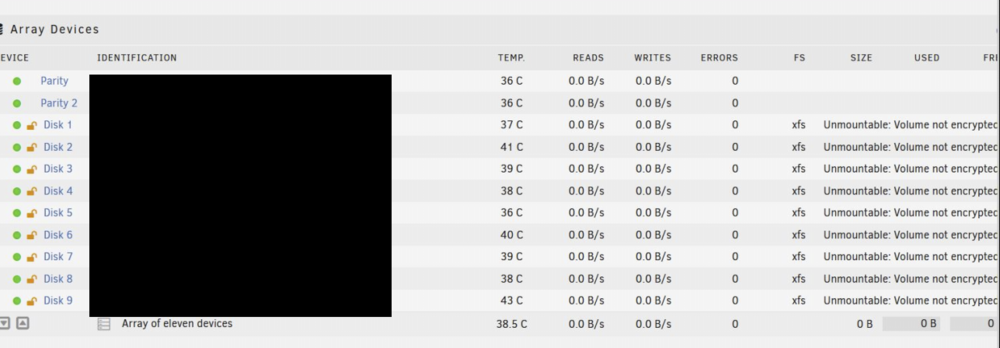
I wanted to update my unraid install, never had any issues previously but i really wanted to get the connectivity back with my docker containers via wireguard and due to macvlan issues that feature went away when macvlan was disabled in my installation. Anyway, when i upgraded everything went fine but when i mounted the array it looked like this: I reconsidered and downgraded back to 6.11.5 without doing anything as i ended up installing wireguard directly in my router instead to maintain docker connectivity from wireguard (no longer having to have unraid act as a router for that traffic). But i am concerned for when i want eventually to upgrade, why would this occur? Why would my simple luks xfs encrypted array mount using the right key yet say the drives are unmountable and want to format them? Sorry for not being able to provide any logs, i'm just curious to what i should consider looking into once i decide to try to upgrade again and have more time to put into fixing my unraid install if it breaks.
-
I think what im asking here how safe are the passwords stored in smbpasswd file, can they be decrypted?
-
Hi, I am concerned about the security, since we cannot encrypt the usb how safe is the passwords we store for users we've created in the unraid gui? I check cat /boot/config/passwd and it seems to contain cleartext usernames which is fine i guess, but the passwords must be stored somewhere too, are these safe or can they be decrypted by a potential attacker that gains access to the usb drive?
-
There's been some discussion regarding what command to use, either powerdown or poweroff. I feel like poweroff is more efficient at actually successfully shutting down the system, even though it might result in a parity check once you power back on, powerdown seems to stall very often and wait for something. Is there any clever person out there that has made a combination of powerdown and power so it issues powerdown but if it stalls for 5+ minutes, then issue poweroff and just cut it there? Being at remote location and working with unraid having it stall randomly during shutdown is brutal, so i wish there was a solid way to 100% shut it down everytime even if something like mover is still running.
-
One of the biggest downsides to unraid for me is the fact that if there were to be any parity sync errors its very difficult to know what files may have been affected by the error. I don't know if there is a simple solution to this, i guess you could use the hash plugin to create a unique hash for every file and then have it compare the hash on all files and if it has changed then there's the problem.... but this requires a massive amount of cpu power and time if you have many files/big array. I'm not by any means smart, my hopes is that the brilliant people behind unraid can build a feature that can detect what files have gone bad from corruption in a better more efficient way?
-
Im trying to figure out if i am experiencing a privoxy issue or if its a email client issue. So i am running a business, and previously i've always used a browser based webmail, which worked fine but i wanted an actual imap client to work with and i found one (the bat) that is nice for my needs. The only issue is when you send email from an email client the actual ip address of your source connection sending the email is embedded by design, i don't want this obviously. its 2023 and exposing your public ip to strangers is a bad idea in general especially for me when i have a static ip, so the solution was to put up a privoxy proxy and use a vpn to send the emails through. The problem: I have setup a privoxy using this containers and everything seems to work fine, i can test the socks5 proxy with a browser and see that if i use it for my traffic the vpn ip comes up. It never lags or slows down when using a browser, but when i use it with my imap mail client the handshakes to the server can take up to 2 minutes of time, and it times out often, and just works really really bad. I have no idea why this would be, whenever i use the bat without proxy it works fine. My question: Do any of you know any setting that could cause email imap to be really slow with privoxy default settings? I've asked chat gpt but no great ideas there, i tested changing the keep alive to 0 etc but none of it seems to change anything, running the email via the proxy is incredible slow and nearly unusable. All ideas welcome.
-
Ive checked the root of /mnt/disks/Appdata_backup both by using the direct link in the gui and via cli and there are no additional files or folders anywhere from this particular mount point, indeed very strange. I cannot run bleeding edge i use my unraid for work and stability is key to my use case, i prefer to be behind a few versions for this reason I guess ill figure it out eventually, i have a lot of additional space for now anyway, but it ponders my mind how it can be EDIT: Found the problem, apparently the docker container is only 13gb on the disk using it, but on the copy its 30gb, not sure why this is but that is whats causing the difference, i'll figure it out. Cheers!
-
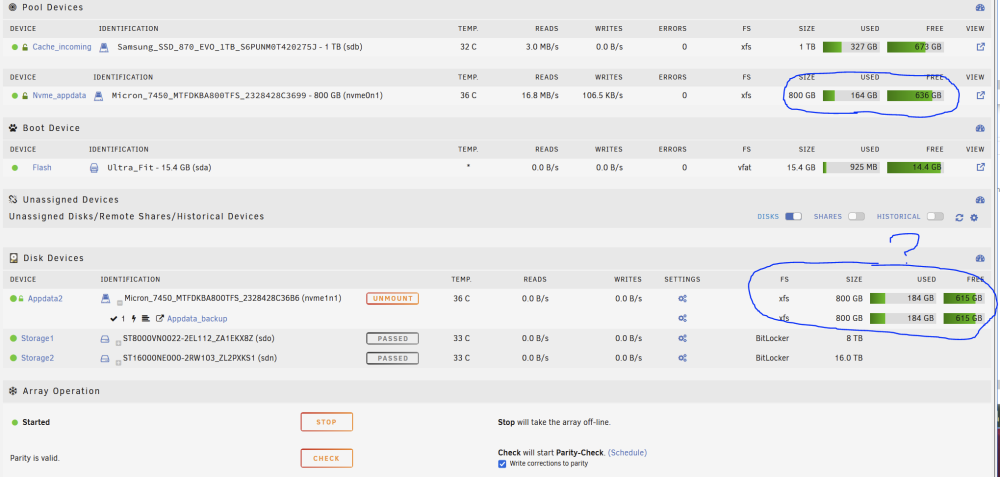
Hi, I am using Unassigned Devices to mount a secondary nvme drive and clone the data from the main nvme drive to this one but i have a question regarding the displayed used data as it does not seem to match. 1. I have first nvme mounted to the array in pool /mnt/nvme_appdata 2. I have used Unassigned Devices to mount the secondary nvme at /mnt/disks/Appdata_backup 3. I use rsync to clone the data from /mnt/nvme_appdata to /mnt/disks/Appdata_backup | rsync -avu --no-i-r --delete --stats --exclude=.Recyc* /mnt/nvme_appdata/Appdata/ /mnt/disks/Appdata_backup/Appdata/Appdata/ The problem is, the displayed used space it doesn't match! according to unraid there is an additional +20gb of data on the Unassigned Devices nvme device? As you can see the main device that is being backed up only has 164gb , yet the device backing up to has 184gb? Both devices is formated with the same type of filesystem. Rsync command runs and it completes without fail, i can see in the log from rsync that it is deleting files that are not on the main /mnt/nvme_appdata. Is this some kind of weird display bug with Unassigned Devices plugin? Actually using df -h it reports the same: /dev/mapper/nvme0n1p1 745G 153G 593G 21% /mnt/nvme_appdata /dev/mapper/Appdata_backup 745G 172G 574G 24% /mnt/disks/Appdata_backup So probably not a unassigned devices issue, very strange, never seen anything like it, there are over 7 million objects being synced though, could there be metadata differences that causes a whooping +20gb of data? it seems crazy to me.
-
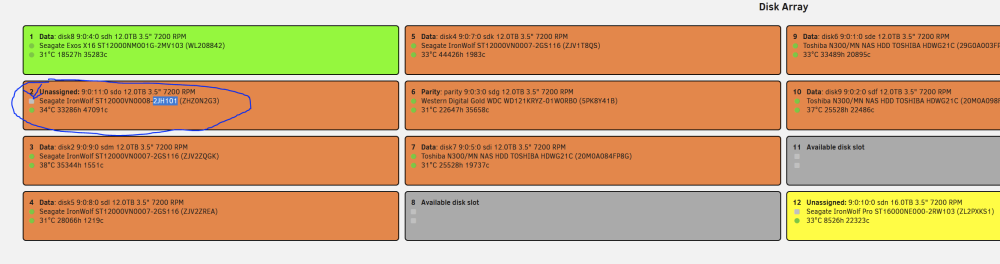
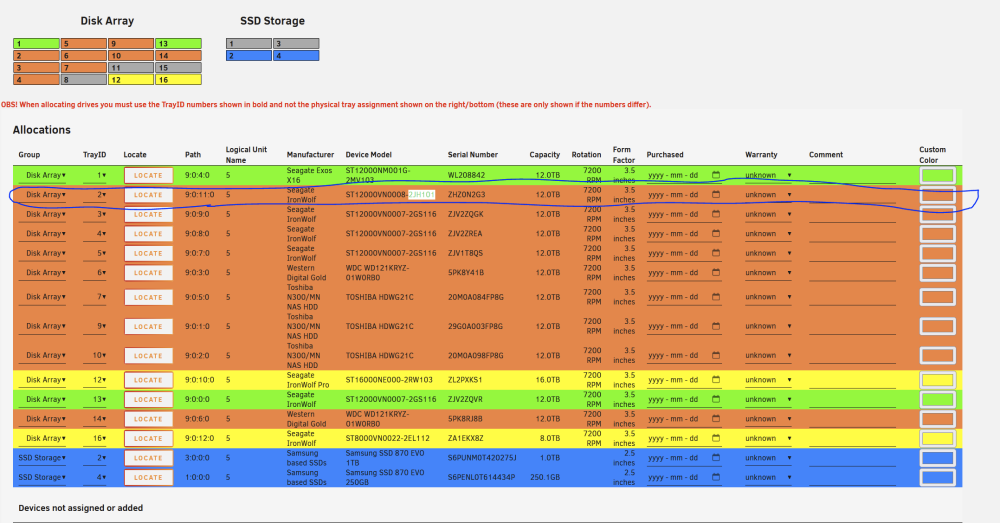
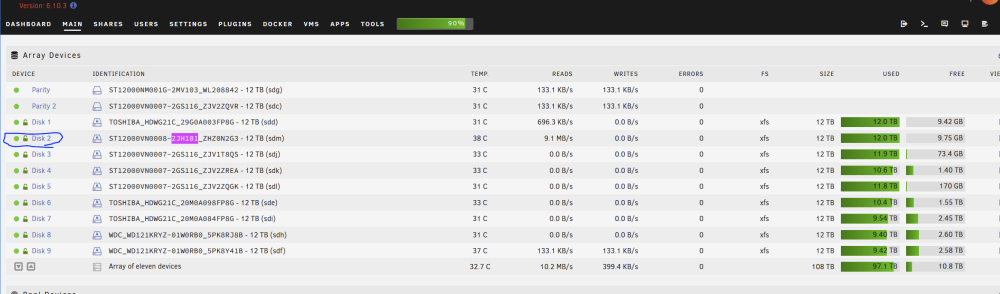
I have the strangest bug with this plugin i just noticed, i am not sure when it started but for whatever reason the plugin feels like one of my drives is "not present" yet it is detected in unraid and also detected in the disk location plugin itself so i can allocate it to a slot... Any ideas how to fix it? Unraid 6.10.3 EDIT: Force scan just fixed it
-
Everytime i try to vnc to a VM using the shortcut thats inside unraid you click the vm and get a drop down menu you click "VNC Remote" i have to restart my browser for it to work, the error message in the log is always: Using firefox, is this a firefox issue or something else? Its not a massive deal because i only have to access once via vnc to enter encryption key for vm to start, but still annoying to have to exit the entire browser, and start a fresh session. It never fails if i restart the session, works every time. On Unraid Version: 6.10.3
-
think a simple google search answered my question: ill be using the parity check tuning by @itimpi until i upgrade my unraid to a more modern version
-
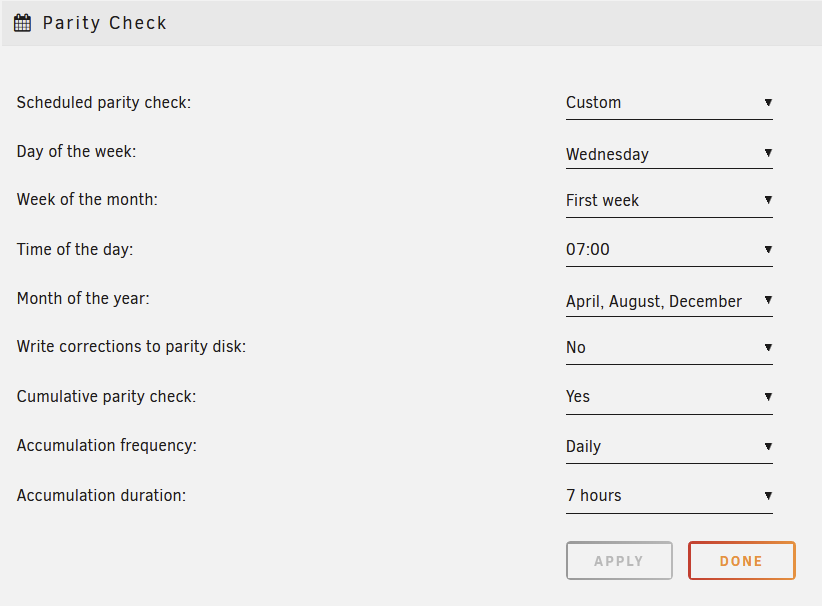
Hi, I am having a hard time understanding the Parity Check scheduler settings in unraid 6.10.3, see screenshot below for my current configuration: What i expect from this configuration is: Every first wednesday of April, August, December, a parity check is starting to run at 07:00 in the morning. After it has ran for 7 hours, it will then pause, and then resume at 07:00 on thursday, same for friday etc, until completed. This is not what happens. Unraid starts parity check on the correct time/day/month, but it never stops after 7 hours has accumulated, it runs until it has completed in one big swoop. Is this a bug in unraid 6.10.3 or is there any misunderstanding on my part on the settings?
-
just reporting back, bios update and re-seating of the pci cards didn't change a thing, but it appears the fix jorgeb recommended solved it
-
Will do if what i did didn't fix it, saw someone else said to update bios if on a x399 motherboard, so i did, also reseated the pci cards, booted the system and the error messages are gone but unsure if they were always present on booting the system or if they are random. Anyhow will try your solution next if they appear again, thanks
-
Hi, Ive seen this in the log today from one of my NAS servers, can anyone help me understand what the problem is and maybe how to fix it? Thanks. worknas2-diagnostics-20231109-0921.zip
-
Yeah i did the mistake of shutting down the array while dockers were still being auto started, i though unraid had some kind of programmed fix where it always shutdowns all the dockers when shutting down the array but it appears the logic is broken there if the docker auto runs are still in progress, ended up not being able to unmount the share where the appdata for the dockers resided.
-
bleh, shutting down the array while docker auto start is still running is a bad idea? i though it would handle it but now stuck in "Nov 5 14:41:18 NAS emhttpd: shcmd (603): umount /mnt/cache_appdata" loop, and via cli cannot force unmount it either, why is it always impossible to force unmount stuff in unraid? lsof /mnt/cache_appdata returns nothing, umount -f /mnt/cache_appdata umount: /mnt/cache_appdata: target is busy. never been able to unmount something when unraid thinks its in use, even the force commands are denied. maybe its unrelated to shutting down the array while docker auto starts are still running?
-
Memtest passed 2 passes up to test 5, isn't 100% confirmed to not be a memory Found this in the bios change log,, bios is 2 years old: "1.4b (01/09/2023) 1. Updated 5.22_WhitleyCrb_0ACMS_ICX_74 (Intel BKC WW46 IPU2023.1). 2. Updated SEL for processor error. 3. Fixed the memory error that is not reported in SMBIOS event log. 4. Enabled all boot options first for test case 220, 271, 356 and 457. 5. Resolved abnormal SOL resolution" Updating to the latest just in case. Do any of you know any way to test memory while running the server? I cant really take it offline 2 days for a complete 4 pass of memtest. Or if you think the culprit could be something else im all ears, thanks
-
Good to mention i did had a XFS Corruption issue pop up out of nowhere a few weeks ago, This time i ran all the xfs checks i could on the device affected, and it returned zero errors. Now here we are again, the docker container went into a locked state the array could not be dismounted, i had to shut down via powerbutton. My idea is, either RAM, bad cable/backplane or could it be something else? the server has been stable for a year or so and now suddenly within a short span of time getting issues.
-
If someone knows how to identify which drive is MD8 it would be helpful, tried a bunch of ways but i cant really figure out which drive it co-relates to, my guess MD8 = disk8?
-
Cant remove it no matter what i do, i guess graceful is not going to happen this time, im gonna shut down the server and run memtest, something is definitely wrong with the hardware, your suggestions are welcome


