





je82
Members
-
Joined
-
Last visited
Everything posted by je82
-
Sorry, sort of new to docker. I am trying this vpnproxy out but it appears it may have a firewall configured? When i attempt to connect to a FTP site via socks5 i get through but fails directory listing: Status: Connecting to ftp.sunet.se through SOCKS5 proxy Status: Connecting to 1.1.1.56:9118... Status: Connection with proxy established, performing handshake... Status: Connection established, waiting for welcome message... Status: Initializing TLS... Status: Verifying certificate... Status: TLS connection established. Status: Logged in Status: Retrieving directory listing... Status: Connection with proxy established, performing handshake... Error: Proxy request failed. Reply from proxy: Connection refused Error: Proxy handshake failed: ECONNABORTED - Connection aborted What do i have to do to allow ftp connectivity via the socks? or have i missed something? I also attempted to run this only as a socks proxy, i honestly don't even know what privoxy is, but if i set privoxy to false and socks to true i cannot connect to the proxy at all, is this docker even functional without privoxy = yes? Thanks!
-
Is there anyway to put a password on this one? like the webinterface and VNC?
-
Hi! I was playing around with markusmcnugen/qbittorrentvpn and i cannot get vpn to connect when not having the docker run in "privileged" mode, i feel like i don't want anything to run with elevated permissions unless i really really really have to. Is there any workaround to get the vpn to work without using the docker in privileged mode? Thank you!
-
Woah, those chassis look deeper then 4U, how many U are they or is it just the camera angle (last pic particularly)
-
Hello, I noticed today after upgrading that my SMB performance had decreased by a lot, but not in the way you would expect. The write/read speeds are fine. The problem seems to only occur whenever you open a media file in a share where there is 1000+ media files stored in the same root folder. If you take 50 of the media files, create a folder and move them into a folder so there's only 50 files in the folder, then playback will be normal, new smb is doing something which adds a ton of delay. Doing the exact same thing on 6.7.2 is much more rapid. You can re-create the issue by having 1000+ media files in a folder and browse next between them. The more files you have in the folder the slower the performance. Thanks.
-
my little box I have 3 more 12tb but i am in the middle of migrating the stuff into a rack, this is the new case i will use
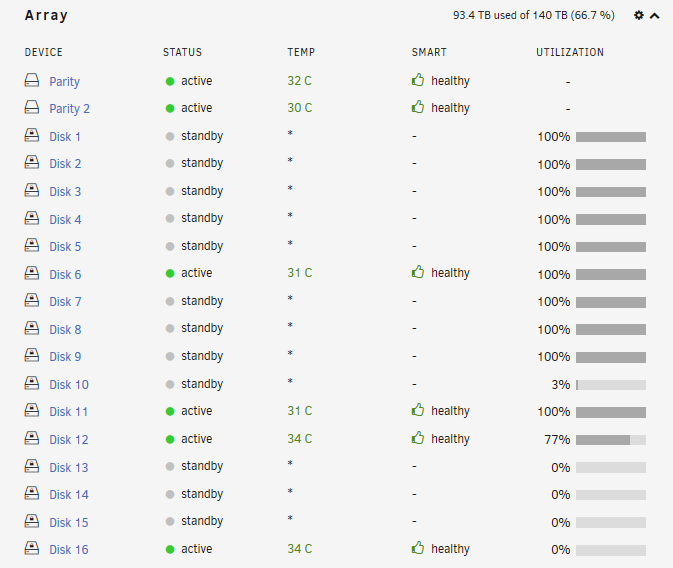
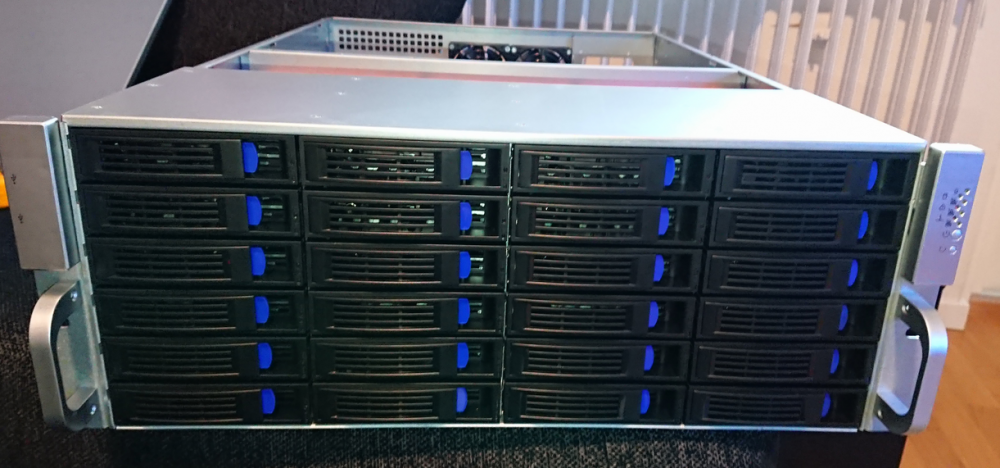
-
great work guys, glad to see this branch make it to stable! can't wait to upgrade!
-
Anyway to figure out why a script decided not to run? This script didn't run today even though it should have:

-
Hello, Ever since i updated to RC5 my system is unable to format new drives. Here's the log after preclear finished email was sent: This failure can be reproduced on my system each time a preclear is done and i click format it happens in RC5, i had no trouble in the current stable build. If you need more data please let me know, i figured i'd drop the report here in case no one had seen the issue. Any idea if this is patched in RC6? Thanks. syslog.txt
-
signed, would love to see a nice progressbar on the main/dashboard letting me know of the movers progress, if possible. keep up the good work guys!
-
I now know what the issue is and a temporary way of fixing it but in the long run i would really like to see the unraid team recreate the issue on their end and fix it, perhaps upgrading SMB on the unraid would be something to do? Here's a thread explaining the issue:
-
It may look similar but my smb only slows to a complete halt... then waits for around 10-15 seconds, then it resumes at 110mb/s again... speeds are fine, its just that it seems to become unresponsive at random times. It is definitely not the network, it responds quickly via web interface while smb is timing out and also pinging the unraid server results in constant 1ms ping times. I turned of smb logging as it was eating usb memory fast. I cannot confirm but it appears to happen whenever a file has completed transfer and a new file is being created to transfer, at that moment sometimes it becomes unresponsive. I'll do more testing this weekend when i have some more time to spend on it.
-
The strange problem here is that i have access, then suddenly smb throws me a access denied when writing a lot of data to the array. SMB drops to a stall and then 30 seconds later it tries again and resumes operation. I'm using a rather popular motherboard "X10SRL-F" from supermicro which i doubt has any compatability issues with unraid as it is used by many as far as i can tell. Im going to have to do more testing before i can figure out exactly what whats going on, i'm no expert in smb but the verbose logging seems strange that first i start transferring a file and access is granted then mid stream suddenly smb alerts that access is denied and it resets. And it only occurs after transfering a rather large amount of random data. Never happened during a smaller transfer of like 5gb of data. More likely to occur around 100gb of data transfer.
-
I have now hardcoded 2 entries into my credentials vault in the windows machine sending the files, my idea is that windows smb is randomly for whatever reason authenticating with the wrong credentials resulting in a read/write error, the strange thing is this did not occur as far as i can tell with my old unraid installation which i did send over 200gb of files via smb to. Will report back with how it goes. EDIT: Thinking of it i may have had the share public access for everyone on the unraid test. I only tested so that account security worked properly on 1 share but this was not the share i decided to fill with data when testing.
-
So i have SMB logging enabled and its very verbose... hard to find what i am looking for. I did send around 50gb of random files until it occured again. What i can gather it seems that the SMB is throwing access denied mid stream as a file is being transferred, see below: Nov 6 11:57:18 NAS smbd[28881]: smb2: fnum 848165825, file Unsorted New/3DRenderTest2.mp4> Nov 6 11:57:18 NAS smbd[28881]: [2019/11/06 11:57:18.241739, 3] ../lib/util/access.c:365(allow_access) Nov 6 11:57:18 NAS smbd[28881]: Allowed connection from 1.1.1.2 (1.1.1.2) Nov 6 11:57:18 NAS smbd[28881]: [2019/11/06 11:57:18.241765, 1] ../source3/smbd/service.c:346(create_connection_session_info) Nov 6 11:57:18 NAS smbd[28881]: create_connection_session_info: guest user (from session setup) not permitted to access this > Nov 6 11:57:18 NAS smbd[28881]: [2019/11/06 11:57:18.241778, 1] ../source3/smbd/service.c:529(make_connection_snum) Nov 6 11:57:18 NAS smbd[28881]: create_connection_session_info failed: NT_STATUS_ACCESS_DENIED Nov 6 11:57:18 NAS smbd[28881]: smb2: fnum 848165825, file Unsorted New/3DRenderTest2.mp4> Later during same file transfer: Nov 6 12:00:37 NAS smbd[28881]: [2019/11/06 12:00:37.654102, 3] ../auth/ntlmssp/ntlmssp_util.c:72(debug_ntlmssp_flags) Nov 6 12:00:37 NAS smbd[28881]: Got NTLMSSP neg_flags=0xe2088297 Nov 6 12:00:37 NAS smbd[28881]: [2019/11/06 12:00:37.715919, 3] ../auth/ntlmssp/ntlmssp_server.c:552(ntlmssp_server_preauth) Nov 6 12:00:37 NAS smbd[28881]: Got user=[] domain=[] workstation=[DESKTOP] len1=1 len2=0 Nov 6 12:00:37 NAS smbd[28881]: [2019/11/06 12:00:37.715962, 3] ../source3/param/loadparm.c:3872(lp_load_ex) Nov 6 12:00:37 NAS smbd[28881]: lp_load_ex: refreshing parameters Nov 6 12:00:37 NAS smbd[28881]: [2019/11/06 12:00:37.716040, 3] ../source3/param/loadparm.c:548(init_globals) Nov 6 12:00:37 NAS smbd[28881]: Initialising global parameters Nov 6 12:00:37 NAS smbd[28881]: [2019/11/06 12:00:37.716171, 3] ../source3/param/loadparm.c:2786(lp_do_section) Nov 6 12:00:37 NAS smbd[28881]: Processing section "[global]" Nov 6 12:00:37 NAS smbd[28881]: [2019/11/06 12:00:37.716336, 1] ../lib/param/loadparm.c:1822(lpcfg_do_global_parameter) Nov 6 12:00:37 NAS smbd[28881]: WARNING: The "null passwords" option is deprecated Nov 6 12:00:37 NAS smbd[28881]: [2019/11/06 12:00:37.716610, 2] ../source3/param/loadparm.c:2803(lp_do_section) Nov 6 12:00:37 NAS smbd[28881]: Processing section "[flash]" Nov 6 12:00:37 NAS smbd[28881]: [2019/11/06 12:00:37.716765, 2] ../source3/param/loadparm.c:2803(lp_do_section) Nov 6 12:00:37 NAS smbd[28881]: Processing section "[Work]" Nov 6 12:00:37 NAS smbd[28881]: [2019/11/06 12:00:37.716841, 3] ../source3/param/loadparm.c:1621(lp_add_ipc) Nov 6 12:00:37 NAS smbd[28881]: adding IPC service Nov 6 12:00:37 NAS smbd[28881]: [2019/11/06 12:00:37.716867, 3] ../source3/auth/auth.c:189(auth_check_ntlm_password) Nov 6 12:00:37 NAS smbd[28881]: check_ntlm_password: Checking password for unmapped user []\[]@[DESKTOP] with the new passwo> Nov 6 12:00:37 NAS smbd[28881]: [2019/11/06 12:00:37.716882, 3] ../source3/auth/auth.c:192(auth_check_ntlm_password) Nov 6 12:00:37 NAS smbd[28881]: check_ntlm_password: mapped user is: []\[]@[DESKTOP] Nov 6 12:00:37 NAS smbd[28881]: [2019/11/06 12:00:37.716897, 3] ../source3/auth/auth.c:256(auth_check_ntlm_password) Nov 6 12:00:37 NAS smbd[28881]: auth_check_ntlm_password: anonymous authentication for user [] succeeded Nov 6 12:00:37 NAS smbd[28881]: [2019/11/06 12:00:37.716921, 3] ../auth/auth_log.c:610(log_authentication_event_human_readable) Nov 6 12:00:37 NAS smbd[28881]: Auth: [SMB2,(null)] user []\[] at [Wed, 06 Nov 2019 12:00:37.716911 CET] with [(null)] status> Nov 6 12:00:37 NAS smbd[28881]: {"timestamp": "2019-11-06T12:00:37.716954+0100", "type": "Authentication", "Authentication": > Nov 6 12:00:37 NAS smbd[28881]: [2019/11/06 12:00:37.717204, 3] ../source3/smbd/smb2_write.c:215(smb2_write_complete_internal) I can't be certain that this is the cause though, but whenever the speed dropped to 0 and smb timed out from what i can tell this message was the only thing out of the ordinary. I have no entries in my cred vault @ windows, i do use the same credentials for my windows machine as the account on the unraid smb share that has access. Any ideas if this is the problem? I find it strange that other clients would experience access issues at the exact same time to the unraid as it is throwing denieds to the machine transferring though, but maybe? I will have to do more file transfers.
-
My preclear disks are done in 2 hours from now, i will then enable smb logging and see if smb is crashing and provide logs. My setup is as follows: 1. No cache is being used at the moment. I have 2x 1tb SSD cache's but they are not being used for now because i am trying to migrate over 100tb data, this migration is being done via SMB. The share i am sending data to does not have cache enabled. 2. Tunable (md_write_method): is set to "auto" which i guess is the default value? I have tested using the plugin "CA Auto Turbo Write Mode" enabled / disabled but i don't really see any difference in speeds, neither do i see any difference in smb being more stable with/without.
-
One batch of 200gb of random files ranging in between 700mb/4gb per file, media stuff... just ctrl-v / ctrl-c in explorer to the unraid share. Update: i did try the thing you mentioned now, and unraid SMB becomes unaccessible from another client machine at the same time as SMB drops from the machine transferring the files, both computers can ping the unraid server so network connectivity is not lost. It's definitely something with smb. I read here about some issue that seems very near what i am experiencing: https://www.ixsystems.com/community/threads/smb-shares-dropping-during-write.73204/ https://redmine.ixsystems.com/issues/43558#change-495697 Updated: verified that it is not a simple bad network cable issue, same thing occurs with different cable. Also verified that when smb drops the webgui is still up and accessible.
-
if it was a connectivity issue wouldn't pings be dropped when network errors occurs? I start transferring files, suddenly after like a couple of minues the transfer halts and i get a permission error, right after this error occurs i cannot access the unraid install via \\hostname\sharename\ but i can ping the unraid server and my ssh session does not drop either, also i can ping from the unraid server to the network while this occurs as well. I do believe it is the smb daemon that is hung and restarts. I will have to wait until the pre clear is done to enable smb logging to see whats going on, no errors being logged in the regular logs as far as i can tell
-
Not sure yet as it is only occuring when i am transfering large amount of files and all my linux installs are tiny webservers that don't have any big files to transfer.... i would have to put up a new linux machine and do that test if need be, but first i am going to enable smb logging and see what that tells me but right now i am preclearing some disks so it will have to wait until tomorrow
-
I have issues with SMB on my Unraid install, both windows 2012 r2 and windows 10 pro are behaving the same. Samba is accessible and fine with my credentials i have setup but randomly when i write data to the array via smb the connection drops and smb stops responding, Unraid still responds to ping from the computer though so it's a not a connectivity issue but a SMB issue. I am preclearing some drives so i cannot enable smb logging for now but i will report back with what i find in the smb logs once i have time to do so, i really hope to resolve this as smb is a major part of my network. Unraid is built on linux, i have 3 linux installs all that have smb, they all work properly so not sure what's specific with the smb on unraid.
-
very nice thanks, looks like someone already done something like this, "Catalog Drive Contents"
-
Hello. I want to have a script that runs every night and simply outputs all the files/folders on target drives specified to a text file on a share somewhere outside of unraid. Why you may ask? In the highly unlikely scenario of actual data loss i want to be able to see what was lost after the fact... It's very difficult to keep track of what data is on which drive when you have a large array and once data is gone how are you suppose to know what you lost? Knowing what data is lost mitigates the pain a lot. Anyone know how i could go about doing this?
-
Damn, i think you're right, it looks very deep when you see it in pictures but once i looked at the video i realize the back plate inside the chassi isn't where you'd think it would be... That's sad because if the chassi had another hdd cage behind the 5.2 cages it would make for the perfect server chassi (outside of a rack) in my opinion.
-
My dream chassi for unraid would be a Lian Li D600, it has 9 front 5.2 which you can convert into 3x5 3.5mm hotswap slots, so just that is 15 hdds for hotswap, then if you modify the chassi internally i believe you can get a 15+ hdd cage into the chassi behind the motherboard section, which means you have a chassi that has 15 hotswap drives, 15 internal drives with great cooling and also amazing looks. I found some guy in texas who had the D600 chassi new but he wanted 1100$ for it, i simply could not do it because i am not 100% certain i could do the modfiication needed to add the internal hdd's but i am very sure it is pretty easy to do. Here's an image of the chassi: here is the inside compartment where you could modify to add more hdd's with a self built hdd cage ( behind the motherboard )


