





je82
Members
-
Joined
-
Last visited
Everything posted by je82
-
I have a problem where whenever an rsync script is ran via user scripts, When i test running this in the CLI it works fine, it sets both directories and files that are being backed up to the correct permissions for unraid, but whenever the same command runs via user scripts it for whatever reason sets the directory permissions to drwxrwx--- instead of drwxrwxrwx+, please advise?
-
I am interested in starting using this plugin, but i have some questions: 1. If the hashing reults are NOT saved to flash, where are they stored? 2. Is it possible to store hash results log to another path then flash? I have for example used fstab to statically mount a smb share on a remote logserver which holds all my logs, i would want the logs to go directly there instead of moving them from the flash each day with a script (avoiding writing as much as possible to flash) is this possible or do i need to modify the plugin to do this?
-
hmm , ill take a look next time it updates and see if it appears in the template again, i managed to remove the jdownloader share after a unraid array restart.
-
can you please remove the default added path of /user/jDownloader that keeps getting added everytime the docker updates? everytime i update the jdownloader2 docker i get a share called "jDownloader", this time around the share is also presistant and cannot be deleted.
-
thanks, i though you could have a remote syslog + logging to a share at the same time to create some kind of backup of the logs in case unraid goes down and you cannot access content on the shares. i will setup a job on a server that mirrors the logfile created in the share essentailly giving me the same feature, thanks for the help!
-
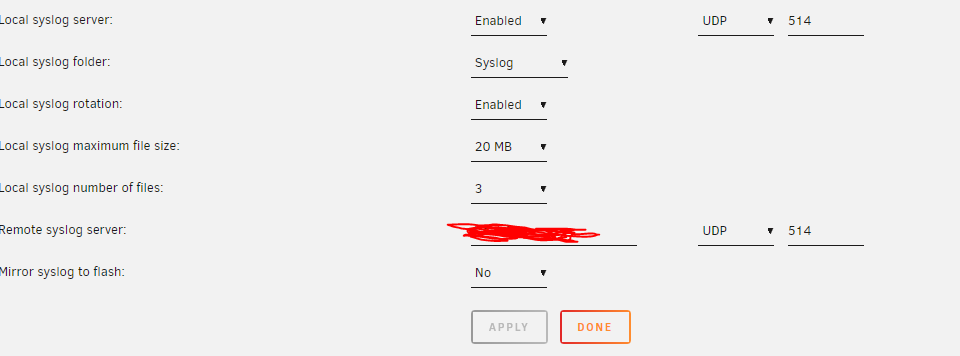
ip address to a remote syslog server on the same lan that has port 514 udp open for incoming messages
-
Hi, I've setup syslogging both remote and to a share, it appears not to be doing any logging at all, have i missed anything? Im on unraid version 6.7.2 No log files appears in the syslog share, no remote logging is being received from unraid system either. Do i have to restart the syslog service via cli? Or restart the entire system? The temporary syslog in /logging.html seems to be getting messages:
-
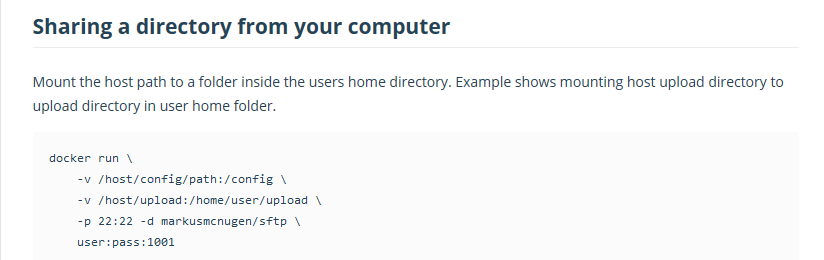
I was reading through the documentation regarding the sFTP docker and it appears i have to specify the home path for each user directly in the startup string of the docker container. Does this mean i can only have 1 user with 1 home path per SFTP container and not multiple different users with multiple different home paths?
-
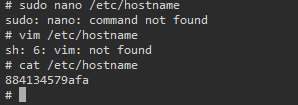
Hi, I wanted to use this pihole docker as my second dns server, i already have a hardware raspberry pi as my main pihole dns, but having a backup is always good. I was wondering how i could change hostname of this pihole installation? I was hoping to simply ssh in and change /etc/hostname to whatever i wanted but there is no editor included in the docker so unsure how i would accomplish this. Ideas? Thanks. EDIT: Figured it out: ssh into the docker cp /etc/hostname /etc/pihole/ ssh into your unraid install nano /mnt/cache/appdata/pihole/pihole/hostname changename + save ssh back into the docker cp /etc/pihole/hostname /etc/ EDIT AGAIN: Wont survive docker container restart damn. EDIT One More time! added --hostname pihole2 to the run command in docker, seems to work!
-
nice! i hear this may also resolve the slow smb performance of 6.8.0? i am waiting for 6.1 to settle and all the dockers to be updated if need be before i upgrade, great to see a new version so soon!
-
I think the command restarts the vnc service on the docker, but not sure really. I noticed something else, everytime i update this jdownloader docker it adds a new download directly mount as "jdownloader" and it also adds a share called "jdownloader". Is there anyway to stop it from doing this? I have already setup my own download paths and shares to use with it.


-
holy smokes, it was a faulty network cable causing me trouble, and it decided to not work everytime i had my 10gps switch connected... what a weird strange draw of luck, it works fine now. i cannot believe it just randomly decided to not work whenever i had the switch connected, but now when i am jiggling it around a bit i notice it is dropping randomly, anyway... i can send wol fine. im making sure to cut this cable in two, this is a cursed one!
-
Interersting, but does that not only relate to having the actual intel nic wake the system up from sleep? Or is the nic actually not capable of sending a wol packet? I've never heard of such a thing. Shouldn't any nic be capable of crafting such a package but not all nics support actually listening for them when the system is sleeping? I'm no network expert, bond seemed the easiest way to run multiple interfaces as one, i do not know what br0 is. I guess i will have to play around a little bit more, i did add a 10gps switch beteen the server and the backup machine and perhaps the switch is not passing the wol package even though it is currently configured to be just a dumb switch nothing more. I'll have to do some more testing, thanks for the reply!
-
Hi, I've been using this tool to wake my backup server, command i used: etherwake -D -i bond0 -b 04:d4:c4:49:f3:a1 This has worked fine on my supermicro motherboard when using the internal nic's on the motherboard, but i recently upgraded to an intel x540-t1 10gbit network card and now my backup server won't wake. I've included the new 10gps nic into the bond0 group, i've also tested to do command etherwake -D -i eth2 -b 04:d4:c4:49:f3:a1 but nothing seems to work Etherwake gives no error message though it tells me it was successful, but nothing wakes up! Ideas what i could do?
-
today jdownloader copy paste bugged out again, it appears to happen if you shutdown unraid and then start it, then start jdownloader docker, it won't accept any copy pastes from outside the docker, it works internally inside the docker. rebooting the docker did not help only way to solve for me was to ssh into the docker and run command: x11vnc -R xk then it starts working instantly. just a heads up, not sure if it helps.
-
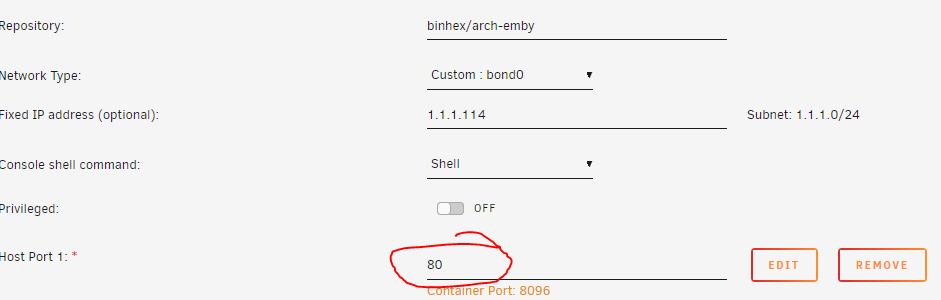
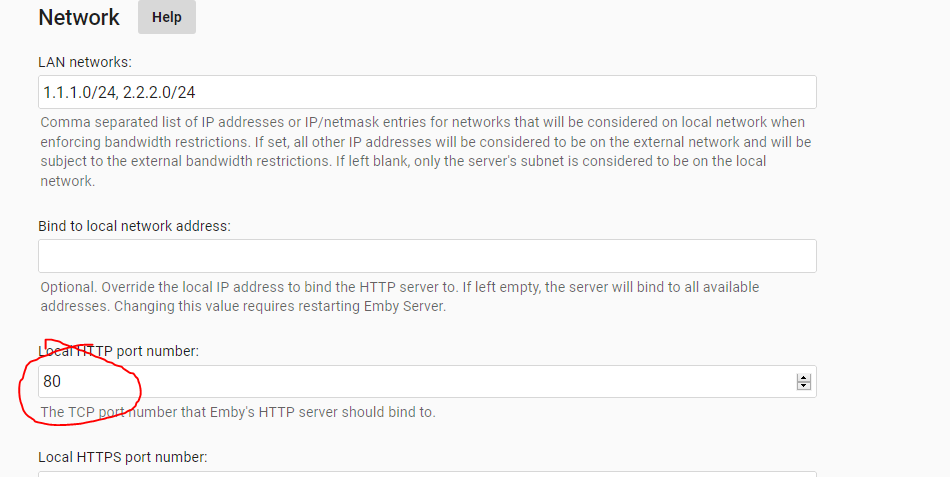
When setting up this container with a unique ip (custom setting) and changing the port to 80, it still only responds on port 8096, i've changed port in docker config: And ive also set port to 80 inside emby: but for whatever reason the emby server still responds and works fine on 8096, it does not work on port 80. ideas? Thanks!
-
Thanks! I've limited myself to /mnt/user/* so i should be good then, thanks for the heads up here, appreciated!
-
You're right! The problem with the popup window was that it was cut short, the "ok/cancel" button never appeared, just text, i pressed enter instead this time around and it installed ffmpeg, thanks again sorry for the bad questions.
-
you're right, i'm too confused
-
thanks for the heads up, i have asked you a question in that thread regarding what you wrote.
-
Can you clarify exactly how this would occur? I have many shares, i use krusader to move files from \\mnt\user\myshare1 to \\mnt\user\myshare2 , how exactly would the files disappear? Example, i just made a move from \\mnt\user\myshare1 to \\mnt\user\myshare2 myshare1 is limited to disk1 in my array. myshare2 is limited to disk2 in my array. i move the file from myshare1 to myshare2 via krusader and file no longer appears on disk1 on the array, it appears on disk2. i am trying to understand what could go wrong here, it appears to work perfectly fine? what more critera do i have to fulfil to trigger this bug?
-
Sorry to add to the confusion but emby is asking for an update, its stuck at 4.3.0.30 asking to update to 4.3.1.0. When i check the url https://www.archlinux.org/packages/community/any/emby-server/ it appears to be 4.3.1.0 but my emby is not updating. I checked the docker repo for updates but its telling me i am running the latest version. Am i missing something on how to update emby server? Thanks!
-
Any youtube video with sound, example: https://www.youtube.com/watch?v=1H-HOPiai5Y Trying to download with jdownloader in container:

-
Found another "issue" with the jdownloader container, when downloading videos from sources such as youtube, ffmpeg is required to merge the sound and video together, is it possible to make ffmpeg library a part of the jdownloader container to give it this capability?
-
Strange. I don't know why it appears to run via network, i have one share called \\NAS\Incoming and one share called \\NAS\Media moving 300gb from Incoming to Media which both are on the array via a thirdparty on smb3 it goes at 100mb/s (gigabit) which is the speed i am connected with. I edited my main post, please see: I would be interested in something like this. Possible?



