





je82
Members
-
Joined
-
Last visited
Everything posted by je82
-
Hi, I've been lurking the forums and i saw there was a big issue with 6.8.x causing btrfs cache volumes to "constantly loop writes" and eventually killing the ssd, is this still a thing or was it ever solved in 6.8x? My unraid install has 2x btrfs mirrored, will this be an issue? Is it recommended to convert this to xfs encrypted rather then running btrfs in 6.8.3? Back when 6.7.2 was the latest version the recommended cache setting was btfs thats why i have it, i have no real idea what the upside/downside of having it really is. The rest of my array is xfs encrypted. Thanks.
-
Okay, i am surprised by the "where they are located" are we talking about physically? I intend to move things psyically too, i never though this had any matter at all though. EDIT: Ignore my question, i am ot of coffee and i somehow read that it mattered where the drivers were connected psyically, i have no idea why, sorry. As long as disks are using the unique ID all should be fine!
-
Sorry for bumping this thread again, i came to think of something i really don't feel comfortable doing without testing it first on a test build, but i cannot find the zip package for unraid version 6.7.2, is there any chance someone knows where i can find this package? The thing i want to test is what happens to a share i have on the server and i change the disk location. Is shares that have allocated disks allocated on "per slot basis" or per disk unique identifier basis? If they are per slot basis, what happens when i change the order of the disks and the share is allocated to now paths that no longer exists? These allocations would not be the same if i change the order, what happens to this share? This is probably easier for me to try on my own than anyone answering it because its a very strange usecase, so the TLDR is, where can i find 6.7.2? This is the version i have on my unraid production server. Cheers! EDIT: Found version 6.7.1 via waybackmachine for whatever reason 6.7.2 seems to never have been posted to the ofifical releases page as it went from 6.7.1 to 6.8.x but 6.7.1 is better than nothing, ill do my own tests to see how unraid behaves when having a share and swapping the order of the drives around.
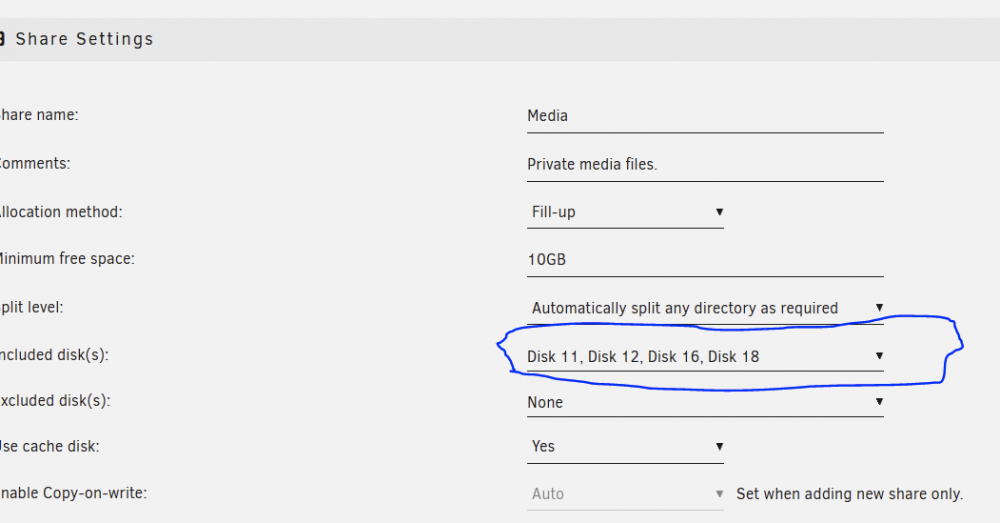
-
So i can assign the disks as i see fit directly at step 6? Only the parity assignments need to be correct so the parity is written to the correct drives, i think i understand, thanks for all the information.
-
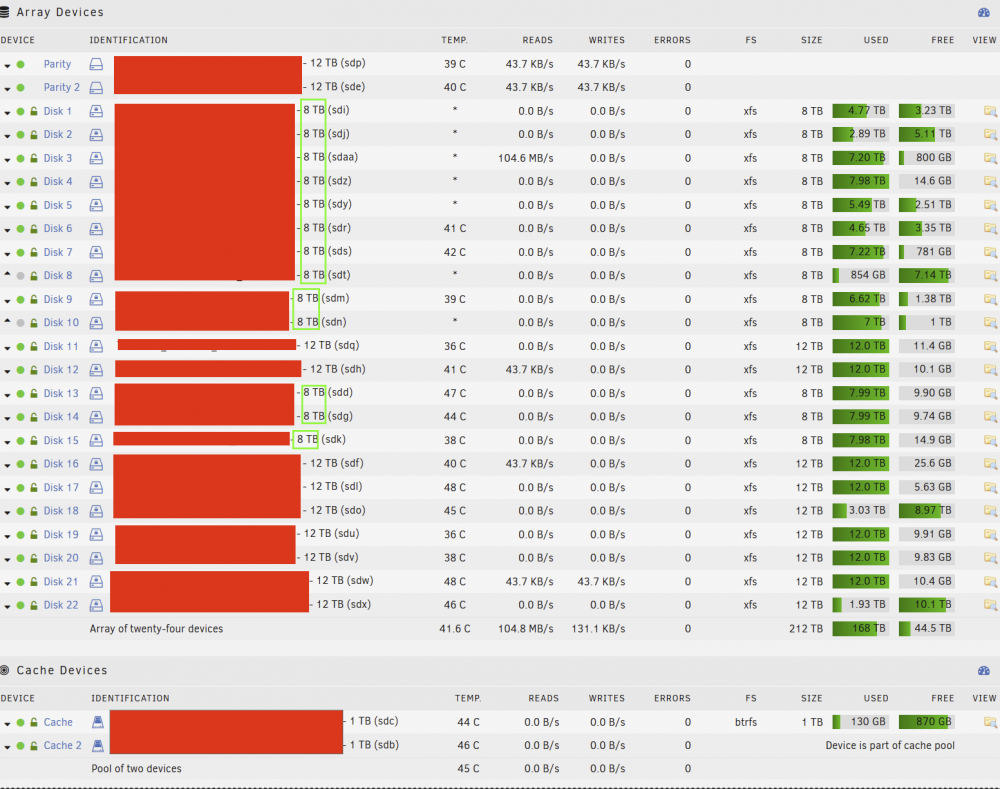
Thanks for the help. Sorry to bother you with one additional question. My disk order will become sort of messy once i remove 13 8tb drives from the array, as you can see in the picture below: What would be the best way to go about re-arranging the disk order? As i understand if i don't want gaps in my disk order i have to do a full parity re-sync first with the old disk order, then i can re-arrange the drives and fix the order so i don't have a massive gap, but due to to me having double parity i will have to do a full re-sync once again? As i understand the second parity drive will not be valid if i change the disk order, but how can i only re-build the parity of the second parity drive so i can keep the protection from at least 1 parity during the disk order reassignment? This is obviously not a super important thing, but it would be nice to keep things tidy as i don't plan to grow the array more once this operation has been done, so having massive gaps in the order will look messy.
-
So recommendation is (for my own sanity here) 1. Write down the current array disk assignments. 2. Move all the data of the 13 drives we want to remove. 3. Remove all the 13 disks from any shares it is a part of. 4. Stop the array 5. Tools > New Config > Retain Current Configuration > All > Close > Yes I want To Do This > Apply > Done 6. Main page > Check assignments and Unassign the 13 drives i want to remove from the array. (Double check that assignments are correct, especially parity drives) 7. Make sure that "Parity is valid" is NOT CHECKED. 8. Start the array and let parity re-sync (pray to god none of the drives decides to crash during this re-sync) 9. Once parity re-sync is done, shut down array, shutdown unraid, remove the 13 drives physically. I do have double parity drives, which seems like a rare configuration, i hope this doesn't change anything? Is my sanity correct here? Thanks for the guidance!
-
Alright, reading the faq this seems like trickery to me, but is it the best way to go about it?. So once i have the 13 drives completely empty, i shut down array, change filesystem for the 13 drives then mount the array and hit format them? Will this work correctly with the parity? if i remember correctly formating a drive is quick while the full clear takes as long as a parity rebuild (nearly 24 hours for 12tb parity) Having to do 13x 24hour non stop full load to the parity drives is a bad idea, so i really want to do this the best way possible, without losing parity protection. EDIT: Otherwise its a choice between 13x24 hour parity writes with parity protection or 1x full parity rebuild without parity protection, i guess?
-
Hello. I have some questions regarding my scenario here. I have 2 x unraid installations, certain files is being moved from unraid 1 to unraid 2 via SMB. (Please note i am MOVING data, so each file that confirms is automatically removed from unraid 1), parity is being updated as content is moving (??). Once i have moved all the data, i should have 13 disks 100% empty. (I will confirm this before i do anything else, if there are remaining files i will move them to another drive that will remain in the array via cli) Once i have 13 disks empty in my 24 drive array, i should be able to uncheck all the 13 disks that are empty from all the shares they are a part of, then simply shut down the array, remove the drives, start up and then unassign these 13 drives and start the array while checking "parity is valid". This way i don't have to rebuild my parity? i also never lose parity safety, am i correct in my thinking here? I really don't want to burden the array with uneccessary rebuilds considering i am moving all the files my though is that parity is being updated as the move is occuring so i don't understand why i would need to rebuild the parity one more time after that?
-
i see relying on full parity check is the best way to deal with this because smart test may not detect the issue, i guess i just have to make a habit of parity checking my backup server every now and again manually as i don't see it as a good solution to have a 24hour parity check run everytime the server boots
-
If unraid doesn't schedule some kind of smart test, what is the unraid health report that keeps being sent every night from my unraid installation that is online 24/7? is there any recommended plugin/scripts that can be used to run some kind of "light maintainance smart check" in order to see this type of stats, i honestly though this was part of the health check but maybe i am wrong? thanks!
-
I have a unraid box that only comes on for a short period of time to sync data from another unraid server as a backup unit. The question i have here, evertime unraid boots is there some kind of quick smart test being done or is this only done if the machine is on and the smart test schedule runs? If yes, how can i change the routine so that the backup server automatically does a quick smart test for the array when it comes up so i don't live in the dark how the drives may feel because it misses the scheduled smart test because its turned of 99% of time? Reason i ask is that i suddenly had a drive fail the boot smart test from bios, i was just lucky this drive was attached to the motherboard controller and not a custom HBA (i am not sure if the bios smart test runs on the HBA attached devies as bios does not see them so i guess it doesn't?) This drive was reporting smart failure and was about to collapse but unraid reported nothing until i manually ran a test on it, which is something i need to prevent for the future, i was under the impression that an alert email would be sent but it appears these notification emails only are sent if the unraid setup is on during the scheduled nightly smart tests which the backup server isn't. Thanks.
-
Thanks for the info, yeah this was a great find i am happy that you guys made this thread. Something tells me many who use xfs encryption only find out about this very big flaw once it is too late, i am very happy to have found this before shit potentially hit the fan so to speak. Cheers, have a nice day!
-
Thank you, i am doing a little bit of research if disaster was to strike and to backup these headers seem essential if you do xfs encryption as if the header is broken all your data is lost on that disk because you cannot mount it even with the correct password (as i understand?) A question to an expert like yourself, is it nessecary to run the header backup as a "cronjob" do have "fresh" header backups or is this only needed to run once as the header never changes?
-
Hey guys, should i use this docker rather then the more up to date one here: Is there any particular reasons you are running a shinobi that has not been updated in 6 months? The repo looks unactive or am i wrong here?
-
Hello, I've been testing this docker and i've ran into some issue where when i delete files in the shinobi interface the files on unraid just gets renamed to .fuse files until i shut down the shinobi docker completely these files will not disappear. It's like the docker container is locking the files as "in use" even though they shouldn't be. My configuration is as follows: Cache only share called "CCTV Files" Stored Video Location = /mnt/user/CCTV Files I added 3 variables to make the file permissions work properly with unraid PUID 99 PGID 100 UMASK 000 Could this be causing the issue i am seeing where files are becoming .fuse rather then disappearing when deleted via shinobi gui?
-
Yeah, thanks for the clarification, cheers!
-
ok so best practice is to use this docker with a vpn provider that does not allow public exposure (NATed / block all incoming)?
-
I mean the docker is still on my internal network, the only thing that has changed is the vpn i use with the proxy now does not block any incoming traffic as the previous vpn provider was. Is this going to be a problem? The docker container is still only accessible via my internal network.
-
i have previously used this with a vpn provider that didn't have "public ip" which means most incoming connections were automatically blocked. i have now switched to a vpn provider that provides no blockage so anything connected to the vpn is fully exposed the internet. is this container in its default setting safe to use this way?
-
thanks for the quick replies by the way! ok i am copying everything just in case. Hopefully i can just drop the CFG folder back in and start up and it should have my settings? Time will tell, the copy will take awhile the folder was very big with a lot of small files. Ill post back if it was a success or not EDIT: Success, worked perfectly, shutdown jdownloader docker, delete everything except cfg folder, boot it back up, and everything is back to normal, cheers ich777 for the amazingly fast support
-
is there anyway to save the "log of files" ive already downloaded? If i delete everything i asume all my settings are gone and all my filehoster accounts ive added? I want to save those settings before deleting anything. Is it possible to just remove the corrupt update? Where is it stored? I looked inside the docker /jDownloader2/updates but there's nothing there.
-
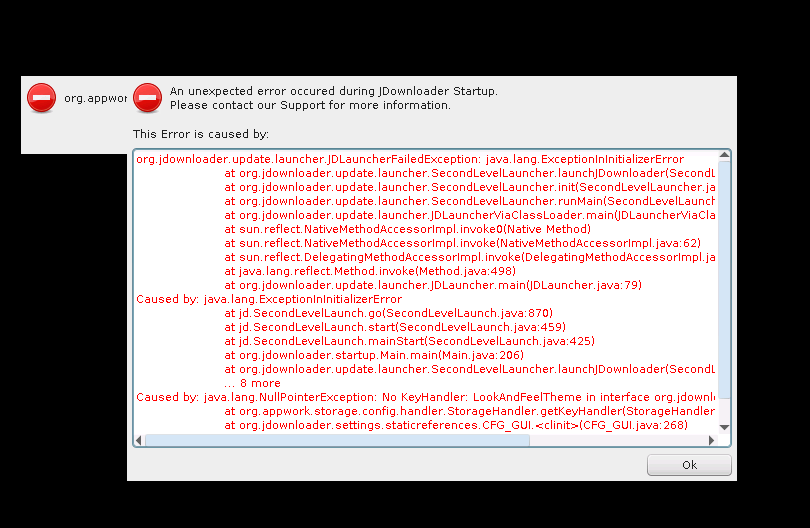
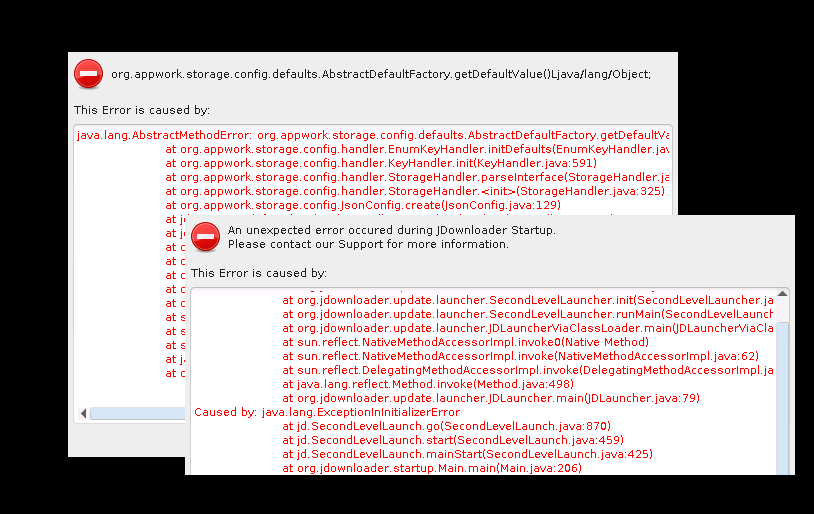
Jdownloader2 container is completely broken since last update, container just loop updates forever and won't start anymore. Non of the message is copy-pastable. Ideas to make it work again?
-
All of the sudden this container doesn't work for me, i haven't changed or updated anything RTNETLINK answers: Permission denied Whats wrong?
-
scripts ran by user scripts plugin are they run as root user? edit: is there a way to run the script as a specific user?
-
can you elaborate on how to do this properly?



