je82
Members
-
Joined
-
Last visited
Everything posted by je82
-
This seems useful, i have been moving files from a server via smb and i notice that it takes a lot longer then need be, i though smb3 was smart enough to detect when files are being moved from one share to another locally but seems to only work when you move files from inside a share to another path inside the same share. Anyway, i want to uset his docker, i am however very concerned with the security of having unencrypted VNC on the network be the root admin to all the array file management. If anyone is listening they could snag the vnc password and then access all the data on the array or even worse, delete it! How can i go about securing this docker more, though it is highly unlikely someone would be listening to my lan traffic, i just want to make sure something as easy as listening for unencrypted traffic isn't the weakest link in my security if a hacker should get into my network for whatever reason. Can this vnc be secured with a certificate? Or perhaps, is there a way to disable the delete commands inside Krusader? I only want to use Krusader strictly for moving files internally on the array, no delete needed. Even better would be to password protect the delete commands so you have to enter password everytime you try to delete something. Ideas?
-
Nice!! Trying out the new containers tonight, thank you for the update!
-
ah yes, you are right, the other containers i have renamed from the beginning. thanks for the heads up! it works fine now.
-
ah i get it, ok, weird... other containers have been able to be installed multiple via the CA no problem, thanks for the heads up.
-
Ah, so the name of the docker has to be different? I renamed the container from the original name of "jDownloader2" to jDownloaderX" just to test and i still cannot install another instance of this docker. As you can see the docker tab tells me "edit" is the only available option to me, no install. What could be blocking me more than the name? Does the data dirr Edit: Also renamed the Appdata path to "jDownloaderX" from jDownloader2 and the issue presists. Since i am using network type: bond0 and a unique ip for each docker, does the port really matter? I have the same port for multiple other "same dockers" with different ip no problem.
-
Yeah, i have not been able to re-create the issue with ease. it does happen after awhile when you randomly use various vnc sessions against various targets from many machines. I use VNC a lot to give support and i guess i am stressing the protocol a little extra. I probably have had copy paste issues in other docker containers but this one is the only container that copy paste from outside the container matters. Copy paste from inside the container to inside same container always works, its just the transfer of copy paste from client connected to the server that does not always work. No stress, next time it happens i will run some commands on the shell of the jdownloader sessions to see if these things fix it. EDIT: Oh, i must ask, other docker containers i've used i can install multiple ones, but this jdownloader docker seems to be limited to just one? I would want to install a second one, why is it not possible? What i can do to fix that?
-
Today i also got problems with VNC copy paste, this is rather common with VNC that copy paste operations stop working randomly, i have no idea why. This however did not resolve when i restarted the container. I tried restarting everything and copy paste would still not operate between any computer and the docker container making me believe the problem was on the docker/unraid side of things because copy paste would work fine between my computer and other vnc hosts. I read here: https://stackoverflow.com/questions/35595598/clipboard-operations-fail-using-tight-vnc That vnc trouble with copy paste can be resolved by installing autocutsel whatever that is, maybe worth a shot? I'm not sure how docker operates but i do believe it uses vnc that is installed in unraid? So it would have to be patched in unraid or in the docker? autocutsel -fork like this #!/bin/bash xrdb $HOME/.Xresources autocutsel -fork startxfce4 & restart vncserver
-
Found an issue (maybe with VNC rather then this docker) but if you connect from one computer and forget that you've connected to it you cannot connect with a second, vnc only renders a black screen. If you exit the first connection the second connection works and renders the graphics. Perhaps this is more an issue in VNC, i was wondering if there's any possible way to mitigate this by having some kind of idle timer and if idle for x minutes disconnect the session? EDIT: Reading up on it i guess x11vnc is installed inside the container, running command x11vnc -R xkb may resolve temporary copy paste issues, question is how you could make the container continously run this everytime a user disconnects from the vnc session clearing out any copy paste that is being held in memory that may result in issues when a new client connects?
-
I used this config file, it gives me the same error. Config file contains: <user>icecast</user> <group>icecast</group> This user is not exist within the container according to icecast and it won't boot. Or is it something else that is wrong and it errors out the wrong thing? Should i be looking at something else? I tried a different container for Icecast and all of them give the exact same error, the user/group does not exist, i've tried with user:group nobody:users as this is the user that runs docker containers on unraid but this doesn't work either. Ideas would be welcome, merry christmas!
-
Not essential just doesn't look good in the gui, all works fine. Is there any security advanced in not exposing the ports in the docker file? Thanks and merry christmas!
-
I'm a complete newb at docker but it looks like this container is broken as it is not running: RUN addgroup -S icecast && \ adduser -S icecast There's no user icecast for this docker container, so the icecast server won't start because it has no users, anyone have any idea how to fix it?
-
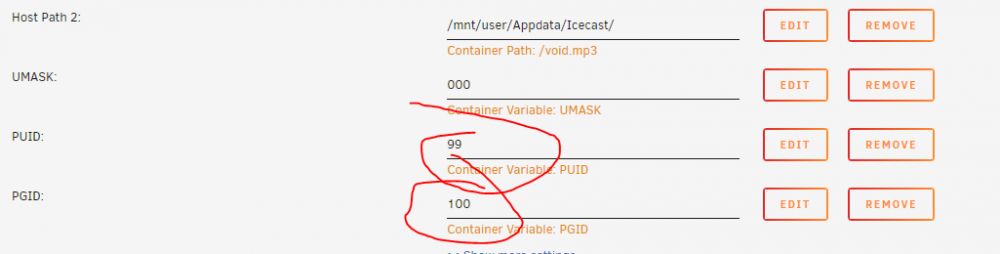
Tells me : Couldn't find user "nobody" in password file Couldn't find group "nobody" in groups file ERROR: You should not run icecast2 as root Use the changeowner directive in the config file I use: <changeowner> <user>nobody</user> <group>nobody</group> </changeowner> I check: I add variables to container: Still user/group "Nobody" found. Whats wrong with this container?

-
even though im specifying the directive <security> <chroot>0</chroot> <changeowner> <user>icecast</user> <group>icecast</group> </changeowner> </security> The docker wont start because: Couldn't find user "icecast" in password file Couldn't find group "icecast" in groups file What do i have to do?
-
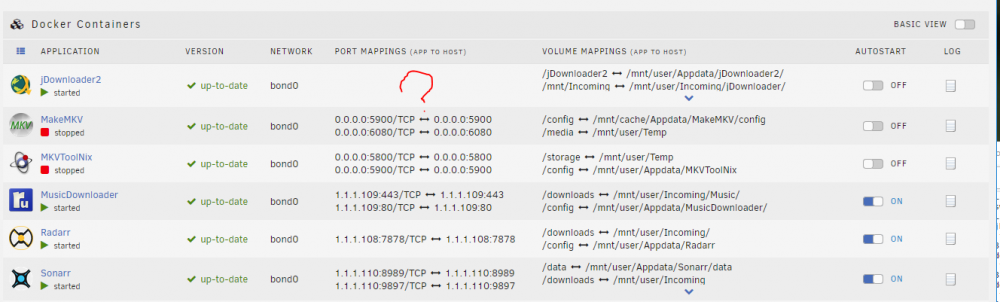
hi, i'm trying out the jdownloader2 docker, it seems to work fine, but is there any particular reason why the docker is not reporting its bond ip to unraid?: I also wonder if there's a variable to specify password on the vnc connection? I tried added Variable: VNC_PASSWORD But no go, still fully open to all vnc connections. EDIT: NVM, not sure why password variable didnt take first time, now it works. IP are still null in unraid though but i can connect to the docker.
-
my 2 most requested is multiple arrays and snapshots.
-
Hi, Thanks for this container, i was wondering if there's anyway to prevent rutorrent client from creating the folders /incoming /watched /completed ? Even though i've set my download folder to be /downloads/ it creates these 3 sub directories. I don't want to use any of them but ive dug around and i can't find how to disable rutorrent from creating them in the first place.
-
thank you!
-
Sorry, i ment to say store on cache (SSD) but it wasting my space. Am i missing what the point of radarr is? I was under the asumption Radarr would be a "configure and set" sort of thing where i would never ever visit the webui of it again once it was setup, it would sit there and scan the specified rss feeds using the specified critera i set. But for some reason radarr is building its own pretty library of movies, when i already have a system that does that for me + allows me to watch the actual movies as well! I guess i am confused what radarr is, i do not see the point of it bloating up the cache with fan art
-
I'm new to Radarr and trying to figure out the point of it. I wanted to use Radarr to automatically fetch movies from a rss source, what i don't want radarr to do is to fill my usb memory with fan art and various other garbage. What is the point of Radarr having fan art? All i want it radarr to fetch movies via rss and send them a torrent client, and then just keep track of what has been downloaded, i do not ever want to visit the radar webui after i've set it up. All the movie/art work etc is automatically done by my emby server when it sees theres a new movie in the folder. Radarr seems to be storing data in its appdata location, i made it download 50 movies and it was storing fan art and posters and all kinds of stuff in the /config/appdata/radarr/* path, this is horrible as it writes to the usb memory which is not good in the long run. TLDR: how can i use radarr to only fetch movies and not do anything with fanart/posters and stuff? I want radarr to be very simple tool to fetch rss and send on to torrent client? Is radarr the wrong choice for me? What should i be looking for instead?
-
Most browsers have the option "proxy dns queries when using socks5" i guess this won't work with privoxy resulting in potential worse security?
-
yeah i think its not more secure but the ftp on the other end probably has made an exception for that ip ccproxy uses (different vpn endpoint from what i tested with your container). is there any particular benefits to using privoxy over socks5 when tunneling traffic in the browser?
-
Thanks, i think the ports and combinations of me trying various things and not really documenting what i've tested resulting in weird results, mail works over socks5 now. The FTP returns directory listing error when using proxy, i have no idea why but i am pretty sure it is on their end the problem is because socks5 works fine when connecting to another ftp now. The strange thing is that socks5 works on the problematic ftp when i do it via ccproxy, but perhaps the guy on the other end has made some special allow for that particular ip i have when connecting through it. Anyway, your docker container works fine!
-
Nope, i can socks5 proxy when i setup a socks5 proxy in windows with ccproxy to the same ftp server. Strange I cannot get socks5 to work with email client either, it won't connect at all works fine with ccproxy and socks5. I am rather confused by the ports here, what service is running on which port? 8118 = socks? 9118 = privoxy? Any more ideas? Would really like to slim down the memory footprint, your docker container takes nothing compared to my fully fledged window wms with ccproxy installed
-
Yeah socks seems to be not working at all, all connections to the socks are refused Attempting to use socks for email: 19/12/2019, 21:50:26: IMAP - Connecting to IMAP server mail.myserver.com on port 993 !19/12/2019, 21:51:26: IMAP - Could not connect to the server Any ideas how to get socks to work? Thanks!
-
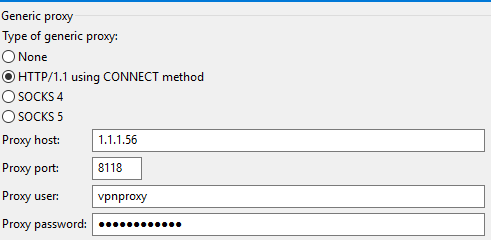
Appears when configuring filezilla to use http 1.0 connect method as proxy the connection goes through Status: Connecting to ftp.sunet.se through HTTP proxy Status: Connecting to 1.1.1.56:8118... Status: Connection with proxy established, performing handshake... Status: Connection established, waiting for welcome message... Status: Initializing TLS... Status: Verifying certificate... Status: TLS connection established. Status: Logged in Status: Retrieving directory listing... Status: Directory listing of "/" successful Not sure if there's anything bad with using http 1.1 connect method rather then socks? (For some reason connection also works without entering the password or username when using http connect method ????)