





gsd2012
Members
-
Joined
-
Last visited
Everything posted by gsd2012
-
First contributions. These are rough designs but plan for more Steampunk type.



-
@SSD How did you setup the md5 verification runs? I looked around but I could not find where to do that. Any help would be great.
-
I just had the same issue this week taking way too long to backup. Strange is it was working fine last week. I don't have anything excluded or preventing the stopping of the dockers set. Not sure how to just not exclude Plex stuff without doing the entire plex docker. What are the best ways to setup backup on UnRAID? I have about 15 dockers running so do I need to back all them up? Just curious since I see all kinds of different answers on the forum but not one that clearly states what are the best practices to get a good backup of your UnRAID system.
-
Well I guess the update fixed it all..working now.
-
Yes that is exactly what happen to me. It keeps forgetting everything even the plugins too.
-
I got Calibre up and working with the old library that I had but each time I reboot the docker (after adding plugins) it goes back to the point of starting a new database again looking for the library. I then locate it again and it comes right up but goes back to the /root each time I reboot it. Second part is if I make a change in the Preferences and reboot it does not save the changes. It resets them back to the original ones. Same goes with changing the icons. I just did a test on plugins too and once it reboots the plugins are all reset back to default and not showing installed. Another strange thing happened over night were I can't pull metadata for the books anymore either.
-
Ok after some tinkering I figured out the problem. I had it pointed right but when you first create the initial library look for the directory label "books" which is the root of my share /mtn/user/media/ebooks/ it will then find the original Calibre database and pull everything in. All is good now!!!
-
Yeah that is what I thought too but it is pointing to the /mtn/user/media/ebooks where the books are at and the original Calibre database. When it boots up it puts the Calibre Library under the /config section which is not on the user drives. P.S. Took me a while to figure out that removing the username and pass makes it work right...lol
-
The question I have is how can I get the library to point to an existing one on my /media/ebooks/ share? It creates the Calibre Library under /config in the mtn/cache/appdata/calibre/config which I do not want it there. My media is on /mtn/user/media/ebooks since it has all the space there for it. I tried to change it but it will not let me see the directory in the /mtn/user/media/. I can see the media directory but it shows no sub-folders. I just don't want it filling up the cache drive with all that information. Any help would be appreciated.
-
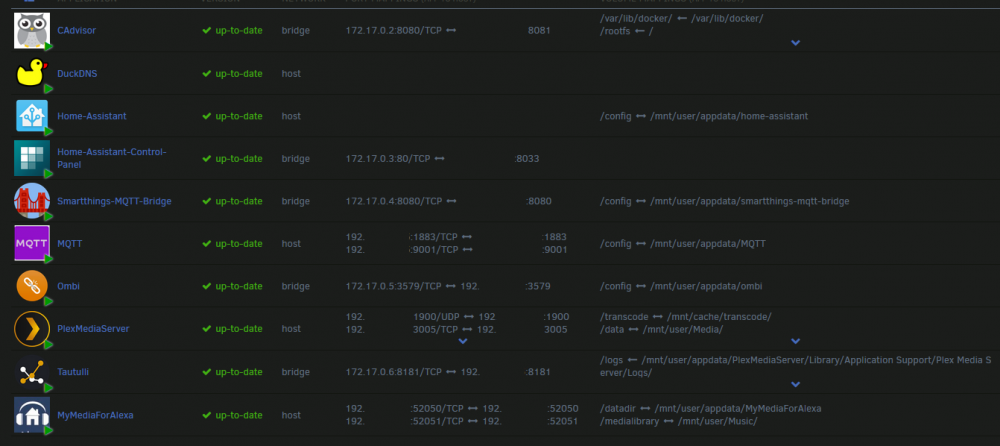
I was just reviewing videos on docker when I saw that it had advance features on the docker.img settings. I was a bit concern that I dorked all this up by just leaving it so all the containers point to the host IP 192.168.0.10. Is it better to put the dockers on their own IP subnet like this topic talks about? Is that the best practice so each devices created in the docker containers gets its own IP address? So if I have two NIC cards what is the best way to utilize them to work best with using Dockers? I was looking at doing maybe some VM in the future. Currently my UnRAID has one IP on one NIC 192.168.0.10 in a /24 network. I have another NIC card installed but currently it is disabled at this time. I am not an expert with some parts of UnRAID and this area I get a bit lost. To get the most out of my UnRAID running Plex, Home Assistant, and other docker what would all the (experts) do to make each docker run smoothly? or does it not matter the way i currently have it in the picture above in other post. I cut out the IP on it but all the 192 are 192.168.0.10 for all the dockers. All of the dockers are setup with the defaults they came with. Thank you for any help you can offer here.
-
Yes correct I have a flat network without VLAN's (switches do not support it). Maybe tying the NIC together for load balancing may help giving it one IP as the host. It is not a problem now with the dockers using the one NIC I just wanted to keep traffic from beating that one up the entire time. Mainly I am looking for the optimal way to use both NICs in the system to support the dockers. Attached is the dockers I am currently running and yes you are right some are host and some are bridged. I am not that knowledgeable on dockers as of yet so I was just going off the default settings for most. I have to add LetsCrypt docker for home automation next so what IS the best way to run these? And what is best for the use of two NICs? Well there be a conflict with Bridge and Host settings? I did like your idea of putting the dockers in their own network but would my current 192.168.0.0 be the address it sees for usage? or will I have to point it to a new network say 192.168.1.0 for devices?
-
So even with two NICs it is not possible to split the two sections of docker? I would prefer all traffic to flood one NIC so what your best advise if you have two NICs installed? I remember you saying in another post you had two NICs what would be the best optimization for just dockers no VMs?
-
Question to add to this. If I have two NICs with two IPs, one for each NIC how can I separate say Plex docker on one IP and say Home Assitant, MQTT, and HA supported dockers on the other NIC? So in theory I would like to keep all Plex, Tautulli, and Ombi traffic through one card and all home automation to the other card? Is it possible or would it be best to divided it like the begin post suggests?
-
Thanks for information, I saw in the configures you can link the NIC too but I was not 100% sure on using that. I would think it is ok to use two IP addresses connected to a managed switch would do ok. It would assume it is two different systems on the same network. Humm may have to really think this through I just beefed up my system with a new mother board, CPU, and memory got it all working smooth now. I hate to throw a wrench in the works at this point. Thanks again.
-
Ok I have looked around for an answer for this question but have not found one that seems correct. Can you have more than one NIC in an UnRAID system? Is this advisable to do? Can it load balance traffic or could one docker use that card vise the other? I am just curious since I have one GiG Nic on the system now and I am running Plex for now but would like to add more apps without it taking away from the media streaming. I would like to know if it is a good idea to have more than one NIC in the system or will the system go nuts? Thanks Greg
-
Has anyone figured out why it triggers an attack while copying files over to the shares? This just started to happen about end of Feb and to fix you have to reboot the server. I was having no issue with it before then and it has worked great up until then. No major changes that I know on my part unless an update changed it. Just curious I love the plugin but if it keeps doing this I am going to have to disable it since I load stuff to it from SMB connect often. Thanks ahead if someone has figured it out.
-
Yeah mine is up and running but I am thinking it is not updating the site either but I place money on the issue being with HughesNet since they double NAT the network. Still trying to work around this issue but it seems impossible at this time.
-
Coppit, Thanks I actually reloaded it with your command line version and it seems to work. Not sure what I did.
-
After a little configuring on the .conf file I was able to get it up and running but I get this error in the log. Everything I enter is correct and there is no error codes on that website that matches it. Any help would be great... now not sure if it mattered where it ran from but I put the conf file in /mnt/cache/appdata/No-Ip vise the default one on the user drive. I didn't know if it would make a difference. /tmp/noip.conf: line 1: $'\357\273\277#': command not found [sep 19 00:33:38] For an explanation of error codes, see http://www.noip.com/integrate/response
-
Bump
-
Squid, I looked to see if this was covered in the postings some where but I am did not find it. Are these a false positive or something I need to really look at? They are under "other comments" so I was not sure before ignoring them. Could not perform unknown plugins installed checks The download of the application feed failed. Could not perform docker application port tests The download of the application feed failed. Thanks for a great plugin! Greg
-
In regards to power supplies I found the Rosewill PSU RD600 600W RT was nice for the price but the limitation came in form of eight sata power plugs and 4 molex power plugs. If I have 15 (non-powered cages are 5x3) drives how can I extend the plug usage to meet all 15 now that also has to include powering the fans too. I can daisy chain the fans together to be used on two molex connectors. I have look through the power supplies listed and most are limited on numbers of connects. Is there something I can put on the cages to loop the power to each drive? Any suggestion would be nice. Thanks



