Everything posted by NTster
-
Hi everyone, I have a warning that pops up when I start up my SABNZBD - /data/completed is not writable at all. This blocks downloads. When try to add a NZB - Failed making (/data/incomplete/filename) Traceback (most recent call last): File "/usr/lib/sabnzbd/sabnzbd/filesystem.py", line 752, in create_all_dirs os.mkdir(path_part_combined) ~~~~~~~~^^^^^^^^^^^^^^^^^^^^ OSError: [Errno 28] No space left on device: '/data/incomplete/filename' I have checked my permissions in the docker, 99, 100. ran the docker safe permissions tool docker set to privileged have sufficient space on my location 500gb What can I do to fix this? Thanks in advance! NT
-
Dear JorgeB, I was looking around at the shares and I saw that the permissions were wrong. made adjustments and it seems to be working again. I created the share with ZFSmaster so i believe the permissions were not input properly. If i find any other issues will ask again. Thanks for the help!

-
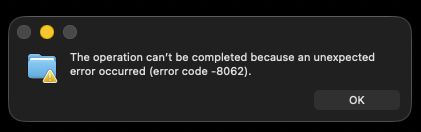
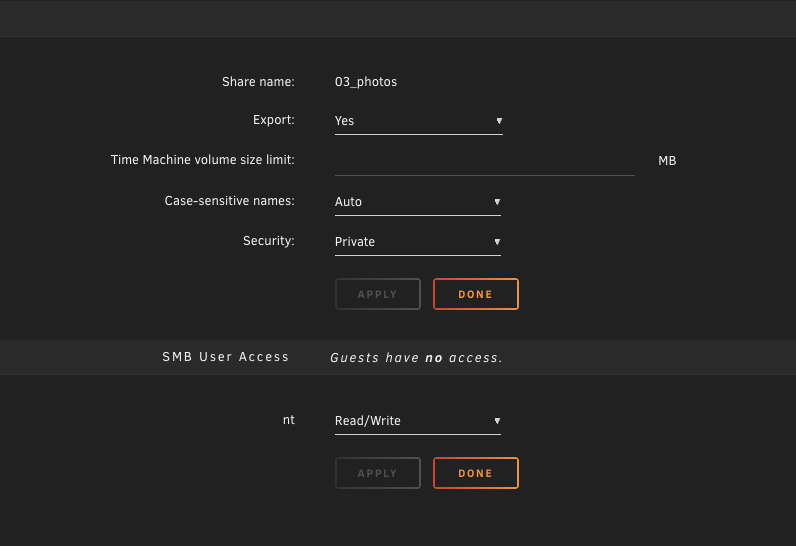
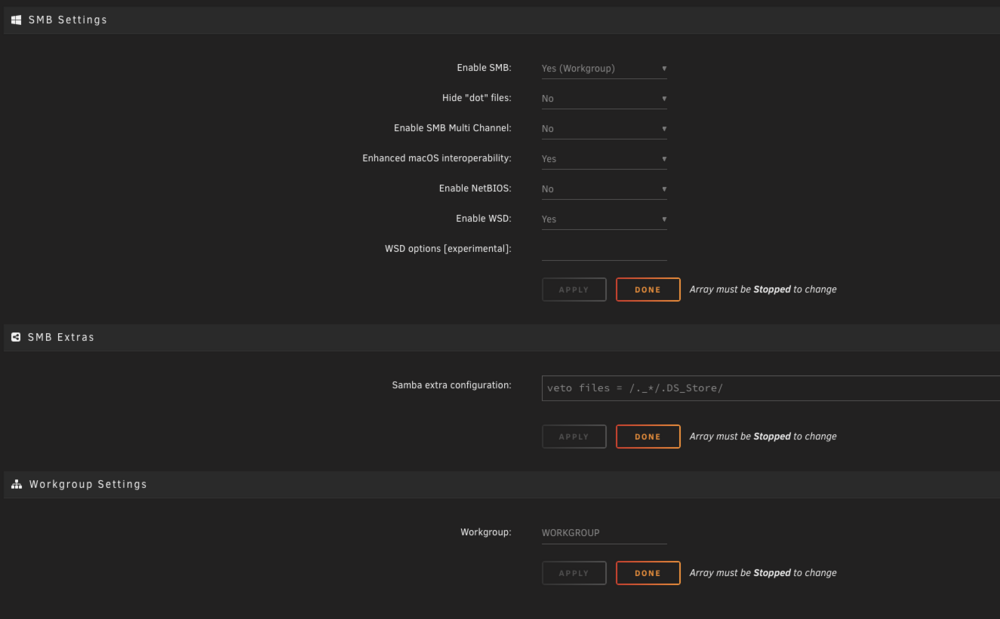
i have been having issues setting up my server. I have previously setup a server with similar SMB share settings and there wasnt any issues On my new server when i am trying to setup a new SMB share i cant seem to transfer into it. I am able to view the folder but when i try and move a file it brings up an error Below are my SMB settings for that share. I have similar problems with other shares This is my general SMB share settings Is there some setting that i am missing? Thanks in advance!

-
Thank you that does the trick! learning new things everyday!
-
Thanks for the advice and update. Currently my install of krusader still uses HTTPS. How do i choose between HTTP and HTTPS? Thanks, Neil
-
Hi i am wondering how i can get the HTTPS krusder link to work? currently when i open the webUI, it directs me to the HTTPS. This cant be reached. To use krusader i have to remove the S and make it HTTP, then krusader works fine I am not sure what i have to do to make the HTTPS to work. Thanks in advance!
-
Hi all, Recently i have been trying to upgrade my system to a more energy efficient MB board and setup Previous setup MB - Supermicro X9DRL-3F/iF , Version 1.01 BIOS dated: Thu 12 Jul 2018 12:00 AM CPU - E5 2650 v2 PSU - 750W SSD 500gb x2 HDD - 5x8TB, 2x12TB, 1 Parity 12TB TP Link 10Gbps NIC New Setup (all the same but the MB & CPU, 10Gbps NIC) MB - ASRock Z790 Steel Legend WiFi Motherboard CPU - 13400 i5 Treadnet 10Gbps NIC I am trying to activate the WOL feature, i have checked that the pcie always power on is enabled in the BIOS but i am unsure why i am unable to trigger the WOL with the magic packet. Is there a setting i need to change to fix this as it worked fine with my previous MB Thanks in advance!
-
Thanks a lot for the advice and lesson!
-
Thanks! this did the trick! I am curious why the - made a difference? trying to learn the details for future problems!
-
Hi all, Recently i have been trying to upgrade my system to a more energy efficient MB board and setup Previous setup MB - Supermicro X9DRL-3F/iF , Version 1.01 BIOS dated: Thu 12 Jul 2018 12:00 AM CPU - E5 2650 v2 PSU - 750W SSD 500gb x2 HDD - 5x8TB, 2x12TB, 1 Parity 12TB TP Link 10Gbps NIC New Setup (all the same but the MB & CPU, 10Gbps NIC) MB - ASRock Z790 Steel Legend WiFi Motherboard CPU - 13400 i5 Treadnet 10Gbps NIC I checked that i enabled legacy boot, setup the boot order and virtualisation Not sure what else i need to check as this bios is different. When i try to boot in it just goes to blank screen and goes to the BIOS Do help and let me know if there is a setting that i need to change regarding this board? When i put the USB back there doesnt seem to be any issues. Thanks in advance!
-
Hey all, I came across another thread recently that spoke about this and it mentioned the privacy settings (on MacOSX) needed to be changed. Went to check and realised the chrome Local network access had been disable. Not sure when it changed. But now there is a solution to this! Settings --> Privacy & Security --> Local Network --> Enable Chrome Hope it helps someone in the future. Thanks all!
-
i guess i will just wait for the next update and see what happens, for now i can still use safari to get things done. hopefully they fix something soon i sadly dont have the time to be playing around with betas so i will wait for the final version to be released before i move over. also this problems happens on all my macs on sequoia oh wells, i will now play the waiting game
-
Hi everyone! I have been unable to connect to my unraid server until recently. I just updated both my MacOS to Sequoia 15.0 and Unraid 16.12.13. My network is running on Unifi 4.0.20 on a Unifi Dream machine Router I have searched online and i have reset my cookies, cache and tried even on incognito mode to see if it was any of the settings but i still doesnt make a difference. It still shows the site is unreachable. show the error Err_address_unreachable When i try using my safari browser i am able to connect with no problems. Does anyone have any thoughts on what else i can try? Thanks!
-
Dear All, I noticed that my server had this pop up on fix common problems. Previously when it happened it was a ram issue and i have since replaced it. I believe the nerd pack is not being supported currently so i dont think i have mcelog? I did download the diagnostic file and file this inside syslog. Does this mean it is the ram again? May 13 21:40:38 NeilServer mcelog: failed to prefill DIMM database from DMI data May 13 21:40:38 NeilServer mcelog: Kernel does not support page offline interface May 13 21:40:38 NeilServer mcelog: Cannot read sysfs field /sys/kernel/security/lockdown: No such file or directory May 13 21:40:38 NeilServer mcelog: Kernel in lockdown. Cannot enable DIMM error location reporting Do you guys need more information from the diagnostics? Thanks in advance!!
-
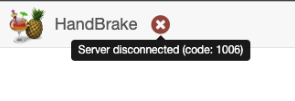
I have been unable to run the GUI for handbrake. I can go to the relevant IP address but it shows me a code error 1006. I am wondering what i need to check to figure this out Thanks in advance!
-
@spall I didnt see this post until today!! thanks for all tip on going to check the proxy. I disable the proxy and everything started working again. I am keen on using the proxy function if possible. How do u get Sonarr/Radarr to ifnose the IP of just the download clients? Thanks, Neil
-
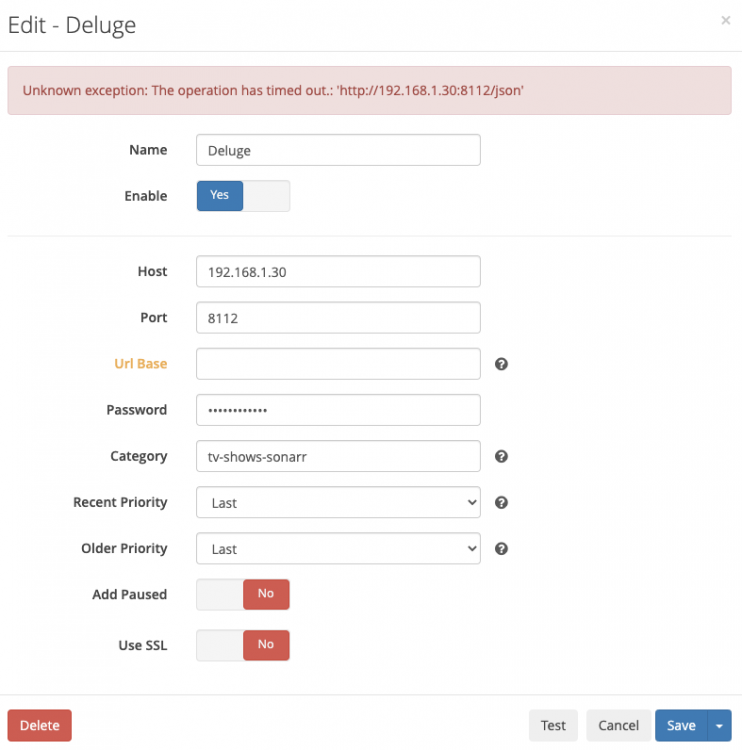
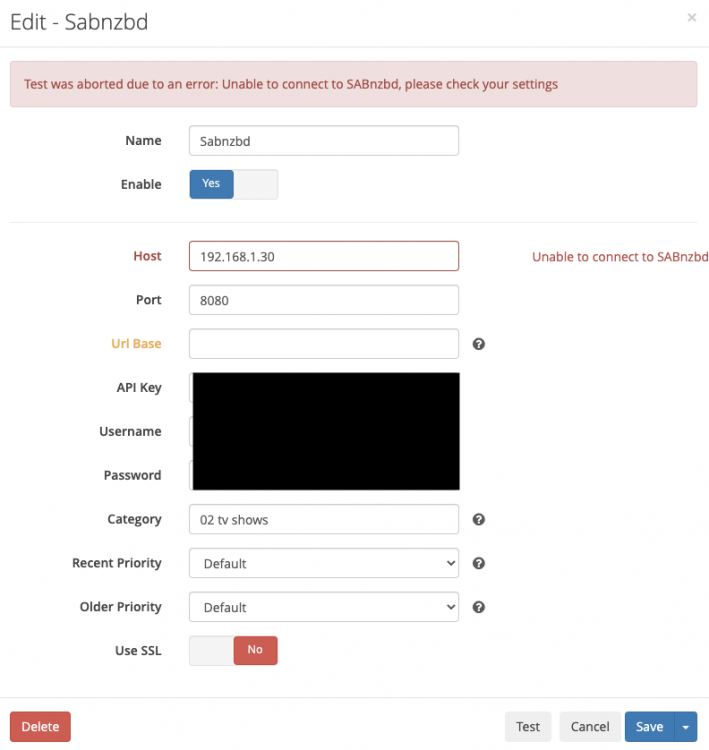
I was recently checking the status of my Sonarr as my Radarr as there was some issues with the downloading of the movies i was monitoring. I noticed that "all the download clients are unavailable due to failures' - (I also noticed that i have issues with my sonarr and lidarr too) i Went to check the setting and both my delugevpn and sabnzb failed on testing in the system status i noted Sabnzbd Deluge I am not sure how i can go about solving this issue, is it the sonarr or the deluge and sabnzbd? I have checked my paths and disabled SSL, I tried disabling certification validation for local addresses too I have not change any settings for quite a while, but i do have auto update on for all my docker apps. i did set up a reverse proxy previously in letencrypt but i havent moved over to swag. I have tried to but wasnt able to set it up properly. in the log files it mentions For Sabnzbd For Deluge Sonarr Version Version 2.0.0.5344 Mono Version 5.20.1.34 sry if i didnt provide enough information, not sure what is needed to troubleshoot this. mostly i follow guides from spaceinvader one when i set up so not sure why now got issues. Thanks in advanced for the help!



-
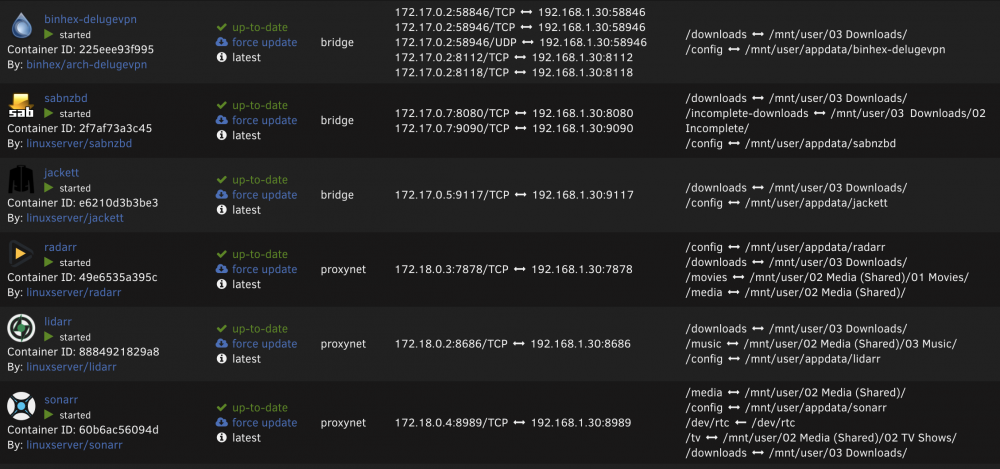
I was recently checking the status of my radarr as there was some issues with the downloading of the movies i was monitoring. I noticed that "all the download clients are unavailable due to failures' - (I also noticed that i have issues with my sonarr and lidarr too) I went to check the setting and both my delugevpn and sabnzb failed on testing in the system status i noted Sabnzbd Deluge I am not sure how i can go about solving this issue, is it the radarr or the deluge and sabnzbd? I have checked my paths and disabled SSL, I tried disabling certification validation for local addresses too I have not change any settings for quite a while, but i do have auto update on for all my docker apps. i did set up a reverse proxy previously in letencrypt but i havent moved over to swag. I have tried to but wasnt able to set it up properly. in the log files it mentions For Sabnzbd For Deluge Radarr Version 3.0.2.4552 Package Version 3.0.2.4552-ls96 by linuxserver.io sry if i didnt provide enough information, not sure what is needed to troubleshoot this. mostly i follow guides from spaceinvader one when i set up so not sure why now got issues. Thanks in advanced for the help!





-
Thanks! that seems to have done the trick! Not sure why i didnt think of that.
-
Hey Everyone! Sorry if i ask any dumb questions I recently got down to trying to sort out my library and trying to name it. Just came across Filebot and it seems very promising! I was able to the AMC portion to work once i bought a license but i cant seen to get the webgui to work. It just shows an empty screen and n it says server disconnected (Code: 1006) at the X I am not sure what other information to provide to give you an idea of what i can change Thanks in advance!