IKWeb
Members
-
Joined
-
Last visited
Everything posted by IKWeb
-
OK so got it installed, configured and setup as a share that can be viewed. When I try and copy something to it tho I get these errors. Any idea what I have done wrong? Now this is way beyond my programming knowladge - I am a windows server guy 🙂 I have added this command to my mount script --vfs-cache-mode writes So my mount script looks like rclone mount --max-read-ahead 1024k --allow-other --vfs-cache-mode writes amazons3:urvault /mnt/disks/amazon & Does this look right? Files now copy up without any error, but stick on 99% for a few min and then finish. The test file I did with this was 300MB and it stoped on 99% for about 2min.

-
Thank you @Stupifier - Will try it out via termain and see how I get on. It was the SpaceInvader Video I have watched - But I am aware that is now like 3 years out of date.
-
OK thats finally removed. Can I ask @Waseh do you know if I want to setup Amazon S3 do I need to boot the server into GUI mode?
-
Looks like I made a mistake and installed the wrong version. Now when I try and install it I get this. ----------Stable Branch installed---------- Uninstall Stable branch to install Beta! plugin: run failed: /bin/bash retval: 1 I need to work out how to uninstall that version and then try again.
-
Not sure if I am making a Noob mistake here, I have installed the plugin and then SSH into my UNRAID server and run rclone config but I get an error that says -bash: rclone: command not found What am I missing?
-
Great plugin works 100% for me, I am using it to backup my VM's for Veeam to them come along and offload the backup to tape. Thank you!! Can I ask - When you open the plugin you have 5 tabs, settings, upload scripts etc. Can you create one for Running Jobs - within this would it be possiable to display what the backup is doing, where its at percentage or even which VM's have been done etc Like a Job History tab within Veem, or Veritas for example? This maybe a good day to bring in the restore option you are talking about as you could display all the past jobs in this window with a restore option as well maybe? Many Thanks
-
Thank you - its not due to expire for a while - I just wasn't sure of the renewal process. Thank you!!
-
Would I be correct in thinking if a cert that has been issued by LetsEncrypt is due to expire if I restart the container it will be re issued with a new end date?
-
Thanks for all the advise @wgstarks I am almost done but I cant sort out the import after download which may need some googling on my behalf. Everything is working fine, but as my Seedbox is hosted in the cloud (not on my local network) when it comes to import Sonarr looks for a path that is on the remote seedbox and fails - as expected as its not on my local network. so the video doesnt get moved from my download drive to the media drive automatically. What does work is the manual import - So within Sonarr my DATA path is to the location of where my downloads come to when they are finally pulled from the SeedBox to my local network. What I cant work out how to do is how to get Sonarr to forget about this remote path that its getting I assume from an API or something - and search this DATA path and import what it finds. I have tried to create a Remote Path Mapping with the IP of the seedbox the path that it gets given, and then the local path /data/ but this doesnt seem to work, so not sure if I have set that up correctly or even if its the correct thing to do. If I download a few shows and do the manual import everything is fine. But I would love to get it to be 100% automated
-
So the only part that still not working is the moving of the downloaded file. My setup is below - incase I have done something stupid. - But that said I cant see anything within Sonarr about the import of the file once its downloaded. So I have Sonnar which searches the torrent site and adds the torrent to a hosted SeedBox File is downloaded from hosted seedbox via Resilio-Sync to a share on the UNRAID server - called Downloads Once the file is on this share I cant figure out how to tell Sonarr its there, so it can pick it up and move it to the correct folder within the TV shows share. From the one I have just tested - its trying to import the file from the folder structure on the remote seedbox and not from the downloads share on the UNRAID server as I can see this error in the logs Import failed, path does not exist or is not accessible by Sonarr: /home/psb21620/files/.AMZN.WEB-DL.DDP5.1.H.264-NTb
-
OK - So the above is with the service I use. I have had to install and setup Jackett - Which is now allowing Sonarr to download a file via the site. I am now waiting on that downlaod to finish to make sure it moves it and puts it in the correct location once its downloaded fingers crossed
-
I think it could be an issue with the website itself I am using as an Indexer - Looking though there forums now. Maybe time to find a new one 😞 shame most of them are invite only these days.

-
Yup - I have even removed and re added it in, still tests fine, but i still get the same error. Under Health these 2 have just shown up - RSS is ticked in the Indexer so could it be the site i am using? Which is limiting my RSS access?

-
So I may have been a little ahead of myself, I am using torrents to download. But when I tell the system to search for new epp's that I know have been released and are available for download I get this show up in the logs Does the NZBSearchService mean its trying to find a NZB Indexer as I dont have one as I dont use that service, but I cant find a way to disable it? The above says searching 0 indexers but I have one Indexer setup via RSS which tests fine.

-
Hello All Not sure if I am missing something here, I have setup Sonarr and its connected to my SeedBox, and the site to grab the files. Everything is downloading as expected. I have set it up so it downloads the files to a holding area for example - Share1 which the system is doing. What its not doing is then moving it to the share2 where all the shows are stored. Within Sonarr it says its downloaded and then under the series it shows this If I hold my mouse over the line it says its downloading and its 100% But I cant play it as its still in the incorrect share. Any ideas what I have missed?

-
Hello All Ever since I moved the unifi controller over to the custom network within docker so I can use Let’s Encrypt as a reverse proxy all my unifi devices are showing disconnected am i missing something ? Do i need to change some other settings?? Unifi uses other ports for comms, so as its on its own network within docker all the ports in the past were forwarded to an IP address on my local network for example 192.168.0.100 do i now just forward them to the UNRAID box? Or do i forward them to the 172 address that docker gives the controller when I move it over to the internal network ?
-
Evening all Does anyone know if there is a conf files for Unifi and Letsencrypt?? so I can use the controller with my reverse proxy. Thank you
-
Hello All Has anyone managed to incrase the file size limit on uploads? I am new to docker and not sure what files I need to modify and how to go about doing it. Would anyone be able to help? Thank you
-
Hello All I am a newbie to NextCloud and when I did the initial setup I created a share on my UNRAID server and then mapped this share in the docker container. What I would like to do tho is add the shares I already have on my UNRAID server into next cloud. Can this be done? Any info on how to do it? Thank you
-
Just for info downloads.google.co.uk isnt a domain I own, i used this as an example. When this has my domain in for example downloads.mydomain.co.uk - is when i get the error. I removed my personal URL so it doesnt get hit by all the bots that pull info from forums 🙂
-
Hello All Issue sorted.
-
Is it possiable to rename a file with this plugin? I cant see a way to do it? From a windows machine it tells me I dont have permissions
-
Hello - Hopefully someone can help. I am following a video from Spaceinvader One to create Lets Encrypt and use it with OwnCloud but when I install the LetsEncrypt Docker and move it over to the new network advised in the video (which i have created, and change the setting to yes to keep the network) I get the below error. I have even rebooted the unraid box but still no joy. The video I am following is root@localhost:# /usr/local/emhttp/plugins/dynamix.docker.manager/scripts/docker run -d --name='letsencrypt' --net='proxynet' --log-opt max-size='50m' --log-opt max-file='1' --privileged=true -e TZ="Europe/London" -e HOST_OS="Unraid" -e 'EMAIL'='email' -e 'URL'='domain' -e 'SUBDOMAINS'='downloads,' -e 'ONLY_SUBDOMAINS'='true' -e 'DHLEVEL'='2048' -e 'VALIDATION'='http' -e 'DNSPLUGIN'='' -e 'PUID'='99' -e 'PGID'='100' -p '180:80/tcp' -p '1443:443/tcp' -v '/mnt/user/appdata/letsencrypt':'/config':'rw' 'linuxserver/letsencrypt' fabcbb598147c5e26db3e08cdf0c57261a347dceb06897ac4a8445b7083c0907 /usr/bin/docker: Error response from daemon: network proxynet not found. ***** UPDATE***** Deleting the docker network and re creating it worked and its now worked as expected.
-
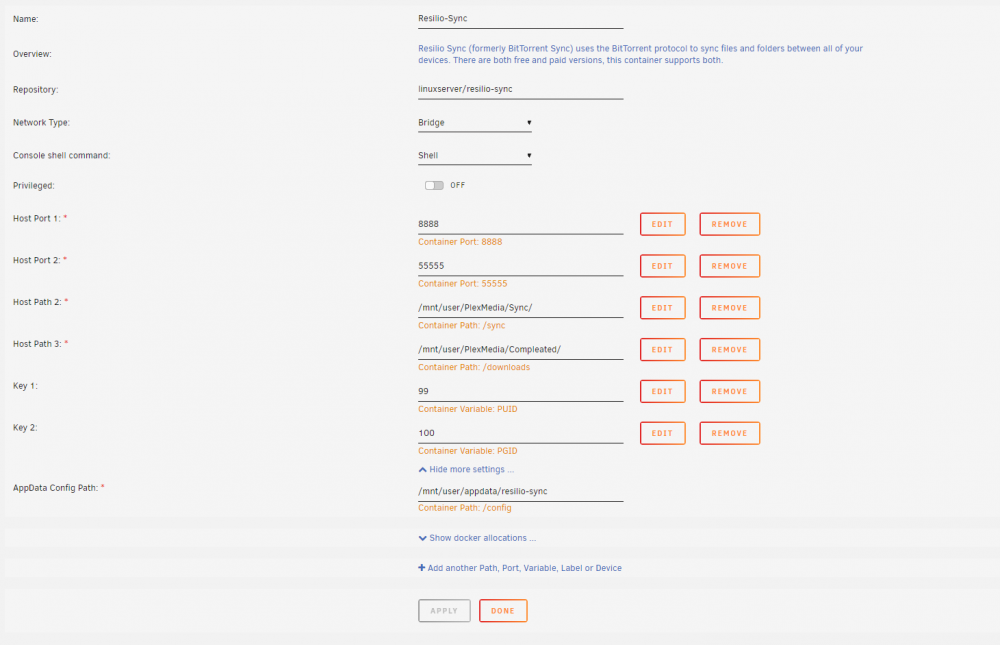
Hello - Hope this is the correct thred to post in - also hope someone can help. I have setup my sync to work and it does. When I download an item using UTorrent it sync's the files to the local server (UNRAID) but when I go to delete the files from the unraid box it tells me I dont have permission and wont remove them. When I delete them from the UTorrent server they are then removed from the local UNRAID server. What have I got wrong? I though I hadnt applied the correct file rights in the docker, but I cant see anywhere to do this... Attached is a copy of the settings for the docker. Would be nice for files to be deleted on the local UNRAID server to be then deleted on the UTORRENT box. But I cant work out where I have gone wrong.