




-Reddit.png.1a2908815c05bd678f6c8b6397b00407.png)
tr3bjockey
Members
-
Joined
-
Last visited
Everything posted by tr3bjockey
-
So I finally got my IO CREST Internal 5 Port Non-Raid SATA III 6GB/S Pci-E X4 Controller Card for Desktop PC Support SSD and HDD with Low Profile Bracket. JMB585 Chipset SI-PEX40139. Everything was going well but I suddenly got the "unmountable: unsupported drive. Per the unraid manual, I started the array in maintenance mode and ran xfs_repair /dev/md2 from the command line. The issue is with disk 2 so I think I did the correct command. I restarted the array (uncheck maintenance mode) and the drive still says unmountable...etc. What am I suppose to do next? root@Tower:~# xfs_repair /dev/md2 Phase 1 - find and verify superblock... - reporting progress in intervals of 15 minutes Phase 2 - using internal log - zero log... - 20:26:15: zeroing log - 38155 of 38155 blocks done - scan filesystem freespace and inode maps... - 20:26:15: scanning filesystem freespace - 50 of 50 allocation groups done - found root inode chunk Phase 3 - for each AG... - scan and clear agi unlinked lists... - 20:26:15: scanning agi unlinked lists - 50 of 50 allocation groups done - process known inodes and perform inode discovery... - agno = 15 - agno = 45 - agno = 0 - agno = 30 - agno = 46 - agno = 16 - agno = 47 - agno = 48 - agno = 17 - agno = 49 - agno = 31 - agno = 18 - agno = 32 - agno = 19 - agno = 33 - agno = 20 - agno = 34 - agno = 35 - agno = 21 - agno = 36 - agno = 37 - agno = 22 - agno = 38 - agno = 39 - agno = 23 - agno = 1 - agno = 40 - agno = 41 - agno = 24 - agno = 42 - agno = 43 - agno = 44 - agno = 25 - agno = 26 - agno = 27 - agno = 2 - agno = 28 - agno = 29 - agno = 3 - agno = 4 - agno = 5 - agno = 6 - agno = 7 - agno = 8 - agno = 9 - agno = 10 - agno = 11 - agno = 12 - agno = 13 - agno = 14 - 20:26:15: process known inodes and inode discovery - 3456 of 3456 inodes done - process newly discovered inodes... - 20:26:15: process newly discovered inodes - 50 of 50 allocation groups done Phase 4 - check for duplicate blocks... - setting up duplicate extent list... - 20:26:15: setting up duplicate extent list - 50 of 50 allocation groups done - check for inodes claiming duplicate blocks... - agno = 0 - agno = 2 - agno = 1 - agno = 7 - agno = 5 - agno = 6 - agno = 3 - agno = 8 - agno = 9 - agno = 10 - agno = 11 - agno = 12 - agno = 13 - agno = 14 - agno = 15 - agno = 16 - agno = 17 - agno = 18 - agno = 19 - agno = 20 - agno = 21 - agno = 22 - agno = 23 - agno = 25 - agno = 26 - agno = 24 - agno = 27 - agno = 28 - agno = 29 - agno = 30 - agno = 31 - agno = 33 - agno = 34 - agno = 35 - agno = 36 - agno = 37 - agno = 38 - agno = 39 - agno = 40 - agno = 41 - agno = 42 - agno = 32 - agno = 43 - agno = 45 - agno = 46 - agno = 48 - agno = 44 - agno = 49 - agno = 4 - agno = 47 - 20:26:15: check for inodes claiming duplicate blocks - 3456 of 3456 inodes done Phase 5 - rebuild AG headers and trees... - 20:26:18: rebuild AG headers and trees - 50 of 50 allocation groups done - reset superblock... Phase 6 - check inode connectivity... - resetting contents of realtime bitmap and summary inodes - traversing filesystem ... - traversal finished ... - moving disconnected inodes to lost+found ... Phase 7 - verify and correct link counts... - 20:26:18: verify and correct link counts - 50 of 50 allocation groups done done tower-diagnostics-20220407-2035.zip
-
The miser part of me decided to just buy the jmb585 card, since I have a video card currently using a 1x (just need it to play with the bios). I disconnected the sata drive that was causing the problem and the system booted up fine, remoted into it fine, and all the dockers seems to be working. Once I get this card, I'll transfer over the 4 spinning rust to the card and use the mobo sata port that were previously plugged into the spinning rust. I bought new sata and power splitters, and I'm not using the same port that might have been the issue too. Do you know if I can run two of these cards at the same time?
-
I had the same issue with a btrfs raid 1 ssd issue. I unplugged the bad SSD and the server came up. Still have not figured out if I have a bad sata cable, a bad power cable, or a bad sata port on MB. I order new sata, power, and a https://www.amazon.com/gp/product/B07ST9CPND/ref=ppx_yo_dt_b_asin_title_o00_s00?ie=UTF8&psc=1 When this comes in, in a few days, I'm going to deep 6 all my old sata cables, and replace them with brand spanking new ones. I also will kick to the curb these little molex to 2 sata power connectors and will connect all my drives via a daisy chained SATA power connector.
-
JEYI NVMe M.2 to 5 Sata Adapter. https://smile.amazon.com/Adapter-Internal-Non-RAID-Desktop-Support/dp/B09N8MCDTZ/ I'm building a new unraid server because my motherboard finally bit the dust. I was going to buy a 300+ motherboard with 10 Sata ports but found this item below which can plug into an m.2. slot and give you 5 more drives. The potential is awesome. I imagine that you could have 4 of these on a system and have 20 drives. i.e. two in two m.2. sockets and two more of these in a pcie x16 to 2 m.2 https://smile.amazon.com/SilverStone-Technology-Advanced-Solution-ECM22/dp/B075ZNWS9Y/ Specs. 1. M.2 Key M SATA3.0 expansion card, using the latest JMB585 chip solution, high-speed transmission and stable performance, in line with M.2 Key M standard 2. Realize the PCI Express Gen 3x2 line bandwidth, with five SATA ports extending from the PC host to the M.2 Key M slot, the transmission speed of each port is up to 6Gbps 3. Transmission protocol: PCIe x2, PCI Express supporting up to two channels 4. Support PCI Express link layer energy saving mode 5. Support command-based and FIS-based port multiplier 6. Support AHCI mode and IDE programming interface 7. Support local command queue (NCQ) 8. Support SATA plug-in detection function 9. Support drive power control and interleaved rotation 10. Support SATA Partial / Slumber power management status 11. Complies with PCI Express Basic Specification Revision 3.1a, SATA Specification Revision 3.2 12. Plug and play, no other software installation or setting required Specification: Name: M.2 Key M SATA3.0 expansion card Chip set: JMB585 Transmission protocol: PCIe x2 Media interface: 5 x SATA 3.0 Transmission rate: 6 Gbps Management functions: SATA plug-in detection, SATA Link power saving mode (partial and hibernation) Operating system: Linux, Win 7 / Win 8 / Win 8.1 / win 10, 32 & 64bit Size: 80 * 22mm
-
Is it necessary to run unraid on top of something like slackware or esxi or can it be run native?
-
Here's the new diags... I looked at ssd on cache 1 and the errors are just rolling in constantly. I just bought a Tyan S5512WGM2NR motherboard with a Intel Xeon E3-1270 V3 to replace the current motherboard. I'm hoping that I can plug in my thumb drive, my ssds and hard drives and and everything will be good to go. tower-diagnostics-20220321-1435.zip
-
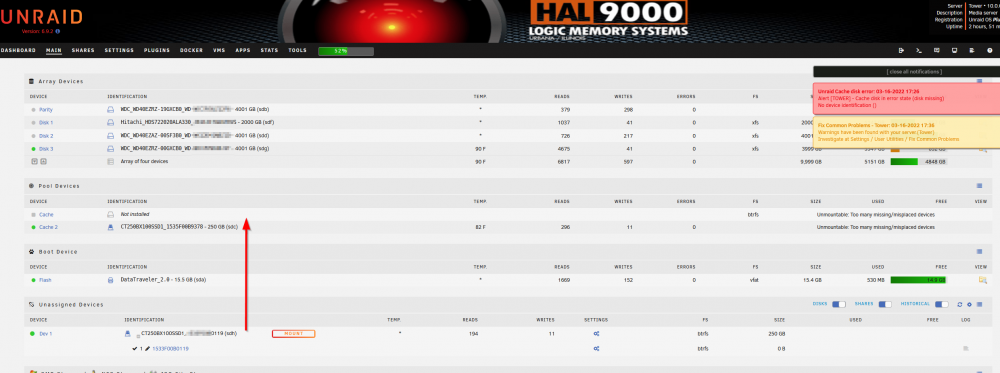
My ssd cache drive disappeared and reappeared. (I know, I need to get rid of the motherboard that is 14 years old as it's failing). The drive did reappear but I'm not sure how to get it back into the cache pool that is setup as raid 1. 1. Why didn't the cache 2 just take over as a single drive if cache 1 became unavailable? Isn't this the whole point of raid 1 that one drive drops off and the other drive still works, you're still okay? 2. The drive is there now, how do I move it back to cache? 3. When I do move it back to cache, will I lose everything on the cache drive (i.e. all docker applications, or is the docker apps saved on the thumb drive, or will it just go back to the way it was before the failure? 4. Do you guys think it's the drive failing, the cable failing, or the SATA port on the MB failing? I was thinking of buying the Chenbro NR12001 server (https://www.ebay.com/itm/353796006228 ) which has tons of sata ports, and is similar to my current MB as far as speed/capability. I can also reuse my ddr3 16gb memory which is a bonus. 3-16-2022 tower-diagnostics-20220316-2030.zip
-
Thank you very much for answering my questions. :-)
-
Thanks a bunch for the very organized answers to my questions. Made it very easy to read. 🙂 Are more advanced card capable of doing trim? I assume SSD garbage collection won't be disabled in the SSD card and will continue to work? Would I be able to use both my MB on board sata ports for the SSD and the sas2008 card the mechanical drives or does the MB somehow get disabled? Will temperature readings still be transmitted through the sas2008 cards for the hard drives?
-
Don't feel obligated to give me your opinion on every question. If you can only answer 1 or 2 per person that's fine. I'm running 4 HD and 2 cache ssd's off of motherboard sata ports. The other day 3 drives disappeared and I think the sata ports are starting to fail possibly. (I could feel all the hard drives motor were running so it wasn't power related. Anyway....I was planning to get a sas 2008 based controller that can handle 8 sata drives and stop using onboard sata ports. Questions: 1. When my unraid pc boots up, will it automatically find the name/serial # of the drives and start using them off of the sas 2008 controller? a. Do I not have to worry about drivers for unraid as it should be already built in correct? 2. Should I split the SSD's so that both ssd's are on the same port of the hba? I.e 1 ssd on hba port 1 and 2nd ssd on hba port 2. Will it make a difference? 3. The card is running on pcie 2.0 x8. Is this going to bottle neck my spinning 4tb hard drives when parity happens? (I have 4 hard drives right now so it's probably not an issue. When I get up to 8 hard drives or 12 hard drives, am I going to see a bottleneck at the PCIe x8 bus? Avg speed of hard drives is about 120-160Mb/s 4. Will unraid be able to spin down hard drives? 5. Will unraid not be able to perform trim on SSD's? 6. Trying to think of everything before I pull the trigger on this. Is there anything I'm giving up by using an HBA card? (have a cheap graphics card running on x1 pcie to save my 2 pcie 16's for future hba card upgrades.
-
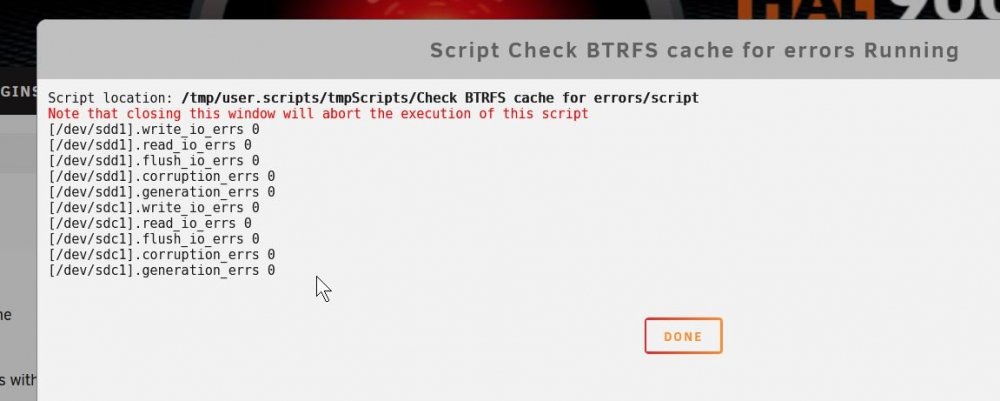
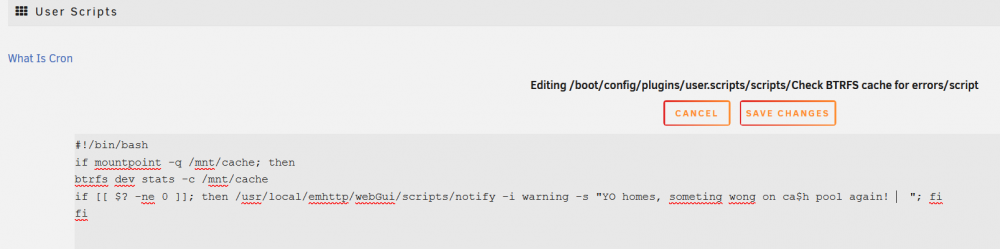
I downloaded the script app you recommended. Named it, put in a description, copied the script from the above (see attachments). When I click on the "run script" I get the below window with the done button. This is so cool. How complicated would it be to have the script not only warn you about the error but then ask you to click Yes to run the scrub with the error box checked, then run a balance, then clear the stats, else click no to abort? I've never written scripts before and found this very exciting. Kind of like when I first got an apple II with no drive/cassette and just typed stuff from magazine articles. 🙂
-
Someone mentioned a drive disconnected which caused the de-balancing/errors mentioned in the other posts. I noticed that both my cache drives have the spin down setting of "default". I just changed both of the raid 1 cache drives to "Never". Is that okay to do since they hardly use any juice when just idling anyway?
-
Thanks for looking at this. So it's normal for this to happen once in a while? Is there a monthly procedure of scrub with error correction then re balance I should do?
-
Had issues with my cache drives in raid 1 configuration. Below is the ticket, requested help on last week. https://forums.unraid.net/topic/116490-read-error-correction-on-both-my-cache-drive-what-should-i-do/?tab=comments#comment-1059568 Was told by JorgeB to run a scrub. Ran a scrub and possibly fixed all the issues. (See diagnostic I posted on that topic). Today, I ran a balance on my cache drives because I saw this ______________________________________________________ btrfs filesystem df: Data, RAID1: total=32.00GiB, used=31.33GiB System, RAID1: total=32.00MiB, used=16.00KiB Metadata, RAID1: total=1.00GiB, used=138.88MiB GlobalReserve, single: total=20.19MiB, used=0.00B btrfs balance status: No balance found on '/mnt/cache'<<<<<<<<<<<<<<<<<<<<<< _____________________________________________________ After doing so, got the message on the top of the screen saying "Docker not available" after selecting the docker tab. I have now attached the tower-diagnostics for you guys to analyze as I have no clue why it's not working. 1st diagnostic ending in -1311 I few minutes later, I did a stop array restart array. Saw activity on the two SSD's that are the cache drives which is good news because that's where I think my docker is run from. Waited for the activity to die down. Then checked docker...everything is back, which is great but I have to know WTF is going on. I attached a second diagnostics so you guys can compare the before and after.-ending in file name 1325. Is this a glitch? Is this a sign something is going to blow up like a ticking time bomb LOL? tower-diagnostics-20211202-1311.zip tower-diagnostics-20211202-1325.zip
-
FYI: I just upgraded a 256gb old hard drive to 4TB. I also ran the scrub someone else recommended. Thank you for your help! 🙂 tower-diagnostics-20211127-1439.zip
-
Removed original text dump from original post. See below for diagnostic file. Thanks everyone! 🙂I'm seeing 429MB/s on the pre-read stage of preclear on my WDC blue 4TB hard drive. (info is in the image below) This drive is a shingle variety. This isn't read cache, it pretty much has stayed at this speed the whole time. Is this why the read speeds are so high? I'll post a follow up on my write speeds. Is this normal? I've only seen SSD's have read speeds like this!
 I figured out it's a bios issue. When it boots, if hit F2 to get into bios, then f8 to choose boot drive, it works every time. I think I'm going to roll back my bios version and go from there.16GB of ram in a ASUSTeK COMPUTER INC. M5A99FX PRO R2.0 AMD FX™-8350 Eight-Core @ 4000 MHz and I only use the server for only one thing... plex. I don't transcode. I don't share my plex outside of my lan and it only pushes plex to one client at a time.Here's the diag. Thank you everyone for checking this. tower-diagnostics-20210826-1019.zipI have a wide variety of hard drive sizes. One of my smaller drives is 98% full. If a share saves to drive 1, 2, and 3 and drive 2 becomes 100% full, will it automatically just save the data in drive 1 and 3? I'm constantly getting the error that drive 2 is full, is there a way to disable the alarm from drive 2?Yes, missed the word port.Thank you for posting this. If bitwarden ever goes belly up or decides to start charging, I'll go with the self hosting one. 🙂 Hopefully this helps others.I've been having issues booting with unraid. Sometimes it boots up with no issues. Most of the time it sits at the "hit del or f2" screen and nothing happens. I thought someone was going to ask me if I did a memtest. So I powered up pc, saw the unraid menu (yeahh!!) selected memtest. PC shutdown, rebooted and I didn't even get the "hit del or F2" just a blank screen. I've been dealing with this for 6 months and thought it was an issue with the power supply having a very low 3.3v output. So I installed a brand new high end PSU. Checked the bios voltages for 3.3v and it was fixed. Alas, I'm still have the boot issue. 😞 Does this sound like an issue with the usb thumb drive? I use the Kingston Digital DataTraveler SE9 16GB USB 2.0 DTSE9H/16GBZ thumb drive. I've changed from using a usb 3.0 to usb 2.0, changed from uefi boot to non uefi boot. I've gone from 2 stick of patriot G2 memory to 1 stick. Left the voltage at default for mem and bumped it up to 1.5v for xmp. I even popped in a 4gb ddr 3 non brand stick to see if both my memory sticks are the issue and still get the 1 out of 4 successful boots. To save everyone the time to look at my profile, I'm using this mb m5a99fx pro R2.0, AMI bios 2501. CPU AMD FX 8350
-Reddit.thumb.png.bd61cce15378879038978fc5fc1e2daf.png)


