




-Reddit.png.1a2908815c05bd678f6c8b6397b00407.png)
tr3bjockey
Members
-
Joined
-
Last visited
Everything posted by tr3bjockey
-
bump
-
I'm looking to replace my dead motherboard. Thinking about running a ryzen 3 1200 because my old server was an fx-8350 and it felt like overkill. I only stream on my lan to one TV with Plex. I don't do VM's. Only turn on the server to add a movie or series I bought and also turn it on just to do plex from my living room tv through my nvidia shield. Most of the movies I have are 1080p/4k and crunched down with handbrake as hvec format and have no problems with my current 1`gbit ethernet. I don't transcode, it's full resolution without any processing. So I checked https://cpu.userbenchmark.com/Compare/AMD-Ryzen-3-1200-vs-AMD-FX-8350/3931vs1489 and it shows that the ryzen processor is faster on single or dual core tasks than my fx-8350 which had 8 threads. Also it's half the watts of my fx-8350 and I'm paying $0.29/Kw Hour so that's a big deal for me. I can buy the processor for $126, the motherboard for $69 after rebate https://www.newegg.com/asus-tuf-gaming-b450m-plus-ii/p/N82E16813119358 (it has 6 sata ports which is the # of drives in my array) 16gb of DDR 4 ram https://www.amazon.com/dp/B0157UQ5A6?tag=pcpapi-20&linkCode=ogi&th=1&psc=1 (DDR4 3000MHz C16) for $68. My case has plenty of slots left for hard drives, and I have the leftover cooler from my rizen 2700x that I didn't use because I water cool my main computer and didn't need it. I also am using a spare 800 watt power supply so that's taken care of too. I have an ati dvi port graphics card that I bought for $19 that's only used when I need to troubleshoot the server if unraid doesn't start. I know some of you are doing crazy processors for unraid because of VM's or your running tons of stuff. Are all those items above compatible with unraid and will this meet or exceed the system I had before? Thank you to tall in advance for any advice.
-
Ditto on this...it would be great if space invader created a video for this!
-
No one know this answer or am I too stupid to know this was a stupid question?
-
I'm very security conscious and don't want anyone accessing my server from the outside. My plex on unraid has external access disabled as one example. I would like to setup bitwarden to be used only on my lan (no reverse proxy). Is this doable? Is there a security risk by doing this?
-
We are not planning to use the server from outside the lan. If we are only intersted in running bitwarden on our local network, can we securely install it without needing to connect a reverse proxy or vpn?
-
That would make sense because when I created the unraid server, that motherboard has issues with the battery/RTC. Does that mean that NTP is not up and running when the server starts writing to the unraid thumb drive and hence the date/time is being pulled from the RTC?
-
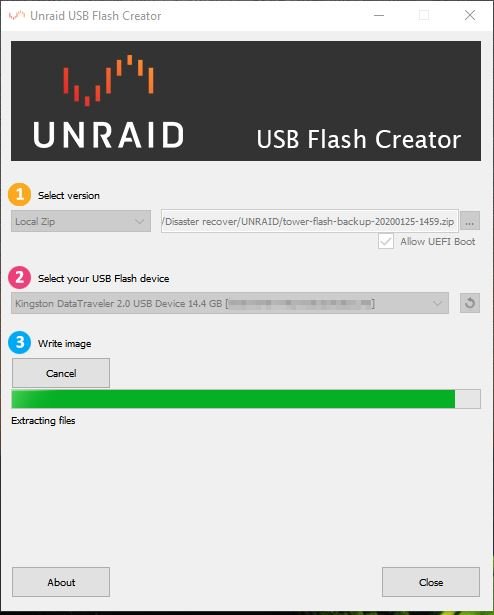
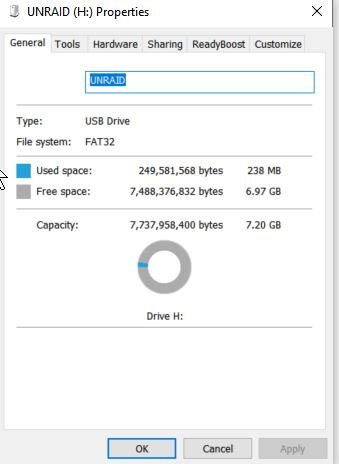
I did the same thing on a kingston data traveler 2.0 usb and it also immediately started to extracted the files. It moves to the 90% in 6 seconds and stayed there. Just when I was about to give up it's telling me it's done. Then I looked at the drive. It seemed ok (but I'm a newbee what do I know right?). Anyway, I pulled up the properties for it and noticed that it only had 7.2gb of capacity instead of 14gb+ for this 16gb drive. So the unraid utility has issues with 16GB drives. So then I popped out the kingston and plugged it back in to my win 10 pc. Ran the make bootable bat file to see if it would boot. Nope...that didn't work either. So then I formatted the drive as fat32. Copied the files manually from the zip, then ran the make bootable bat file. Transfered the usb drive to the unraid server and this worked.
-
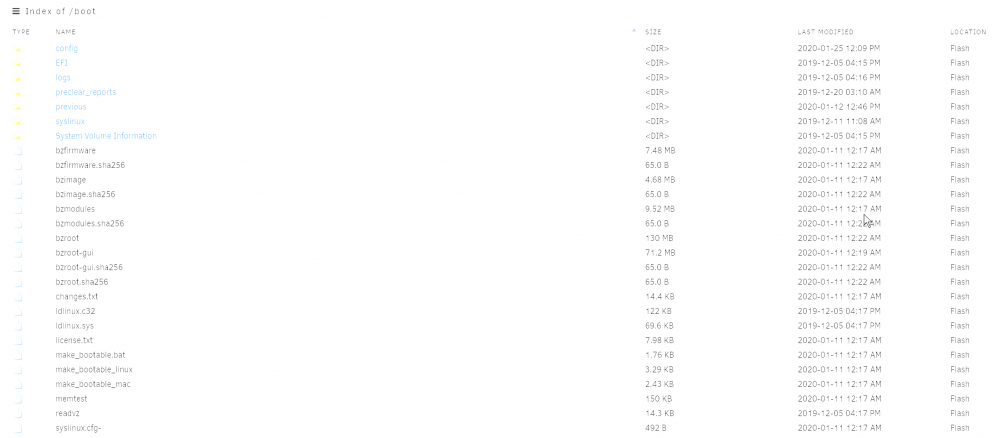
Another question. Why is the backup date 1969? In case your wonder if it's getting the date from the folders or the files on the root, the next picture shows nothing states 1969. Any ideas?

-
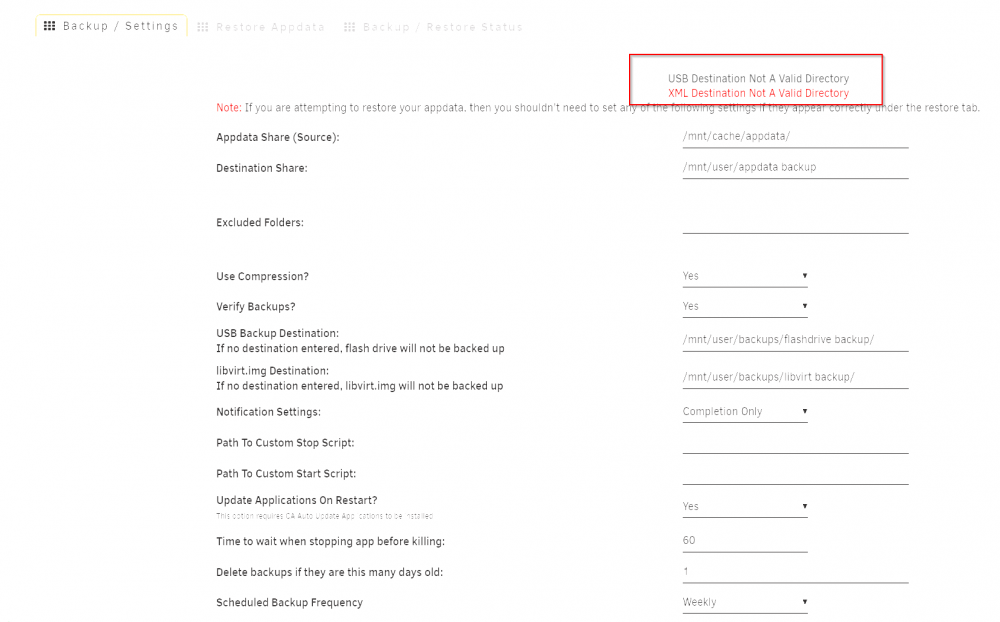
I'm concerned that CA appdata is not backing up my whole unraid boot drive. I see the error in the red square box below once in a while.
-
Is there a way to fix this in Krusader. My date and time format on unraid are correct. The directions weren't clear on how to change the date format. It's getting confusing to try to reverse it from European format.

-
Unraid just told me that plex has been updated. How can I find out what's new in this version?
-
Anyone? Bueler? Bueler?
-
Thank you for creating the pluggin. I was hoping this would help me but it's making me even more confused! 🙂 I'm puzzled if my processor is throttling the frequency down or not. In several locations, it says my processor is running at it's max 4.0ghz. But doing the cpufreq-info gives me 1.5ghz to 3.7ghz on different threads. I also have the "no driver" in the tweak page. My cool and quiet in my bios is set to "always" The other settings not used for it are "disabled" or "auto". I also notice no power savings at all after loading the pluggin. (based upon my killawatt meter) (all my docker apps are shut down) CPU Scaling Governor: Power Save Enable Intel Turbo/AMD Performance Boost?: <nothing to pull down> root@tr3bjockey:~# cpufreq-info -o minimum CPU frequency - maximum CPU frequency - governor root@tr3bjockey:~# cpufreq-info -g root@tr3bjockey:~# cpufreq-info -y -m 4294.55 ms root@tr3bjockey:~# cpufreq-info -y -m 4294.55 ms root@tr3bjockey:~# cpufreq-info -y -m 4294.55 ms root@tr3bjockey:~# cpufreq-info -y -m 4294.55 ms root@tr3bjockey:~# cpufreq-info -d root@tr3bjockey:~# Every 2.0s: grep "cpu MHz" /proc/cpuinfo tr3bjockey: Mon Dec 30 10:27:44 2019 cpu MHz : 1811.999 cpu MHz : 1977.109 cpu MHz : 2729.762 cpu MHz : 1750.587 cpu MHz : 1540.822 cpu MHz : 3401.385 cpu MHz : 3736.209 cpu MHz : 3382.610 <on tips and tweak page> CPU Frequency Scaling Driver: * no driver * Governor: <<<<<blank Motherboard TITLE INFORMATION Base Board Information Manufacturer: ASUSTeK COMPUTER INC. Product Name: M5A99FX PRO R2.0 Version: Rev 1.xx Serial Number: xxxxxxxxxxxxxxxxxxxxxxxxx Asset Tag: To be filled by O.E.M. Features: Board is a hosting board Board is replaceable Location In Chassis: To be filled by O.E.M. Type: Motherboard Processor TITLE INFORMATION Processor Information Socket Designation: Socket 942 Type: Central Family: FX Manufacturer: AMD ID: 20 0F 60 00 FF FB 8B 17 Signature: Family 21, Model 2, Stepping 0 Flags: FPU (Floating-point unit on-chip) VME (Virtual mode extension) DE (Debugging extension) PSE (Page size extension) TSC (Time stamp counter) MSR (Model specific registers) PAE (Physical address extension) MCE (Machine check exception) CX8 (CMPXCHG8 instruction supported) APIC (On-chip APIC hardware supported) SEP (Fast system call) MTRR (Memory type range registers) PGE (Page global enable) MCA (Machine check architecture) CMOV (Conditional move instruction supported) PAT (Page attribute table) PSE-36 (36-bit page size extension) CLFSH (CLFLUSH instruction supported) MMX (MMX technology supported) FXSR (FXSAVE and FXSTOR instructions supported) SSE (Streaming SIMD extensions) SSE2 (Streaming SIMD extensions 2) HTT (Multi-threading) Version: AMD FX(tm)-8350 Eight-Core Voltage: 1.4 V External Clock: 200 MHz Max Speed: 4000 MHz Current Speed: 4000 MHz Status: Populated, Enabled Upgrade: Socket AM3 Serial Number: To Be Filled By O.E.M. Asset Tag: To Be Filled By O.E.M. Part Number: To Be Filled By O.E.M. Core Count: 8 Core Enabled: 8 Thread Count: 8 Characteristics: 64-bit capable
-Reddit.thumb.png.bd61cce15378879038978fc5fc1e2daf.png)



