






Ectropian
Members
-
Joined
-
Last visited
-
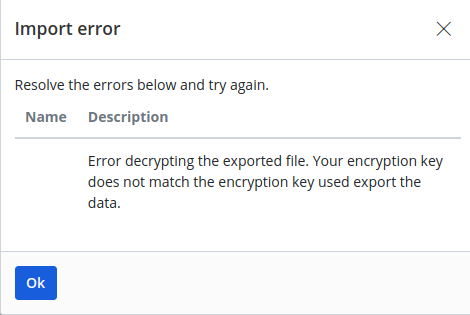
I'm making a tutorial for my wife on moving my VW Vault back to Bitwarden's Website should anything happen to me (She is super anti-technical). I want to be sure that any Exports are done via Encrypted .json, but when I try to import back to Bitwarden, I get the following error. There doesn't seem to be a way to "Set" the encryption key on the website to match your export key. The only options are to Change the key ramdonly, or to view the current key. Is the only way to import a vault in non-encrypted .json or .csv state?
-
Thanks itimpi, But Support Thread link points to this thread. I didn't notice the difference before. https://forums.unraid.net/topic/43651-plug-in-unbalance/
-
Hi Juan, I'm getting a notice this morning that the plugin is deprecated. Can you confirm the status? I'm not sure why it would say this if you're obviously maintaining it. TIA

-
Does anyone know how to turn off CDP in the container? Since I only want the backup set to run at a specific time, when I untick the checkbox on the website it does not push down to the container. When I run ./account_setting.pl it shows the CDP server is running. running ./cdp_server.pl (stop) does not stop the service (does nothing). In Scheduler you can only set CDP schedule realtime, or in minutes. Think I've tried everything I can think of. Anyone else have any ideas?
-
This is an awesome tutorial. Thank you so much! Does anyone have any idea if the internal update works, or should we rebuild from each update on docker?
-
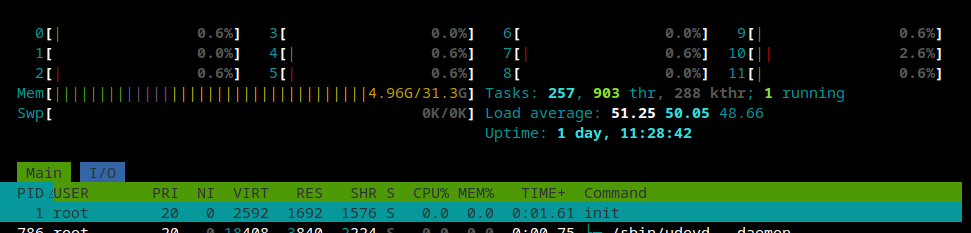
Having the same issue this morning. Dashboard shows all cpus maxed at 100% so I panicked, SSH's into root and checked htop to find very little activity. Manourvering around the webgui, was ok to start, then fails to respond. Settings/Docker to restart also fails to load. Feels like a memory leak, but htop memory shows normal activity with only 4.9G/31.3G memory used. I also noticed 254 Tasks with 904 Threads. Dashboard has completely failed to operate. Incidently I just switched from intel to AMD B550 chipset a few days ago. Edit: Reboot from cli fails to shutdown the server. Docker fails to respond, so cannot stop containers. Will leave it sit a while hoping reboot will timeout. Otherwise I'm afraid I will not be able to gracefully shutdown the server. <sadface>
-
<deleted> .. nevermind.. I'm an idiot. Somehow my server address was entered into the "Custom Environment: Web Vault Server URL" (which makes sense).. instead of "Self-hosted Environment: Server URL" ... no idea what the difference would be, but that fixed it.
-
Having an issue with sync between my devices. Sometimes logging out of my ios app and back in, seems to refresh, to my phone. But I'm noticing that many items created on my ios app have not synced back to my vaultwarden database. Sync says it's up to date on my phone. How do I force an item to repopulate?
-
Good to know.. thanks!
-
I Setup nextcloud with Onlyoffice for this purpose, and have sub-domains pointing through with Letsencrypt, however my family rarely uses anything else in nextcloud except file storage and remote editing of excel files. (which can be done with the onlyoffice app).. Is FileRun a smaller/better alternative for this usecase? And has anyone migrated their nextcloud database to FileRun sucessfully?
-
Ectropian changed their profile photo
-
Maybe this is on the 2020 wishlist?
-
Thanks @Skitals looking good!
-
I've noticed that the WebUi seems to be a reoccurring issue over the last few years in this thread, So I'll post here and maybe someone can help me understand what's going on. After starting Qbittorrent i cannot log into the WebUi. After checking the log, I can see that it accepts my openvpn login/password, and assigns me an Ip address. "Started qBittorrent daemon successfully..." .. But No WebUi. So I disabled Vpn login and I Vuala! Webui works. so I log in, open Console> and manually run openvpn my.ovpn. At this point it uses the cridentials.conf and logs me into my vpn. However I have to keep the console window open or I lose vpn connection. When I reenable vpn in the config, No more WebUi. ideas??


