





Bjur
Members
-
Joined
-
Last visited
Everything posted by Bjur
-
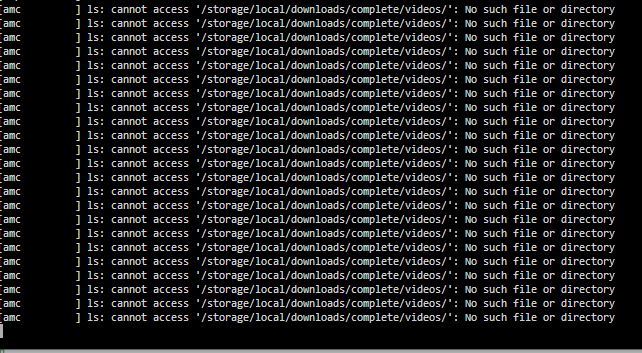
Hi I want Filebot to watch a folder and run AMC script for an unassigned device called ssddl: Have configured the following: But the log gives me this: I don't know why it ignores the path I've configured.

-
I have problems with making my SSD unassigned device a DL drive because of permission problems. Can I make it a cache drive instead but only dedicated for DL and not to have anything to do with my other cache drive containing dockers?
-
Hi have started using this plugin. From my Double Commander I can access the folder on the unassigned disk throught mnt/disks and create the folders, but when using another docker like Sabnzb it gives an error accessing the folder I specify in SAB. I have mounted the path in the docker template but dont know how to solve it. Hope someone can help.
-
Thanks for the reply. Two last questions. 1. Would you recommend to use discard on SSDs instead of TRIM? 2. Is it better to use passthrough on the UD if it's used for DL for dockers?
-
Ahh okay thanks. How often do you recommending TRIM your SSDs? When you say single device pools are you talking only about SSDs? My 5 x 3.5" HDD in my array is also XFS.
-
Hi. I have in my array: 5 x HDD 3.5" XFS 1 cache SSD XFS and 1 unassigned SSD. My questions are: 1. For the 2 x SSDs. Should I change system from XFS? 2. Should I install Trim plugin or use discard? 3. Is XFS a good system for all the disks?
-
Hi just started the plugin for the first time. I get the error below. What can I do? [28.05.2024 00:06:09][ℹ️][plex] Backing up plex... [28.05.2024 00:15:32][❌][plex] tar creation failed! Tar said: tar: /mnt/cache/appdata/plex/Library/Application Support/Plex Media Server/Media/localhost/7/83dbfe58c7c5cd7\220\026\203l\201\210\377\3775a31956cc96b652f.bundle: File removed before we read it; tar: /mnt/cache/appdata/plex/Library/Application Support/Plex Media Server/Metadata/Albums/a/0dd40729668e25fd704419e7aed4630ece659d9.bundle/Contents/com.plexapp.agents.localmedia/posters: Cannot stat: Structure needs cleaning; tar: /mnt/cache/appdata/plex/Library/Application Support/Plex Media Server/Metadata/Albums/d/abd89efa5ae178382cbd166acd3de4926cec142.bundle/Contents/_stored: Cannot stat: Structure needs cleaning; tar: Exiting with failure status due to previous errors
-
@Sptz87 Did you ever get an answer to this, since I'm wondering the same?
-
What else can I try?
-
Any other suggestions?
-
@ConnerVTTried that and it gives me this:

-
Hi I have an SSD which keeps docker container and metadata but lately ive discovered if I browse Plex metadata my datadrives wakes up which doesnt makes sense only when video starts but is not supposed to do it while browsing. Why does it do that?
-
Got the same type of message in February so had to take it out. A shame. Thanks for all the hard work you guys have done with this script. It was really nice as long it lasted🙏
-
Did you change something in the mount script? I also have a 1 gig line but only get 67 MB when DL. Should be almost double. I'm using DoubleCommander but time is important so hope someone has a better solution.
-
Okay so you suggestion is if i want to do it the proper way without having to preclear all drives is to. Stop currently parity build. Remove parity drive. Install 2 new replacement drives. Add 2 new drives in new data slots. Copy data from old disks to new disks. Replace old disks data slots with 2 other newer disks. When thats done add parity and rebuild?
-
Thanks for the answer. I will let it rebuild. Ive ordered 2 x molex to sata power cables. I have enough sata data cables since i have a controller card. If i move the data manually from old disk1 to disk2 after parity has finished can i do the last 3 steps in 1 step. So remove both old data drives (1 with data, 1 without data) add 2 new replacement drives and 2 new drives normally to array? Tbh I haven't precleared new parity drive since they are new Exos enterprise drives and read it should not be necessary anymore.
-
Thanks for the answer. It's already been building parity for a few hours now. But can I move the data from the old disk2 to disk1 while parity is rebuilding? Also with the new disks how do I balance them correctly so let's say I want to fill disk1 up to x perfect and then next disk takes over so it will not completely fill up? Is there a balancer or what is best practice?
-
Anyone that can recommend a moving script for moving the data back from Workspace? Would like to not move it all manually and it needs to be stable when moving.
-
So I have 3 disks in my array (1 x 8 TB Parity, 1 x 3 TB and 1 x 6 TB. I want to change it to 5 x 18 TB disks quickly. I have removed the parity and changed with a new disk and started it. Takes a long time. How do I change the datadrives quickly (they are healthy)? Can I move the data from disk2 to disk1 while the parity is rebuilding or is that not smart? Reason is I only have two sata power ports left for the new 4 disks, so thought I could empty data from one hdd and take that out and maybe buy a molex to sata power cable for the remaining. I have a dealine on this to saturday, so hope it's doable.
-
Hi, I currently have 3 drives in my array (8 TB (parity), 6 TB and a 3 TB (both data)). I have bought 5 new and larger disks so I will be changing all of them. How do I do it the right way when all should be exchanged?
-
Had Google Workspace after being forced from the old G-Suite. It's been read only since july I think, so I got 30 days to move it over before deleting all of it. @axeman Thanks I have 1gb DL speed so I think I will move it manually then. Did you use Double Commander or Mc to move it over manually? I want to keep all the attributes. stamps etc.
-
Can anyone tell what the best way to move the files back locally from Google? I got an email from Google saying they will delete my files within x days.
-
Damn that was not the answer I was hoping for:( I've seen others mention many of their recertified Exos was perfectly fine, since it was enterprise.
-
-
Hi also from Denmark. Considering ordering Seagate recertified from ServerPartDeals, but if something is wrong with the drives, would I then be able to contact Seagate in Denmark and return it to them instead of sending back to US?


