soana
Members
-
Joined
-
Last visited
Everything posted by soana
-
Can I re-install the Connect plugin or should I wait for API updates in the upcoming versions?
-
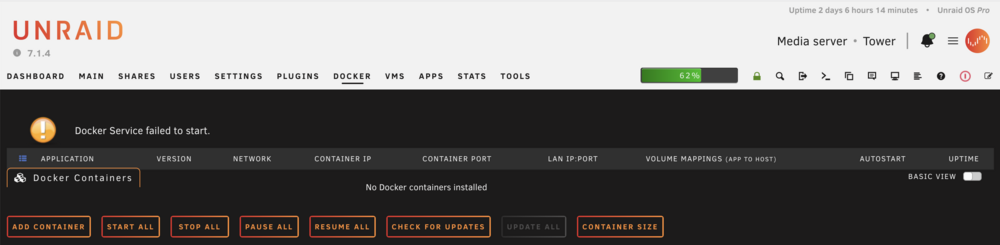
For several weeks and in an apparent random pattern the docker tab will display this message from the image below. While none of the dockers show up in webui some are still working while others are not reachable. A reboot will solve the issue temporary until the issue shows up again. These two lines might show a clue: Jun 24 13:24:46 Tower monitor_nchan: Stop running nchan processes Jun 24 19:49:21 Tower monitor_nchan: Stop running nchan processesbut I don't know how to find out what is creating this. root@Tower:~# ps aux |grep nchan root 3509 0.0 0.0 4228 2436 ? S Jun22 0:06 /bin/bash /usr/local/sbin/monitor_nchan root 2985687 0.0 0.0 104708 31676 ? SL Jun24 0:00 /usr/bin/php -q /usr/local/emhttp/webGui/nchan/notify_poller root 2985689 0.0 0.0 104700 30644 ? SL Jun24 0:00 /usr/bin/php -q /usr/local/emhttp/webGui/nchan/session_check root 2985691 0.0 0.0 104768 30712 ? SL Jun24 0:00 /usr/bin/php -q /usr/local/emhttp/plugins/dynamix.system.temp/nchan/system_temp root 2985694 0.0 0.0 104700 32428 ? SL Jun24 0:00 /usr/bin/php -q /usr/local/emhttp/webGui/nchan/wg_poller root 2985696 0.0 0.0 104732 32268 ? SL Jun24 0:00 /usr/bin/php -q /usr/local/emhttp/webGui/nchan/update_1 root 2985698 0.3 0.0 104728 31736 ? SL Jun24 0:01 /usr/bin/php -q /usr/local/emhttp/webGui/nchan/update_2 root 2985700 0.2 0.0 104784 32996 ? SL Jun24 0:01 /usr/bin/php -q /usr/local/emhttp/webGui/nchan/update_3 root 3024662 0.0 0.0 4260 2032 pts/2 S+ 00:04 0:00 grep nchan Thanks for any help on this problem. tower-diagnostics-20250624-2344.zip
-
After swapping out all the mechanical disks, changing form the two Dell Perc H310 to one SAS9300-16i LSI and new SAS cables, the sync file systems still last about 3 minutes. I guess moving forward in order to avoid a parity check every time I reboot the server I will have to first stop the array manually and then initiate then shutdown or reboot command.
-
yes, it did have snapshots. pool is also zfs with snapshots.
-
Some progress. I had disk10 in my array that was formatted zfs, after removing everything from it and reformatting it in xfs the time for the sync filesystems reduced from about 12minutes to about 3minutes.
-
Hmm, not sure if related but I just lost all the user shares. Looking into the forums I seem to have a known issue that can be resolved with a reboot. Jan 19 10:05:07 Tower shfs: shfs: ../lib/fuse.c:1402: unlink_node: Assertion `node->nlookup > 1' failed.
-
Thanks for the suggestion it will be a long task, but not impossible Couple of questions: 1. I keep getting these messages in the log, is it possible that one of my controllers or the connection from HDD->backplane->controller is bad? Just thinking if it's worth it to replace the my two SAS controllers with a new one before I start replacing one disk at a time. Jan 19 08:45:48 Tower kernel: sas: Enter sas_scsi_recover_host busy: 1 failed: 1 Jan 19 08:45:48 Tower kernel: sas: ata7: end_device-1:0: cmd error handler Jan 19 08:45:48 Tower kernel: sas: ata7: end_device-1:0: dev error handler Jan 19 08:45:48 Tower kernel: sas: ata8: end_device-1:1: dev error handler Jan 19 08:45:48 Tower kernel: sas: --- Exit sas_scsi_recover_host: busy: 0 failed: 1 tries: 1 Jan 19 08:45:48 Tower kernel: sas: Enter sas_scsi_recover_host busy: 1 failed: 1 Jan 19 08:45:48 Tower kernel: sas: ata10: end_device-2:1: cmd error handler Jan 19 08:45:48 Tower kernel: sas: ata9: end_device-2:0: dev error handler Jan 19 08:45:48 Tower kernel: sas: ata10: end_device-2:1: dev error handler Jan 19 08:45:48 Tower kernel: sas: --- Exit sas_scsi_recover_host: busy: 0 failed: 1 tries: 1 2. During the 12 minute of "sync filesystems" can I run any commands to see what disk are accessed, hoping that can narrow down the culprit.
-
With just the pool I did a start and stop array everything seemed to work OK. Stopping services took some time but sync filesystems was not there or it was instantaneously since I could not see it during the stop of the array with just the pool.
-
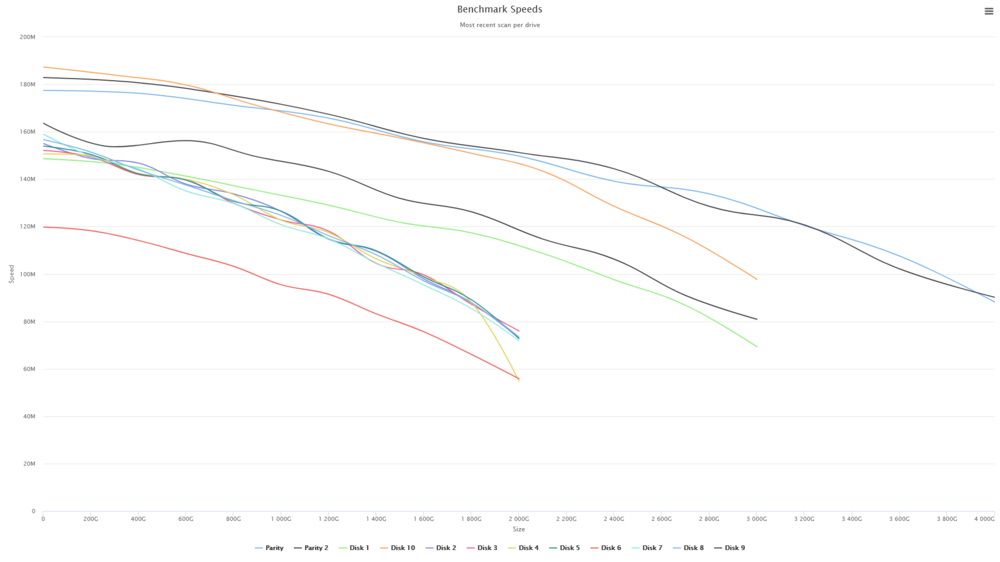
I did run the DiskSpeed docker and the results are attached. Disk 6 seems to be on the slow side but even that is between 119Mb/sec and 56 Mb/sec. I'm not sure I understand your suggestion about the new config without the array.
-
With no dockers, vm's and in safe mode the array eventually stopped after 15 minutes in the sync filesystems step. On other servers that step takes only seconds. I'm adding a new diagnostics file tower-diagnostics-20250116-1044.zip

-
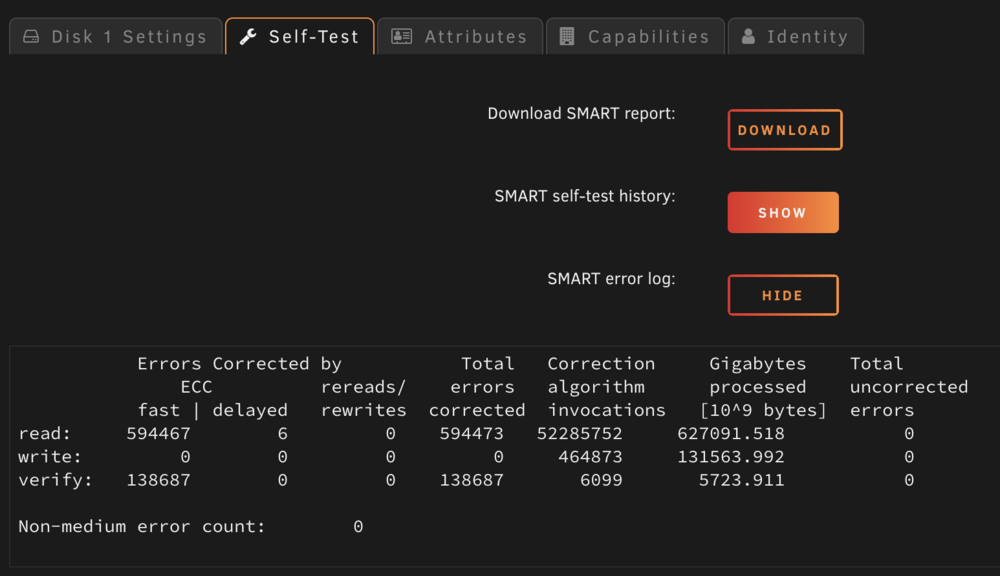
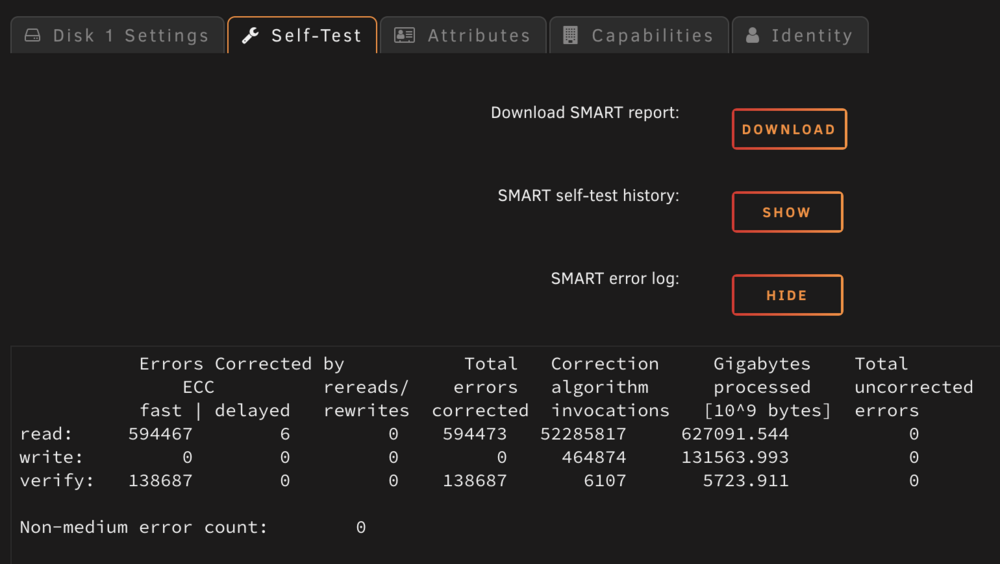
When trying to stop array the system seems to get stuck at Sync Filesystem, the only way to move forward is to reboot the machine. I attached the diagnostics file for reference. Before writing here I did look at the forums and the indication was that maybe one disk is going bad or maybe a connection to the disk is going bad. I did find two disk with some "issues" see attached images and replaced them I also reconnected all the power and SATA connectors to the drives and to the board but no dice. tower-diagnostics-20250114-2152.zip
-
Thanks for the feedback Jorge, it is probably time to replace the flash drive if I remember correctly it's more than 8 years old. This could also explain why the server is starting a new parity check after each reboot.
-
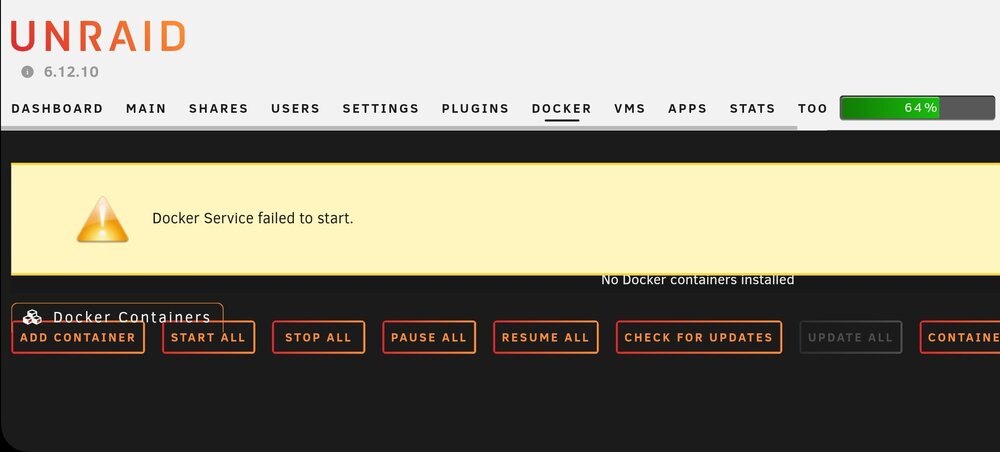
Since several days the Docker service started dropping with the error shown in the image attached. A restart does solve the problem and the docker service is up for a day or two and then it drops again. I looked at the sys log but could not figure out the issue. Any help would be apreciated. Thank you. tower-diagnostics-20240507-0740.zip
-
Started to get these messages in the container log. The lines bellow keep repeating in the log and there is no access to the WebUI of the container I think the cypher was there before when it used to work OK. 2023-05-31 21:14:10,641 DEBG 'start-script' stdout output: 2023-05-31 21:14:10 NOTE: the current --script-security setting may allow this configuration to call user-defined scripts 2023-05-31 21:14:10,645 DEBG 'start-script' stdout output: 2023-05-31 21:14:10 TCP/UDP: Preserving recently used remote address: [AF_INET]185.2.30.216:80 2023-05-31 21:14:10 Attempting to establish TCP connection with [AF_INET]185.2.30.216:80 2023-05-31 21:14:10,748 DEBG 'start-script' stdout output: 2023-05-31 21:14:10 TCP connection established with [AF_INET]185.2.30.216:80 2023-05-31 21:14:10 TCPv4_CLIENT link local: (not bound) 2023-05-31 21:14:10 TCPv4_CLIENT link remote: [AF_INET]185.2.30.216:80 2023-05-31 21:14:10,851 DEBG 'start-script' stdout output: 2023-05-31 21:14:10 Connection reset, restarting [0] 2023-05-31 21:14:10,852 DEBG 'start-script' stdout output: 2023-05-31 21:14:10 SIGHUP[soft,connection-reset] received, process restarting 2023-05-31 21:14:10,853 DEBG 'start-script' stdout output: 2023-05-31 21:14:10 DEPRECATED OPTION: --cipher set to 'AES-256-CBC' but missing in --data-ciphers (AES-256-GCM:AES-128-GCM:CHACHA20-POLY1305). OpenVPN ignores --cipher for cipher negotiations. 2023-05-31 21:14:10,856 DEBG 'start-script' stdout output: 2023-05-31 21:14:10 WARNING: file 'credentials.conf' is group or others accessible 2023-05-31 21:14:10 OpenVPN 2.6.3 [git:makepkg/94aad8c51043a805+] x86_64-pc-linux-gnu [SSL (OpenSSL)] [LZO] [LZ4] [EPOLL] [PKCS11] [MH/PKTINFO] [AEAD] [DCO] built on Apr 13 2023 2023-05-31 21:14:10,856 DEBG 'start-script' stdout output: 2023-05-31 21:14:10 library versions: OpenSSL 3.0.8 7 Feb 2023, LZO 2.10 2023-05-31 21:14:10 DCO version: N/A
-
That worked. I did not think of checking the domains folder because I usually delete the both the VM and the disk. Thanks SimonF and ChatNoir for your help!
-
The clear cache and other browser solutions did not work
-
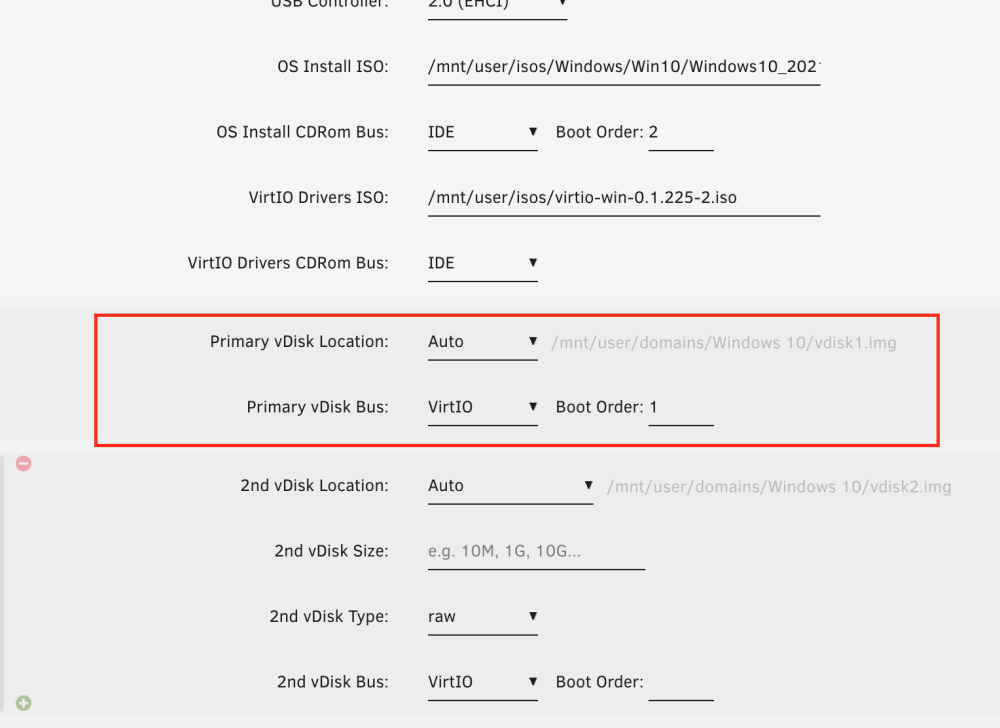
Wondering what am I missing here, using the latest unraid version but for some reason when creating a Win10 VM the primary vDisk Size option is not available, the second vDisk does show the size option - as seen in the screenshot below. It only happens for Win10, when trying to create a Win11 or Win8 VM the vDisk Size is present, also on my primary server the Win10 creation works just fine. unraid-sandbox-diagnostics-20221219-2152.zip
-
With several dockers running (Plex, mariaDB, Photoprism, nextcloud, etc) the appdata tar backup file is getting to about 250Gb and that is for about 3.6million files. While I know how to just extract the folder needed in case let's say plex appdata files are getting corrupted, just for the tar command to go trough the 3.6million files it can take hours. Would it be possible during the backup process to create tarballs for individual appdata folders rather than the whole appdata.
-
Here is my script I did not put too much time into it since it did the job from the first time. Line 4 and 5 define the source and the destination. The backup (rsync) and notification bits are in the ACTION block #!/bin/bash PATH=/usr/local/sbin:/usr/sbin:/sbin:/usr/local/bin:/usr/bin:/bin source="/mnt/user/Personal/" destination="/mnt/disks/My_Book_3Tb/" ## Available variables: # AVAIL : available space # USED : used space # SIZE : partition size # SERIAL : disk serial number # ACTION : if mounting, ADD; if unmounting, UNMOUNT; if unmounted, REMOVE; if error, ERROR_MOUNT, ERROR_UNMOUNT # MOUNTPOINT : where the partition is mounted # FSTYPE : partition filesystem # LABEL : partition label # DEVICE : partition device, e.g /dev/sda1 # OWNER : "udev" if executed by UDEV, otherwise "user" # PROG_NAME : program name of this script # LOGFILE : log file for this script case $ACTION in 'ADD' ) # do your stuff here /usr/local/emhttp/webGui/scripts/notify -e "Unraid Server Notice" -s "Unassigned Devices" -d "Device mounted" -i "normal" date >/var/log/My_Book_3Tb_Backup.log /usr/bin/rsync -avrtH --delete $source $destination >>/var/log/My_Book_3Tb_Backup.log /usr/local/emhttp/webGui/scripts/notify -e "Unraid Server Notice" -s "My_Book_3Tb" -d "Backup to My_Book_3Tb finished see /var/log/My_Book_3Tb_Backup.log for details" -i "normal" # This will refresh the UD webpage when the script is finished. /usr/local/sbin/rc.unassigned refresh $DEVICE ;; 'UNMOUNT' ) # do your stuff here /usr/local/emhttp/webGui/scripts/notify -e "Unraid Server Notice" -s "Unassigned Devices" -d "Device unmounting" -i "normal" ;; 'REMOVE' ) # do your stuff here /usr/local/emhttp/webGui/scripts/notify -e "Unraid Server Notice" -s "Unassigned Devices" -d "Device unmounted" -i "normal" ;; 'ERROR_MOUNT' ) # do your stuff here /usr/local/emhttp/webGui/scripts/notify -e "Unraid Server Notice" -s "Unassigned Devices" -d "Error mounting device" -i "alert" ;; 'ERROR_UNMOUNT' ) # do your stuff here /usr/local/emhttp/webGui/scripts/notify -e "Unraid Server Notice" -s "Unassigned Devices" -d "Error unmounting device" -i "alert" ;; esac
-
The unassigned devices plugin has a very nice option to run a script when external drive is plugged in. Use the default script button to start with a default script and build from there, I have something similar build but not with encryption.
-
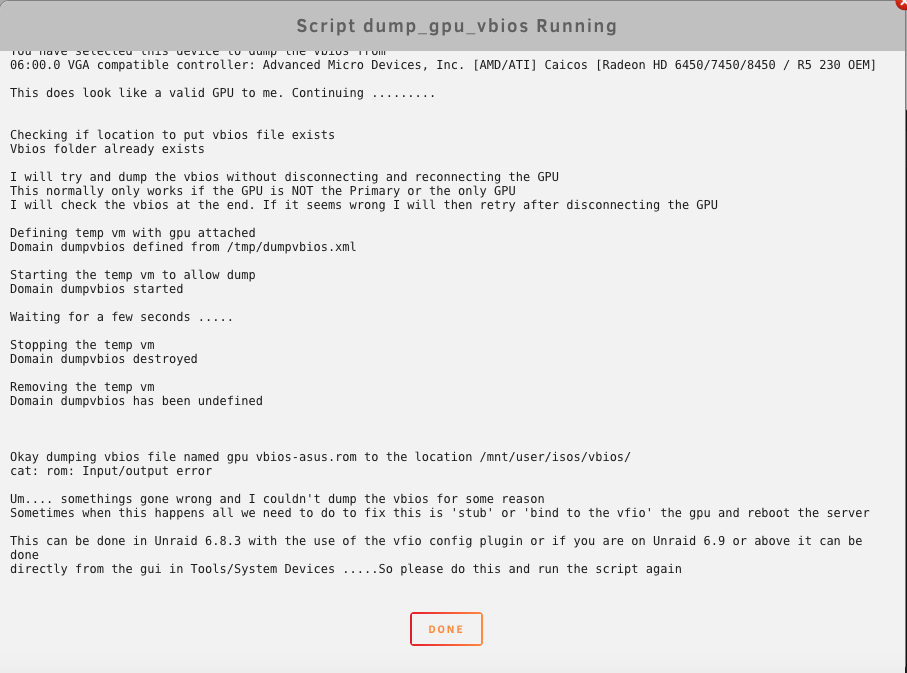
Got the following error: cat: rom: Input/output eror Did powerdown the server stopped docker and had all VM's set to not autostart. The Tools/System Devices does have the Video and Audio checked. GPU is not primary.

-
551Mb after 12 hours pfsense router


-
This workaround does not seem to work on my Windows VM running on 6.8.0-rc1 - anybody else having this issue or is it just me? I ended up passing a whole USB controller and everything is back up and running.
-
Sure, let me know what info you need.
-
Still getting a conversion "error", video is playing very narrow in VLC, if I go and manually adjust the aspect ratio in the VLC video settings to 16:9 then the images fills the VLC window as expected. Thanks for this app!