matmat07
Members
-
Joined
-
Last visited
Everything posted by matmat07
-
Alright, got it working. I believe I had some public IP in there from an old internet provider of where the server used to be. Once I deleted the resolver.conf file, I was at least able to get the default SWAG page. After that, a mix of force refresh, "80" for port, an update of SWAG and a fresh "filebrowser.subdomain.conf" file (which had port 8080 by default), It works. I hope it makes sense for someone, and it'll help if someone come here looking for help like others did in the past. The resolver file only has "127.0.0.11" in it now. And like I said, Port has to be the "inside docker" one.
-
Yea, even though "nslookup" did resolve with caps, it is better to have it without everywhere, thank you. I believe the port should stay 80. Is it the port we're looking at inside docker right? From the same "proxynet" network. I any case, I tried it. The only difference was that "308" changed to "1" in nginx error log: 2024/07/23 13:56:45 [error] 666#666: *308 filebrowser could not be resolved (3: Host not found), client: 192.168.1.1, server: filebrowser.*, request: "GET / HTTP/2.0", host: "filebrowser.domain.net", referrer: "https://organizr.domain.net/" 2024/07/23 14:00:49 [error] 666#666: *1 filebrowser could not be resolved (3: Host not found), client: 192.168.1.1, server: filebrowser.*, request: "GET / HTTP/2.0", host: "filebrowser.domain.net", referrer: "https://organizr.domain.net/" While changing the web adress in this post, I did notice the IP in there points to my real router. Am I understanding Nginx is trying to resolve "filebrowser" using my router instead of docker's DNS (not sure if there's such a thing, but whatever made nslookup bring up the right internal IP of 172.18.0.12).
-
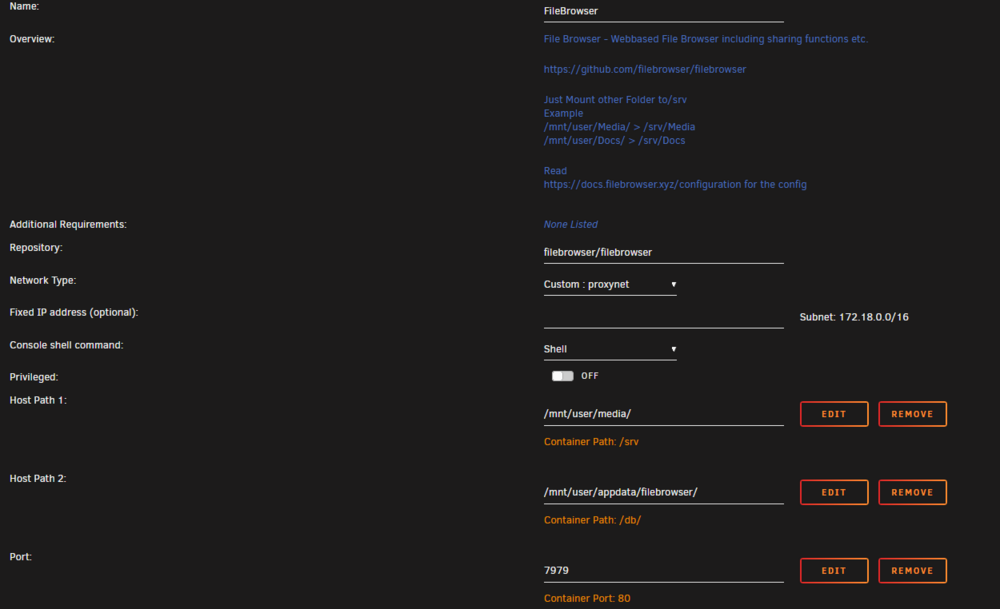
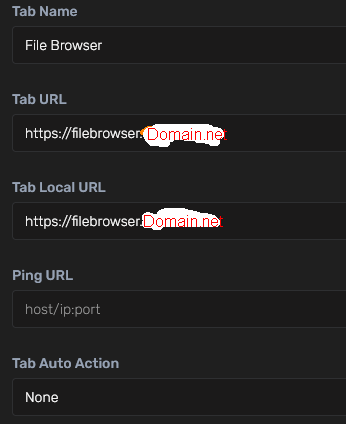
Hi, I'm trying to get this app on organizr/SWAG, but I always end up with "502 bad gateway" no matter what I tried. I found many different config for nginx, but the different tweak don't seem to help. About to just give up. I don't know what I'm doing wrong, but here's my basic settings. Cname seems to be working as "filebrowser.Domain.Net" links to my IP adress. I do have other app working fine (sonarr, deluge, netdata to name a few) / # cat .filebrowser.json { "port": 80, "baseURL": "", "address": "", "log": "stdout", "database": "/database.db", "root": "/srv" Unraid: Organizr: filebrowser.subdomain.conf: ## Version 2023/05/31 # make sure that your filebrowser container is named filebrowser # make sure that your dns has a cname set for filebrowser server { listen 443 ssl http2; listen [::]:443 ssl http2; server_name filebrowser.*; include /config/nginx/ssl.conf; client_max_body_size 0; # enable for ldap auth (requires ldap-location.conf in the location block) #include /config/nginx/ldap-server.conf; # enable for Authelia (requires authelia-location.conf in the location block) #include /config/nginx/authelia-server.conf; # enable for Authentik (requires authentik-location.conf in the location block) #include /config/nginx/authentik-server.conf; location / { # enable the next two lines for http auth #auth_basic "Restricted"; #auth_basic_user_file /config/nginx/.htpasswd; # enable for ldap auth (requires ldap-server.conf in the server block) #include /config/nginx/ldap-location.conf; # enable for Authelia (requires authelia-server.conf in the server block) #include /config/nginx/authelia-location.conf; # enable for Authentik (requires authentik-server.conf in the server block) #include /config/nginx/authentik-location.conf; include /config/nginx/proxy.conf; include /config/nginx/resolver.conf; set $upstream_app filebrowser; set $upstream_port 80; set $upstream_proto http; proxy_pass $upstream_proto://$upstream_app:$upstream_port; } location ~ (/filebrowser)?/api/public { include /config/nginx/proxy.conf; include /config/nginx/resolver.conf; set $upstream_app filebrowser; set $upstream_port 80; set $upstream_proto http; proxy_pass $upstream_proto://$upstream_app:$upstream_port; } location ~ (/filebrowser)?/share { include /config/nginx/proxy.conf; include /config/nginx/resolver.conf; set $upstream_app filebrowser; set $upstream_port 80; set $upstream_proto http; proxy_pass $upstream_proto://$upstream_app:$upstream_port; } location ~ (/filebrowser)?/static { include /config/nginx/proxy.conf; include /config/nginx/resolver.conf; set $upstream_app filebrowser; set $upstream_port 80; set $upstream_proto http; proxy_pass $upstream_proto://$upstream_app:$upstream_port; } } I can currently reach it fine via "localIP:7979". But either through Organizr or with "filebrowser.Domain.Net" gives the 502 error. Not sure how to diagnose it even at this point. I did see a couple of remarks about the
-
I'm currently having this issue too on Unraid 6.12.10.
-
Looks like that was the issue. It seems I'm getting further now, I believe the sever is generating the world now. I'm not gotta bother make the rest working to be sure, but I believe BepInEx was the issue. I was sure I tried disabling it, oh well. Thanks for the support, seems like there's a lot to do on your side and I appreciate.
-
Now I wonder what went wrong with my installation. I did not configure any file in it yet, but I doubt this would be what makes it reboot. That PID thing, is it because it's looking for a process that never started? Anyway...
-
Well, I spoke too fast. After I restarted the container once it keep restarting by itself once again. I'll check some more tomorrow morning, but I'm done for the day on this I believe
-
Thanks for that! I was about to prepare a server for the game release and I had a similar issue with the container restarting in loop. That trick seems to have done the job. You're busy enough I'm sure, but I'd be curious as to why if you had a simple explanation. Too complicated and I won't understand anyway haha
-
Hi, I just came back after 2 years. I used to have the xteve_zap docker using zap2it. Why was it removed? What is the alternative now? Seems to be Schedules Direct with Guide2Go, but I'd rather not have to pay for the access.
-
Again thanks for those template, and a bit thank you for supporting us here too, even if you often have to remind people to read the sticky. I was talking about Valheim, and I have now 2 docker running Valheim succesfully. I don't remember what went wrong that time, but it was a pretty quick setup this time. I'm now curious if we can share the same STEAMCMD folder between the instances. Did not do search yet, no need to take time to answer me if you don't have the answer on the tip of your fingers already.
-
After a very long time, my server worked yesterday. Thank you! I'm trying to import my friend's one now. I can see the server, but I think it is still loading something
-
Same here too.
-
Had to rename my Centon DataStick PRO usb2.0 to UNRAID for it to work too.
-
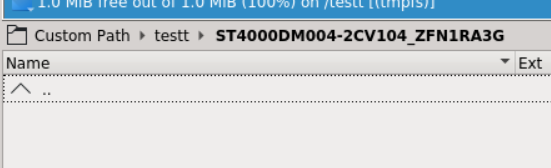
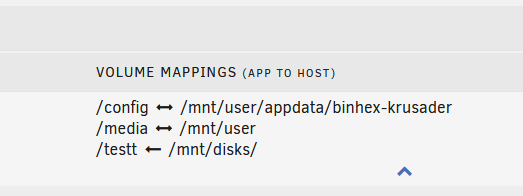
That's logic enough, and it did seem to get me a bit further, thanks. Okay, I had to map the drive to make it work, not just the "disks" folder. Thanks a lot for making me look at the right place.
-
Hi, I'm trying to mount an NTFS partition using the "unassigned device" plugin. It seems to be mounting okay, but I just can't find it using krusader or as a share. But I can definitely browse it from the "main" tab. Jan 22 20:16:04 Tower ntfs-3g[9996]: Mounted /dev/sdc2 (Read-Only, label "Data", NTFS 3.1) Jan 22 20:16:04 Tower ntfs-3g[9996]: Cmdline options: ro,noatime,nodiratime,nodev,nosuid,umask=000 Jan 22 20:16:04 Tower ntfs-3g[9996]: Mount options: ro,nodiratime,nodev,nosuid,allow_other,nonempty,noatime,default_permissions,fsname=/dev/sdc2,blkdev,blksize=4096 Jan 22 20:16:04 Tower ntfs-3g[9996]: Global ownership and permissions enforced, configuration type 1 Jan 22 20:16:04 Tower unassigned.devices: Successfully mounted '/dev/sdc2' on '/mnt/disks/ST4000DM004-2CV104_ZFN1RA3G'. If you need some specific logs, I'm not sure which one or where to get it.. tower-diagnostics-20200123-2027.zip