





shiftylilbastrd
Members
-
Joined
-
Last visited
Everything posted by shiftylilbastrd
-
--device /dev/net/tun --cap-add=NET_ADMIN --cap-add=SYS_ADMIN --sysctl net.ipv4.conf.all.rp_filter=2 you only need --device /dev/net/tun --cap-add=NET_ADMIN If I remember correctly. The rest is me trying to get nordlynx working
-
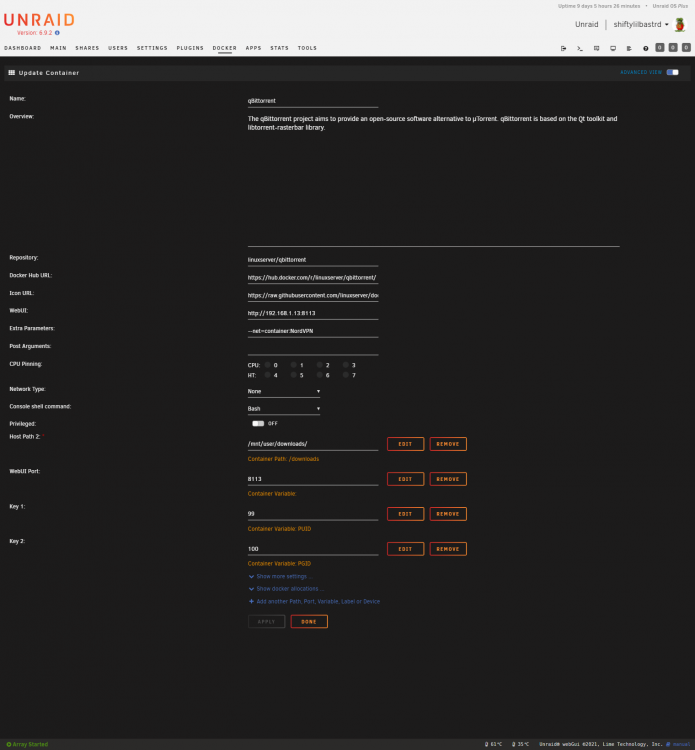
Notice the ports on the vpn container, those are actually the ports required for qBittorrent. Also note that qBit is set to network none and then has the extra parameter --net=container:nordvpn (or whatever you have your vpn container named). This will force a rebuild of any dependent containers when there’s a change to the vpn container.
-
And your container that you want to sent through the vpn should resemble this
-
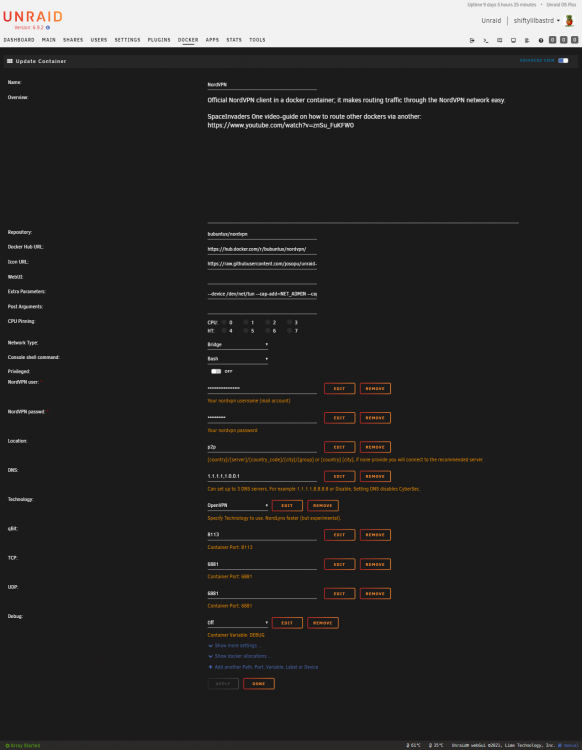
You Nord configure should resemble this except leave location blank unless you have a preference
-
You need to take the ports out of the firefox container and add them to your nordvpn container
-
This is from the details on Bubuntux GitHub page Provide a [country_code] argument to connect to a specific country. For example: us Provide a [city] argument to connect to a specific city. For example: 'Hungary Budapest' , Use docker run --rm ghcr.io/bubuntux/nordvpn cities [country] to get the list of cities.
-
So I just got the notification that my pull request was committed. Now if we can get the plugin updated to pull the latest version(2.1.3) this should be functional again.
-
Well that didn't actually fix it. I'll have to keep looking for a solution.
-
@JcloudSo far that seems to have done the trick. It had been working well enough using openvpn I just forgot about it. Thanks for pointing that out.
-
My nextcloud instance completely stopped working recently. I tried using CA appdata backup to do a restore of two different dates and neither worked. I did it for both nextcloud and my mariadb docker. I then completely removed both dockers renamed the existing appdata and did a clean install of both. Still no joy. Neither container shows errors in the log but I still can't access the UI, all I get is site can't be reached.
-
I had been using an install I setup using the bubuntux container for the past year. Was only ever able to get it working in openvpn mode, could never get nordlynx to work. I was hoping you had figured out something I missed but apparently not, still can't manage to stay connected with nordlynx. For some reason in qbittorrent DHT nodes drop to zero and transfer speeds grind to a halt.
-
@klepel That works perfect Submitted a pull request to sivel/speedtest-cli on Github. Maybe that'll get it fixed.
-
First off, thanks so much, this is freeing up so much space on my server amd I'm loving the simplicity of it. I was wondering if you were planning on adding the ability to remux in the future. I found this script for MKVMerge and was wondering if it would be possible to adapt it to your build. I'm python illiterare so I have no idea where to begin or if it's even possible since you use ffmpg.
-
Ya got me. I was getting ahead of myself. My setup is actually going to resemble the one Maikash a couple posts down I just haven't got the drive for the Plex pool installed yet.
-
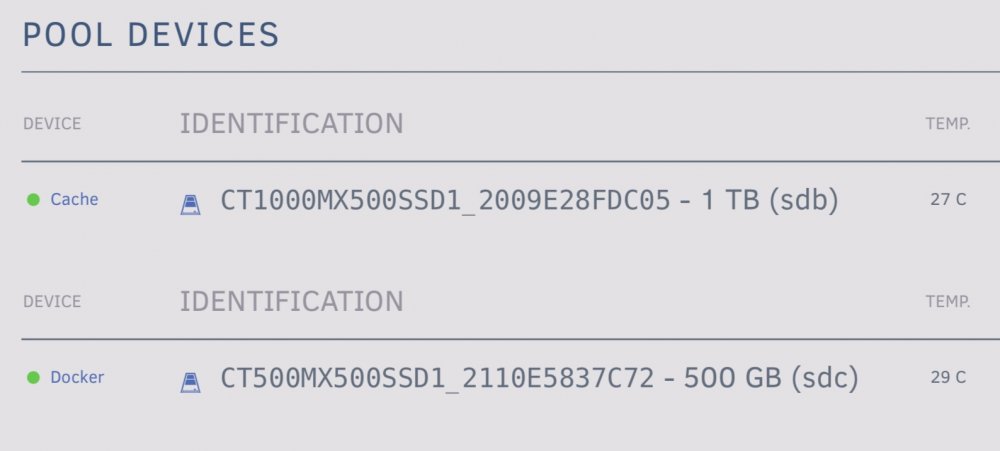
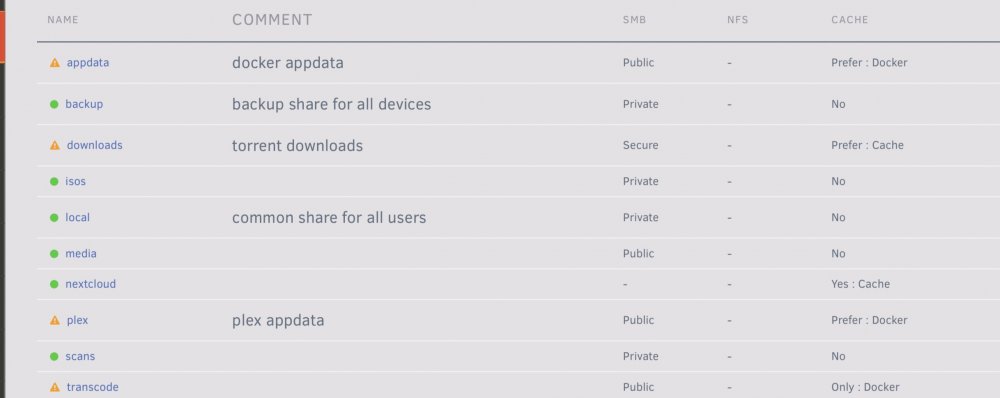
See my current setup in attached pics Plex appdata on one pool, everything else on the other. Can only specify one source for backup. Scenarios Two pools of one drive each If I only use one share for all appdata I can only specify one pool to send it to One pool of two drives All appdata is distributed between the two drives Neither case allows me to dedicate one drive to Plex only. If I’m wrong please help me understand what I’m missing here.
-
I already have two pools. There’s a Plex share set to use cache2 only and then another share for all other appdata and set to cache1 only. Are you saying instead of mapping to /user/Plex use /disks/cache2? I would still need to be able to map two paths to back up both.
-
Is it possible to backup multiple source locations? I have a dedicated ssd for my Plex appdata and the appdata for everything else on the cache and want to back up both. I tried separating the locations with a comma but that doesn't seem to work.
-
Is it safe to switch from the nightly branch back to latest or develop? I switched to nightly months ago as a test but now that it's official I'd like something that's less volatile.
-
I figured it out. I had a typo in my host machine path for the container. Thanks
-
Can't seem to get this working. Plex and tmdb added and testing correctly. After hitting search my media successfully shows up but if I switch tabs I see the mind the gap message. Error from the log shown below. Tried removing and adding the docker and get the same thing. 2020-06-24 20:04:26.787 ERROR 8 --- [nio-8484-exec-4] com.jasonhhouse.gaps.service.IoService : Can't write to file /usr/data/e0d895c1495924ed2395a81cb81dbee45bc69539/1/ownedMovies.json
-
I'm having an issue where qBittorrent drops all DHT nodes. Picks up nodes fine on startup but after a yet undetermined amount of time connections go to zero. Was previously getting "TLS: tls_process: killed expiring key" in my VPN container and thought that was my issue. I removed/replaced my old VPN instance and haven't had any connections issues there now but still having the DHT issue. Because all this started happening at the same time I'm not 100% sure where the problem is. I've included a snip from the log that includes everytheng that seemed relevent. I'm using a container I ported over myself to use NordLynx for my VPN. qBittorrent v4.2.5 Edit: It also looks that my uploads have dropped to almost zero. I'm connected to a dedicated P2P server and have checked the connection inside the container. qbit.txt
-
So no help here?
-
Is it possible to get this to run only "on idle". Running on Unraid and it doesn't seem to ever start folding when the option is checked.




