





Faceman
Members
-
Joined
-
Last visited
Everything posted by Faceman
-
ideally those shares would be set to use cache only and never be touched by the mover. Mover tuning will not touch them if the shares are configured not to use secondary storage.
-
VMs in Unraid 7 support snapshots, with native ZFS snapshot support too.
-
I have the mover schedule set to run hourly, most of the time it doesn't actually move anything because of the mover tuning rules. With this plugin the native schedule options become how often you want the system to check the rules.
-
Hey, Ibracorp, the man the myth the legend. Are you certain you have version 2024.09.05.0222 of the plugin? the old version is still in the app store but has been broken on Unraid 7 for a very long time. And yea, we all wish Limetech would build in at least some of these features too.
-
I created that duplicate as an example, I wasnt really looking for help just pointing out what seems to be a very easy way to do a lot of damage. I didnt really know where else to post it to warn people than here. I feel like the delete command I mentioned when clicking on that single file in the list shouldn't be deleting the entire share.
-
It is still Beta, then it will be RC for a while, then it will be released. once released you could expect a more regular update schedule. While the unraid core itself is private, the web-ui portion is public on github, and you can see they are constantly working on it with the current version being beta4.9, Beta5 (or whatever it may be called, rc or otherwise) is seemingly very close if we look at how the previous versions of the beta were released, but it will only be released when it is absolutely ready. LimeTech did say quite clearly a while back that they wanted a more regular and rapid release cycle a while ago to go along with the new pricing structure and expanded team and U7 should be the start of that once it is released stable.
-
I had that happen with a few music files, your best plan of attack there is to avoid symbols in filenames entirely which is just good practice anyway. This isn't an issue specific to this plug-in it's common across a number of applications on Linux. For windows PC backups where the file and folder names arent easily changed I switched to using duplicati as it can do backups as chunks of zip files of a controllable size, instead of the raw files, makes using the mover much faster and easier.
-
Hi All, Just a quick note about something that seems a touch to easy to accidentally do damage with. if you happen to have a duplicated file that exists on multiple disks within the same share/subfolder, they appear yellow in the webui file manager: on the right side where it shows which disks the file exists on, you can click the disk names and there is an option for "delete", be cautious of that option as it will not delete that one file, it will, without warning, delete the entire shares contents on that disk, which could be many more files than you are expecting to delete. If you select the file with the checkbox on the left, it seems to work but I have only tested that very quickly with a test share and a single test duplicate file. I'll admit I've done this without thinking twice in the last 6 months, deleting about 10TB of (completely replaceable and partially backed up content), and I fear I'll do it again as I tend to tinker with the mover tuning plugins, smart caching scripts and file management in the terminal more than I should, and apparently don't learn my lesson. I think the wording, or confirmation page could be clearer here for people in the future.

-
Might be something to do with the Mellanox CX414 cards or the mlx5_core driver they use. try stopping your docker service, switch from IPVlan/MacVlan and back, see if the error stops.
-
Hi Folks, I had an unexpected power failure overnight (very rare for me and I didn't have the UPS connected due to leaked batteries) and after getting everything rebooted and back up and running, parity check in progress ZFS pool scrubs done etc. etc. I'm getting a repeated error in the logs: Nov 5 07:47:22 Morpheus kernel: page_pool_release_retry() stalled pool shutdown 1 inflight 2658 sec Nov 5 07:47:22 Morpheus kernel: page_pool_release_retry() stalled pool shutdown 2 inflight 2658 sec Nov 5 07:48:23 Morpheus kernel: page_pool_release_retry() stalled pool shutdown 1 inflight 2718 sec Nov 5 07:48:23 Morpheus kernel: page_pool_release_retry() stalled pool shutdown 1 inflight 2718 sec As far as I can tell this is related to networking, but it's such a rare error there's not much out there on the web about it. Everything seems to be working perfectly so far despite this. If this needs to be in the U7 Beta Forum rather than here, just let me know, but it seems like more of a general error than something distinctly beta related. EDIT: resetting the docker network configuration fixed it. I remembered I had recently gone back to macvlan+bridge as an experiment and while it was perfectly stable, it seemed to have caused this little error after a reboot. so the issue is now gone. morpheus-diagnostics-20241105-0756.zip
-
Usually 64GB as 4x16gb 3200mhz modules running at a slightly derated 3000.. but at the moment it's 48gb as i had to pull one 32G set for a temporary build and stuck in a mismatched 2x8gb set.. configured the ram down to 2666 to account for the mismatch and it booted right up no issue. supposed to be temporary.. but you know how these things work out. they could be in there for months.
-
That worked, it then considered the device disconnected and I was able to remove it with the red X. Cheers.
-
Anyone know how to clear this line: It says "Historical device is in standby" when i mouse over the green dot, but that device was removed from the system entirely. the remove button isn't enabled and cant be clicked.
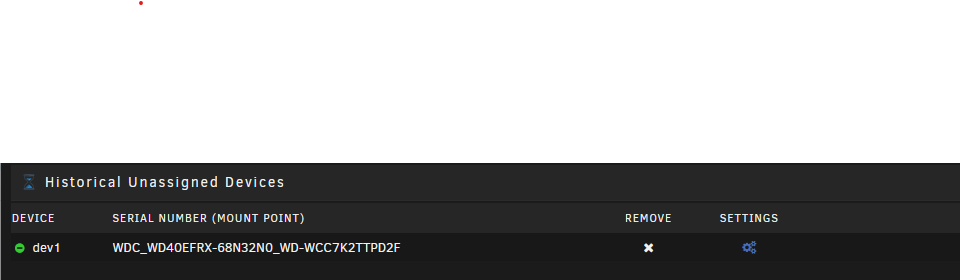
-
Unraid does warn "We highly recommend to make your life easier and avoid special characters." So while the space isn't a symbol they explicitly disallow, I wouldn't be using spaces for share names where you know scripts will be running commands on them. sometimes they dont get sanitised/escaped into "/mnt/cache/TV\ Shows/" properly edit: I suspect it could be fixed with some tweaks to the scripts, but simply renaming a couple of shares and adjusting container mappings to suit would solve it for everything.
-
I think I've found a small bug in the logging for the fan speed updates. Oct 9 09:10:20 Morpheus autofan: Highest disk temp is 40C, adjusting fan speed from: 112 (43% @ 1011rpm) to: 125 (49% @ 1105rpm) Oct 9 09:10:20 Morpheus autofan: Highest disk temp is 40C, adjusting fan speed from: 134 (52% @ 1011rpm) to: 145 (56% @ 1105rpm) The first line there is correct, but the second line is reporting the same RPM value, though that fan is different and is reporting over 2400. It's all working just fine, both fans are adjusting as they should based on my settings, but the log always reports the same RPM values for each autofan process. Unraid 7 beta 2, with Autofan 2023.02.05a
-
Do you have a second M.2 slot available?
-
next to the path for Host Path 3, what does it say the container path is? /data? /media?
-
just keep in mind that CRC errors already logged will stay on the disks Smart data, but you just want to see too many new ones. One every now and then isnt too uncommon, nor is it a sign of a major issue, thats usually just a tired old cable or something simple like that.
-
while you're tinkering, reseat all your sata cables and the sas connectors too. just in case.
-
well, it's pretty much as per that reddit post. Get the executable sas2flash from here get the firmware file 9207-8.bin from here (its in /Firmware/HBA_9207_8i_IT/ ) put them onto your boot USB, then boot up and either log in to the terminal on an attached monitor, or open the terminal from the webUI. The unraid terminal is always root so be very careful to double check commands as you can do a lot of damage with it. change directory to boot, which is the unraid usb cd /boot here you can type 'ls' for a file listing to make sure the files are there if you want to check copy the files sas2flash and 9207-8.bin from the current directory to /tmp (just a place to stick things) cp sas2flash 9207-8.bin /tmp now we go to the /tmp directory cd /tmp make sas2flash executable chmod +x sas2flash now we can use sas2flash to flash the firmware ./sas2flash -c 0 -o -f 9207-8.bin That should do it, after a reboot you should be good to go assuming that known firmware bug was your issue, and i think it was.
-
since its an IT to IT upgrade you should be able to use the linux executable and do it from within unraid (with the array offline of course), no need to deal with DOS or EFI.
-
did you buy it from somewhere or were you given it? if its got firmware 20 on it then it's probably in the 9200 series, but it's good the have the right variant (9211-8i, 9207-8i, etc etc) for a firmware flash there is a way to find out, but the only way I know is with LSIutil which does require some poking around in the terminal to get it to run.
-
by the way you dont need to reboot to check firmware, you can pull it out of the terminal with dmesg|grep -i lsi
-
What model is the card? There are issues with 20.00.00.00, usually fixed in 20.00.07.00
-
was the LSI card's firmware up to date and it's definitely not overheating?


