giganode
Community Developer
-
Joined
-
Last visited
Everything posted by giganode
-
I am running a custom build with nvidia support and the vendor-reset. Please do a new build with the kernel-helper but integrate nvidia support into it. Remove the nvidia plugin if you readded it.
-
I can share my settings, but I feel like something went wrong with the build.. But I don't know for a fact kernel /bzimage append video=vesafb:off,efifb:off vfio_iommu_type1.allow_unsafe_interrupts=1 isolcpus=4-15,20-31 pcie_acs_override=downstream,multifunction initrd=/bzroot
-
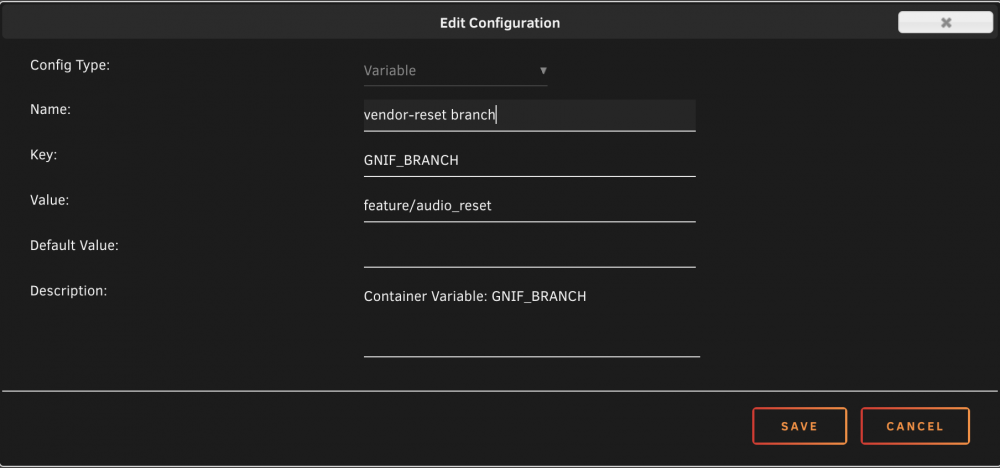
The vendor-reset got an update for navi users. I tested it on my system. I have no broken audio anymore after resets. For me this is a real breakthrough! I don't need the old navi patch anymore now. I can now boot between Windows 10 20H2, macOS Big Sur 11.1 and Ubuntu 20.10. For all navi user who wanna try it out: Force update the docker Edit the docker and add a variable like this: Try and hopefully enjoy! Keep in mind, this only fixes the specific audio issue for navi users. Please report your expierences here. Special Thanks to @ich777 for that fast edit.
-
That looks similar to the reported outputs for navi10.. So you've got the same problem like me. The vendor-reset does not work for you. But...there is a possible workaround for you: https://forum.level1techs.com/t/vega-10-and-12-reset-application/145666 If you can not patch the kernel on your own, aks @ich777 for help. He has been very helpful for me for integrating the old navi patch.
-
Open terminal and try: dmesg | grep VEGA
-
Please remove that entry. The vendor-reset has to be loaded as soon as possible on host boot. If this already has happend and you reload it again with your entry in the go file this might lead into issues. Please reboot unraid after that and try again. The vendor-reset is a wip. Maybe it just doesn't work right now. While your vega is a vega10, there is a reported issue for vega20. The vendor-reset for example breaks the audio on my 5700xt. Had to switch back to the old navi patch.. List of supported GPUs: |AMD|Polaris 10| |AMD|Polaris 11| |AMD|Polaris 12| |AMD|Vega 10| Vega 56/64 | |AMD|Vega 10| Vega 56/64/FE | |AMD|Vega 20| Radeon VII | |AMD|Navi 10| 5600XT, 5700, 5700XT |AMD|Navi 12| Pro 5600M | I keep my fingers crossed for you Keep us updated!
-
No Problemo Amigo
-
Cause the product does not exist..
-
I know its a completely different thing, but..... I would really love to see a cut down version of unraid for arm without support for vms. With that we could build power efficient backup servers and maybe even offload some containers from the main server. *Thinking about the rpi cm4*
-
Hello @DemonWarrior, it is okay to use the version you prefer, no one can say anything about that as it is your decision. But this went way to far here. @ich777doesn't have to admit anything to you. You want to use something he provided to the community. If you want to benefit from that just update. If you don't want to update you miss an oppertunity here. But its your decision, not his... You should rather appreciate what he does for the community.
-
For everyone who needs to mount an apfs volume Open terminal or ssh into server and work through these steps: mkdir -p /tmp/apfs && cd /tmp/apfs wget https://github.com/ich777/apfs-fuse/releases/download/v20200708/fuse3-3.10.1-x86_64-1.txz wget https://github.com/ich777/apfs-fuse/releases/download/v20200708/apfsfuse-v20200708-x86_64-1.txz installpkg fuse3-3.10.1-x86_64-1.txz installpkg apfsfuse-v20200708-x86_64-1.txz rm -rf /tmp/apfs Now, all dependencies are available. The following steps show an example with an qcow2 image. This requires an additional step: qemu-nbd --connect=/dev/nbd0 /path/to/your/image.qcow2 You can now mount your apfs volume with: losetup -r /dev/loop8 /dev/nbd0p2 mkdir /mnt/disks/apfsvolume apfs-fuse /dev/loop8 /mnt/disks/apfsvolume Thanks to @ich777 for the files!
-
I went for the macinabox solution as I have no experience with opencore. Have always used clover. After the installation I just added AAPL,ig-platform-id .... and agdpmod=pikera. Edited xml for passthrough and booted into macOS.
-
Did a quick fresh install with opencore and big sur. I can confirm that a 5700xt runs with opencore aswell.
-
As I only have an 5700xt I sadly cannot try to help you...
-
Do you use a 5700xt? Which Bootloader do you use? Are you using a custom unraid build? I have a working macOS vm with a 5700xt passed through, but atm I am using the clover bootloader. I will setup a macOS vm with opencore soon for testing.
-
I just updated to Big Sur 11.0.1 Works like a charm.. with slightly improved performance
-
Ich nutze tatsächlich Unraid mit einem UltraFit.. Der Weg über den konventionellen Flash Creator eignet sich hierfür nicht. Mach es manuell. Das du nur einen Stick zur Zeit haben kannst ist sinnvoll. Verhindert Piraterie, Punkt.
-
I have no problems with testing or helping but first off all let the two 5700xt users use the patched build. Output as follows: Display 0 vendor id 4c2d product id f9c EDID: 0x00, 0xff, 0xff, 0xff, 0xff, 0xff, 0xff, 0x00, 0x4c, 0x2d, 0x9c, 0x0f, 0x00, 0x00, 0x00, 0x00, 0x2b, 0x1c, 0x01, 0x04, 0x90, 0x77, 0x22, 0x78, 0x3b, 0xa2, 0xa1, 0xad, 0x4f, 0x46, 0xa7, 0x24, 0x0e, 0x50, 0x54, 0xbf, 0xef, 0x80, 0x71, 0x4f, 0x81, 0x00, 0x81, 0xc0, 0x81, 0x80, 0xa9, 0xc0, 0xb3, 0x00, 0x95, 0x00, 0xd1, 0xc0, 0x74, 0xd6, 0x00, 0xa0, 0xf0, 0x38, 0x40, 0x40, 0x30, 0x20, 0x3a, 0x00, 0xa9, 0x50, 0x41, 0x00, 0x00, 0x1a, 0x00, 0x00, 0x00, 0xfd, 0x00, 0x30, 0x78, 0xbe, 0xbe, 0x61, 0x01, 0x0a, 0x20, 0x20, 0x20, 0x20, 0x20, 0x20, 0x00, 0x00, 0x00, 0xfc, 0x00, 0x43, 0x34, 0x39, 0x52, 0x47, 0x39, 0x78, 0x0a, 0x20, 0x20, 0x20, 0x20, 0x20, 0x00, 0x00, 0x00, 0xff, 0x00, 0x48, 0x31, 0x41, 0x4b, 0x35, 0x30, 0x30, 0x30, 0x30, 0x30, 0x0a, 0x20, 0x20, 0x02, 0xf3
-
Clover with WeG version 1.4.3 running as a iMacPro1,1. But first of all, they have to use a patch.
-
Now things get really interesting. First off all, everything works now. Even the immidiate restart or shutdown via button, as long as the refresh rate is at 100Hz and I do not change it back up to 120 Hz.
-
Works!
-
That's exactly what I was thinking, too!! But anyways guys... I inspected it a bit further and I think I found something out. I am now able to restart the macOS vm directly. Furthermore I am able to start the macOS vm directly after a shutdown now!! I tried it multiple times to verify. What have I done? On restart or shutdown you are prompted with a window with the selection to start open apps on next boot and to directly shut the system down with that specific button. I did not hit that button, instead I waited for 1 minute. Whats the difference? On immediate restart/shutdown macOS closes everything and just goes for it. If the 1 minute expires and the restart/shutdown gets initiated macOS closes everything, but instead after that the screen turns black and back on so I can see the background for around 1-2 seconds again and the restart just simply works flawlessly!!! I would be very thankful, if people with 5700xt's pn @ich777, ask for the link to download the patched build and to verify my described behaviour.
-
ok... But if you haven't got one... then don't deny my statement...
-
I'm currently running 6.9.0-beta35 with the old Navi Reset Patch. You can find it here: https://forum.level1techs.com/t/navi-reset-kernel-patch/147547/47 It's no longer supported, because gnif works on something new. But that new project is in the early stages and cannot supersede the old patch as Navi and Vega cards are not working correctly, atm. I tested it. As soon as the new vendor-reset - https://github.com/gnif/vendor-reset - does work, we should give it a try. And maybe - or better hopefully - the new fix can deal with macOS vms better than the old patch.
-
I use a patched kernel. So no, its just related to my macOS vm.. everything else works fine.