






akshunj
Members
-
Joined
-
Last visited
-
easy to use, approval required for potentially destructive commands, granular control..... Nicely done!
-
This bug is still live in unraid 7.2.3. Took me FOREVER to find this forum post and fix the issue manually. Cheers to @warwolf7 for getting it sorted. My disks can spin down and snooze now.
-
This is quite a nice file browser for unRaid. Just stood it up, and switched to one-tap mode. Works like a champ on a mobile device! This is what I've been missing! I tried CopyParty, but it's sort of "too good"? It's constantly indexing in the background and keeps the disks spun up, etc. File Browser is perfect for my use case, which usually is just moving a few files here and there.
-
Because of my reverse proxy situation, I have to rely on Tailscale for any containers I want to expose to the internet. But not all of them work seamlessly with the built-in docker Tailscale. TSDProxy (I used the wrong name in my previous post) is a great solution for those situations. GitHubGitHub - almeidapaulopt/tsdproxy: Tailscale Docker ProxyTailscale Docker Proxy. Contribute to almeidapaulopt/tsdproxy development by creating an account on GitHub.It's in the apps tab, and requires the "labels" plugin for configuration. Great and easy to use solution.
-
Chiming in. I can't use a revere proxy due to ISP issues, but I did get OpenCloud up and running with a Tailscale funnel, so I can access via internet (outside of Tailscale). You don't get a custom hostname, but I don't really care. I used TDSProxy, since the UnRaid built-in Tailscale routing caused the container to crash. Once I had it up locally, I added it to TDSProxy (using HTTPS, but TLS Validate=no), validated in Tailscale, then edited the container changing the host ip to my Tailscale url, changed insecure to false, then restarted the container. It worked right away and all apps can access it. Hope this helps someone, especially those who can't reverse proxy.
-
I ended up getting an old "Marvell AQC107s 10Gb Network Card" used on eBay. Smooth sailing and fully supported on my ancient server. It steps down to 2.5g nicely, and I guess I've future-proofed my network. Also, pro-tip, if things aren't working out networking-wise for you, it's always smart to check your ethernet cable. Would have saved me about 2hrs of Internet research when I was getting 100Mb speeds on my Marvell card. Ended up being a bad cable. Ha.
-
This is good news. I feel like the 2.5g spec is really new, and a lot of these cards don't play well with my 10yo mobo. Was also considering an older 10g card that can step down to 2.5g. I know the 10g spec is much older and better supported. Thanks for the reply! Helps a lot
-
Hi all. I am running Unraid 7.1.4 on an old Intel s2600IP board. I tried adding a realtek chipset-based card and it locked my entire system up when I connected the ethernet cable. Tried a couple of different PCIe slots, but none had a different outcome. Just frozen requiring a hard reboot. I am eyeballing an Intel i226-V card. I searched the forum, but didn't find any conclusive feedback on this chipset. Any thoughts or experiences? I'd like to get some feedback before I pull the trigger. Thanks
-
Install Mariadb from the Apps tab. I used the official container. Random password for root (displayed in the log for the container so you won't forget), and then used the rest of the template to setup a db for booklore with username and password appropriate for that. Then start the container, and install Booklore. Supply those credentials you just created for mariadb to the Booklore docker template. Worked first time for me, and that's saying something! Great app! It's like Plex for ebooks. So much nicer than the calibre stuff.
-
Same issue here. Just happened to me. (However, I don't use Headscale). Internet went out for a couple of minutes, and Tailscale obviously lost connection. When internet was restored, Tailscale would not reconnect. It also stopped all of my containers from accessing the Internet. I tried to stop and start Tailscale from the command line, but no dice. I had to do a full server reboot to reconnect. Anyone know what's happening here?
-
Ended up using TSDProxy. Worked perfectly
-
It appears that my ISP has blocked ports 80 and 443 after a few days of using NPM. I used Tailscale via TSDProxy instead. Go figure
-
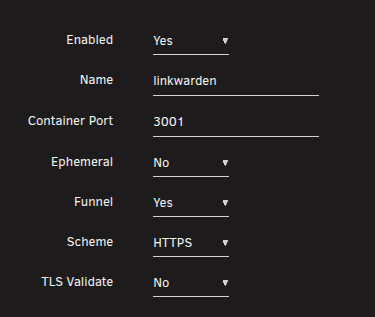
Figured it out. Needed scheme to be: HTTP, and TLS Validate to be: No.
-
Trying to get this working on Linkwarden container as a funnel. Container shows connected and "funnel" in tailscale dash. Here's my label config: Any advice? I can't connect to this container via tailscale funnel, or just via my regular tailnet. But local IP works fine. thanks!
-
Hey all. I successfully setup NPM two or three days ago. I linked an A-record from my custom domain to my ISP public ip address (which never changes), using my DNS provider where I manage the custom domain name. Hope all that makes sense. I spun up linkwarden and NPM on a custom network, got linkwarden setup properly, then setup NPM with SSL. Ports 80 and 443 are forwarded in my router to 180 and 1443 respectively, and my NPM container reflects this. This setup WORKED FINE for the last two days. I could hit linkwarden.mycustomdomain.org from anywhere on any device. Then today, it stopped. DNS checker shows the hostname is resolving to my IP address, but when I test "server reachability" in NPM, I get this: linkwarden.mycustomdomain.org: There is a server found at this domain but it returned an unexpected status code Connection timed out.. Is it the NPM server? Please make sure your domain points to the IP where your NPM instance is running. I've checked NPM docker logs, and I don't see any errors. Again, nothing about my server has changed and this setup was working fine. I am not behind CGNAT or anything weird like that. My Plex server is still running fine using UPNP port forwarding. Any ideas?


