





Espressomatic
Members
-
Joined
-
Last visited
Everything posted by Espressomatic
-
There are definitely some differences compared to a few weeks ago in Tailscale. A page or so back I brought up the fact that I was seeing DNS traffic in ADG coming from both pfSense and the Unraid system hosting it. That's abnormal and wasn't something ever being logged previously. I "fixed" the issue by turning off advertising my local subnet in Tailscale on a pair of machines, plus turning off "Forward IP" on all machines/instances of Tailscale. But now, I can no longer use an exit node. Using a local exit node or a remote exit node (hosted on a VPS), I can't connect to anything - browser says there's no internet connection. I'm not saying nor suggesting this is a plugin problem - it may very well be a Tailscale problem. TS itself has been updated quite a few times, via the plugin, but also on non-Unraid environments directly from TS's own servers (Macbook, iPhone, pfSense/FBSD, Debian, etc.) Tailscale is super easy to set up, but its biggest problem right now is that it seems to be in constant change and looks just as easy to break.
-
Supposed to be coming. But in the meantime... Other NAS products don't have anything like Unraid's Array at all, so it's already a feature well beyond "basic NAS functionality." And Unraid supports unlimited Pools, which is what you get with (some) other solutions (not all can do even this).
-
Indeed turning off IP FWD has remedied the issue, so thanks for the heads up on the subnet router feature.
-
That box was advertising routes (Tailscale setting), but not set to use advertised routes - and no other machines were set to use advertised routes. I just noticed that all 4 of my Unraid systems have "Enable IP forwarding" turned ON in TS settings. Is this the settings that would have turned the system advertising routes into a full-fledged subnet router? Does the plugin use /etc/sysctl.d/99-tailscale.conf ? As that file has IP fwd set to 1 for both ipv4 and ipv6, even after turning it off in the UI. I also found the option to turn off SNAT, preserving the IP when using a node in this way. Going to try turning off IP fwd. None of these settings were recently made/changed, but the behavior I initially described only started happening somewhat recently - which is what's thrown me for a loop.
-
Turning off Tailscale (everywhere) seems to have resolved the above. Still testing/investigating.
-
Unfortunately that doesn't work - "too many non-flag arguments:" Ok, seemed to work after I hand-wrote the string. Cutting and pasting from the forum (excluding fancy quotes) was generating an error, maybe the dashes were coming up as some other unicode character.
-
Any idea/info on why this no longer works to disable advertising routes? tailscale up --advertise-routes The following also doesn't work tailscale set --advertise-routes As per the built-in help, not specifying a route should clear any existing I'm seeing some really weird behavior after the last few Unraid updates. In my AdGuard Home logs, I can see that the Unraid machine I'm running to host my pfSense VM is sending out DNS queries to AGH (on its Unraid-only IP) that I know are coming from other devices, like iPhones, Mac, my Thermostat, etc. So trying to disable a number of things one at a time to get a grip on what's happening.
-
I don't have the time at the moment, but since you're starting from scratch I'll try to get back tomorrow with details of my setup for you to compare. In my case I'm using AdGuard Home as initial local DNS where you're using PiHole, which shouldn't matter. I have some ideas that you can try instead of setting things back the way you had before.
-
I can't think of what's wrong, but I can't imagine there would be any issues besides a few lost minutes tearing it all down and putting it all back up again. Go for it. I'm not using Tailscale's DNS, so I've had to temporarily turn it on a few times when testing and posting. It wasn't on when I added that ts ping image above. Once you've got everything back, test and then if it's still not working, check the different sections/tabs in the Tailscale plugin settings page (examples: Settings, Status, Info and maybe logs). Also a reminder that to enable the use of TS DNS on the Unraid plugin, you have to do it from the terminal.
-
I can't think of anything concrete to offer. But if you want to poke around, from Unraid terminal you can use the tailscale command to check status and ping directly using tailscale to see if there's a difference.

-
Hmmm.. How about trying the same tests from the terminal on your Unraid machine? nslookup some machine and ping your Mac
-
OK, then it seems your browser may have its own DNS settings that you need to disable. Example: Firefox's secure DNS defaults

-
From a terminal, nslookup your Unraid machine by IP, and check the server and address output displayed before the machine name. That'll show what DNS you're using - it sounds like the query isn't going to your Tailnet's DNS. You'll see your router's address when it's not working, and 100.100.100.100 when it's using Tailscale and working.
-
But it fixed the URL rewrite issue, right? So now are we talking strictly Tailscale tailnet domain or also by Tailscale IP?
-
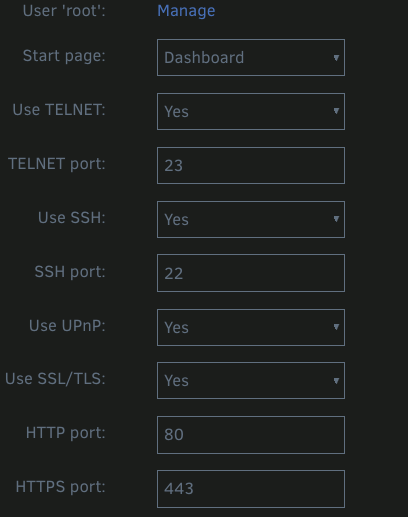
OK, that's important info. This is the section above the URL listings in Management Access. It sounds like you have Strict set for "Use SSL/TLS" instead of "Yes" or "No" - is that the case? Click on the Use SSL/TLS title to pop open some help/instructions and you'll see that the Strict setting will cause a redirect like you're seeing. Try changing the setting to Yes.

-
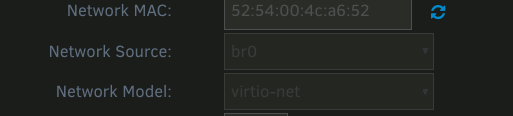
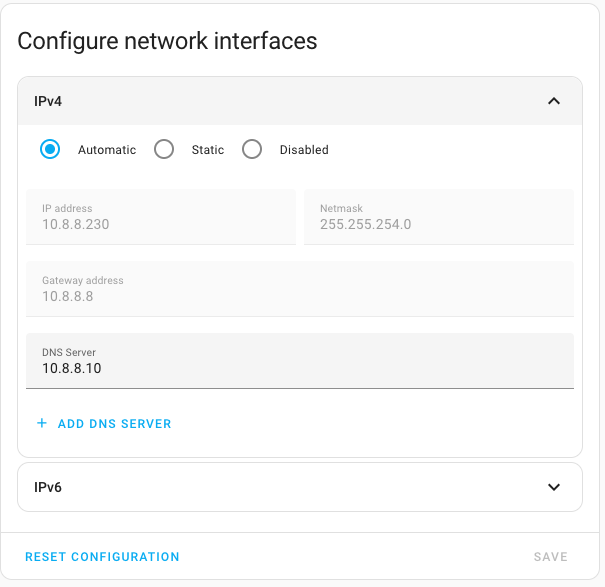
What IP is displayed in your VM row for HA on the Unraid VM page? My LAN uses the range 10.8.8.0/23 (which includes 10.8.8.0 through to 10.8.9.254), and an IP is reserved by my DHCP server as 10.8.8.230 by matching the VM MAC Address If your VM is set up with a bridged interface (like my example below) then you must receive an IP on your 192.168.212.* range. This will be done by the DHCP server on your router. You will need to create a static assignment in your DHCP for the MAC address listed in the VM config if you want to set it to your own IP. You can also set this in Home Assistant (see more below) In Home Assistant, Settings -> System -> Network - you can manually specify IP/Mask etc. or set to Automatic (default)

-
Go to Settings -> Management Access and scroll down to the Local Access URLs section - take a look at the URLs Unraid says you can connect on. Example: You should see one listed for Tailscale like so: Confirm if those digits match the TS IP you're trying. In my case, if I grab just the number and replace the dashes with dots to make an IP, my webUI works as expected - without a valid certificate of course. This didn't take any special setup afaik.


-
Wait, what!?
-
How are you going to access anything on 192.168.122.* from 192.168.212.* ? In bridge mode, you should get a 192.168.212.* address (if your mask is /24)
-
That's Firefox. 🤣
-
Insofar as it's a reverse proxy, yes. It also comes with certbot for certificate provisioning and can serve web indexes/pages if you need a fast/quick way to get up a basic page or two locally.
-
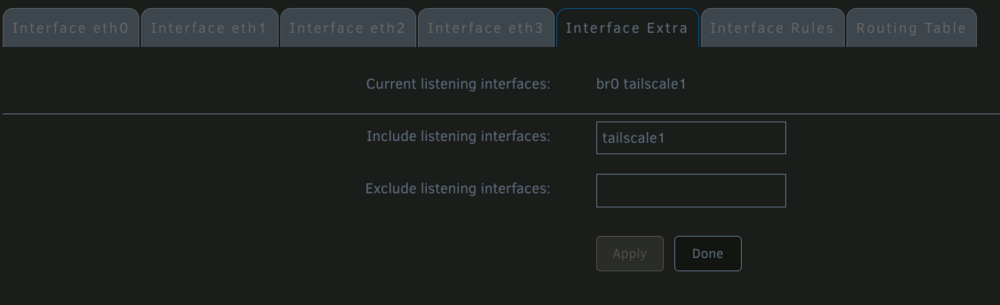
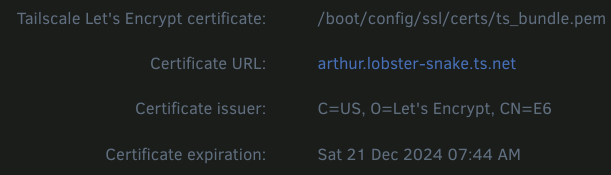
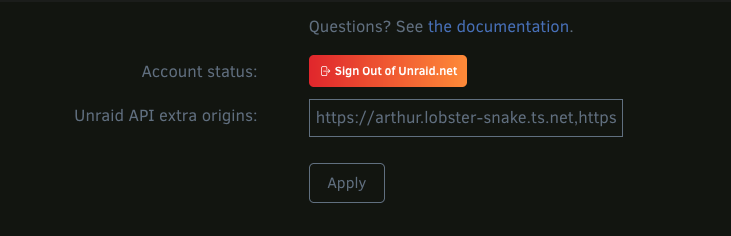
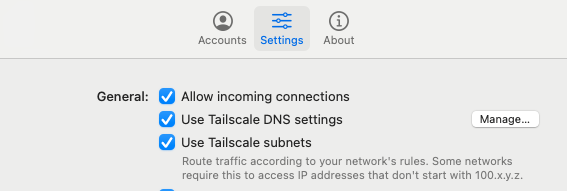
A couple more things to check... In Network settings, is the Tailscale interface added/included in the Interface Extras section? And at the bottom of the Management Access page, is Tailscale listed there with its certificate path? And lastly, below that in the Unraid Connect section, under Extra Origins, is the tailscale address included? These are the items that immediately came to mind for this issue - just in case. I'm pretty sure this last one isn't significant for this issue - at least not when connecting from the LAN. Do make sure "Use Tailscale DNS settings" is turned ON. "Use Tailscale Subnets" should probably be OFF for your testing. And also make sure you using the correct (and current) tailnet name. For instance, I had the one above recorded (the lobster snake) but when I went to go look at my Tailscale Admin page, realized that I'd changed it a while back. Connections with all above settings work as expected to the Unraid machines on my network.
-
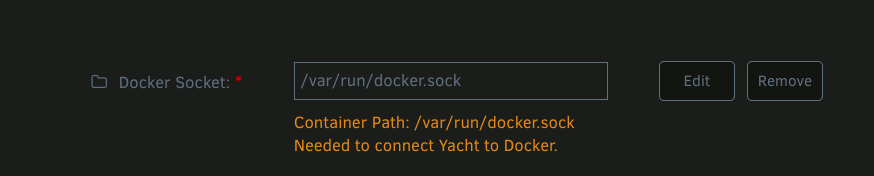
Do you have the Docker socket set (properly) in the Yacht docker config? It's hidden below "Show More Settings" by default.
-
What's this Tailscale URL? Are you referring to using machinename.tailnetname.net? You have to be using Tailscale's DNS and have MagicDNS turned on. Is that the case in your configuration?
-
You likely shouldn't be using route advertising in Tailscale. And not to advertise a single IP like that. Your DNS & Unbound need to be set up to support your VLANs, which should all be working before you do anything with Tailscale. In the end, Tailscale gives you access to your network from outside, but isn't what makes your LAN setup work in the first place.




