





Espressomatic
Members
-
Joined
-
Last visited
Everything posted by Espressomatic
-
Yeah, I use that for installations outside my LAN, not for anything within it.
-
You might do well with something from Jonsbo, with accessible drive bays at the front of relatively compact cases. They have an assorted range.
-
Yeah, I used to work for the largest graphics chip company in the world, but I probably forgot all about how video works. I don't own anything that can't decode a 4k stream. And I make it a priority to store content using codecs the devices I'll want to play it on can handle. If I play anything out of Plex and it reports that it's transcoding, then that means there's a problem that needs to be fixed. For me, that problem is finding out why it's transcoding and then making sure it doesn't. The solution is never going to be to add more horsepower to handle a real-time stream transcode. Besides that, I also keep much less content on Plex than I use to, and set up other streaming services on Unraid to proxy the content from elsewhere. That ends up saving on storage expenses too. I don't run anything in Plex that I share out to anyone not in this household - again, there are other solutions for that. But at the end of the day, if you do want to transcode, you'd want dedicated hardware, and previous gen Intel stuff, including their ARC does that fairly well. Arrow lake is a mess and I wouldn't touch anything beyond 12th gen. I don't see Unraid as a limiting factor either way, since its kernel limitations can be gotten around for such dedicated tasks (VM for example).
-
10G networking nice (great in fact), support for the newest/bleeding edge Intel silicon is... Well, just not important. Intel chips aren't fast whether you get one back a couple of generations or one that comes out tomorrow. If you have really demanding CPU needs, then I'm not sure why you're setting up a server to serve general purpose. If it's for transcoding video then, fast network and cheap storage negates all needs for that around here. Why would I transcode instead of just streaming high bandwidth 4K to every client? Save your money, buy a slightly older CPU and set up multiple systems dedicated to a narrower scope of functions.
-
You can run Unraid without the flash drive plugged in, how is your drive failing while not being written to?
-
How many exit nodes do you guys have set up and available? I've got 1 on my LAN and 1 on a virtual private server in the US. The first can be used to tunnel traffic when I'm out and the second the opposite.
-
What happened?
-
Not yet. But there is support for FUSE passthrough coming in an eventual kernel update which may change that.
-
You made the reply as I was still editing, sorry. The Sonoff stick seems to work with multiprotocol from what I've seen, and the SoC is designed for that ability. But still nothing to do with IPv6 specifically. I'd suggest anyone using USB stick move to PoE radios anyway - configuration and ability to deploy physically anywhere are game-changers. Both for Zigbee or Thread.
-
Your posted link was very specifically about Nabu Casa's own ZBT-1. Sonoff have their own multi-protocol firmware and by all accounts use a different SiLabs chip. But if you read any of the thread it's clear this has nothing to do with the radio but IPv6 specifically, so your comment was kind of sideways here and out of place.
-
Do you have the Synology Firewall set up and configured with rules to block any ranges including those ports?
-
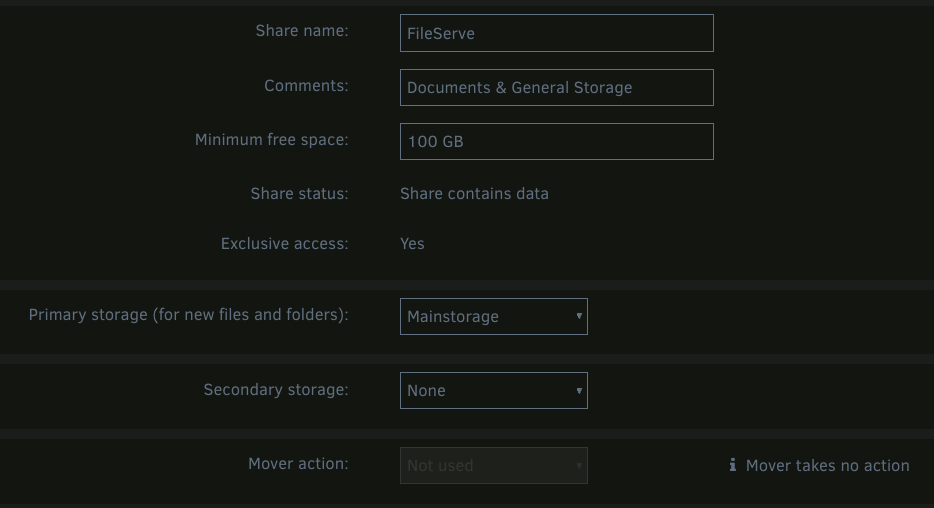
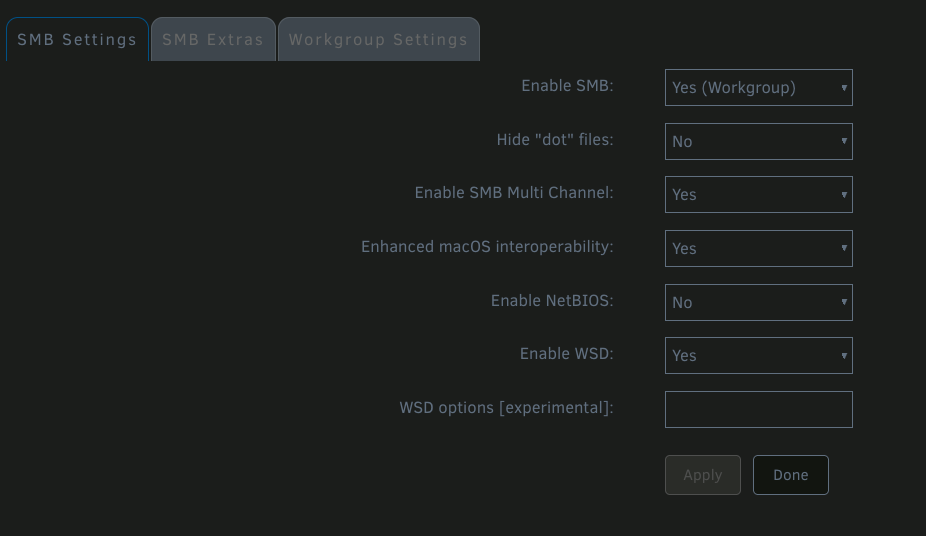
Your share should look like this, right? Exclusive yes, no secondary storage, no mover. Then this is my SMB settings page: That's my setup on three systems. On a fourth system, it turns out I still have some left-over SMB Extra parameters specified from before I updated to Unraid 7 and switched to using ZFS Pools. However, all 4 systems seem to work as reliably as each other. #vfs_fruit compatibility for Apple SMB [global] vfs objects = catia fruit streams_xattr fruit:nfs_aces = no fruit:zero_file_id = yes fruit:encoding = native spotlight backend = tracker fruit:metadata = stream fruit:posix_rename = yes readdir_attr:aapl_max_access = no readdir_attr:aapl_finder_info = no readdir_attr:aapl_rsize = no
-
Unraid is just as fast as TrueNAS if you're accessing a share that has "Exclusive access" enabled - it must not be set up to use mover and can't be part of a regular array. So using Unraid 7, where you don't need an array, you can use a nice ZFS Pool and there are no such issues with MacOS and SMB. Wicked fast always. No (other) special configuration on Unraid or MacOS - except to turn on Exclusive Access in the Unraid Disk settings and the restrictions I mentioned above.
-
Sounds fine and should work like you mention at the end. SSL/HTTPS with FQDN from browser to auth and proxy. Proxy to Home Assistant HTTP (no SSL) IP:port
-
In your reverse proxy setup did you make sure to specify the HA host URL (on port 8143) as HTTP and not HTTPS? Because that error sounds like you're trying to load an unencrypted resource using HTTPS.
-
I keep the DHCP server turned off as well. I don't need it to assign addresses internally & Matter seems to work fine as it uses mdns anyway. As mentioned in the reddit thread you linked, this was supposed to be addressed in beta3. Weird it wasn't on your system. Beta 3 release notes: Docker: Add IPV6_FORWARD to rc.docker and set it to ACCEPT instead of DROP In the rc.docker file on Beta3 and Beta4: # create IPv6 forward accept rule if [[ $IPV6_FORWARD == accept ]]; then log "creating forward accept rule for IPv6 network" ip6tables -P FORWARD ACCEPT fi log "Network started." The $IPV6_FORWARD variable is set to "accept" earlier in the file.
-
Does your ISP assign you an IPv6 range? My IPv6 is all link-local as my ISP doesn't support IPv6 at all, and I have it turned off at my pfSense router. Unraid hosting HAOS VM is also set to IPv4 only. If ISP doesn't give out a static IPv6 range, there's no point (and can't) set IPv6 static address for the router. If router doesn't have static IPv6, you can't run a local IPv6 DHCP. If there's no IPv6DHCP, there's no point/need to turn on IPv6 on a host. None of this seems to stop or block Matter servers/devices from using link-local addresses and communicating. Matter and Thread working in HA with the single end-device I have at the moment, Aqara Hub feeding U100 lock. Every border router can also be communicated with, 3x Eero and 5x Apple devices (Homepod and AppleTV)
-
Just to confirm... Have you done both of the following? 1. Set up your reverse proxy to point to Home Assistant's IP:port? 2. Set Home Assistant to allow proxy connections by adding something like below to your configuration.yaml? http: use_x_forwarded_for: true trusted_proxies: - 10.8.8.2 - 10.8.8.0/23 In above example, a specific proxy IP or an entire CIDR range.
-
Isn't that completely out of scope for this thread? SI1's container is a tool to install HA's own HAOS VM. HA on Windows is very different, and IMO, not something I'd ever trust to run any kind of home automation setup. If you want to do yourself a huge favor, use SpaceInvaderOne's container to install and start the expected HAOS VM. Set up a Tailscale account, install the Tailscale plugin in Unraid and set it up to use your account. Install Tailscale on your mobile devices. Stop using DDNS, and the tunnel, plus you won't need Authelia for HA.
-
I understand where you're coming from and I've seen some other people shy away from USB boot - for any number of reasons, I haven't taken a poll to find out all the details. In particular, what you've mentioned wrt TPM could be more work than it's worth. There's no way to know what Limetech is considering for non-USB boot, but there are a lot of ways to protect software keys out there. The boot volume itself isn't something one would typically need encrypted, nor is it necessarily required to access (all) the data on the other attached disks. If what you mentioned about "someone else" booting the system is anything beyond a hypothetical, it sounds like maybe your requirements go beyond only booting from alternate media.
-
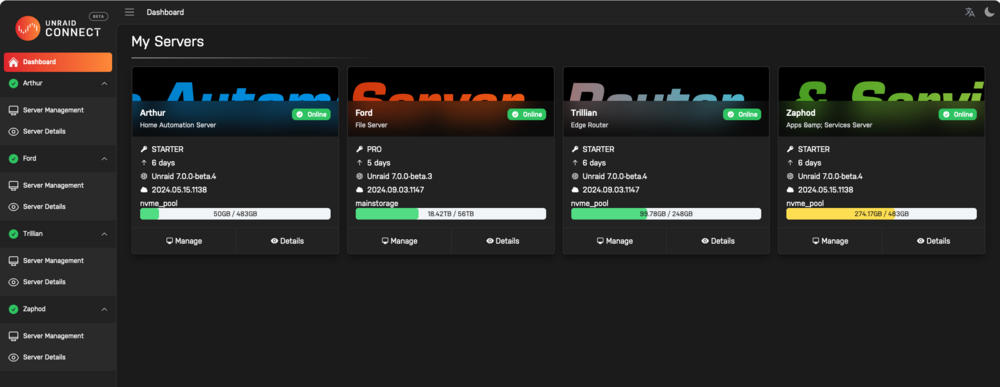
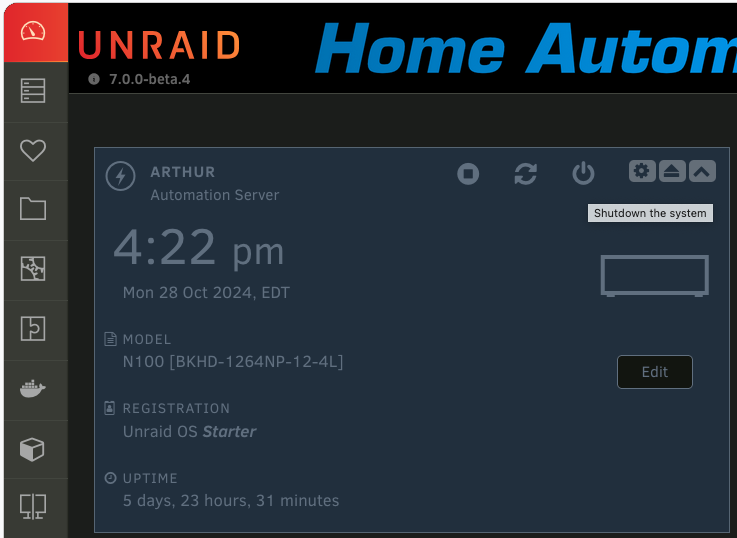
That's too bad. I haven't had the need to use it outside the home myself, but I've used it a number of times to quickly download a flash backup and for testing. When remote, I can connect directly to any of the servers without it, as I'm running with Tailscale always up.
-
Yup. And remote connection can be done easily from Unraid Connect.
-
I'm not sure how you can prevent that, regardless of how you boot a system. You don't have to yank a USB boot disk to boot off another device. Likewise, you can boot off USB even if the system is set to boot from a different device - even if USB ports are disabled, they're easy enough to turn on. If someone has physical access to your machine, it's game over - there is no way to protect it. If that's an issue for you, then USB booting is the least of your concerns. I've got Unraid installed on a machine that fits in the palm of my hand with a USB drive attached internally. If it only had a single USB port, I'd add a hub. Doesn't it make a lot more sense to add a hub, internally or externally for your other devices than to try putting the Unraid boot volume on an SSD? I can't imaghine the changes required to use TPM would be insignificant. Let alone the trouble-shooting and support required when things invariably go sideways for customers - those that even have a TPM chip in their systems. Maybe I have the best luck in the world, because I've been using USB thumb drives for 25 years and have only ever had a single failure. A Corsair 1GB model back sometime around 2005.
-
Your maximum speed to the server is 1Gbps. The only way to change that is to put a faster network card in the server. Link aggregation, at most, increases your bandwidth - but can't do anything for speed. More bandwidth means more streams at UP TO the same speed. Which means the potential to support more users. So unless you have 2, 3 5 people accessing your server at the same time, you won't saturate the available bandwidth. A good network file copy of very large files is a good way to saturate a link. You want more speed everywhere, then you need to put 2.5G nics in all your machines, potentially 5 or 10G on your server (if you have multiple ppl accessing) and get 2.5, 5 or 10G switches.
-
I went to Headscale primarily because I couldn't stand that Tailscale doesn't allow editing of the user name. As I first signed in with an iCloud private email address, it was a long string of crap that really cluttered up the UI. It was like a small pebble in my shoe, bothering me more every time I opened the page(s) 🤣 Someone might also want Headscale because you can support any number of user accounts, where the Personal/Free tier of Tailscale supports only 3. That wasn't an issue for me, as every machine gets added under my single account anyway, but it might be for someone else.




