





Espressomatic
Members
-
Joined
-
Last visited
Everything posted by Espressomatic
-
Cheers, yes I recognize you're dealing with limitations imposed by both LXC and Unraid. And again, thank you for putting this together and releasing it. Being able to put Tailscale together with NPM (so quickly and so painlessly) has made deploying all the services across my entire network securely to the WAN, SUPER EASY. If you decide to refactor in the future, I would suggest trying to align the user experience to Unraid's VM system. Right now all this deployment and testing has been on my "Edge" system where I run pfSense and only other Edge functions like DNS and Reverse Proxy. In that regard, this container doesn't have to be performant in snapshots nor coexist with other containers as I may only have one LXC here. If I can find other reasons to use LXC containers, then my Apps/Services system can handle many of them.
-
In my history of using thumb drives, probably sometime around 2001, I have only ever had 1 go bad. Never any with Unraid. But yesterday, even though I didn't have a bad drive, I decided to migrate one system to a new physically smaller drive. It took a few seconds to download my flash backup, used Unraid media tool to make the new bootable drive with that backup (on my Mac!), then popped it into its system and booted. Upon boot and hitting the webUI, a BIG ORANGE button displayed right in the middle of the screen to request a new license for this drive. Clicked it and within seconds it was re-registered, my old key blacklisted and system working the same as it always has. So... I don't get it when people talk about the flash drive negatively. It's INSANE how fast you can be back up and running compared to booting off a fixed disk. The thumb drive is an invaluable feature, not a negative.
-
Again, not arguing. I know that you know how it works. What I'm trying to explain is how anyone else besides the person who created this sees it. There's a big difference. Install plugin and then go to plugin settings. As you know, no option for ZFS. But the difference between the author and a user here is that you know that something else CAN appear there after applying. No one else will know that. After pressing Apply of course as you mentioned: But no one installing this is going to look at that menu again the second time because they will never expect that it changes after applying the setup options. And that you have to make a second change and Apply a second time. After pressing Apply the first time, I suspect 99.9% of people will leave this setup page and go to the LXC tab to start creating a container. Just like with most of Unraid setup tabs/pages. I can see that after the initial Apply, the nvme_pool/lxc path is created as a normal folder. Because you've explained it here in the forum, now I choose ZFS and apply again. Then go to the LXC tab and create a container without starting it, called Debian. This creates 3 datasets as you mentioned, one of which points to the rootfs of the container. So now let me explain how I would expect this to work, not knowing any of what you told me: When the plugin starts, it checks the volumes and keeps track of their filesystems. The backing option is populated right away to include all relevant options. In my case that means dir and ZFS are there from the start. Since it is not recommended to put the container folder in the FUSE path, I would not expect it pre-populated with the fuse path by default. Even leaving it empty is better here so the settings can’t be applied until the warning is read and a path entered manually. So I specify the storage path outside /user fuse path, in my case on my pool, nvme_pool. I choose the ZFS backing option and then press apply. Now the container path, which I have called “lxc” is created as a ZFS dataset exactly where I specified it should be be: nvme_pool/lxc Next I go to the LXC tab and create a container (Debian) and press apply The plugin creates a “nvme_pool/lxc/Debian” dataset and a rootfs dataset (if needed) under the Debian. This would match the behavior of the VM system in Unraid, which (when using ZFS) also has a dataset parent and dataset to store the vdisks: That's it. 🍻🍻
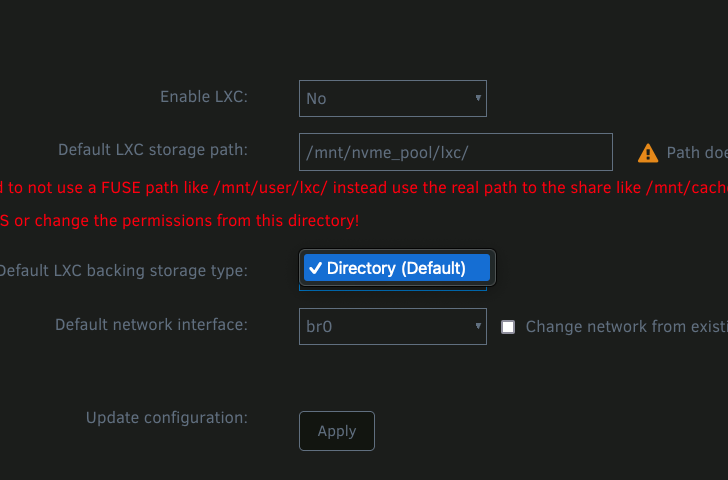
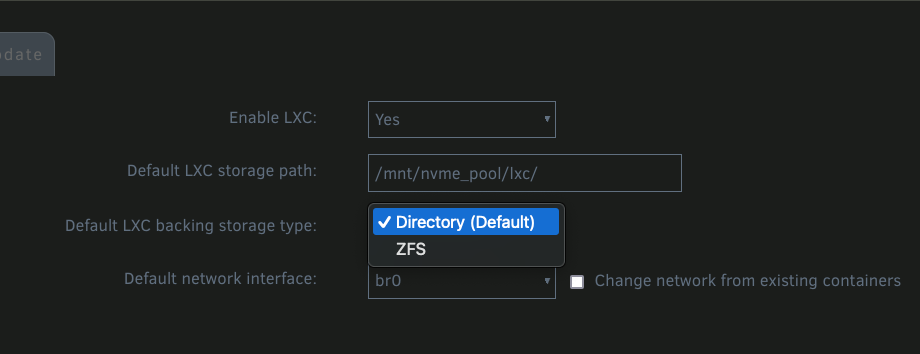

-
Not arguing, just trying to explain what's happening on my system. Let me wipe everything clean so I can get some examples of what this looks like. There's been too many manual changes now so I want to make sure I can see and show what happens right from the start. Be back shortly. I'll also explain how I anticipated this would work (as a former software designer and developer, how I believe it should work), if it's different.
-
I played around with the convert and saw the above, which I'm not fond of. I was hoping for only one top-level dataset for LXC, and therefore only one entry in Unraid's Shares tab. The LXC path created in the plugin settings is already a dataset. Does there need to be another dataset that links back to the first?

-
Diags attached below trillian-diagnostics-20240923-1006.zip
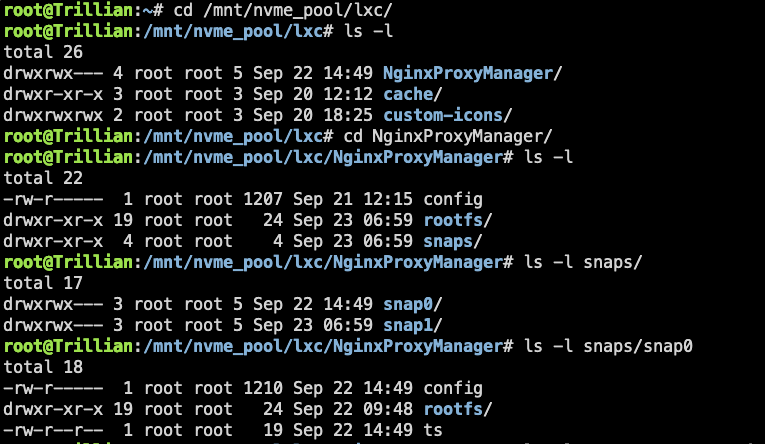
-
It is. The only difference in setup was that I created the dataset before selecting the option in lxc plugin settings.
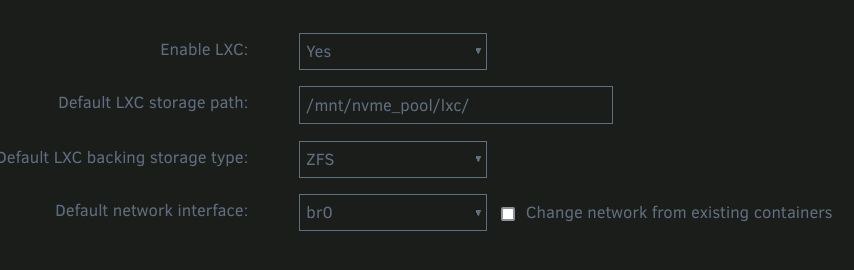

-
These cover the issues I've had with other install media besides Unraid: Problems with media creation: How was the new boot USB made? Using the Unraid tool? Problem with USB Hub/port compatibility/accessibility: Have you tried all the USB ports on your system? Are any ports "extra" and can they be disconnected or disabled in BIOS? Other USB devices: What else do you have plugged in? BIOS config: Do you have Secure Boot enabled in the BIOS? Turn it off. BIOS config: Have you tried disabling UEFI and booting Legacy instead? Definitely try booting install media for some Linux distros rather than Windows. Debian, Ubuntu, etc.
-
Is that a troubleshooting recommendation for sampson or is multi-channel generally not recommended? I've got it enabled on 4 systems right now and so far no issues. I've yet to get to benchmarking though.
-
I haven't seen containers disappear while simply being used or "in the middle of the night" kind of thing, but I've had them vanish immediately many times when saving them after editing. I've even had something similar happen with VMs. If there's some configuration error that can't be dealt with, I'm notified of the error/failure in startup, and then pressing Done, poof, the container is nowhere to be seen in the WebUI. Same as you, Docker containers are able to be added back.
-
You can always roll your own, or find someone else who has, using the same tools. The sensor data should be able to be gotten by lm-sensors (sensors command), which you can check from the command line. You can use Prometheus to pull that data and Grafana to display it. Both should have docker images in the Community Apps. That's my plan in fact. Except I won't be looking at voltage. This guy has gone to the 9's
-
No worries. The result is the same. ZFS is listed as the backer in the plugin and the container storage is a dataset. The container is working correctly, auto-start, stop, etc. The plugin is working correctly, including the ability to make snapshots. Kudos on the extensive help. I wasn't aware it existed as I didn't even think to check - so many ppl skip that so my first instinct is to assume it doesn't exist.
-
I gave Netbird a go and everything on the Unraid side seems to have gone smoothly and appeared to be working (using Netbird's own server as coordinator). Unfortunately I couldn't get it to sign in or authorize on my iOS devices (strictly a Netbird issue, nothing to do with the docker containers here). After finding many dozens of people complaining about the same thing, I had to try something else - connecting from iPhones and iPads is 99% of the reason to have this set up. Tailscale was an even easier install and pretty much "just worked." I hate to even call it an install as it was no more than hitting the app-store, clicking on an app and logging in. Repeat for other devices, including Unraid where TS is available as a plugin. If the Netbird folks can get their iOS app working (again?) I'd really like to give this another shot - especially if we might have the possibility of seeing the client as an Unraid plugin in the future. As a comparison, Tailscale is easy to get going, but I'm not a big fan of how convoluted they make their whole management. It's like the first steps are a few dots of sauce on an empty plate, easy to see, easy to understand. Then they throw a giant pot full of spaghetti on top and leave you to sort it out. 🤣 There's apparently no way to even rename your users or put a custom icon on them. If this were an organization account, I have no idea how anyone could possibly manage it. I haven't tried the self-hosted custom coordination server Headscale, hopefully that's cleaner.
-
Dynamix System Temperature. But I don't know how to get multiple temperatures for the same component to show up in a panel, such as those in the Dashboard Two of my systems, i5-1235U and i3-10100
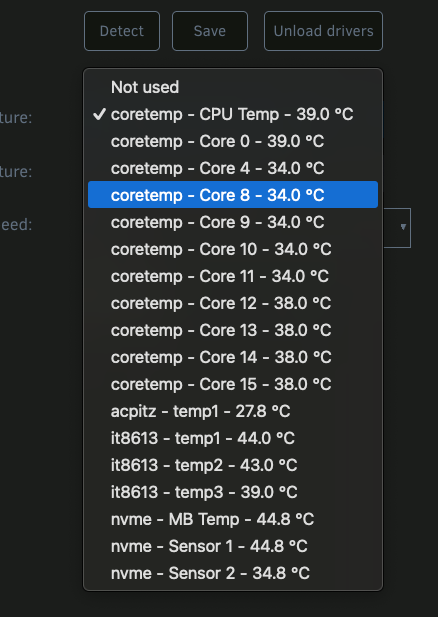
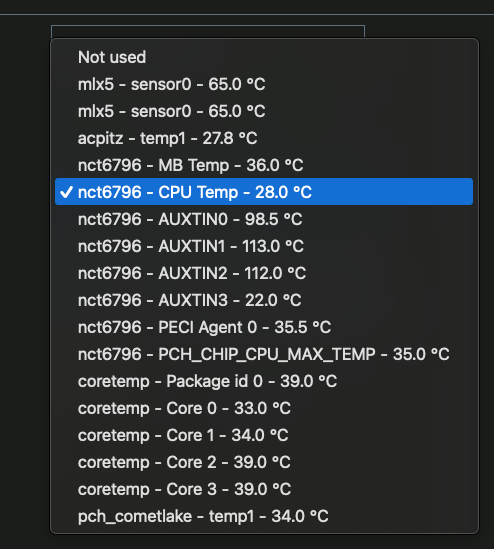
-
I am now. I took the opportunity to create the lxc share via the Unraid dashboard on the pool so it's created as a dataset. Everything running well as expected.
-
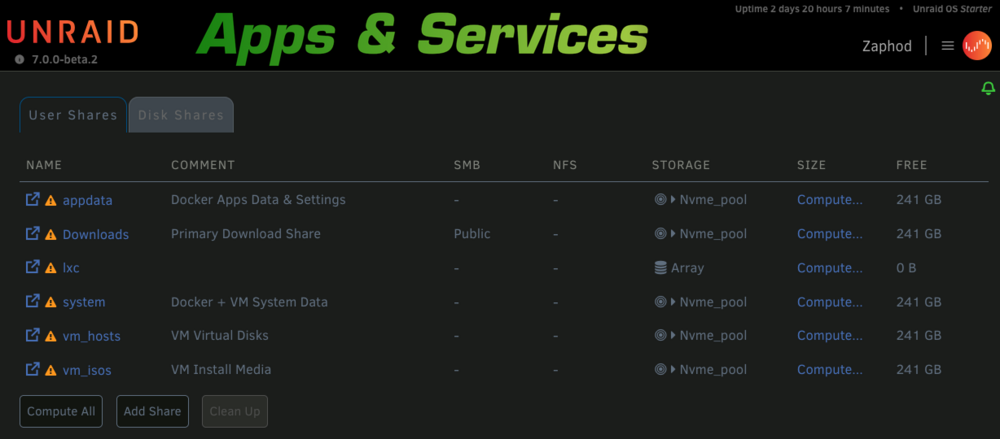
This issue was originally found when setting up the LXC plugin, whereby its "lxc" storage directory was exhibiting this issue when stored inside the only pool on the system. Description From terminal (or a script or a plugin), creating a directory under a pool will cause that directory to show up as a share, but listed as stored on Array instead of the Pool. This happens even if you do not have an Array. In the case where you have no array, the directory is created in the pool, but the system thinks that this directory/share has 0 bytes free. *You may or may not be able to copy anything to it from terminal for example - I've had it work and I've had it report that the target was full. In the case where you have an array and a pool, the directory will be created in both the pool and in the Array's FUSE FS (not on the actual disks that make up the array). The system will show the directory/share as having the free space of the Array. You can copy as much data as this reported free space. Steps to Reproduce On a system with a single NVME drive formatted as ZFS - No Array From terminal, create a directory on the pool volume It gets created (shown as TestfolderZ in this image) Open the Shares tab in the WebUI to see the directory/share listed as belonging to "Array" (which doesn't exist) If you check the /mnt/user/ fuse path, you can see the directory appears there as well, but not as a link like all the other shares The directory/share's settings correctly show that it really belongs under the pool Making an edit to the settings, such as adding a Comment, and then applying, corrects the issue: Continued in next post...
-
I don't know how easy it'll be to fix, but the issue is caused by making a directory (on the ZFS pool), whereas using the Shares UI to create a new share creates a ZFS Dataset (which doesn't show the issue). I'm going to try this on a server where I have some extra disks and where I can make an array device - interested to see what happens.
-
You misunderstood. I never use the FUSE "/mnt/user" path on my systems for anything (absolutely every share on every server I'm running uses pool storage directly). I was only showing what it looked like in there after using only the pool. I edited the previous post as I isolated this as an Unraid bug. Any folder created inside the root of the pool causes this issue.
-
It's not simply visual. Uncorrected, this issue prevents file copying in terminal, where it thinks the lxc destination is "full." OK, I've definitively confirmed this isn't an issue with the plugin - it's an issue in Unraid 7beta itself. $ mkdir /mnt/pool/testing I'll post a bug report.

-
If we're doing suggestions for new features: Allow providing a github URL for a script and an option to auto-update. Spin up Unraid 7.0.0beta2 on a spare USB stick and give it a try.
-
I've duplicated the "Array" issue on another two machines. Seems like the magic recipe is that these servers have only pools, no array. The one pictured here has a pool consisting of a single NVME, and the other has a pool of 6 spinners in ZRAID2. The issue is "repaired" by simply making an edit to the share, even something as simple as adding a comment and then applying.
-
I typically watch out for things like that, which wasn't what I was referring to. Funnily enough, the Authentik video instructions do in fact work (so kudos), and I didn't notice any glaring omissions. It leaves you with a functioning Authentik installation which you can successfully log into when finished. My previous post was more along the lines of steps completely missed or dependencies and other requirements not disclosed, both in video and written instructions. Again, not relating to changes in the software in question - those issues are easy to ignore for the most part.
-
I think the limit_in_bytes might be deprecated actually. Way too much info here: https://git.kernel.org/pub/scm/linux/kernel/git/tj/cgroup.git/tree/Documentation/admin-guide/cgroup-v2.rst Only one mention of the above, but it does sound like the "max" you mentioned replaces it. Along with using "high" and "low"
-
Thanks, I didn't find any info about memory.max, only the memory.limit_in_bytes I had posted. They seem to do different things. Here's what limit in bytes looks like: the total memory seen by the lxc is 512M And memory max here: the total memory seen by the lxc is ~16GB (the total I have installed on this system)


-
BTW, how do we set CPU/core and memory usage/limits for individual containers? I'm not sure if I missed that somewhere, as it was late last night while I read much of the thread. OK, just like the other post someone wrote about this... nevermind, found the reference:





