





Espressomatic
Members
-
Joined
-
Last visited
Everything posted by Espressomatic
-
Are you're connecting TO it from the outside? Does it need to be on your tailnet? The only "desktops" I have are all servers, so I keep them on the tailnet all the time, but it's not used for local addresses and that seems to work reliably. My phones and notebooks all activate and deactivate TS depending on whether or not they're at home. But I did just test forcing my Macbook to always be connected to TS and SMB connections all continue to work as expected.
-
How about getting rid of the macvlan warnings?
-
How about setting the TS client to not connect when it's on your LAN?
-
Pretty sure VLANs are (way) outside the scope of this container.
-
I can't help with the filter settings in Frigate, but otherwise I'd have set things up a bit differently. Intel CPU with iGPU - skip the coral, the iGPU will handle Frigate inferencing on multiple cameras Record directly from cameras to Frigate, all streams - no decoding, no processing on record 14TB or larger HDD for 6 or more cameras Every camera with 128GB sd card as backup go2RTC after frigate to support Home Assistant, etc. But if what you have works for you, then no need to change. Frigate's new NVR capabilities are still in pretty early beta, so expect the whole thing to be fleshed out and expanded greatly. Just don't expect it that quickly as it's just the one guy doing most of it.
-
4 SSD, RAIDZ1. Done. Incidentally, I also have systems running a single NVME formatted ZFS.
-
The new Frigate (beta?) is a full NVR. The old Frigate was a motion event processing app. If you're recording from cameras without any transcoding (the direct camera stream) then you need very little CPU, only modest HDD speed (one spinner can easily handle 10+ 4K streams) and only moderate network (1GbE can handle as many streams as the HDD easily). So you can pipe through Frigate onto a HDD directly attached or sitting on another computer on the LAN. For integration into Home Assistant it sounds like you already have the optimal solution with goRTC using an RTSP rebroadcast from Frigate (or can be from something else - just don't do it from the cameras).
-
Looks like you're copying. On ZFS you might be dealing with multiple datasets, not directories. Check mv from the CLI. If that isn't instant, then your source/dest aren't the same volume.
-
Ya, different container. In my case, I treat reverse proxy as an edge service, so NPM runs on a system dedicated to those types of tasks. The same system on which I run pfSense firewall/router (in VM) along with AdGuard Home for DNS black hole. Other services, of mixed purpose, run on an apps and general-services-oriented system, so that includes web-serving, media serving, etc. I've run simple static pages directly from NPM, as well as used it to wrap directory listings using Fancy Index, but I wouldn't run active content nor data-driven content on it while using it for proxy and TLS duty for the entire network.
-
Nginx Proxy Manager can pull triple duty for light web-serving, reverse proxy and certificate procurement/renewal - an easy to use webUI will let you deploy/set up hosts/pages/sites likely a bit easier than SWAG - using the same web server under the hood of course. You can then spin up another pure Nginx container or Apache or whatever, to serve more complex content. That's how I'd do it. MySQL, Maria, Postgres or other databases can sit in their own containers and work along-side.
-
No, I just meant that as an example of a USB-based installer.
-
Try every USB port on the system, including USB 3 ports. You can also try making a USB drive for something else like Debian to try. This is usually an individual machine/BIOS issue, recognizing UEFI bootable USB drives, rather than an Unraid issue, IMO. I have a couple of newer systems that have that kind of issue. A few reboots and moving a USB drive around usually gets it going. Once it starts recognizing a USB drive on a particular port, it'll keep doing so after reboots and power down/up. Weird, but I've already exhausted all my patience on trying to figure out the whys of stuff like that.
-
Try an Unraid version that isn't 6 months old? And look at other recent threads on this subject. Could be stuck VM?
-
Nice, I'll check that out when it drops. Running your Tailscale plugin at the moment which is great on its own too.
-
If you can force the update that you showed above, do it and immediately go look at your AG query/block logs. Find what's being blocked and unblock those destinations.
-
I saw Tailscale mentioned multiple times and then people talking about opening ports, so I'm guessing there are a lot of people setting this all up in a lot of different ways. IMO, the best way is to definitely use Tailscale. Install it as a plugin. But also, don't use the NPM docker. Instead: Using the LXC plugin, create a Debian container and install NPM into that. Create the container, and then edit its config to add these lines #Allow TUN access lxc.cgroup2.devices.allow = c 10:200 rwm lxc.mount.entry = /dev/net/tun dev/net/tun none bind,create=file Start the LXC container, then open its terminal and install wget and curl apt-get install wget apt-get install curl Then use this script to install NPM sh -c "$(wget --no-cache -qO- https://raw.githubusercontent.com/ej52/proxmox/main/install.sh)" -s --app nginx-proxy-manager Lastly, install Tailscale in the same Debian container. curl -fsSL https://tailscale.com/install.sh | sh No port forwarding, you'll be able to access anything on this Unraid machine you wish, plus on any other machine on any locally accessible network your NPM installation proxies to.
-
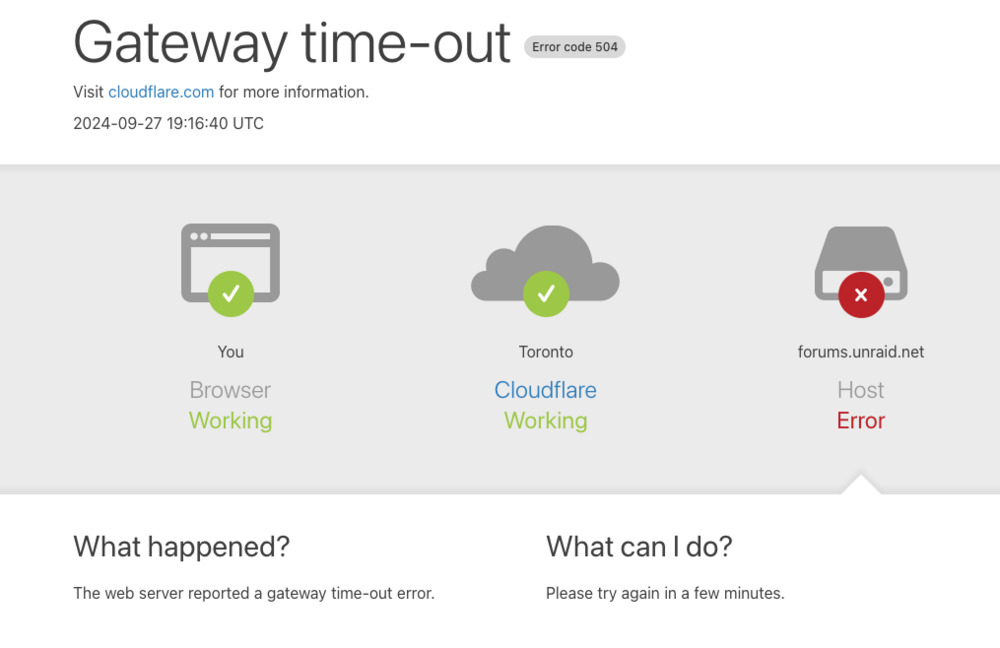
The forum subdomain has been somewhat slow from here for longer than I can remember at this point. Today however, it's excruciatingly slow - I'm talking 1986 waiting for pages on a BBS to load at 300 baud. There's obviously a lot more data transferred now, but the slowness is cutting reading speed down to that level. It's not uncommon to see something like this pop up a few times per week: Everything ends at Cloudflare, so ping is damn fast (and a useless metric), but traceroute is slower than I'd expect - still much more than fast enough that it's not responsible for the web serving speeds.
-
So far, no problems with these on two different systems: Sandisk SDCZ430-032G-G46 https://www.amazon.ca/dp/B077VXV323?ref=ppx_yo2ov_dt_b_fed_asin_title

-
<borat> Wowawewa, isa very nice! </borat>
-
And if so, is it enabled or disabled?
-
What version of Unraid are you using? I'm running 7.0.0beta2 on 4 machines with completely different hardware/specs. I can select and apply any/every option in Connect without issue. UPnP is also able to verify that it's working when pressing "Check" If I were installing Unraid for the first time, I'd jump right onto version 7. Each of the 4 systems I'm running are production. One of them being my edge router, running pfSense handling the internet connection (+ DHCP, DNS, DNSBL, Firewall, VPN, etc.) for the entire home. Another is my home automation system, running Home Assistant and supporting over 100 devices in the house.
-
The correct server is always initially loaded when the manage link is clicked, but then the first one automatically reloads replacing it. I'm "somewhat" sure this was working correctly in the previous version of Connect (before Sep 11 2024). I'd test that now, but I don't know how to roll back to a previous version without a github or other link to the raw plugin.
-
The yelling at me is always going to happen, I don't think I can prevent that even if I had a 5 person IT department working under me at my house with 99.9% uptime. If I have to do a fast reboot on my router while setting something up, it's a chorus of "what's wrong with the wifi?" I'm running AdGuard Home (in place of PiHole) on the same system as pfSense, so if the system goes down, it's everything gone. I'd like to have some redundancy for the entire system using other servers I already have, but at the moment it's a question of some extra cabling work and configuration on switches - which I need some time to figure out. I'd otherwise be pretty nervous about relying on general-purpose hardware to run this stuff, but I've had amazing stability with Unraid for over 5 years, I had no reservations about setting up a dedicated system for routing/firewall/dns/proxy.
-
Do you have QEMU guest agent running for all your VMs? Are you able to completely shut down every VM from the VM menus? Do you have USB manager installed? A VM not shutting down or restarting after it shut down, preventing the system from going down (most of the time) is what's caused this for me. The last time was one I couldn't figure out because I'd addressed the guest agent issue which caused me not to be able to shut down some VMs in the past. SimonF figured it was a USB Manager option and sure enough, he was right. I had an option set that rested the VM when a specific USB device was inserted. And that was getting triggered every time I tried to shut that system down, leaving the whole thing in a loop and from my perspective just stuck.
-
So streamlined, great work! No need for steps 3 and 4 with this release? 3. Such as setting the serial number on the EFI partition, verifying it's unique, etc. 4. Setting the default boot volume and turning off the bootloader.



