





Espressomatic
Members
-
Joined
-
Last visited
Everything posted by Espressomatic
-
I suppose I wouldn't run a botnet back through my LAN IPs either.
-
Just install 7 beta 3 and never look back. All the cool kids are doing it.
-
Then I'd make sure you advertise your LAN route(s) to the tailnet from at least one machine and use the routes on any machine that can't normally access those ranges. Then use your LAN IPs instead of the Tailnet IPs, so long as they're reserved/static.
-
Exactly this. And generally not on any of your LAN-based machines. I had to expressly advertise my LAN route and then use the route on the node I'm running on the US-based VPS. That gives it access to all the machines on the tailnet using my home LAN IPs, just as if it were sitting here connected to one of my local switches. [borat] is very nice [/borat]
-
Easiest way: Give all those machines names via DHCP Additional suggestion: put a FQDN onto your LAN. Like "mylan.tld" - it has to be a real TLD if you want to use it from a web browser easily. Best to have your own registered domain, but you can obviously just make one up if you're not going to need to resolve it from an outside public network. Then every machine you create a name for will be reachable via name.domain.tld This all has to work on your LAN before it can work through your tailnet Like I said earlier, I don't rely on mDNS advertisements from the individual machines - that's setting an Unraid machine name inside Unraid itself like your "Tower" example and then being able to resolve that as tower.local from other LAN devices.
-
You might want to stop using tailscale's DNS.
-
Doesn't really make a difference, IF.... If you can resolve those machines by hostname on your own private LAN, you can make that work with Tailscale. Use a subnet route on at least one LAN node, defined as the CIDR for your LAN (like 10.0.0.0/24). And make sure that system is also using your local DNS. I've found the above is only needed for hosts that live outside your LAN to access your LAN as if they were local. Machines that are already inthe LAN shouldn't need the above. Example, I'm using the advertised subnet on TS running on a VPS in the US while my LAN is in Canada. I've set my local DNS (AdGuard Home) as the Global DNS in the Tailscale admin console. I'm not using Tailscale DNS on any nodes. This is what I've done to be able to access everything on my LAN. In addition however, I'm also running my own DNS resolver (upstream of AdGuard) where I give every machine and service a meaningful host name, so I don't rely only on mDNS. And for those that need it, for secure certificates on the web, I also use Nginx Proxy Manager to change ports and apply certificates. I've got Tailscale running along side that inside a container (LXC in my case) which also makes it so the tailnet sees all those proxies. Practical examples of devices I can access which don't have Tailscale: Any of my managed switches My Jailbroken PS3 and PS4 Wii-U IP cameras Commercial NVR Any of my Wifi-based home automation devices Home Assistant VM - via web or via Home Assistant app CNC controller etc
-
1. Never use the IP addresses for anything, use host names instead 2. Assign the same IP once you move over to the plugin - you can do this in the admin console SMB doesn't affect name resolution in general and certainly not over hhtp.
-
I've now completely redone my tailnet so it's fully under my control. VPS hosted in the US running Headscale as my coordinator, installed via docker compose and sits behind Nginx Proxy Manager which lets me use the single IP I have for the server to host unlimited content. I've also re-installed Tailscale linux clients and number of times, and those always default to YES for use Tailscale DNS. Setting that to OFF everywhere, advertising a subnet from one of my local Unraid systems and then setting up the VPS to use the subnet, allows DNS and access back to my LAN transparently. It took a bit to get everything running smoothly and it would have been a lot faster if I had been able to install Unraid on the VPS. Setting up the client on that VPS with the Exit-Node feature is pretty cool and works like a traditional outbound VPN. It also makes it super simple to get onto Hunter Biden's laptop.
-
This says everything you need to know about the snake oil these companies are peddling.
-
Apps/Services system: 192GB NAS+ system: 64GB Edge Router/Firewall: 32GB Home Automation: 32GB Backup NAS: 16GB
-
I've never had an APC last more than 2 years. I've been through 6 of them. 4 units, 1 replaced twice at Costco. Seems like they're engineered to fail. I've still got them (batteryless) kicking around here but don't yet know what to do about bringing UPS back online for my rack.
-
No worries about hitting real-debrid too hard. We already use it in the house from multiple clients, so the frequency/bandwidth won't change, only the client app. When I asked about users I wasn't so much concerned with people seeing what's being added, but rather whether it can be set up to shove content into different libraries/lists in Plex. I suppose so long as everyone is using their own Plex sign-in ID, Plex itself will keep track of the watched progress, so that if someone watched something I'm also watching, I won't be affected by their progress when I get to that title/episode - or visa versa. I don't have any of the arr stuff nor overseerr installed yet, but they're on my list. I figured if I was able to automate that kind of thing, then I might get back to collecting/saving some specific content on my server(s). It's really been all-streaming for the past 5 years and I haven't really touched any personal collections. Thanks again for all this info, I'm sure to give it a try. It's funny that to try and "simplify" things around here I have to first get way into the weeds with a bunch of new stuff. I'd been running a single Unraid system for 5 years and as of a coupler of months ago I'm now up to 4, albeit each with a more focused purpose. I've been trying to install one app/component every couple of days so I don't get overwhelmed - and so I still have time to do everything else that keeps me busy. Today it was Borg backup and I now have the server sorted along with BorgWarehouse. Still need to configure clients.
-
It's sounding more useful the way you've described it. When I originally read about Plex-Debrid it sounded like it was a lot more manual and that as the "admin" it would be up to me to have to intervene (at least approve manually) to get content index/inserted into Plex after someone else requested it. Nor did I know it was as automated as selecting the content directly from a browsable UI as you mentioned. And I definitely didn't know the results would be almost instant. Does this mean that in addition to Riven, some other UI is used to add content? If I'm to let other ppl in the fam know how to use something like this, what would be their primary UI to make selections before finally going to play in Plex? And, am I assuming correctly that it's able to support multiple separate Plex users (like in a managed library/home) with a single Real-Debrid account? Does it insert media into Plex such that every user/account sees it or can you put it into libraries that are specific to the individual user/account?
-
Ah yes. We chatted this past weekend in your github where I got the docker working behind reverse proxy and https, streaming directly on iOS too. This house is also iOS-first and I've been running a Mac as my daily-driver for 20 years and Plex with lifetime for about 12. OK, so Riven is a new implementation of Plex Debrid more or less. The issue I had with the original is the requirement for pre-populating Plex with one item at a time. Over the past 5 years I've barely used Plex because I haven't been spending any time managing nor curating my local library. I prefer to just search live on a streaming service or multiple and play direct. Also not a big fan of Stremio here and the only reason I set it up was because you provided the really convenient docker, and to see if I could do something with it for iOS. Their own web-hosted solution didn't do much for iOS without linking an external player like VLC and that wasn't something other ppl in the family were going to manage. I'm also a big fan of being able to use Trakt to sync any number of client UIs, even from different projects, so no matter what I use to play some media, my play history, collection and watch lists are there. I've never been able to tie Trakt together with Plex very well and of course it's even worse for any official clients for Netflix et al. So even though I have subs to plenty of services, I often just do the streaming from an "off-brand" app like Syncler. or Stremio.
-
This is a comment on the original project, not this template. No one anywhere has posted/explained why anyone would want to run Riven with Plex. Lots of tutorials and info on how to install the various parts, but nothing to say why anyone should care. Nothing to advocate over Stremio, Syncler, etc. Solutions which are fool-proof and offer maintenance-free access to media without any kind of manual intervention on behalf of "requested" content.
-
Weird. I have this installed on 4 different systems, have never changed that setting, and they were all set to Yes when I checked today while writing the previous posts. Running the "Plugin - Preview" version. Unraid 7b3
-
Here's the Tailscale advanced setting "Tailscale Outbound Networking" Use DNS is set to Yes by default. It might be a good idea to default this to No if the issue of not using upstream/global DNS can't be fixed in the plugin.

-
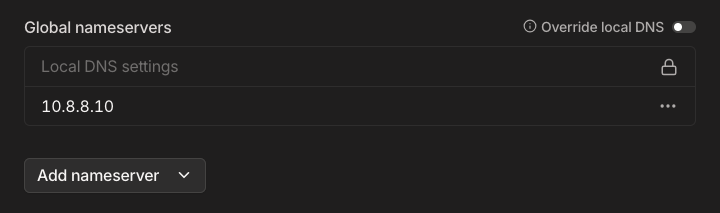
This didn't fix the issue on my end with the chromium or firefox test containers. The issue I'm seeing is that the containers using custom docker network (br0) aren't resolving domain names while Tailscale is on. On some containers I'm seeing the same DNS failure with or without Tailscale plugin installed. Firefox which I did most testing with, only when TS is installed. Some containers have enough binaries where this is easy to test from their command line - ping, nslookup, etc. So besides Firefox I also tested with QBittorrent's and Stremio's consoles. Both of those containers were already working, but sure enough, nslookups and pings from their consoles failed to resolve domains. In every case, 127.0.0.11:53 is displayed as the DNS server:port. We can go one step further and look at resolve.conf - below is Firefox while tailscale is not installed: # Generated by Docker Engine. # This file can be edited; Docker Engine will not make further changes once it # has been modified. nameserver 127.0.0.11 options ndots:0 # Based on host file: '/etc/resolv.conf' (internal resolver) # ExtServers: [10.8.8.10] # Overrides: [] # Option ndots from: internal You can see the docker-generated DNS and then you can see "Extservers" which comes from Unraid's settings (I'm pretty sure it's not coming from DHCP as the static address given when using br0 means the container doesn't perform a query to the DHCP server. Anyway, here's what happens when Tailscale is installed/running: # Generated by Docker Engine. # This file can be edited; Docker Engine will not make further changes once it # has been modified. nameserver 127.0.0.11 options ndots:0 # Based on host file: '/etc/resolv.conf' (internal resolver) # ExtServers: [100.100.100.100] # Overrides: [] # Option ndots from: internal Hmm 100.100.100.100 - That's Tailscale's localhost (same as 127.0.0.1 on normal setups). According to their docs, MagicDNS resolves short names when querying DNS port 53 at this address, but it's not what controls whether or not this address is used. The above was captured while MagicDNS was OFF, so it's still always putting that IP in there. The problem is that it doesn't seem to forward to my "upstream" aka "Global" DNS resolver which is defined/set in the Tailscale Admin site/page. The Fixes (Workarounds - use one or the other) 1.) You can turn OFF the use of Tailscale DNS: in the TS Plugin Settings tab, turn on the ADVANCED view, and part way down the page, set "Use Tailscale DNS settings" to NO and then Apply. 2.) You can manually set DNS Server for the docker container: if you pop open the Advanced view while editing the container, and put "--dns IPv4-of-a-DNS-server" into "Extra Parameters," that will force it to use that server. Doing either of the above, Firefox and Chromium immediately started resolving names/sites without issue. Same for using command line nslookup and ping from QBT and Stremio consoles. I did some testing on my Mac and it doesn't show this problem when using TS's DNS (quad-100) - it seems to correctly go upstream, using my "Global" DNS setting from TS Admin> DNS tab.
-
I'm going to try this right now and will let you know what I see on my system - in case there's any difference compared to the other containers I mentioned earlier. I have always had Magic DNS turned ON and have created a name-name.ts.net tailnet name, I have also specified my own DNS server (actually black hole and resolver) as the global (every machine that sits on the LAN also uses the same DNS, assigned by DHCP: The results for Chromium match yours - it is unable to reach any domain name - DNS doesn't work at all. It doesn't seem to matter which settings I change in Chromium. I can reach devices in my LAN by IP address. BUT... I think I found the problem and a solution. Doing some testing.
-
Hey, @EDACerton, in the LXC thread you'd mentioned Unraid 7beta3 would include something new for Tailscale docker access. Can you elaborate on that? Just as a refresher, in the LXC thread I'd mentioned that I had installed TS and Nginx Proxy Manager into a Debian LXC to give NPM a direct connection to the tailnet making reverse proxy transparent and "just work" without any additional config or hoops to jump.
-
I have exactly the same Tailscale plugin settings in place as you do on each of 4 different systems, and I'm also using the br0 network on a number of containers on 3 of those systems. I don't have any issues going out to the net on any container that should have that capability - not that I know of yet. My docker networking for br0 is MACvlan and I'm running Unraid 7.0.0.beta3 (just updated from bet2 which I'd been running since June). Every system is advertising my subnet, but none of them are set to accept a subnet from elsewhere (they don't need it). No exit points set up on these systems or on other systems connected to the Tailnet. Plex can go fetch data, Stremio can load sources, JDownloader can do direct downloads from anywhere, QBittorrent working, (those are all on unique ips with br0), and even pfSense (in a VM) can download plugins and make cloud backups, etc.
-
That's great advice at any time. I've just used the Unraid Connect backup download feature to write a replacement SD card and it worked great. Just need to pick "Other" when using the Unraid USB Creator and it'll use the contents of the backup zip to make a new drive. Generating a license is as simple as booting up and clicking a couple of buttons in the browser. This easy recovery procedure is a major reason the USB drive is a huge benefit.
-
I just wanted to mention that this isn't showing up in CA - not while running Unraid 7 anyway.
-
I'd probably start by disabling NetBIOS while investigating this. And a shot in the dark... How is your wireless set up? Are you using real AP? Combo device in bridge mode? Not double-NAT right? Did you happen to see this post back in the thread?






