





TexasUnraid
Members
-
Joined
-
Last visited
Everything posted by TexasUnraid
-
Gotya, Waiting to update until they get the BTRFS speed regression issue sorted out.
-
Just curious, is the read/write speed counters supposed to work with the UD drives? I noticed these were added after I updated but they stay at zero for me. Not a problem, maybe I need to reboot? Or are they not fully implemented yet?
-
All I need is a way to see the kodi library from any networked computer. Don't really care how it is done, webui works as well but you can't add or scan for media from the webui, so I can't figure out how to make it usable. This is purely to keep the kids from endlessly looking through options on the TV and burning it in. This way they can browse on the computer and watch on the TV. It would also be nice for sorting out issues with kodi, I have naming issues from time to time that will prevent a show/movie from scanning in correctly and re-scanning on the TV box takes forever with unraid due to the exceedingly slow latency of small files.
-
How do you update the library from the webui? It is possible that would work but I can't find this option? How would you setup a local kodi on unraid? I can't find any dockers that allow this? That is what I wanted to do when I started this lol. Ideally I would just have kodi running in a VNC environment in a docker. I seem to remember there being a VNC template floating around someplace for projects like this but can't find hide nor hair of it now. I have no clue how to setup a docker from scratch, all the tutorials I find start from a fairly advanced stage talking about dockerhub and the like. I don't want or care about that, I just want a local docker for my own use if I did this.
-
Ok, I finally had time to copy over the sources.xml file but it doesn't seem to of worked, I tried to browse but it just hangs at the spinning circle. I even tried to copy over the whole userdata folder but then the web interface would not come up at all? I did try connecting to the TV media box web interface and worst case that will work, just annoying as it either has to stay on or be turned on and it won't boot up without the TV on for some reason. Be real cool to have it running on the server instead.
-
Yeah, I know I could use an SQL setup it is just not needed for my use case and I can't see any benefit. I only have 1 kodi box that I care about. I have also heard that SQL dockers can put a lot of writes on the drives unnecessarily.
-
It is strictly to browse media on the computers to prevent burn-in on the TV (old plasma TV I got for free with some horse trading that still looks better then any TV I have seen outside of OLED). Interesting, I will try copying the sources.xml over from my main kodi box and see what that does.
-
I can't even figure out how to setup a library much less scan it lol. Thats all I need, to scan a library and then be able to browse it.
-
This is my netdata template, if you delete the netdata you have now, shut down the server, copy this file to the unraid USB boot drive folder (remove any existing netdata files) flash\config\plugins\dockerMan\templates-user/cofig/plugin/dockerman/ Then start the server again, go to apps and select previous apps. It should list netdata there, simply click the install button and it should have the settings already entered and ready to go. (you can do all of this without rebooting if you know how to access the USB drive on unraid) After this, you can see the netconfig file it is using by adding :19999/netdata.conf to your servers ip address. The file should be located in /user/appdata/netdata if you need to edit it in krusader. my-netdata.xml
-
Yeah, then this is going to be deeper then what you can learn here. You should watch some videos on how docker works, I think spaceinvaderone has some. The -v strings are path mappings, in unraid you set them in the template when you are installing/editing the docker. Although in this case, those strings are secondary, the important part are the paths in the later posts to the config file. You will still need to read up on how to navigate the folders and edit the file from the command line though. If you map the config path to appdata that will make it simpler since you can edit the file in krusader.
-
https://github.com/netdata/netdata/issues/9807 You have to use the console of the docker itself to see the folder. I ended up mapping the folder to appdata and then reinstalling the container, this allowed me to edit the file from appdata using krusader instead of inside the container.
-
Yeah, I don't need hardly any features, just the ability to add media and then be able to browse it. It is purely a way to keep the TV from getting burned in. Kinda scary when the kids "used" it last and I turn it on to see clear burnt in ghosting of the title explore page. The current webui would most likely work if I could add media to it.
-
That would be fine but how do you add media to it? The readme seems to say it only works with an SQL setup which I am not using. Basically I want a way for people to be able to look through the media from the computers instead of burning in the TV looking at options on there endlessly lol. Admittedly I didn't know that kodi had a web interface until now, I thought it was just some kind of remote control.
-
I forgot off hand, if it is not listed in one of the posts on the last page then it should be in the manual if you google it.
-
ok, that explains that, does anyone know of a VNC kodi container? What is this container used for exactly? seems kinda pointless to have a webui that can't add or mess with any media as a standalone container? Might as well connect to an existing install?
-
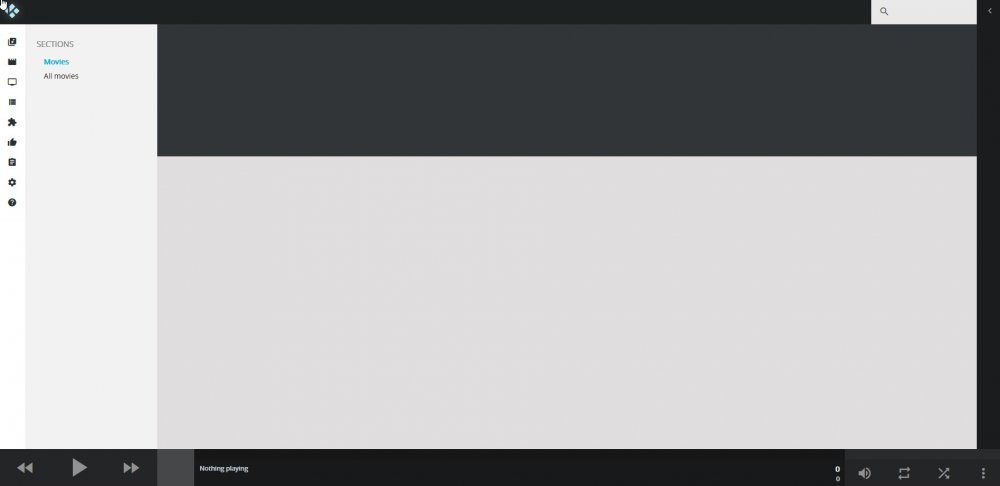
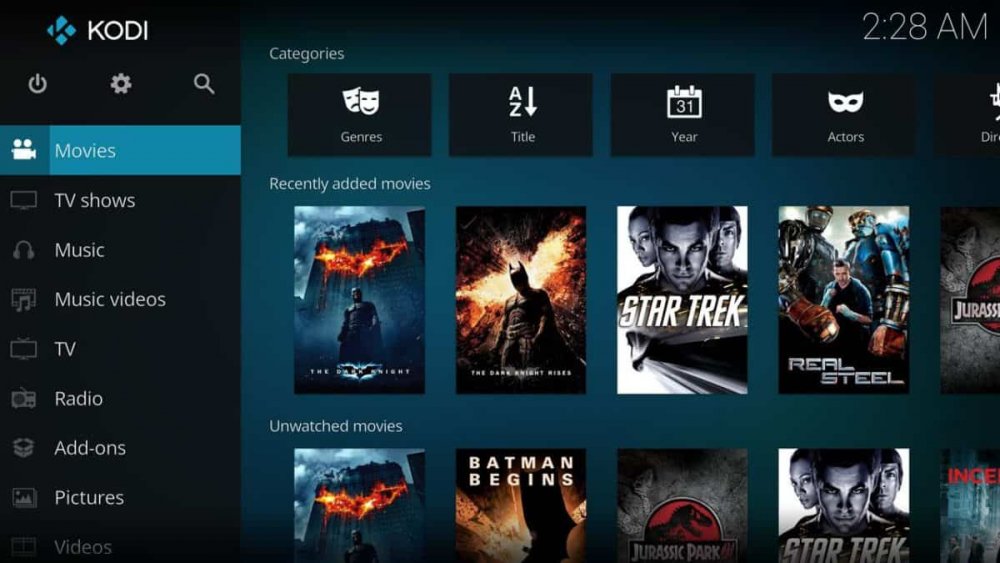
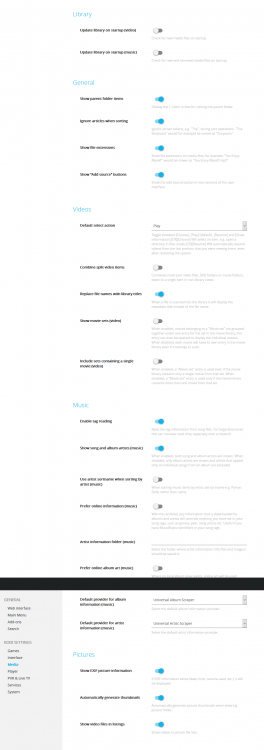
I need a headless kodi install with VNC that I can view from multiple computers. I tried installing this container as it looked like a perfect fit but can't figure it out. When I open the VNC I am presented with a really strange GUI that is nothing like kodi on any of my other devices. Vs all my other devices: The settings menu in particular is completely different. I can not find any place to scan a folder for media? It is also missing most of the settings options. How do I add media to this kodi? Is it possible to go to the stock kodi skin?
-
Don't pre-clear the WD drives in the enclosure. I know from experience it won't work and you will have to do it again when you add them to the array. Unless you plan to keep the drives in the enclosures while they are in the array that is. If you plan to run them off USB in the array I would highly recommend figuring out a way to get some more sata ports (time for an HBA it sounds like). USB is not nearly as reliable as sata and it only takes a drive dropping out for a second to require you to have to rebuild the entire disk. You can get HBA's on ebay for less then $50 last I checked. Far as the issues with the plugin itself, can't help you there.
-
If you go back a page I had to deal with the same issue. I wiped the container and started over and got it working after a few tweaks.
-
I had this happen at first after I swapped from a intel motherboard. I pressed detect and it got nothing but then I rebooted and it worked after rebooting. I think it was trying to load the coretemp and it failed (there was a message on bootup). Although I am on B450.
-
It would be cool if a button could be added to the top menu, possibly with the small buttons of the right side to allow quick changing of the CPU governor. With my new Ryzen setup using anything but power saving has the CPU sitting at ~1.4v and double to triple the energy usage almost all the time. While technically "safe" I just see no reason to waste the energy and the fans constantly ramping up and down is annoying. Plus unless I am actively doing something, there is no difference in power saving mode where it sits at 0.8v and never gets warm. A button to quickly change the governor would be really cool so when I want to encode a video for example, I can bump it to performance mode. To add to this, it would be nice if we could set schedules for more then just performance/on demand. Alternatively I would like to setup schedules with power saving and Schedutil as these seem to work the best with my setup. I notice significantly higher clock speeds with Schedutil and lower idle clocks vs on demand. If none of this is possible, what is the command for these that I could manually script?
-
Ok, so I got auto fan dialed in but when restarting the server it does not start working unless I manually go into it and change a setting and press apply. How do I set it to start automatically?
-
Thanks for all the hard work and great plugins! I just upgraded my mobo to something that supports fan control. I have been setting up autofan and really like this, I did have a few suggestions that would make setup much easier. 1: It would be really nice if it could display the RPM of the selected fan in real time once selected in the menu. Makes it easier to identify which fan it is controlling. 2: Once the fan is identified, it would be REALLY nice to be able to label the fan in both speedfan and system temp. 3: Allow for the temp sensor to be selected so you can control off of more then just the drive temps. For example I have a 10GB nic that likes to overheat when used heavily and reports temps in unraid, it would be nice to ramp the fan that blows on it up when needed instead of having to keep it high.
-
Good find! that does seem to of worked!
-
This is normal, it is caching the torrents to memory as they are downloaded/uploaded. In the advanced setting you can change the amount of memory it uses and disable the OS cache but not sure that the disable OS cache setting works in the docker version.
-
I experience much the same thing but not just with QBT but with general file activity. If you install netdata you can watch the iowait and other factors but what I have noticed in particular is that the ram dirty writes seem to be the issue. Basically the cache will fill up and then it will decide it needs to flush it to disk, the entire server will become non responsive until it finished flushing to disk. It seems to be a bug with unraid itself. Reducing the dirty writes using the tips and tweaks plugin down to ~2-3% seems to help in the sense that it can flush the data much faster and the lock up is short lived but this also defeats the purpose of the cache and wastes the ram. Also causes the hard drives to trash more. So I just live with the lockups. This and the dismally slow performance with small files over SMB are the only real complaints I have had with unraid. Being that these drives appear to just be used for seeding, it is possible you could reduce the downtime by moving them into a BTRFS cache pool (6.9 beta allows for multiple pools) and use a raid5 setup so that the speed is greatly increased and it can flush the data faster. Plus it keeps these drives out of the array, I like to only have drives with my personal important data in the array and drives I don't care about in separate pools.



