





SPOautos
Members
-
Joined
-
Last visited
Everything posted by SPOautos
-
Is it normal that if you go to a browser on a device that is NOT local to your network (for instance using cellular) and type in your main internet ip address of your router into the browser, that it would bring up your Heimdall page? Same with typing in the Dynamic DNS that is setup for the router. Mine is doing that and it doesn't seem like that would be normal. Is there a issue somewhere? Wondering if you guys have this same thing happening.... Thanks
-
Thank You for looking.....so funny the timing, I was just fixing to post something. I was looking in the SWAG log (the log in the dockers tab) and it says this in it..... Could this be some kind of issue? I went to that url but its over my head, I have no idea what its talking about. nginx: [alert] detected a LuaJIT version which is not OpenResty's; many optimizations will be disabled and performance will be compromised (see https://github.com/openresty/luajit2 for OpenResty's LuaJIT or, even better, consider using the OpenResty releases from https://openresty.org/en/download.html) The main ip address of my router is 24.178.85.225 and if you type that into a browser it goes to my Heindall page. Same thing if you type in my Dynamic DNS which is whiteunraid.tplinkdns.com I was told on the Heimdall thread that it shouldnt do that and it seems like I have the settings correct so I'm thinking it has something to do with Swag redirecting it or something. In my router the port forwarding is setup with the Unraid server ip address with external port 80 and internal port 180 and another one external port 443 and internal port 1443. Then In the Swag template I used port 180 and 1443. I also have swag and heimdall both setup in their templates with the same custom named network type....IS that all correct???
-
Hope you dont mind that I have the command lines and these files on seperate posts. I'm not sure what to do with the config files since it wouldnt let me copy/paste so I am just uploading them, does that work? Please let me know if you would like me to get them in here a different way. I dont think I actually changed anything in these except In a heimdall file I made the url "server"@myurl.com instead of [email protected].... but I have noticed that in Heimdall files and Swag files they both point to port 80 and 443 eventhough I changed ports in the templates so they would be different. Could this be why they are 'overlapping' and Heimdall shows up when I select the Swag gui? Also, something else is that in my router, my main internet IP address that shows up.....if I go to a browser without being on my local network (I did it over cellular) and type in that router internet ip address, it takes me to my Heimdall page. Same with my routers Dynamic DNS, if I type it in on a browser over cellular it also goes to my Heimdall page. I realized this because I have been trying to set up a PPTP vpn in my router using the dynamic dns and it doesnt seem to be working and I think this is why....because its going to my Heimdall page. I'm not positive if that is causing the vpn issue, but I stumbled on all of this with heimdall and swag while trying to figure out why my router is directing to heimdall.....maybe it should do that because of reverse proxy and all that, I do not really know. I havent done much more than use email and a browser on a windows pc in 20 years.....so honestly I'm suprised I've made it this far with this project....its only because of awesome people like you and old posts here on the forum, and SpaceInvader videos that I have all this going and working on a box I actually put together myself.....its pretty amazing! I appreciate the help! heimdall nginx.conf heimdall site confs swag nginx site confs
-
I edited the post above removing the screen shots and redoing with copy/paste of the command info but I'll add it here as well. But I'm not sure how to do the config files. I'm going into Krusader and going to a file but when I copy it then try to paste it here in the </> code box, it wont paste. Is there a better way to do them? Can I somehow download the file and then upload it into the forum post? SWAG.... Command: root@localhost:# /usr/local/emhttp/plugins/dynamix.docker.manager/scripts/docker run -d --name='swag' --net='proxynet' -e TZ="America/Chicago" -e HOST_OS="Unraid" -e 'EMAIL'='[email protected]' -e 'URL'='mywebsite.com' -e 'SUBDOMAINS'='ombi,server,sonarr,radarr,lidarr,nextcloud,sabnzbd,nzbget,plex' -e 'ONLY_SUBDOMAINS'='true' -e 'VALIDATION'='http' -e 'DNSPLUGIN'='' -e 'EXTRA_DOMAINS'='' -e 'STAGING'='false' -e 'DUCKDNSTOKEN'='' -e 'PROPAGATION'='' -e 'PUID'='99' -e 'PGID'='100' -p '180:80/tcp' -p '1443:443/tcp' -v '/mnt/user/appdata/swag':'/config':'rw' --cap-add=NET_ADMIN 'linuxserver/swag' 76457241e9b946d99184a4254b3963fe78876f13c10d23e0fed380eb7a8ceb4e The command finished successfully! Heimdall..... Command:root@localhost:# /usr/local/emhttp/plugins/dynamix.docker.manager/scripts/docker run -d --name='heimdall' --net='proxynet' -e TZ="America/Chicago" -e HOST_OS="Unraid" -e 'PUID'='99' -e 'PGID'='100' -p '280:80/tcp' -p '2443:443/tcp' -v '/mnt/user/appdata/heimdall':'/config':'rw' 'linuxserver/heimdall' 773977f9c74aa209781671d43f3d93c6b6200b45132fc58ae73bc2f27b1402cb
-
Thank You! So this is the docker run command you were refering too, correct? I want sure if you meant the one for Swag or Heimdall so I just attached them both.... SWAG.... Command: root@localhost:# /usr/local/emhttp/plugins/dynamix.docker.manager/scripts/docker run -d --name='swag' --net='proxynet' -e TZ="America/Chicago" -e HOST_OS="Unraid" -e 'EMAIL'='[email protected]' -e 'URL'='mywebsite.com' -e 'SUBDOMAINS'='ombi,server,sonarr,radarr,lidarr,nextcloud,sabnzbd,nzbget,plex' -e 'ONLY_SUBDOMAINS'='true' -e 'VALIDATION'='http' -e 'DNSPLUGIN'='' -e 'EXTRA_DOMAINS'='' -e 'STAGING'='false' -e 'DUCKDNSTOKEN'='' -e 'PROPAGATION'='' -e 'PUID'='99' -e 'PGID'='100' -p '180:80/tcp' -p '1443:443/tcp' -v '/mnt/user/appdata/swag':'/config':'rw' --cap-add=NET_ADMIN 'linuxserver/swag' 76457241e9b946d99184a4254b3963fe78876f13c10d23e0fed380eb7a8ceb4e The command finished successfully! Heimdall..... Command:root@localhost:# /usr/local/emhttp/plugins/dynamix.docker.manager/scripts/docker run -d --name='heimdall' --net='proxynet' -e TZ="America/Chicago" -e HOST_OS="Unraid" -e 'PUID'='99' -e 'PGID'='100' -p '280:80/tcp' -p '2443:443/tcp' -v '/mnt/user/appdata/heimdall':'/config':'rw' 'linuxserver/heimdall' 773977f9c74aa209781671d43f3d93c6b6200b45132fc58ae73bc2f27b1402cb The command finished successfully! I went to appdata/Heimdall/nginix/site-confs/default but when I open it and highlight it all and copy, it wont let me paste it in here. What is the best way to provide the config files?
-
I have the Heimdall template network type pointing to the reverse proxy network and I have Heimdall listed but as "server" instead of Heimdall so that my url that pulls up Heimdall is server.myurl.com.....and it all functions perfectly except this one issue. How do I post my "docker run command"? Please forgive the ignorance but I'm brand new to all of this....."all of this" being computers, networks, servers, Unraid, all of it. I've been working on my server for about 2 months and just trying my best to learn everything as I go. A couple months ago I'd never heard of a reverse proxy, VPN, VM....nothing lol. So I'm about as newbie as they come....BUT slowly Im getting it all working great! If you can get me a little more info regarding the docker run command I'll post it and maybe we can figure out if I need to edit something in nginx.
-
okay, so its in the dropdown where you can select webgui but its not actually built in yet, correct? So is what I am seeing normal when I select on that webgui in the swag dropdown (for someone with Heimdall)?
-
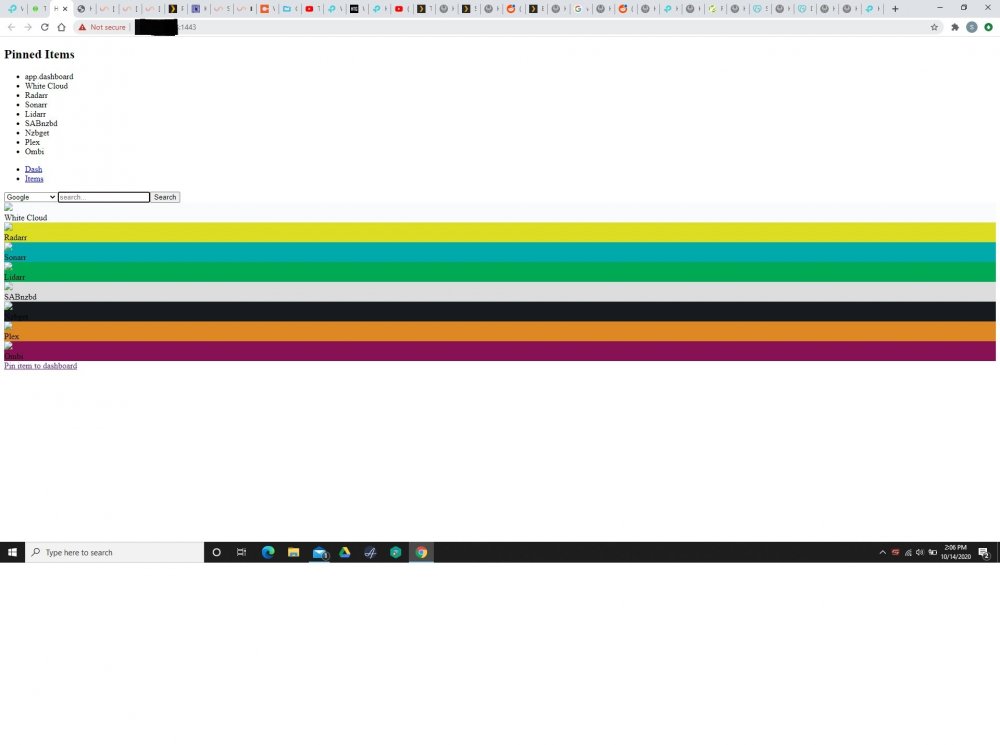
My Swag GUI looks like this....it basically looks like data from my Heimdall app. Am I doing something wrong between the two? If this is messed up what would be the most likely cause?
-
When using the tmp/PlexRamScratch method does it dedicate that space similar to how a VM does or is it more like a usage cap? I'm thinking it will still let a VM or docker or whatever dip into that same ram space as Plex uses....but just want to verify that it will.
-
As I understand it (or maybe dont understand it) the tmpfs/scratch disk method allows you to create a limited amount of ram for Plex to use. If you were maxing out your /tmp then how are you able to have the same functionality of having two recordings going at once that use 16GB each when you have reduced your ram allocation? Does Plex start to overflow into a different location that isnt ram? I'm confused about that.
-
How are you removing the commercials? Does Plex do that on its own when you DVR something? Well since I'm doing all this right now maybe I should just go ahead and set up the tmpfs/scratch disk method. I guess I need to go back some pages and research that a bit more. What is the tmpfs/scratch disk method doing that helps you be able to transcode with RAM but still do all the dvr stuff with the OTA? I guess I'm not following whats going on. I'm actually setting up a HD Homerun this week so I guess I need to understand how this is all working.
-
Well, I am fixing to set up a HD Homerun OTA tuner with Plex but we mostly use it for live viewing of bad weather and such. I suppose if we decide to start recording things I'll need to change it. So when you record with HD Homerun does it put the entire recording temporarily in the transcode folder and then move it to the HD Homerun? I thought the HD Homerun saved recordings directly on it. Can you please give me a basic explanation of how tmpfs/scratch disk method resolved your issue.....just so I have a better understanding of what its doing....it sounds like I could very easily run into that issue if someone decided to start recording OTA shows.
-
Did you switch to the tmpfs/scratch disk method because you were having issues? Was Plex using up all your ram? I have 32GB of ram but I've never seen my ram utilization get over around 7-8Gb so I feel like I have plenty of headway.
-
I am fixing to do this and have a couple questions. Since I have plenty of RAM and am not worried about limiting it can I still just follow the instructions on the very first original post? Its from 2015 so I just want to make sure its all still applicable.
-
I've never used crash plan but I think I want to get it. Can you guys give me a little info.....does CrashPlan backup EVERYTHING where you could restore the entire server if needed.....dockers, plugins, vm's, all their settings, ect? Like a full image of the server you can just reinstall on new drives? In addition can you just restore a single file if say a file was accidently deleted or something like that? Thanks!
-
Thank you for the info....I've watched that one but it doesnt seem very applicable to me trying to get it going with no VPN. In the template for the field labeled "Container Variable: VPN_ENABLED" I changed that from yes too no (but not sure if thats right or not). I also made sure it had my correct router IP for "LAN Network". I'm trying to start it without a VPN just to look it over and get familiar with it....I do not yet have a VPN to enter info in. With just those couple things changed, it wont start, when I select start, it instantly changes to stopped.
-
Let me start off by saying I'm new to Unraid, servers, networks, vpn's, torrent stuff, etc.....SO that means I have no idea what I'm doing LOL I installed the bindex-rtorrentvpn from CA.....does it require vpn to already be setup in order to work? I do not have a vpn setup yet but I am trying to open rtorrent and see what its like. However, when I go to start it, it just reverts back to stopped. I haven't made any kind of changes, I have only simply downloaded the container. Is it reverting back to stopped because I do not have a VPN setup yet? Thanks
-
I must be doing something wrong....when in the ultimate dashboard 1.3 when I make changes, then save as a JSON file, then go to import that JSON file....it says the file already exists. I have changed the name of the newly downloaded file but when I go to import it, the original name carries forward instead of the name i changed it too. It wont let me get past the file already existing. When I click to overwrite it wont. Not sure what I'm doing wrong.
-
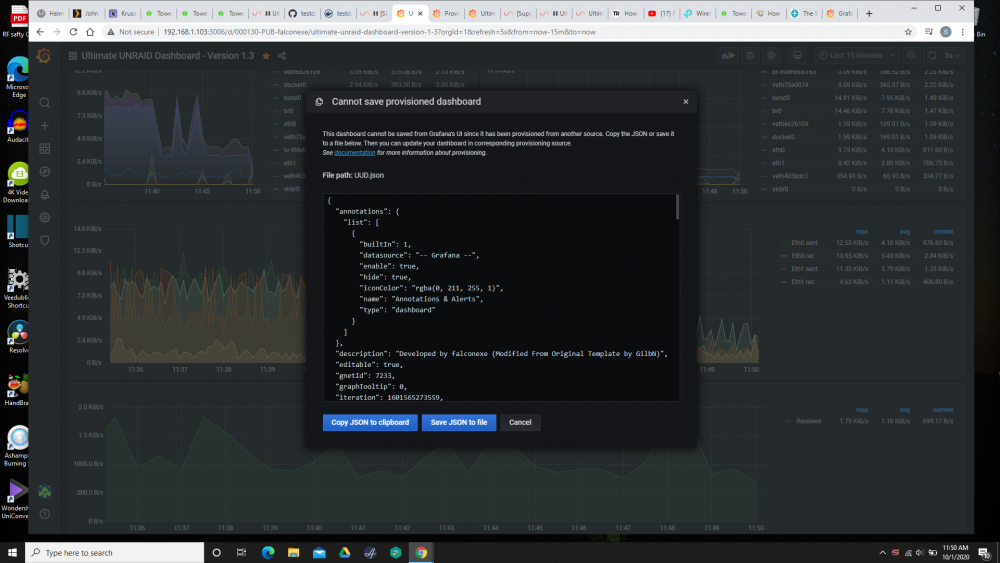
I have GUS set up but in the 1.3 when I go to make changes and hit the save icon, I get this..... Is there a way to make it so that I can just hit the save icon and it save? If not, what do I do here....should I just hit "save JSON to file" and it will save the current configuration that has my edits as the new provisioned dashboard?
-
Well I think before I go too much farther with customizing things, I may jump over to the GUS support thread and get this figure out where all I have to do is his the save icon. Once I get that fixed up, I'll start making changes. THANKS!
-
That screen shot I posted is what comes up when I hit the save button in the upper right.
-
Well, I may have missed understood something.....in the OP of this thread where you have 👉 Create Telegraf Configuration File 👈 (DO THIS FIRST!) Is the Telegraf Configuration File the same thing as the UUD 1.3 that is already installed in GUS or is it something different that I need to install? When I go into GUS and to the 1.3 dashboard there is already a lot of stuff but does the Telegraf Config file change up the dashboard from its default? I'm not sure how I install that using GUS.
-
Okay, I think I have everything working good. There are some data streams not showing up that I need to address but most of them are working fine. I made sure all the drop downs at the top of the dashboard have the correct data in them. Just to clarify, if I make changes like edit a data stream or add one, ect that change will be lost if I close out the browser tab then later go back to it unless I go through a process where I save the JSON file. In this image, do I need to just click "save to file" or do I need to "copy to clipboard" then reimport it or something like that? I'm making changes and just want to make sure I dont lose them.
-
I've got "GUS" installed and went into the 1.3 module. How to I get it to show fan speed and CPU temp? Currently I can see fan speed for each fan in my bios and I can see cpu temps for each core in Unraid, but I've not been able to figure out how to see them in GUS.....I see the "gauges" for them but they have no data going to them. I JUST installed this and I'm new to Unraid and computer stuff in general.....so just pounding my way through it and chewing on it a bit trying to figure out how this all works. Thanks! Stephen
-
Okay, this may be part of the confusion. The one you mentioned...."Grafana Unraid Stack" is actually the one I installed. So since I installed that one, I do not need to install the others nor your download....its all there in the one package correct? I'll swing on over to that thread too and check it out now that I see it has a separate support thread for it.

