Flemming
Members
-
Joined
-
Last visited
-
I had the same issue, and this worked for me to.
-
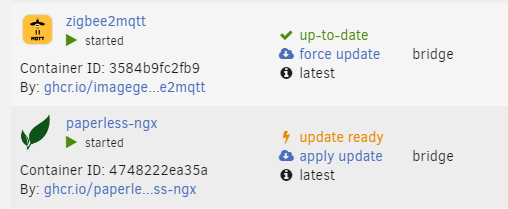
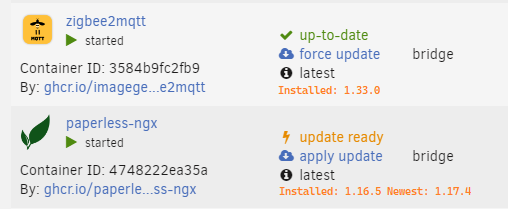
I don't know how complicated this is to implement, but a version tag of installed and new would have been very helpful. How it is: How it should be (example):
-
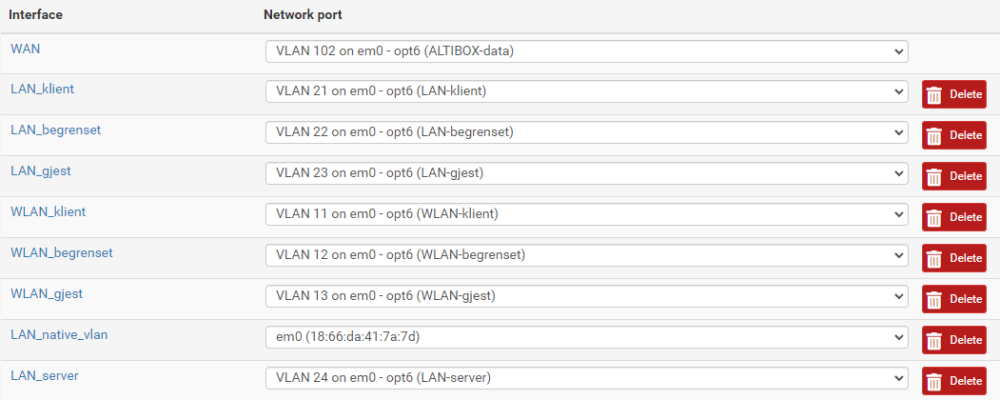
I think I have the same issue, kind of. I have been using UNRAID as a client (vlan not enabled) on VLAN 24 (configured on cisco switch). I also have a pfSense Router where untagged traffic is the management network and all other networks has vlans. pfSense My cisco is very default, 1 is default vlan I try to install the UniFi Controller, so I first enabled vlan on UnRAID with vlan 24 as the first one. Looks like this is "native" for the UnRAID now? And it works, I can manage man unraid server with 10.0.24.10, an all my containers has 10.0.24.10:port. So I tested adding a vlan "vlan1" that should how I understand it be the same as untagged. But how it looks, it is on br0.1 i don't know if this means it's tagged or if it is just a name for the virtual vlan nic(??) The unifi-controller is set to use Custom : br0.1 -- LAN_native_vlan, and it is as shown in the picture assigned (automatic?) 10.0.1.2. But that address is not leased by pfSense, did UnRAID lease it from itself? It is not accessible. I think it might be two different vlan 1's here?


-
Some questions I wonder about the new plugin: 1. What does the "Verify Backup?" do, how is it verifying? 2. The "Ignore errors during backup?", does it report errors but contunue, or is it also not warning about errors in nitification/log? 3. Can I get an example of the tar's glob syntax with two folders? (ref Excluded folders/files) 4. I see that in the old plugin the, the "libvirt.img" was backed up, not there is just some config in libvirt/qemu (ref Backup VM meta?) What is this, how is it different from before? 5. I guess not, but can this plugin backup VM's?
-
I found out that it is. You will not find the new "Appdata Backup" if you are on anything below "6.12". and it is also the other way, you will not find the Appdata Backup/Restore v2.5 on anything above "6.12".
-
I am testing this plugin and there is some questions I can't find any info about here. What does this tell me? [10.08.2023 07:35:14] Backing Up /usr/bin/tar: ./qbittorrent/qBittorrent/ipc-socket: socket ignored What does the "Verify Backups" option do? On USB backup it is noted that "NOTE: USB Backup is deprecated on Unraid version 6.9.0 It is advised to use the Unraid.net plugin instead". Is this option to backup the USB stick where Unraid is stored? Is there any reason this is not recommended? Will it stop working? I understand Unraid.net plugin is not free, and is a subscription service. When restoring backup I see that there is just possible to select full storage. A) Is it possible to just restore one appdata-folder (for one app) from a full backup? I see that is not a option, not even from splitted backups. B) If the appdata-folder is containing appdata not backed up (app-folders not included in backup ect), will these be deleted in the restore-process or will they be untouched? C) if you restore to an existing app-data app folder (like nextcloud or any), will this script just add not existing files or will it overwrite files with same name/path? What about files just in app-data but not in the backup?
-
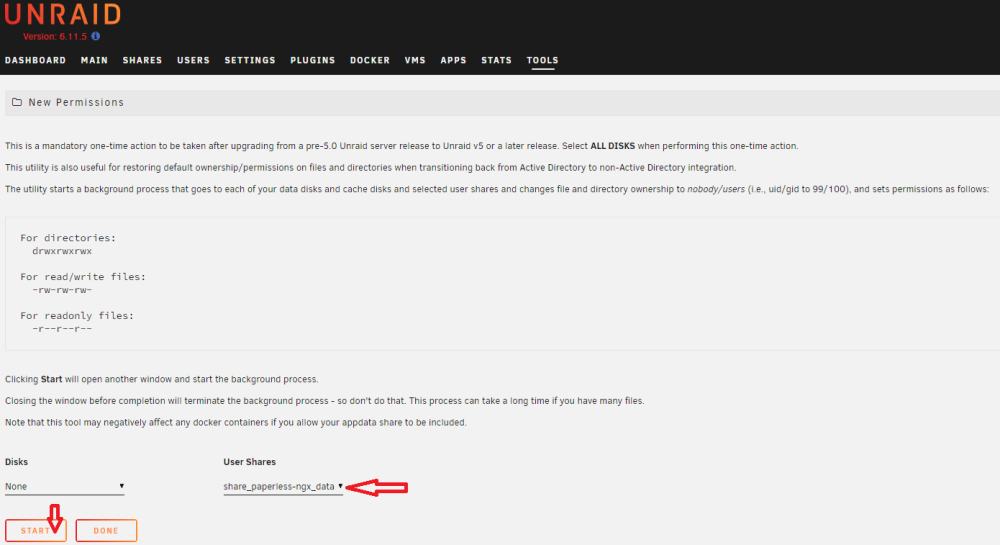
Another solution, when I have problems like this I use the "New Permissions" tool in unraid on that share Thanks for using the guide btw. Processing: /mnt/user/share_paperless-ngx_data ... chmod -R u-x,go-rwx,go+u,ugo+X /mnt/user/share_paperless-ngx_data ... chown -R nobody:users /mnt/user/share_paperless-ngx_data ... sync Completed, elapsed time: 00:00:01 😎
-
This one has stopped working for me. The problem is that I am not able to access the Web UI. Also I don't think the backup are running. Tested http://10.0.24.10:7810/ http://10.0.24.10:7910/ http://10.0.24.10:5800/ Apply: Removing container: CrashPlanPRO Successfully removed container 'CrashPlanPRO' Command execution docker run -d --name='CrashPlanPRO' --net='host' --privileged=true -e TZ="Europe/Berlin" -e HOST_OS="Unraid" -e HOST_HOSTNAME="UnRAID" -e HOST_CONTAINERNAME="CrashPlanPRO" -e 'USER_ID'='99' -e 'GROUP_ID'='100' -e 'UMASK'='000' -e 'APP_NICENESS'='' -e 'DISPLAY_WIDTH'='1280' -e 'DISPLAY_HEIGHT'='768' -e 'SECURE_CONNECTION'='0' -e 'X11VNC_EXTRA_OPTS'='' -e 'CRASHPLAN_SRV_MAX_MEM'='' -e 'TCP_PORT_7810'='7810' -e 'TCP_PORT_7910'='7910' -e 'TCP_PORT_7810'='7810' -e 'TCP_PORT_7910'='7910' -l net.unraid.docker.managed=dockerman -l net.unraid.docker.webui='http://[IP]:[PORT:5800]' -l net.unraid.docker.icon='https://raw.githubusercontent.com/jlesage/docker-templates/master/jlesage/images/crashplan-pro-icon.png' -v '/mnt/user':'/storage':'ro' -v '/mnt/user/appdata/CrashPlanPRO':'/config':'rw' 'jlesage/crashplan-pro' 85aca7548e2a4af0062f41b17f411e76009e5c05467885dbd2fc7d552f231278 The command finished successfully! Log: [supervisor ] service 'certsmonitor' is disabled. [supervisor ] loading service 'nginx'... [supervisor ] loading service 'xvnc'... [supervisor ] loading service 'openbox'... [supervisor ] loading service 'CrashPlanEngine'... [supervisor ] loading service 'logmonitor'... [supervisor ] loading service 'logrotate'... [supervisor ] all services loaded. [supervisor ] starting services... [supervisor ] starting service 'xvnc'... [xvnc ] Xvnc TigerVNC 1.13.1 - built May 16 2023 17:43:49 [xvnc ] Copyright (C) 1999-2022 TigerVNC Team and many others (see README.rst) [xvnc ] See https://www.tigervnc.org for information on TigerVNC. [xvnc ] Underlying X server release 12014000 [xvnc ] Fri Jun 16 10:32:11 2023 [xvnc ] vncext: VNC extension running! [xvnc ] vncext: Listening for VNC connections on /tmp/vnc.sock (mode 0660) [xvnc ] (EE) [xvnc ] Fatal server error: [xvnc ] (EE) vncExtInit: failed to bind socket: Address in use (98) [xvnc ] (EE) [supervisor ] service 'xvnc' failed to be started: not ready after 5000 msec, giving up. [supervisor ] stopping service 'xvnc'... [supervisor ] service 'xvnc' exited (with status 1). [finish ] executing container finish scripts... [finish ] all container finish scripts executed. [init ] container is starting... [cont-env ] loading container environment variables... [cont-env ] APP_NAME: loading... [cont-env ] APP_VERSION: loading... [cont-env ] DISPLAY: executing... [cont-env ] DISPLAY: terminated successfully. [cont-env ] DISPLAY: loading... [cont-env ] DOCKER_IMAGE_PLATFORM: loading... [cont-env ] DOCKER_IMAGE_VERSION: loading... [cont-env ] GTK2_RC_FILES: executing... [cont-env ] GTK2_RC_FILES: terminated successfully. [cont-env ] GTK2_RC_FILES: loading... [cont-env ] GTK_THEME: executing... [cont-env ] GTK_THEME: terminated successfully. [cont-env ] GTK_THEME: loading... [cont-env ] HOME: loading... [cont-env ] QT_STYLE_OVERRIDE: executing... [cont-env ] QT_STYLE_OVERRIDE: terminated successfully. [cont-env ] QT_STYLE_OVERRIDE: loading... [cont-env ] TAKE_CONFIG_OWNERSHIP: loading... [cont-env ] XDG_CACHE_HOME: loading... [cont-env ] XDG_CONFIG_HOME: loading... [cont-env ] XDG_DATA_HOME: loading... [cont-env ] XDG_RUNTIME_DIR: loading... [cont-env ] XDG_STATE_HOME: loading... [cont-env ] container environment variables initialized. [cont-secrets] loading container secrets... [cont-secrets] container secrets loaded. [cont-init ] executing container initialization scripts... [cont-init ] 10-certs.sh: executing... [cont-init ] 10-certs.sh: terminated successfully. [cont-init ] 10-check-app-niceness.sh: executing... [cont-init ] 10-check-app-niceness.sh: terminated successfully. [cont-init ] 10-cjk-font.sh: executing... [cont-init ] 10-cjk-font.sh: terminated successfully. [cont-init ] 10-clean-logmonitor-states.sh: executing... [cont-init ] 10-clean-logmonitor-states.sh: terminated successfully. [cont-init ] 10-clean-tmp-dir.sh: executing... [cont-init ] 10-clean-tmp-dir.sh: terminated successfully. [cont-init ] 10-fontconfig-cache-dir.sh: executing... [cont-init ] 10-fontconfig-cache-dir.sh: terminated successfully. [cont-init ] 10-init-users.sh: executing... [cont-init ] 10-init-users.sh: terminated successfully. [cont-init ] 10-nginx.sh: executing... [cont-init ] 10-nginx.sh: terminated successfully. [cont-init ] 10-openbox.sh: executing... [cont-init ] 10-openbox.sh: terminated successfully. [cont-init ] 10-set-tmp-dir-perms.sh: executing... [cont-init ] 10-set-tmp-dir-perms.sh: terminated successfully. [cont-init ] 10-vnc-password.sh: executing... [cont-init ] 10-vnc-password.sh: terminated successfully. [cont-init ] 10-web-data.sh: executing... [cont-init ] 10-web-data.sh: terminated successfully. [cont-init ] 10-x11-unix.sh: executing... [cont-init ] 10-x11-unix.sh: terminated successfully. [cont-init ] 10-xdg-runtime-dir.sh: executing... [cont-init ] 10-xdg-runtime-dir.sh: terminated successfully. [cont-init ] 15-install-pkgs.sh: executing... [cont-init ] 15-install-pkgs.sh: terminated successfully. [cont-init ] 55-crashplan-pro.sh: executing... [cont-init ] 55-crashplan-pro.sh: terminated successfully. [cont-init ] 55-validate_max_mem.sh: executing... [cont-init ] 55-validate_max_mem.sh: terminated successfully. [cont-init ] 85-take-config-ownership.sh: executing... ** Press ANY KEY to close this window ** d
-
I solved this today by adding "adapter: deconz" to the configuration.yaml, this is required for ConBee and ConBee II (and RaspBee and RaspBee II, but they are likely not used in a UnRAID setup) serial: adapter: deconz port: /dev/ttyACM1 https://www.zigbee2mqtt.io/guide/adapters/#recommended
-
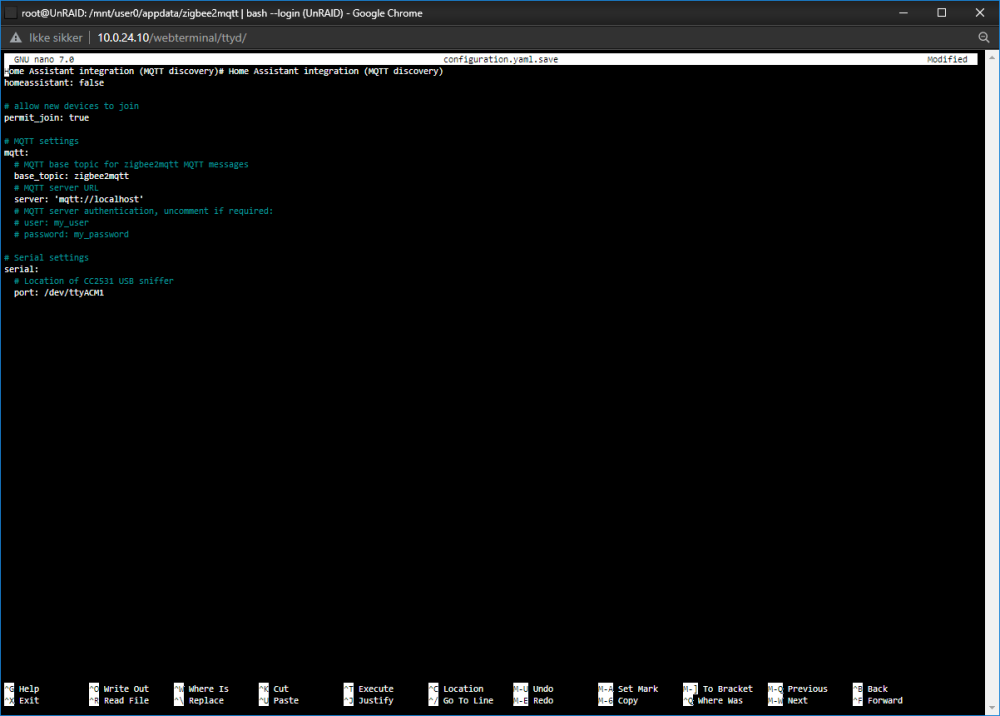
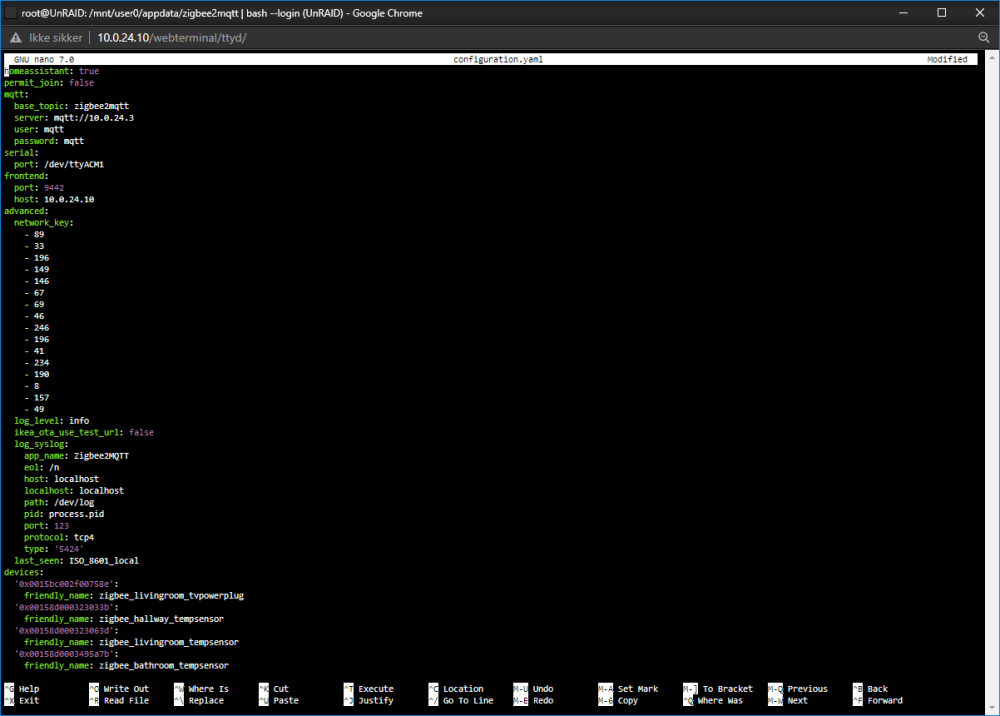
Hi. I have used Zigbee2MQTT on a Pi for the last 1-2 years using this method: https://flemmingss.com/how-to-set-up-zigbee2mqtt-on-a-raspberry-pi-and-integrate-it-with-home-assistant/ But I want to migrate ZigBee2mqtt to UnRAID så I don't have to have a Pi just for this. I have: Stopped the zigbee2mqtt service on Pi. Copyd the content of the data folder from the Pi /opt/zigbee2mqtt/ using winSCP on to UnRAID \\10.0.24.10\appdata\zigbee2mqtt Used the "New Permissions" on the appdata folder used the cli to change the config of configuration.yaml and configuration.yaml.save using nano root@UnRAID:/mnt/user0/appdata/zigbee2mqtt# nano configuration.yaml root@UnRAID:/mnt/user0/appdata/zigbee2mqtt# nano configuration.yaml.save root@UnRAID:/mnt/user0/appdata/zigbee2mqtt# nano configuration.yaml root@UnRAID:/mnt/user0/appdata/zigbee2mqtt# nano configuration.yaml.save inserted ConBee II in the UnRAID server and tried both ZigBee2MQTT dockers available in the appstore (koenkk/zigbee2mqtt and koenkk/zigbee2mqtt). No mather what I do, if I map by path or id, I get this: Zigbee2MQTT:info 2023-03-11 11:39:17: Logging to console and directory: '/config/log/2023-03-11.11-39-17' filename: log.txt Zigbee2MQTT:info 2023-03-11 11:39:17: Starting Zigbee2MQTT version 1.30.2 (commit #unknown) Zigbee2MQTT:info 2023-03-11 11:39:17: Starting zigbee-herdsman (0.14.96) Zigbee2MQTT:error 2023-03-11 11:39:38: Error while starting zigbee-herdsman Zigbee2MQTT:error 2023-03-11 11:39:38: Failed to start zigbee Zigbee2MQTT:error 2023-03-11 11:39:38: Check https://www.zigbee2mqtt.io/guide/installation/20_zigbee2mqtt-fails-to-start.html for possible solutions Zigbee2MQTT:error 2023-03-11 11:39:38: Exiting... have Tried both available dockers for zigbee2mqtt in the appstore. They fail in the same way. The device is /dev/ttyACM1 or /dev/serial/by-id/usb-dresden_elektronik_ingenieurtechnik_GmbH_ConBee_II_DE2445271-if00 root@UnRAID:~# ls -l /dev/ttyACM* crw-rw---- 1 root dialout 166, 0 Feb 20 20:04 /dev/ttyACM0 crw-rw---- 1 root dialout 166, 1 Mar 11 10:37 /dev/ttyACM1 root@UnRAID:~# ls -l /dev/serial/by-id total 0 lrwxrwxrwx 1 root root 13 Feb 20 20:04 usb-0658_0200_12345678-9012-3456-7890-123456789012-if00 -> ../../ttyACM0 lrwxrwxrwx 1 root root 13 Mar 11 11:27 usb-dresden_elektronik_ingenieurtechnik_GmbH_ConBee_II_DE2445271-if00 -> ../../ttyACM1 I have tested access: root@UnRAID:~# test -w /dev/ttyACM1 && echo success || echo failure success have tried all kinds of mapping, isk why it is not working, because i have Zwave JS UI up an running 0 problem using /dev/ttyACM0:/dev/zwave For Zigbee2MQTT I have tried all kind of configurations /dev/ttyACM1 /dev/ttyACM1:/dev/ttyACM1 /dev/serial/by-id/usb-dresden_elektronik_ingenieurtechnik_GmbH_ConBee_II_DE2445271-if00 /dev/serial/by-id/usb-dresden_elektronik_ingenieurtechnik_GmbH_ConBee_II_DE2445271-if00:/dev/ttyACM1 /dev/ttyACM1/dev/serial/by-id/usb-dresden_elektronik_ingenieurtechnik_GmbH_ConBee_II_DE2445271-if00 I have also tried both variant on port. serial: port: /dev/ttyACM1 Can anyone explain why this is failing? I have my stick back in the Pi now and the network is up and running.
-
nop, that worked
-
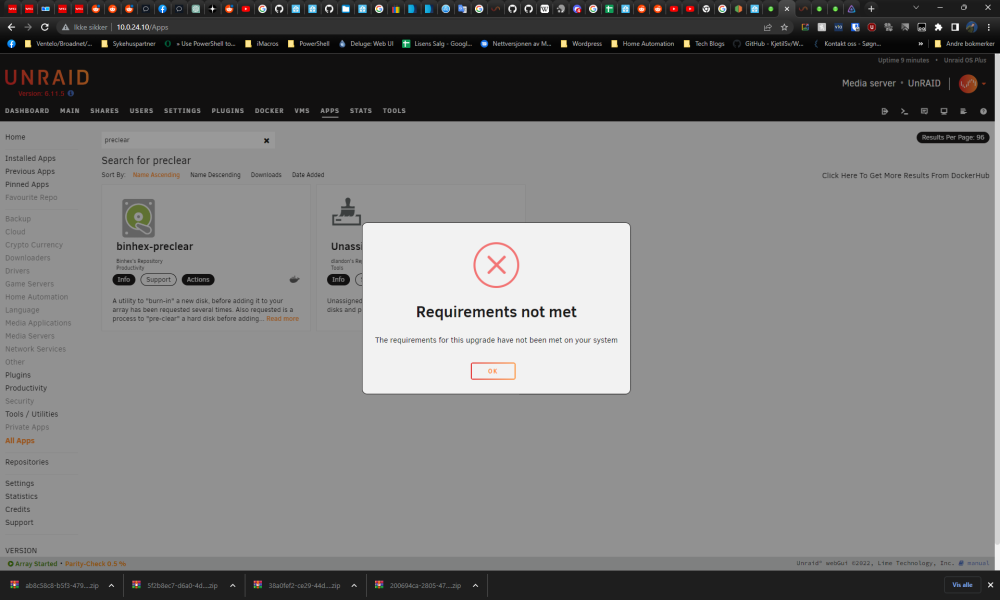
I am on 6.11.5 and I get this when trying to install "Unassigned Devices Preclear"
-
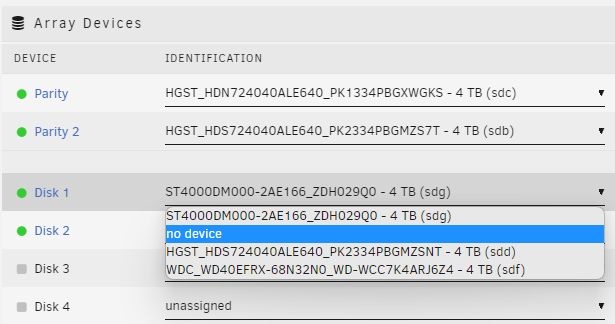
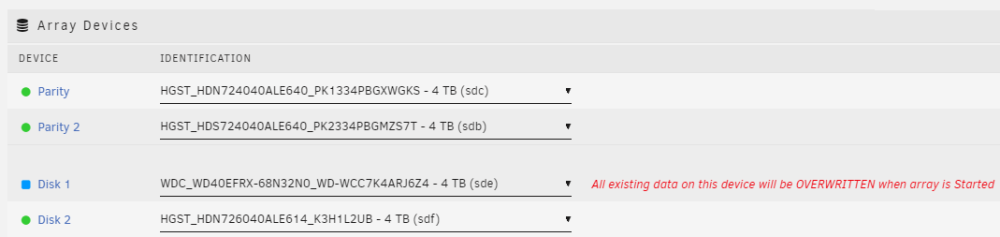
Good evening. I have read some guides according to replacing drives in UnRAID, including the official one. It looks like in each guide you should select "no device", restart array (or reboot server) and then select the new drive again. It there any reason I can't just change from "....ZDH029Q0" to "....WCC7K4ARJ6Z4" directly in one go whit out starting the array or rebooting in the meantime? Does the array has to be started without Disk 1 present to understand that it has to rebuild the new drive? Like changing it to this in the first place (Screenshot is btw from after restart of array and reboot):
-
So the two here is fine? HGST_HDS724040ALE640_PK2334PBGMZSNT WDC_WD40EFRX-68N32N0_WD-WCC7K4ARJ6Z4
-
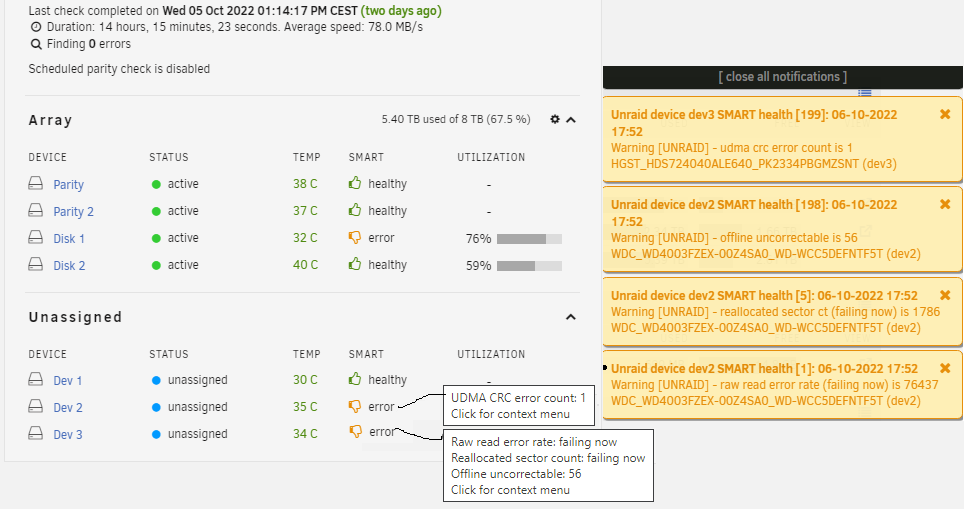
Hi. I have three new (used) 4TB drives I planed to add to my array, Pre-clear success for two of three. But looks like two is marked ERROR. Do you have any idea which of these I can safely use and which I should avoid? Dev 2 - sdb WDC_WD4003FZEX-00Z4SA0_WD-WCC5DEFNTF5T Pre-Clear report: ############################################################################################################################ # # # unRAID Server Preclear of disk WD-WCC5DEFNTF5T # # Cycle 1 of 1, partition start on sector 64. # # # # # # Step 1 of 5 - Pre-read in progress: (25% Done) # # # # # # # # # # # # # # # # # # # # ** Time elapsed: 19:20:58 | Current speed: 14 MB/s | Average speed: 14 MB/s # # # ############################################################################################################################ # Cycle elapsed time: 19:20:59 | Total elapsed time: 19:20:59 # ############################################################################################################################ ############################################################################################################################ # # # S.M.A.R.T. Status (device type: default) # # # # # # ATTRIBUTE INITIAL STATUS # # 5-Reallocated_Sector_Ct 480 - # # 9-Power_On_Hours 45568 - # # 194-Temperature_Celsius 31 - # # 196-Reallocated_Event_Count 429 - # # 197-Current_Pending_Sector 0 - # # 198-Offline_Uncorrectable 56 - # # 199-UDMA_CRC_Error_Count 0 - # # # # # # # # # # # ############################################################################################################################ # SMART overall-health self-assessment test result: PASSED # ############################################################################################################################ /usr/local/emhttp/plugins/preclear.disk/script/preclear_disk.sh: line 844: 19:20:58 + 66 : syntax error in expression (error token is ":20:5 8 + 66 ") /usr/local/emhttp/plugins/preclear.disk/script/preclear_disk.sh: line 1139: 19:20:58 : syntax error in expression (error token is ":20:58 ") --> ATTENTION: Please take a look into the SMART report above for drive health issues. --> RESULT: Preclear Finished Successfully!. SMART report: WDC_WD4003FZEX-00Z4SA0_WD-WCC5DEFNTF5T-20221007-1431.txt Dev 3 - sdc HGST_HDS724040ALE640_PK2334PBGMZSNT Pre-Clear report: ############################################################################################################################ # # # unRAID Server Preclear of disk PK2334PBGMZSNT # # Cycle 1 of 1, partition start on sector 64. # # # # # # Step 1 of 5 - Pre-read verification: [9:21:58 @ 118 MB/s] SUCCESS # # Step 2 of 5 - Zeroing the disk: [16:37:20 @ 0 MB/s] SUCCESS # # Step 3 of 5 - Writing unRAID's Preclear signature: SUCCESS # # Step 4 of 5 - Verifying unRAID's Preclear signature: SUCCESS # # Step 5 of 5 - Post-Read verification: [9:23:44 @ 118 MB/s] SUCCESS # # # # # # # # # # # # # # # ############################################################################################################################ # Cycle elapsed time: 35:23:41 | Total elapsed time: 35:23:44 # ############################################################################################################################ ############################################################################################################################ # # # S.M.A.R.T. Status (device type: default) # # # # # # ATTRIBUTE INITIAL CYCLE 1 STATUS # # Reallocated_Sector_Ct 0 0 - # # Power_On_Hours 16498 16534 Up 36 # # Temperature_Celsius 30 37 Up 7 # # Reallocated_Event_Count 0 0 - # # Current_Pending_Sector 0 0 - # # Offline_Uncorrectable 0 0 - # # UDMA_CRC_Error_Count 1 1 - # # # # # # # # # # # ############################################################################################################################ # SMART overall-health self-assessment test result: PASSED # ############################################################################################################################ --> ATTENTION: Please take a look into the SMART report above for drive health issues. --> RESULT: Preclear Finished Successfully!. SMART report: HGST_HDS724040ALE640_PK2334PBGMZSNT-20221007-1435.txt Dev 1 - sdd WDC_WD40EFRX-68N32N0_WD-WCC7K4ARJ6Z4 Pre-Clear report: ############################################################################################################################ # # # unRAID Server Preclear of disk WD-WCC7K4ARJ6Z4 # # Cycle 1 of 1, partition start on sector 64. # # # # # # Step 1 of 5 - Pre-read verification: [8:02:34 @ 138 MB/s] SUCCESS # # Step 2 of 5 - Zeroing the disk: [7:46:39 @ 142 MB/s] SUCCESS # # Step 3 of 5 - Writing unRAID's Preclear signature: SUCCESS # # Step 4 of 5 - Verifying unRAID's Preclear signature: SUCCESS # # Step 5 of 5 - Post-Read verification: [8:06:55 @ 136 MB/s] SUCCESS # # # # # # # # # # # # # # # ############################################################################################################################ # Cycle elapsed time: 23:56:26 | Total elapsed time: 23:56:27 # ############################################################################################################################ ############################################################################################################################ # # # S.M.A.R.T. Status (device type: default) # # # # # # ATTRIBUTE INITIAL CYCLE 1 STATUS # # Reallocated_Sector_Ct 0 0 - # # Power_On_Hours 17292 17316 Up 24 # # Temperature_Celsius 28 32 Up 4 # # Reallocated_Event_Count 0 0 - # # Current_Pending_Sector 0 0 - # # Offline_Uncorrectable 0 0 - # # UDMA_CRC_Error_Count 0 0 - # # # # # # # # # # # ############################################################################################################################ # SMART overall-health self-assessment test result: PASSED # ############################################################################################################################ --> ATTENTION: Please take a look into the SMART report above for drive health issues. --> RESULT: Preclear Finished Successfully!. SMART report: WDC_WD40EFRX-68N32N0_WD-WCC7K4ARJ6Z4-20221007-1433.txt