





ikosa
Members
-
Joined
-
Last visited
-
That fixed on my situation too. I'm on 2.9.0 and afraid to click on apply update 😐
-
after 6.8.1 update fail2ban failed to start: root@Tower:/custom/fail2ban-0.11.1# /etc/rc.d/rc.fail2ban start Starting fail2ban: ERROR:root:code for hash md5 was not found. Traceback (most recent call last): File "/usr/lib64/python2.7/hashlib.py", line 139, in <module> globals()[__func_name] = __get_hash(__func_name) File "/usr/lib64/python2.7/hashlib.py", line 91, in __get_builtin_constructor raise ValueError('unsupported hash type ' + name) ValueError: unsupported hash type md5 ERROR:root:code for hash sha1 was not found. Traceback (most recent call last): File "/usr/lib64/python2.7/hashlib.py", line 139, in <module> globals()[__func_name] = __get_hash(__func_name) File "/usr/lib64/python2.7/hashlib.py", line 91, in __get_builtin_constructor raise ValueError('unsupported hash type ' + name) ValueError: unsupported hash type sha1 ERROR:root:code for hash sha224 was not found. Traceback (most recent call last): File "/usr/lib64/python2.7/hashlib.py", line 139, in <module> globals()[__func_name] = __get_hash(__func_name) File "/usr/lib64/python2.7/hashlib.py", line 91, in __get_builtin_constructor raise ValueError('unsupported hash type ' + name) ValueError: unsupported hash type sha224 ERROR:root:code for hash sha256 was not found. Traceback (most recent call last): File "/usr/lib64/python2.7/hashlib.py", line 139, in <module> globals()[__func_name] = __get_hash(__func_name) File "/usr/lib64/python2.7/hashlib.py", line 91, in __get_builtin_constructor raise ValueError('unsupported hash type ' + name) ValueError: unsupported hash type sha256 ERROR:root:code for hash sha384 was not found. Traceback (most recent call last): File "/usr/lib64/python2.7/hashlib.py", line 139, in <module> globals()[__func_name] = __get_hash(__func_name) File "/usr/lib64/python2.7/hashlib.py", line 91, in __get_builtin_constructor raise ValueError('unsupported hash type ' + name) ValueError: unsupported hash type sha384 ERROR:root:code for hash sha512 was not found. Traceback (most recent call last): File "/usr/lib64/python2.7/hashlib.py", line 139, in <module> globals()[__func_name] = __get_hash(__func_name) File "/usr/lib64/python2.7/hashlib.py", line 91, in __get_builtin_constructor raise ValueError('unsupported hash type ' + name) ValueError: unsupported hash type sha512 ERROR:root:code for hash md5 was not found. Traceback (most recent call last): File "/usr/lib64/python2.7/hashlib.py", line 139, in <module> globals()[__func_name] = __get_hash(__func_name) File "/usr/lib64/python2.7/hashlib.py", line 91, in __get_builtin_constructor raise ValueError('unsupported hash type ' + name) ValueError: unsupported hash type md5 ERROR:root:code for hash sha1 was not found. Traceback (most recent call last): File "/usr/lib64/python2.7/hashlib.py", line 139, in <module> globals()[__func_name] = __get_hash(__func_name) File "/usr/lib64/python2.7/hashlib.py", line 91, in __get_builtin_constructor raise ValueError('unsupported hash type ' + name) ValueError: unsupported hash type sha1 ERROR:root:code for hash sha224 was not found. Traceback (most recent call last): File "/usr/lib64/python2.7/hashlib.py", line 139, in <module> globals()[__func_name] = __get_hash(__func_name) File "/usr/lib64/python2.7/hashlib.py", line 91, in __get_builtin_constructor raise ValueError('unsupported hash type ' + name) ValueError: unsupported hash type sha224 ERROR:root:code for hash sha256 was not found. Traceback (most recent call last): File "/usr/lib64/python2.7/hashlib.py", line 139, in <module> globals()[__func_name] = __get_hash(__func_name) File "/usr/lib64/python2.7/hashlib.py", line 91, in __get_builtin_constructor raise ValueError('unsupported hash type ' + name) ValueError: unsupported hash type sha256 ERROR:root:code for hash sha384 was not found. Traceback (most recent call last): File "/usr/lib64/python2.7/hashlib.py", line 139, in <module> globals()[__func_name] = __get_hash(__func_name) File "/usr/lib64/python2.7/hashlib.py", line 91, in __get_builtin_constructor raise ValueError('unsupported hash type ' + name) ValueError: unsupported hash type sha384 ERROR:root:code for hash sha512 was not found. Traceback (most recent call last): File "/usr/lib64/python2.7/hashlib.py", line 139, in <module> globals()[__func_name] = __get_hash(__func_name) File "/usr/lib64/python2.7/hashlib.py", line 91, in __get_builtin_constructor raise ValueError('unsupported hash type ' + name) ValueError: unsupported hash type sha512 2020-01-12 17:11:54,549 fail2ban [15981]: ERROR 'module' object has no attribute 'sha1' ERROR:fail2ban:'module' object has no attribute 'sha1' 2020-01-12 17:12:24,895 fail2ban [15980]: ERROR Could not start server. Maybe an old socket file is still present. Try to remove /var/run/fail2 ban/fail2ban.sock. If you used fail2ban-client to start the server, adding the - x option will do it ERROR:fail2ban:Could not start server. Maybe an old socket file is still present A quick search shows that is related to python installation: https://stackoverflow.com/questions/59269208/errorrootcode-for-hash-md5-was-not-found-not-able-to-use-any-hg-mercurial-co https://stackoverflow.com/questions/59068580/cqlsh-errorrootcode-for-hash-md5-was-not-found https://stackoverflow.com/questions/20399331/error-importing-hashlib-with-python-2-7-but-not-with-2-6 ... Solution: i download and install python-2.7.17-x86_64-2.txz and fail2ban starts without problem. I download and install python-2.7.5-x86_64-1.txz to double check and fail2ban failed to start again. I'm not sure if there is a python update in 6.8.1 but seems like something broken in it.
-
I have updated from 6.8.0 to 6.8.1 after update fail2ban cant start. root@Tower:/custom/fail2ban-0.11.1# /etc/rc.d/rc.fail2ban start Starting fail2ban: ERROR:root:code for hash md5 was not found. Traceback (most recent call last): File "/usr/lib64/python2.7/hashlib.py", line 139, in <module> globals()[__func_name] = __get_hash(__func_name) File "/usr/lib64/python2.7/hashlib.py", line 91, in __get_builtin_constructor raise ValueError('unsupported hash type ' + name) ValueError: unsupported hash type md5 ERROR:root:code for hash sha1 was not found. Traceback (most recent call last): File "/usr/lib64/python2.7/hashlib.py", line 139, in <module> globals()[__func_name] = __get_hash(__func_name) File "/usr/lib64/python2.7/hashlib.py", line 91, in __get_builtin_constructor raise ValueError('unsupported hash type ' + name) ValueError: unsupported hash type sha1 ERROR:root:code for hash sha224 was not found. Traceback (most recent call last): File "/usr/lib64/python2.7/hashlib.py", line 139, in <module> globals()[__func_name] = __get_hash(__func_name) File "/usr/lib64/python2.7/hashlib.py", line 91, in __get_builtin_constructor raise ValueError('unsupported hash type ' + name) ValueError: unsupported hash type sha224 ERROR:root:code for hash sha256 was not found. Traceback (most recent call last): File "/usr/lib64/python2.7/hashlib.py", line 139, in <module> globals()[__func_name] = __get_hash(__func_name) File "/usr/lib64/python2.7/hashlib.py", line 91, in __get_builtin_constructor raise ValueError('unsupported hash type ' + name) ValueError: unsupported hash type sha256 ERROR:root:code for hash sha384 was not found. Traceback (most recent call last): File "/usr/lib64/python2.7/hashlib.py", line 139, in <module> globals()[__func_name] = __get_hash(__func_name) File "/usr/lib64/python2.7/hashlib.py", line 91, in __get_builtin_constructor raise ValueError('unsupported hash type ' + name) ValueError: unsupported hash type sha384 ERROR:root:code for hash sha512 was not found. Traceback (most recent call last): File "/usr/lib64/python2.7/hashlib.py", line 139, in <module> globals()[__func_name] = __get_hash(__func_name) File "/usr/lib64/python2.7/hashlib.py", line 91, in __get_builtin_constructor raise ValueError('unsupported hash type ' + name) ValueError: unsupported hash type sha512 ERROR:root:code for hash md5 was not found. Traceback (most recent call last): File "/usr/lib64/python2.7/hashlib.py", line 139, in <module> globals()[__func_name] = __get_hash(__func_name) File "/usr/lib64/python2.7/hashlib.py", line 91, in __get_builtin_constructor raise ValueError('unsupported hash type ' + name) ValueError: unsupported hash type md5 ERROR:root:code for hash sha1 was not found. Traceback (most recent call last): File "/usr/lib64/python2.7/hashlib.py", line 139, in <module> globals()[__func_name] = __get_hash(__func_name) File "/usr/lib64/python2.7/hashlib.py", line 91, in __get_builtin_constructor raise ValueError('unsupported hash type ' + name) ValueError: unsupported hash type sha1 ERROR:root:code for hash sha224 was not found. Traceback (most recent call last): File "/usr/lib64/python2.7/hashlib.py", line 139, in <module> globals()[__func_name] = __get_hash(__func_name) File "/usr/lib64/python2.7/hashlib.py", line 91, in __get_builtin_constructor raise ValueError('unsupported hash type ' + name) ValueError: unsupported hash type sha224 ERROR:root:code for hash sha256 was not found. Traceback (most recent call last): File "/usr/lib64/python2.7/hashlib.py", line 139, in <module> globals()[__func_name] = __get_hash(__func_name) File "/usr/lib64/python2.7/hashlib.py", line 91, in __get_builtin_constructor raise ValueError('unsupported hash type ' + name) ValueError: unsupported hash type sha256 ERROR:root:code for hash sha384 was not found. Traceback (most recent call last): File "/usr/lib64/python2.7/hashlib.py", line 139, in <module> globals()[__func_name] = __get_hash(__func_name) File "/usr/lib64/python2.7/hashlib.py", line 91, in __get_builtin_constructor raise ValueError('unsupported hash type ' + name) ValueError: unsupported hash type sha384 ERROR:root:code for hash sha512 was not found. Traceback (most recent call last): File "/usr/lib64/python2.7/hashlib.py", line 139, in <module> globals()[__func_name] = __get_hash(__func_name) File "/usr/lib64/python2.7/hashlib.py", line 91, in __get_builtin_constructor raise ValueError('unsupported hash type ' + name) ValueError: unsupported hash type sha512 2020-01-12 17:11:54,549 fail2ban [15981]: ERROR 'module' object has no attribute 'sha1' ERROR:fail2ban:'module' object has no attribute 'sha1' 2020-01-12 17:12:24,895 fail2ban [15980]: ERROR Could not start server. Maybe an old socket file is still present. Try to remove /var/run/fail2 ban/fail2ban.sock. If you used fail2ban-client to start the server, adding the - x option will do it ERROR:fail2ban:Could not start server. Maybe an old socket file is still present . Try to remove /var/run/fail2ban/fail2ban.sock. If you used fail2ban-client to start the server, adding the -x option will do it
-
+1 for lycheesync or a way/a fork to use lycheesync with this docker image etc. i dont want to duplicate my all photos or lose folder structure.
-
Thanks again for this great docker. Yesterday i realize that there is a problem with existing turkish characters on files and folders. I can type turkish chars without problem. But cant see and cant work with files and folders that have turkish chars in it. I think this problem poped up after a update because i use this docker since the beginnig. Can your last update cause this?
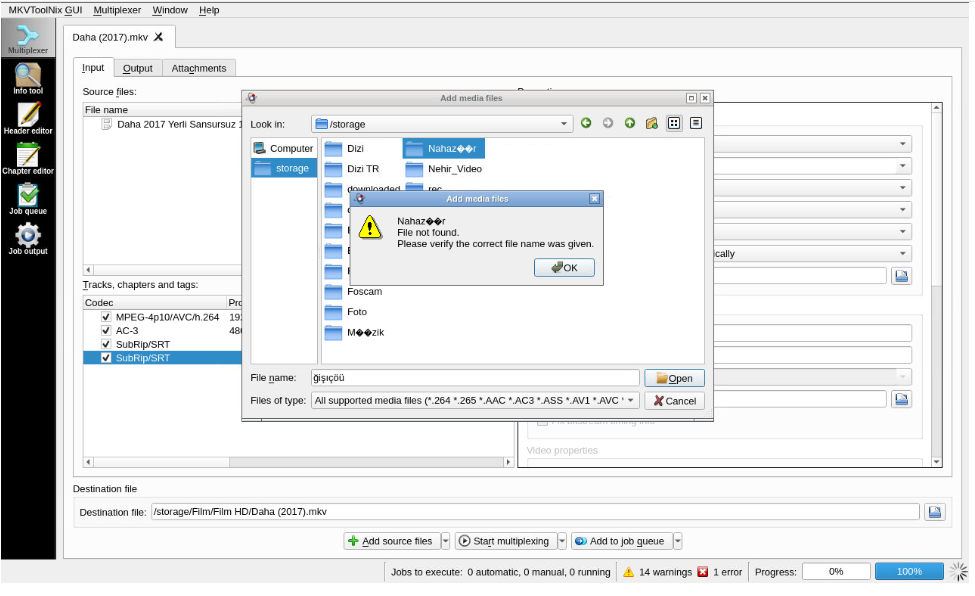
-
Thanks that really helped. But if you can add bash and curl to the container i will be appriciated. Or is there any proper and easy way to add bash and curl to my container that can survive container update?
-
this requires lots of editing on my scripts.
-
Container is running and i can log in from webui but i cant login from terminal? root@Tower:/# docker inspect --format="{{ .State.Running }}" MKVToolNix true root@Tower:/# docker exec -ti MKVToolNix /bin/bash rpc error: code = 2 desc = containerd: container not started
-
I've already tried this, but Crashplan's logs aren't particularly large. And as I said in my post there don't seem to be any logs internal to crashplan that I can clear or limit the size of. That solves my issue with btsync and couchpotato. SM-N9000Q cihaz?mdan Tapatalk kullan?larak gönderildi
-
http://lime-technology.com/forum/index.php?topic=45249.0 SM-N9000Q cihaz?mdan Tapatalk kullan?larak gönderildi
-
We need a script to track usage of containers and (not mapped)directories in containers
-
If anybody is interested I found some tools to monitor and track docker containers. Prometheus, container_exporter: http://rancher.com/docker-monitoring-continued-prometheus-and-sysdig/ And Prometheus can also get metrics from cadvisor. https://labs.ctl.io/monitoring-docker-services-with-prometheus/ I can't play enough to achieve my goal. Interestingly can't find a metric about container sizes...
-
Its a bug within dockerMan, not CA. You're going to have to basically delete all references to the template file within /boot/config/plugins/dockerMan. See here http://lime-technology.com/forum/index.php?topic=40262.msg380740#msg380740 i have deleted the files that is related to cadvisor: /boot/config/plugins/dockerMan/templates-user/my-cadvisor.xml /boot/config/plugins/dockerMan/images/ 2 image files related to cadvisor delete container and the image reinstall cadvisor but still no webui link do i miss smtg? Reboot Nope, retried it with restart but still no link.
-
Its a bug within dockerMan, not CA. You're going to have to basically delete all references to the template file within /boot/config/plugins/dockerMan. See here http://lime-technology.com/forum/index.php?topic=40262.msg380740#msg380740 i have deleted the files that is related to cadvisor: /boot/config/plugins/dockerMan/templates-user/my-cadvisor.xml /boot/config/plugins/dockerMan/images/ 2 image files related to cadvisor delete container and the image reinstall cadvisor but still no webui link do i miss smtg?
-
I add webui link to the advanced parameters for cadvisor but stiil there is no webui link in the menu for cadvisor. Is it normal, is there a missing point at that container or is it a bug in CA? http://[iP]:[PORT:8082]/
