





LakersFan
Members
-
Joined
-
Last visited
Everything posted by LakersFan
-
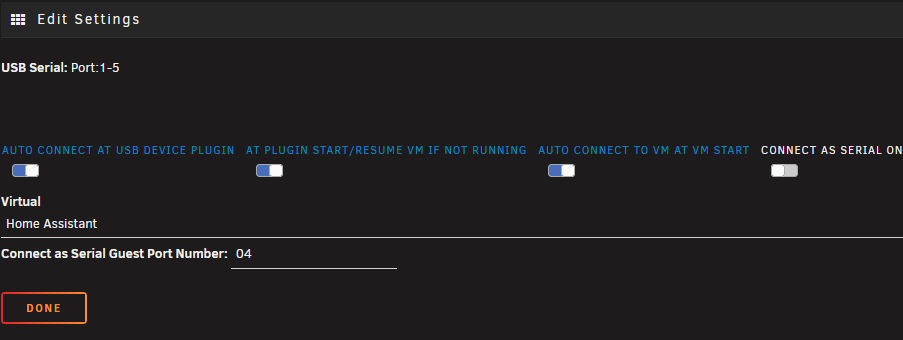
Thanks for pointing me in that direction. I found the issue may have been my Home Assistant had a device connected to it via USB that was set to automatically reconnect (see pic). I disabled those in USB Manager and the array was able to be stopped without issue. So far so good. I'll try again tomorrow to make sure and if it seems well, I'll make this as solved.
-
Here's a new syslog and diagnostics after a reboot attempt. tower-diagnostics-20260513-1446.zip syslog
-
I sent syslog-previous. Should i have sent the current one?
-
No, it was not. It said unclean shutdown and parity check started upon reboot. Perhaps i sent you the wrong file?
-
Here you go. Hopefully this tells us something. syslog-previous
-
I take it back. Went to reboot after the latest update and it stuck on trying to unmount drives again. "retry unmounting disk shares..." Those plugins are no longer installed, so it must be something else? Do diagnostics after a reboot even help?
-
I uninstalled both un-get and rclone and it seems to be stopping like normal. Must have been one of them. Thank you for the help.
-
I was using the un-get plugin for 7zip/7z tools. Rclone was for a script I had running to back up home assistant where it stopped the homeassistant_inabox docker. I uninstalled the cloudflared plugin just now and it doesn’t appear that was the culprit.
-
After it reboot in safe mode, I started the dockers and vm. Then I reboot and it worked like normal. So I’m guessing its one of my plugins…?
-
Thanks for the help. Here you go. I should clarify that unraid did eventually reboot, however it said it was not a clean reboot. tower-safemode-diagnostics-20260509-0645.zip
-
I stopped both the vm and the docker services. I clicked to reboot in safe mode, then rebooted. It, again, is stuck on “Array stopping, retry unmounting disk shares…”. It never reboots…
-
Trying to stop array and it's stuck on "retry unmounting disk shares". VM is stopped; docker service is stopped. I've been having parity checks after reboot the last few times. Just tried to stop the array this time and see that it gets stuck. Diagnostics attached. Thanks! tower-diagnostics-20260508-2021.zip
-
Is this the “go-to” for VM backups still or is there a better supported option available?
-
Thanks @ich777 . I initially read that post but thought it was a different issue. So I rolled it back and it works. Basically what you're saying though, is I'll no longer be able to update this particular GPU, right?
-
Hello- I am also getting the "NVIDIA-SMI has failed because it couldn't communicate with the NVIDIA driver. Make sure that the latest NVIDIA driver is installed and running" error after upgrading my driver to 590.44.01 this morning. Any docker that uses the extra parameters "--runtime=nvidia" will no longer start. I've attached my diagnostics to hopefully troubleshoot the issue. Thank you! tower-diagnostics-20251205-0740.zip
-
Thanks @itimpi. I initially tried to rename the file from Data.cfg to data.cfg and it wasn't letting me. So then I renamed it to data1.cfg (worked), so then back to data.cfg (worked). Ran the mover and everything seems to be working fine. Appreciate the guidance on this one.
-
Ok, thanks. I found that somehow my data folder is capitalized in that folder for whatever reason. I moved it elsewhere and ran the Mover, but it still didn’t work. I assumed it would just recreate the cfg file. So then I tried to rename the file to all lowercase and it wouldn’t allow me to rename it. What’s the correct way to fix this?
-
Hi all, hoping you can help me with this. Mover hasn't been working since I upgraded to 7.0.0 when either manually pressing the button or scheduled. No mover related plugins are installed. No recent changes to my Shared drives. Nothing in Fix Common Problems. I tried "mover stop" command and it said mover wasn't running. I even did a good ol fashioned reboot. I'm hoping one of you can please read my diagnostics and see whats going on. Thank you! tower-diagnostics-20250201-0738.zip
-
Thank you. I found the issue and resolved it as you stated. No more error...!
-
Hi there, I'm getting this in fix common problems - "Invalid folder cache contained within /mnt". Hoping someone is able to help me figure out the culprit. Thank you! tower-diagnostics-20250119-2023.zip
-
That is odd; I’m using safari on the iPad and chrome on the windows PC. In safari I’m using AdGuard. On the Windows (11) PC, I’m using uBlock Origin .. which I disabled to test (to no avail).
-
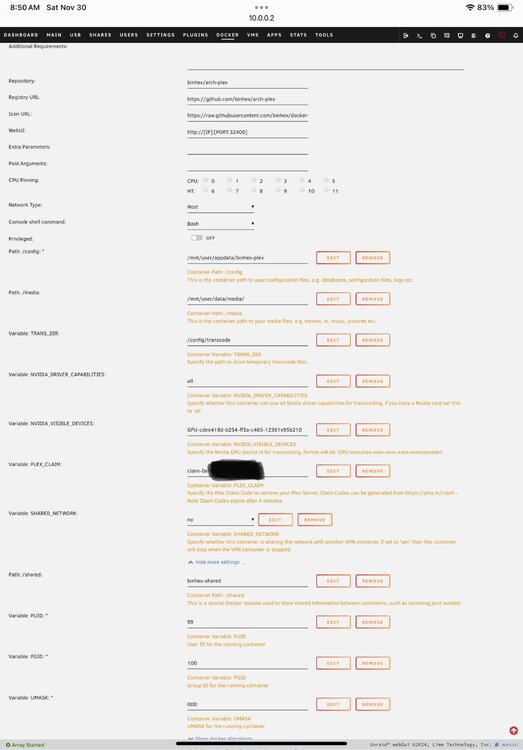
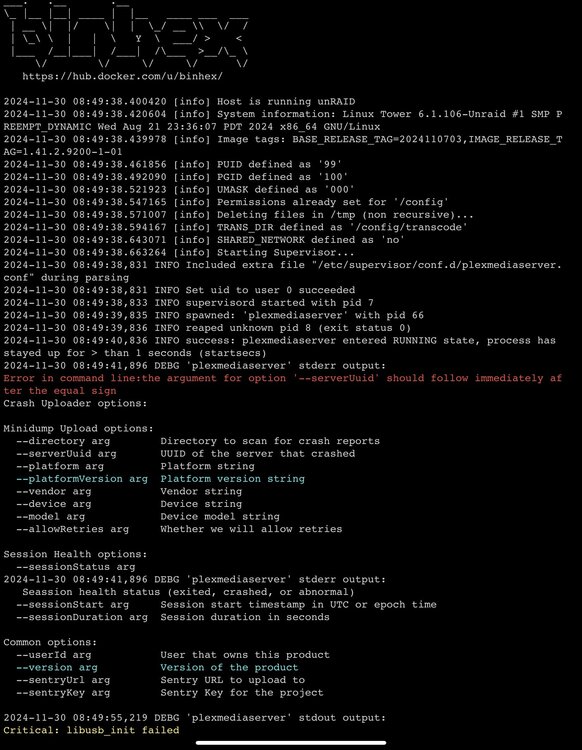
It does not seem to be a db corruption. I followed the instructions and there were no corruption or fatal messages in the Plex Media Server.log. I tried the fix under Q5 anyways and it didn't fix my issue. It still opens to a blank screen using the WebUI IP address of http://10.0.0.2:32400. Tried this both on an ipad and in Windows. Again, I'm a new user to Plex. There is no database / media added yet. I installed it today and couldn't get past the blank screen. Thanks! EDIT - Figured it out ... I couldn't just use the webUI as is. I had to add http://10.0.0.2:32400/web/index.html to the end of it.
-
New user here… I’m getting this same error and when opening plex it’s just a blank page.
-
Disregard - Looks like a known issue they are working on. https://emby.media/community/index.php?/topic/126711-4906-fails-cannot-get-required-symbol-engine_by_id-from-libssl/#comment-1333404
-
I went to update tonight and everything seemed to update as normal. However I am unable to get Emby to run. My log from the docker states: text error warn system array login Cannot get required symbol ENGINE_by_id from libssl Aborted Cannot get required symbol ENGINE_by_id from libssl Aborted Cannot get required symbol ENGINE_by_id from libssl Aborted Cannot get required symbol ENGINE_by_id from libssl Aborted Cannot get required symbol ENGINE_by_id from libssl Aborted [s6-init] making user provided files available at /var/run/s6/etc...exited 0. [s6-init] ensuring user provided files have correct perms...exited 0. [fix-attrs.d] applying ownership & permissions fixes... [fix-attrs.d] done. [cont-init.d] executing container initialization scripts... [cont-init.d] done. [services.d] starting services [services.d] done. [cont-finish.d] executing container finish scripts... [cont-finish.d] done. [s6-finish] waiting for services. [s6-finish] sending all processes the TERM signal. [s6-finish] sending all processes the KILL signal and exiting. [s6-init] making user provided files available at /var/run/s6/etc...exited 0. [s6-init] ensuring user provided files have correct perms...exited 0. [fix-attrs.d] applying ownership & permissions fixes... [fix-attrs.d] done. [cont-init.d] executing container initialization scripts... [cont-init.d] done. [services.d] starting services [services.d] done. [cont-finish.d] executing container finish scripts... [cont-finish.d] done. [s6-finish] waiting for services. [s6-finish] sending all processes the TERM signal. [s6-finish] sending all processes the KILL signal and exiting. [s6-init] making user provided files available at /var/run/s6/etc...exited 0. [s6-init] ensuring user provided files have correct perms...exited 0. [fix-attrs.d] applying ownership & permissions fixes... [fix-attrs.d] done. [cont-init.d] executing container initialization scripts... [cont-init.d] done. [services.d] starting services [services.d] done. [cont-finish.d] executing container finish scripts... [cont-finish.d] done. [s6-finish] waiting for services. [s6-finish] sending all processes the TERM signal. [s6-finish] sending all processes the KILL signal and exiting. [s6-init] making user provided files available at /var/run/s6/etc...exited 0. [s6-init] ensuring user provided files have correct perms...exited 0. [fix-attrs.d] applying ownership & permissions fixes... [fix-attrs.d] done. [cont-init.d] executing container initialization scripts... [cont-init.d] done. [services.d] starting services [services.d] done. [cont-finish.d] executing container finish scripts... [cont-finish.d] done. [s6-finish] waiting for services. [s6-finish] sending all processes the TERM signal. [s6-finish] sending all processes the KILL signal and exiting. [s6-init] making user provided files available at /var/run/s6/etc...exited 0. [s6-init] ensuring user provided files have correct perms...exited 0. [fix-attrs.d] applying ownership & permissions fixes... [fix-attrs.d] done. [cont-init.d] executing container initialization scripts... [cont-init.d] done. [services.d] starting services [services.d] done. [cont-finish.d] executing container finish scripts... [cont-finish.d] done. [s6-finish] waiting for services. [s6-finish] sending all processes the TERM signal. [s6-finish] sending all processes the KILL signal and exiting. Any idea what's going on?


