





MikeGNola
Members
-
Joined
-
Last visited
Everything posted by MikeGNola
-
I finally found it, but decided to submit a ticket first. despite many tries have not been able to update plex. Imagine they are swamped with all the problems this update has given. Wil give them another couple of hours before rolling back. Thanks again
-
Got in, but the server is slow as molasses. dunno if it's doing stuff that slows it down. Will give it awhile. If that doesn't work and you don't mind, how to roll back?
-
your suggestion worked for the ip. moved a cable from the switch to the router. of course now unraid doesn't recognize the login ☹️ will keep fighting. thanks again
-
tnx. will try. My irritating son installed a new switch so have 2 unknowns to deal with ☹️
-
installed the new version of unraid. Have had unraid tower address set to 192.168.50.49 for years. After the install and unraid came back up, it showed what looked like a generic address of 169.254.141.64. I rebooted a few times and once it showed the original address but somehow didn't get in. Have tried rebooting some more, but it kept coming up with the 169 address. Would roll back if I could. Help!
-
Have used plexpass without a problem for several years. Last month we had some power outages and when I got my server back up, plex could not access the data share where my videos were still located. After fiddling with it unsuccessfully, finally decided to reinstall plex. I keep getting the following : docker run -d --name='Plex-Media-Server' --net='host' -e TZ="America/Chicago" -e HOST_OS="Unraid" -e HOST_HOSTNAME="Tower" -e HOST_CONTAINERNAME="Plex-Media-Server" -e 'PLEX_CLAIM'='claim-P6jJSKcHnBXAQbhbu4Zo' -e 'PLEX_UID'='99' -e 'PLEX_GID'='100' -e 'VERSION'='latest' -l net.unraid.docker.managed=dockerman -l net.unraid.docker.webui='http://[IP]:[PORT:32400]/web' -l net.unraid.docker.icon='https://raw.githubusercontent.com/plexinc/pms-docker/master/img/plex-server.png' -v '/tmp':'/transcode':'rw' -v '/mnt/user/PlexMedia/':'/data':'rw' -v '/mnt/user/appdata/Plex-Media-Server':'/config':'rw' 'plexinc/pms-docker' c0689b7aff31b59d78853ce046e72037c1f38b03102b6a1aef8b6174fab3a819 docker: Error response from daemon: error while creating mount source path '/mnt/user/appdata/Plex-Media-Server': mkdir /mnt/user/appdata/Plex-Media-Server: no medium found. The command failed. Any help would be appreciated.
-
Thanks for the ideas, but after fiddling with it enough, I finally got it to boot without it going into the loop and logged on from my laptop. Then told it to revert to Version: 6.9.2 and after more fiddling, it seems to be back to pre-upgrade normal. I'm going to wait awhile to upgrade until I'm certain the kinks are out. I saw somewhere that powering down completely help in some of the reboot loop situations. And it seemed to. Thanks for the help. Mike
-
Maybe shoulda left well enough alone. Previous version has been working fine. Backed up the flash drive and have the zip on my laptop. Upgrade appeared to go ok and then it said it needed a reboot. Reboot went ok but when I tried logging in, it would not take my password and after a few tries, it said too many failed logins. So, I tried using the method here: https://wiki.unraid.net/Manual/Troubleshooting#Lost_root_Password Lost root Password Occasionally users lose their password for managing Unraid via the Unraid webGUI or console. This may be that they simply forgot the password, but corruption of the flash drive can also result in the password not being recognized. Passwords for shares can be changed/reset from the Unraid webGUI. To reset the management password, use the following process: Shutdown server and then plug the USB boot flash device into a PC or Mac While there it is a good idea to run a check on the flash drive and make a backup of its contents Delete these files: config/passwd config/shadow config/smbpasswd Plug the flash back into the server and start up again. Note that this will reset all user passwords including ‘root’ user to null (blank). After trying that, it goes through the boot process and immediately restarts. Tried extracting the zipped boot flash file to a spare blank usb2 drive. Using that to boot, plenty of messages that it can't find hardware, including network card. Can't even get to a login screen. any help would be appreciated.
-
Finally stumbled across the solution. How things got screwed up, I have no idea. Plex support asked me to enable logging on the ROKU and send them the logs. Was trying to do that tonight, but could not connect to the ROKU. After much irritation, I looked at the ROKU settings and saw that the ROKU was connected to an old 5GB guest network I had long ago created for use with the ROKU but had not used in years. Switched the ROKU connection back to the 5GB network I had been using on the router and everything worked again.😝 No idea why the ROKU changed networks since the update was to the Plex server and not to the ROKU. Have disabled the guest network that caused the trouble.
-
Tried lots stuff. No help. Finally left a request for help on the Plex support forum.
-
Still haven't figured it out. Let me know if you do.
-
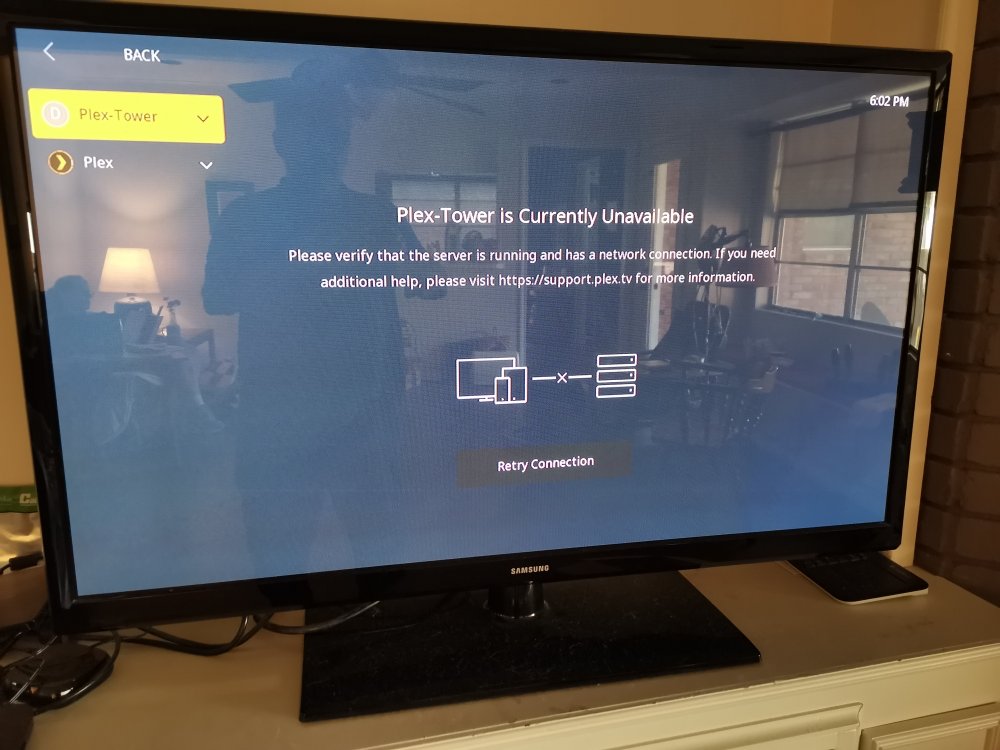
Plex has been running fine on unraid for a long time. Got a notification this morning that there was an update available for Plex, so I updated it. Seemed to go ok, but later when I tried to look at something using plex on our TV using ROKU as we always do, it said the server is not available. However i can still watch Plex on my laptop on the home network at https://app.plex.tv/ Tried setting IP of the server manually using TV interface. No help, All the online internet TV stuff that Plex provides that I never use works fine. Only content on the Plex server can't be accessed, although, as I said can watch in on the laptop. Any help would be appreciated.
-
Never mind, for now anyway. Following a suggestion, I cleared browser cache.
-
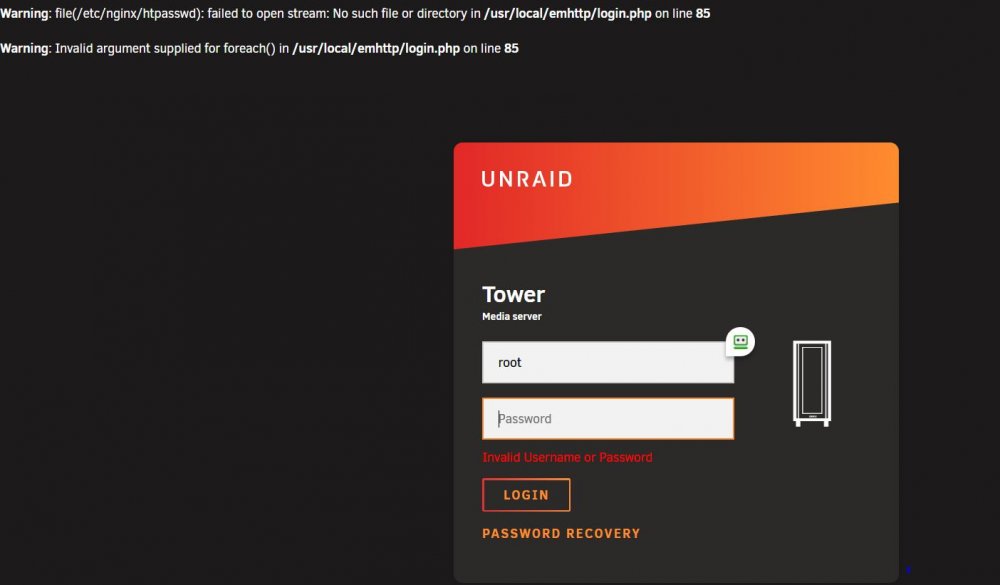
Made mistake of listening to some warning about needing to make root password more secure. Should have left well enough alone. After changing password, could not log in using the new password. Finally used procedure for lost password in Manual Troubleshooting page Delete these files: config/passwd config/shadow config/smbpasswd After putting the flash drive back in and starting up: unraid boots, Plex runs and I suppose it's checking parity since I could not shut down cleanly with logging in after the password change. But, I can still not log in. The Troubleshooting page says all passwords are set to null by deleting the config files. But unraid at first said I needed a password and I now keep getting the error shown below. I still have copies of the config files I deleted. Help please. While I'm asking, have backed up the flash drive to server on occasion, but have no idea how to recover the backup without logging in.
-
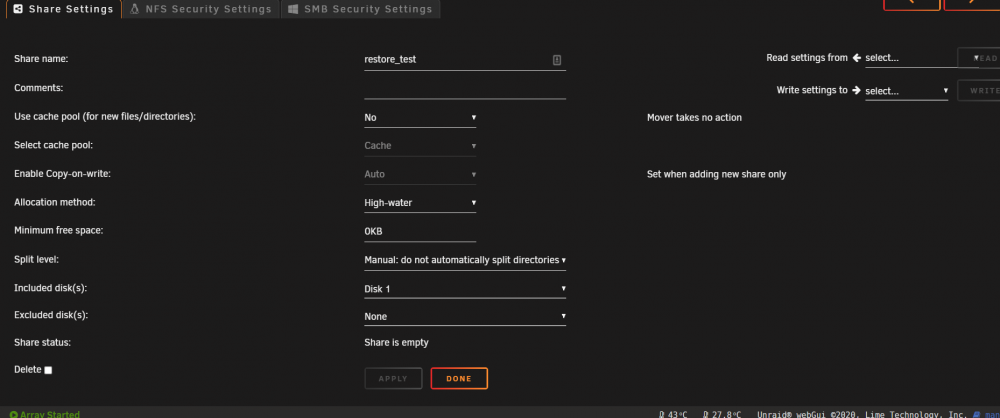
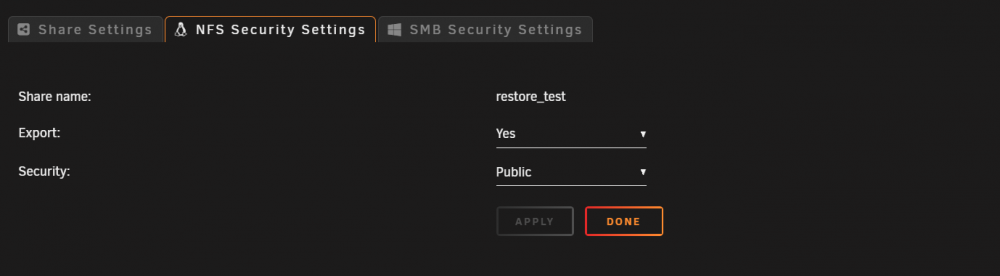
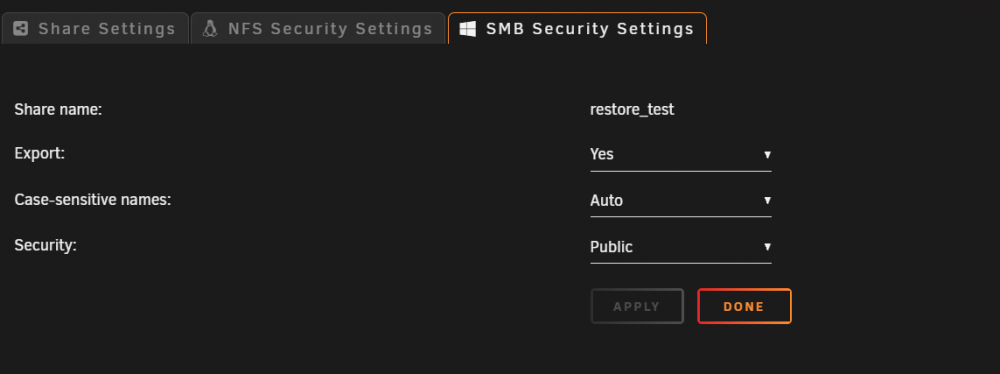
Sorry. Just found this. Created a separate share to eliminate variables. This is it, along with permissions. Not a linux wiz, so may be something simple. Thanks.
-
let me know. I'm sure I'm just doing something stupid in Cloudberry but lord knows what.
-
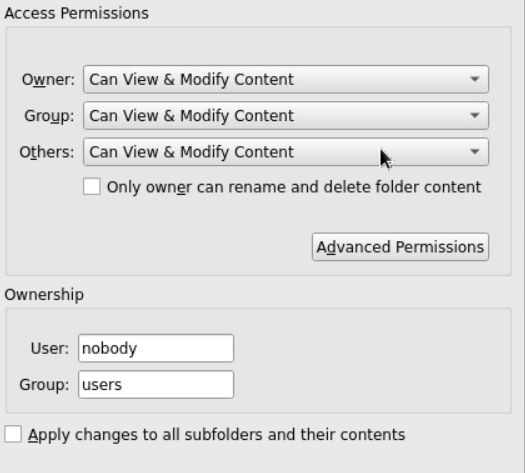
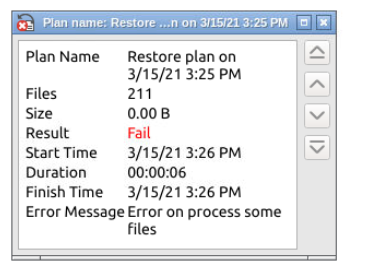
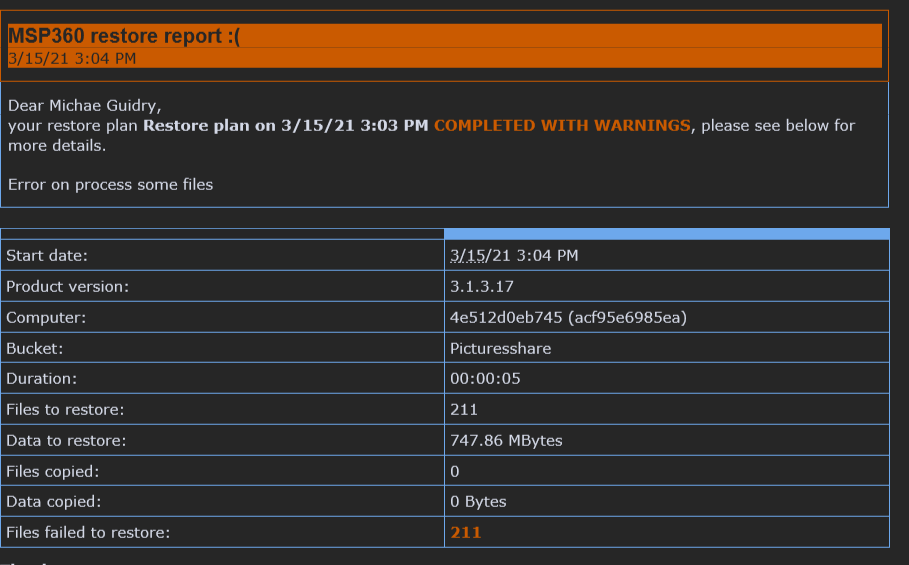
I can't get a restore to work either. Originally created a big container using encryption and backed up a lot to it. Using the "browse fiies" option on the Backblaze site shows what looks iike the correct files, tho couldn't download them because of encryption. To eliminate encryption as a variable, I created another container for pictures with no encryption. Backup completed and I could browse the files on the Backblaze site and download and view individual pictures in my browser. Below are permissions. But still can't get a restore to work. Created a new folder to restore to. As per a previous post, checked the time and it was correct. Each time I try to restore a picture folder, it fails with the following error I asked it for a detailed email report and it sends this which is not helpful Help?
-
Never mind. Think I found the answer. Can't do it on Backblaze or most other cloud storage. This supplies some answers. How to Encrypt Cloud Storage in 2021: Better Safe Than Sorry These services are a bit more limited (and pricier) than Backblaze, so I suppose the solution would be to split info that you want really encrypted from ordinary and only encrypt the critical stuff.
-
A little confused. Signed up for Backblaze and got the trial version of Cloudberry as was described. Used to use Cloudberry Windows Backup and so am comfortable with it. No problem with the cost. When I used to use Cloudberry with Rackspace I had set an encryption key for the containers and had to use that to get into the containers. Somewhere in the setup yesterday I believe for cloudberry, there appeared an option for an encryption key, so I created one and let the backup run. Seemed fine. I just logged onto Backblaze B2 and browsed the container which appears to be unencrypted. I can browse the files without any key and the B2 site says it is unencrypted. It also says under encryption: "Backblaze B2 key (SSE-B2), an encryption key that Backblaze creates, manages and uses for you." Don't really want that. Too much snooping these days. I want to hold my own keys. I looked through the options for the Cloudberry container and found no option for encryption. Is there any way to have a private encryption key?
-
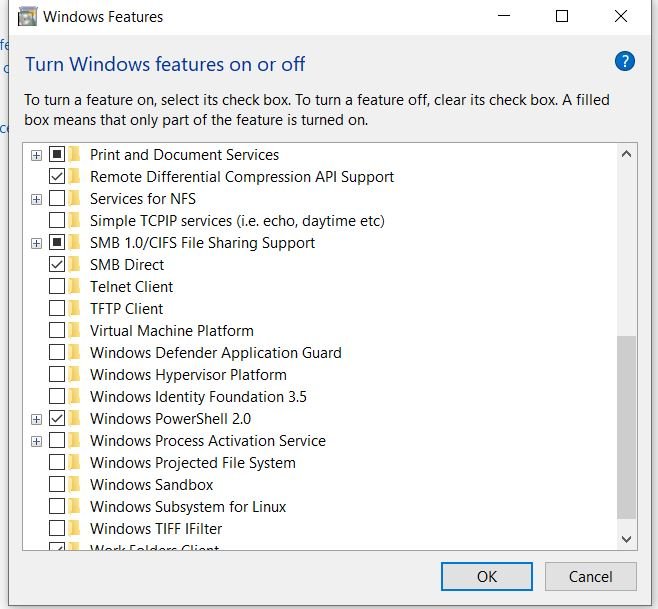
FWIW For anyone like me who spontaneously could no longer see your Tower on your local network from within a Windows 10 VM on the Tower, I poked around after reading through this thread and found that SMB 1.0 had been turned off, presumably by an update around November 10, 2020. All the other machines on my local LAN could see the Tower fine. I turned it back on and the Tower reappeared in my Network Places. The blame doesn't appear to be with Lime Tech but with MSFT monkeying around with network settings in updates I hope that Lime Tech will put a permanent fix for this Windows issue in a future update. Thanks.
-
Just installed the docker and got it to connect using PIA defaults. After watching SpaceInvader's vid on it. Thanks. Haven't looked into airvpn yet. I have used another non-US VPN for years and looked for reviews of others. I wasn't thrilled that PIA is US based and ran across this which is a bit troubling. FWIW https://restoreprivacy.com/vpn/reviews/private-internet-access/ Hope I'm not causing problems unnecessarily.
-
Looking at one of these but don't know much about 10GB. Is Cat6 network cable compatibale and sufficient? Thanks
-
I would appreciate info on how to do this. My eyes are getting worse and I really have trouble reading with the highlights
-
same here



