





yogy
Members
-
Joined
-
Last visited
Everything posted by yogy
-
Can someone please explain how to get email functions set up. I went to Settings >> Email >> SMTP, fill in the details but it still doesn't work. Is there anything else to be done?
-
I did that I'll just install another client (deluge, qbittorrent, rutorrent,....) and transfer my torrent files.
-
I have everything working before the update. Now I cannot enable my password and have no clue how to whitelist hosts. I shutdown the Transmission container, tried to edit settings.json (/mnt/user/appdata/transmission) with no luck on enabling password again. It keeps going back to false. I can change rpc-host-whitelist entries but nothing I enter there works.
-
After today's update I get this notification: 421: Misdirected RequestTransmission received your request, but the hostname was unrecognized.To fix this, choose one of the following options:Enable password authentication, then any hostname is allowed.Add the hostname you want to use to the whitelist in settings.If you're editing settings.json, see the 'rpc-host-whitelist' and 'rpc-host-whitelist-enabled' entries.This requirement has been added to help prevent DNS Rebinding attacks. Password authentication was enabled before the update. I know I should change something in settings.json but not really sure what. Any suggestions?
-
For everyone still on v6.3.8 stable who didn't (or don't want to) update to 6.9 beta, I can confirm that prebuilt image - Unraid Custom nVidia builtin v6.8.3: Download (nVidia driver: 455.45.01) works great. You can find this on the bottom of the first page in this thread. I was using Unraid Nvidia plugin from Linuxserver.io before but it's not supported anymore and it was throwing me some errors. So I decided to give this a try. I'm using this driver for my Nvidia GTX 1650 for transcoding in Emby docker container. As mentioned already, don't use this prebuilt image for GPU passthrough in the VM. Here is a short tutorial, hope it helps others: 1. Uninstall Unraid Nvidia Plugin from Linuxserver.io (if you were using this before); 2. Extract the Unraid Custom nVidia builtin v6.8.3 *.zip archive and replace the (bz*) files from the USB Boot device with the ones from the archive (all files that needs to be replaced/owerwritten are in the root of your unRAID USB Boot drive); 3. Reboot the server; 4. Install Unraid-Kernel-Helper-Plugin (not the Docker) if you want to see your UUID of the GPU installed. I left all extra parameters (--runtime=nvidia, NVIDIA_DRIVER_CAPABILITIES -> value=all, NVIDIA_VISIBLE_DEVICES with my GPU value) as they were before in my Emby docker container settings. Big THANKS (again) to @ich777 for his hard work creating this image and plugin and made it available for the members of this great community.
-
Will do, thanks
-
I have a question or just need a confirmation I'm doing this right. I'm on unRAID 6.8.3 and I don't want to update to 6.9 until stable. I have 2 Nvidia GPU's installed in my unRAID server (GeForce GTX 1650 and Quadro K4200). 1650 is only used by Emby/Emby docker container for transcoding and nothing else. Quadro K4200 is used for a GPU passthrough for MacOS Catalina. I went through reading a couple of threads about new nvidia driver plugin (thanks @ich777 for your hard work and effort to help people here). I'm currently using Unraid Nvidia plugin from LinuxServer. I know the plugin is not supported anymore and wanted to use this drivers from @ich777. I downloaded Unraid Custom nVidia builtin v6.8.3: Download (nVidia driver: 450.66) Now, is the following procedure correct: 1. Uninstall Unraid Nvidia Plugin from Linuxserver.io (drivers are still working but it's giving me some errors lately) 2. Extract the Unraid Custom nVidia builtin v6.8.3 *.zip archive and replace the bz* files from the USB Boot device with the ones from the archive 3. Reboot the server 4. Install Unraid-Kernel-Helper-Plugin (not the Docker) if you want to see your UUID of the GPU install Is that it, or I'm missing something? Should I change something in the Emby docker settings? Are there any additional steps?
-
FYI I don't see this mentioned already but all the links for the prebuilt images (in the first post on the bottom) are down.
-
If your Pi hole isn't your DNS Server, then the Peer DNS server should be your router or something else (default gateway). In this case try to put 10.100.1.1 and not 10.100.1.2 as in the picture above. Don't forget to scan your code again (if you're using your mobile device) when you change this setting.
-
I've successfully setup ONLYOFFICE to work in my self hosted Nextcloud instance. Like many others here I use NginxProxyManager to setup reverse proxy and get a certificate from Let's Encrypt for my subdomains. As already mentioned here you don't need to create any config files and copying certificate and private key to a newly created folder certs in appdata ...... I think anyone who added at least one proxy host to NginxProxyManager with SSL certificate from Let's Encrypt pointing to the newly created subdomain will be able to configure OnlyOffice Document Server to work properly with Nextcloud. If not I will gladly provide some assistance. My main intention here is creating a brief HOW TO in order to restrict the access to ONLYOFFICE Document Server (for security reasons and data integrity) with encrypted signature, known as Secret Key. Let me emphasize that I don't own the credit for this tutorial, I'm just posting something found among user comments in @SpaceInvaderOne YouTube video tutorial How to Install and Integrate Only Office with Nextcloud. Many, many thanks to @SpaceInvaderOne for providing great tutorials for us "nerds" and make our experience with unRAID easier. HOW TO add and configure Secret Key in ONLYOFFICE: Stop the OnlyOffice Document Server container. In the "edit" option for the OnlyOffice Document Server docker, do "+ Add another Path, Port, Variable, Label or Device". Config Type: Variable Name: JWT_ENABLED (can be whatever you want to see in the UI, I used the key) Key: JWT_ENABLED Value: true Description: Enables use of Secret key [press ADD] Then add another variable: Config Type: Variable Name: JWT_SECRET (same thing, up to you) Key: JWT_SECRET Value: [WhateverSecretKeyYouWantToUse]. You can use the following command in Terminal (without quotes) to create a random Secret Key: "openssl rand -base64 48" and press Enter Description: Defines the Secret key value [press ADD] [press APPLY] Start OnlyOffice Document Server container. Go to Nextcloud > Settings > ONLYOFFICE page. Enter the Secret Key and click Save (you should get the message: Settings have been successfully updated ..... No restart of the Nextcloud docker was needed.
-
I FOUND A SOLUTION! yes, I'm answering to myself but hopefully others will find this useful. If you are using Wireguard VPN app for Windows OS and try to connect to unRAID using Remote tunneled access here is a solution This issue of broken local network routing appears to only happen in WireGuard for Windows.
-
When I look at my config files they are exactly as you described. Me neither. The strange thing is that with exactly the same configuration it works on my mobile phone but not on the laptop accessing unRAID server from the same "work" network. Static route is set, also port forwarding. If it wasn't the connection on my mobile phone wouldn't work. I appreciate your help though. Seems like I'll have to dig deeper.
-
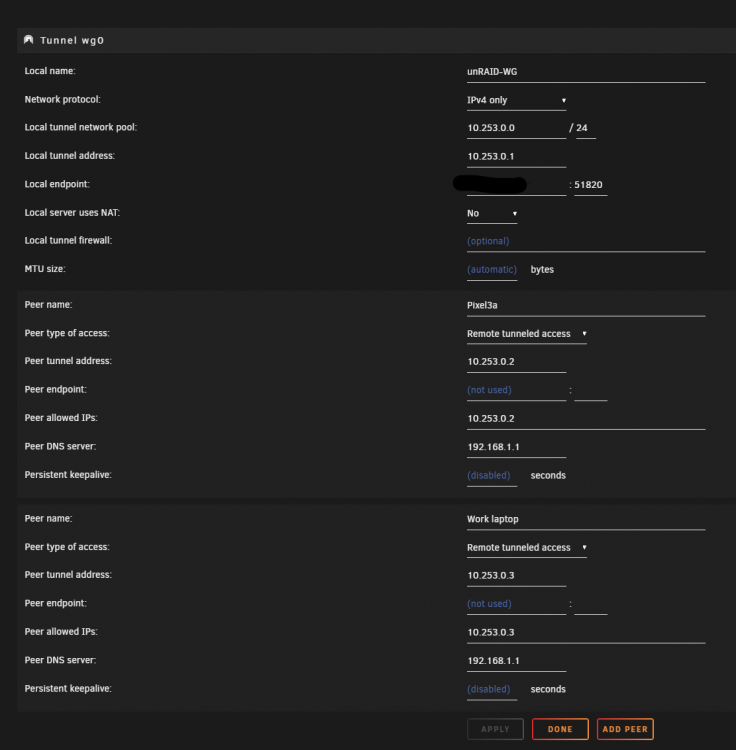
UPDATE to my previous post On my "Work laptop" I now tried to establish a connection with Access to LAN peer type of access and could connect to all devices in my 192.168.1.0/24 network including Pi-hole (192.168.1.15) which is on br0. In other words Access to LAN works OK but Remote tunneled access only works partially (I get my "home" WAN IP but couldn't connect to any devices in my 192.168.1.0/24 LAN). Any thoughts or suggestions?
-
I don't think so. No special software and / or settings on that laptop. It's actually my laptop used also at work. I did.
-
I've read this thread and some others with Wireguard topic and still searching for solution. I have port forwarding and static route all setup on the router (Untangle). I can successfully connect with my Pixel3a mobile phone to the internet and I can also reach all devices on 192.168.1.0/24 network and unRAID docker containers. When I connect with my Work laptop I have internet access but no access to devices on 192.168.1.0/24 network and unRAID docker containers. Both devices are on the same "at work" network when establishing VPN connection. What am I missing here. It doesn't make any sense to me.
-
Yes this is a Euro currency symbol. You won't see this symbol on any keyboard (even on EU countries one). I can access it by Alt+e. I couldn't agree more
-
After 2 hours of searching on the internet I finnaly found 2 solutions. Both worked for me in resolving my issue with unRAID shared folders mapped in Windows 10. 1. If you cannot mount SMB share to windows 10 use NFS share client in Windows. It works great. enable NFS in your unRAID server follow this tutorial on your Windows 10 (only Pro and Enterprise versions) computer 2. I tried and read every single tutorial here and couldn't mount SMB share in my Windows 10 computer. I finnaly realized that I have a special character "€" in my password and that caused SMB shares never worked for me. I change the password in unRAID server and Windows 10 PC and BOOOOOOOOM it worked straight away. Maybe this will help others. Thank you @trurl and @Frank1940 for trying to provide some help.
-
All shares are set to Private. Where? On Windows 10? I have my NAS shares already mounted.
-
I have 2 SMB shares mapped to unRAID. I also tried this, but still doesn't work.
-
I don't have any saved unRAID credentials in Credential Manager. I think I tried all the tweaks mentioned in the related topics but would simply not work.
-
I did among many others
-
I've read so many topics, tried so many things but still cannot access my private shared folders. If I set them to public everything is OK. I'm lost and also wondering why everything just works with Synology and Openmediavault, but not with unRAID. I'm more and more certain it's on unRAID side and not Windows.
-
For everyone wondering about Nvidia GPU that are still supported (natively / no drivers needed) in MacOS High Sierra, Mojave and Catalina: Nvidia Kepler Cards that are Natively Supported: (GT 630 through GTX 690 may have issues) GTX Titan (GK110) GTX Titan Black (GK110) GTX Titan Z GTX 780/Ti GTX 770 GTX 760/Ti GT 740 GT 730 GT 720 GT 710 (DDR3 versions) GTX 690 GTX 680 GTX 670 GTX 660/Ti GTX 650/Ti GTX 645 (GT 645 is Fermi) GT 640 (Kepler edition, GK107/208 core) GT 630 (Kepler edition, GK208 core) Quadro 410 Quadro K420 Quadro K600 Quadro K2000/D Quadro K4000/D Quadro K4200 Quadro K5000 Quadro K5200 Quadro K6000 Quadro NVS510 I recently bought a used Nvidia Quadro K4200 and tested on Mojave and Catalina. Card worked flawlessly in passthrough mode (still does in Catalina). I've had Radeon RX580 before but for some reason I've had problems with it in Windows, Ubuntu, Mojave and Catalina with random resets (of both server and the card). With K4200 no problems whatsoever, working like a charm in all OS's named above. Just wanted to share this with you.
-
VM snapshots, please
-
Thank you @ghost82 and @mSedek for clarifying this. Kepler it is 🤞👍


