





arturovf
Members
-
Joined
-
Last visited
Everything posted by arturovf
-
bummer.. still 31 here
-
I could not use the promo code
-
thanks !
-
Updated krusader, lost the ability to edit text files and preview images, already deleted data folder to start fresh but not working
-
I understand your frustration but unraid offers a 30-day trial which can be extended another 15 days
-
Another thanks for the solution to this, I think the fix would be very easy to implement if it gets noticed by the devs
-
interested as well in the answer
-
yeah I have set it up that way, that's not the issue, turns out it was an unraid bug, which could be resolved from a simple script to launch every array start
-
that sucks.. GVT-g is not supported either, can you confirm this?
-
Does this works on rocket lake like the 11700 ?
-
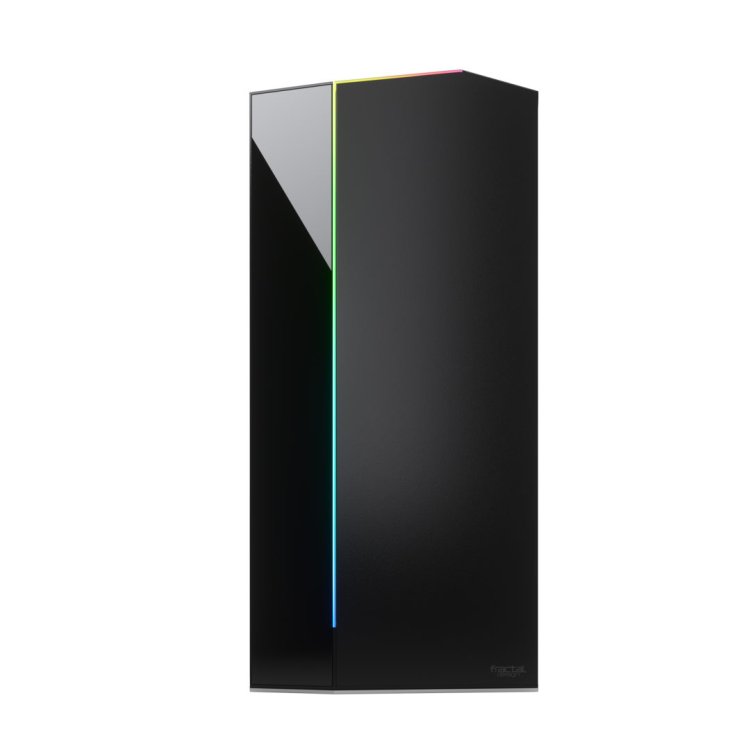
increíble work @Mex! Is it possible to do Fractal Design Vector RS? https://www.fractal-design.com/products/cases/vector/vector-rs-tempered-glass/
-
a post from this thread says its based on 15.0
-
Or you can be on latest version and just disable HDR tonemapping. Now test an HDR transcoding and you will notice that tonemapping is happening even if disabled.
-
I would like that as well
-
have this issue as well
-
Same problem as you guys HW transcoding with HDR tone mapping seems to be broken in latest version of linuxserver image. Downgrade to Plex to 1.25.9 did not help but downgrade container image did. If you want to test change repository to linuxserver/plex:1.25.9.5721-965587f64-ls109
-
I use container by @ich777 everyday and it works great
-
thank you for the instructions, what did it for me was to install version 6.0, latest branch would result in error 400
-
Manage to narrow it to fail2ban banning me 😮 When hitting the Mattermost login screen I got some 401 lines on Nginx unauthorized logs which triggers fail2ban ban: REMOTE_IP - - [23/Feb/2022:22:49:20 -0600] "GET /plugins/playbooks/api/v0/settings HTTP/2.0" 401 15 "-" "Mozilla/5.0 (Macintosh; Intel Mac OS X 10_15_7) AppleWebKit/605.1.15 (KHTML, like Gecko) Version/15.3 Safari/605.1.15" REMOTE_IP - - [23/Feb/2022:22:49:20 -0600] "GET /plugins/playbooks/api/v0/bot/connect HTTP/2.0" 401 15 "-" "Mozilla/5.0 (Macintosh; Intel Mac OS X 10_15_7) AppleWebKit/605.1.15 (KHTML, like Gecko) Version/15.3 Safari/605.1.15" REMOTE_IP - - [23/Feb/2022:22:49:20 -0600] "GET /api/v4/teams?page=0&per_page=200&include_total_count=false&exclude_policy_constrained=false HTTP/2.0" 401 202 "-" "Mozilla/5.0 (Macintosh; Intel Mac OS X 10_15_7) AppleWebKit/605.1.15 (KHTML, like Gecko) Version/15.3 Safari/605.1.15" REMOTE_IP - - [23/Feb/2022:22:49:20 -0600] "GET /api/v4/analytics/old?name=standard&team_id= HTTP/2.0" 401 202 "-" "Mozilla/5.0 (Macintosh; Intel Mac OS X 10_15_7) AppleWebKit/605.1.15 (KHTML, like Gecko) Version/15.3 Safari/605.1.15" Does anybody have a clue what might be happening? This is my config according to a fellow user @Heciruam and mattermost documentation (https://docs.mattermost.com/install/config-ssl-http2-nginx.html) upstream backend { server 192.168.52.182:8065; keepalive 32; } proxy_cache_path /var/cache/nginx levels=1:2 keys_zone=mattermost_cache:10m max_size=3g inactive=120m use_temp_path=off; server { listen 80; server_name board.*; return 301 https://$host$request_uri; } server { listen 443 ssl; server_name board.*; location ~ /api/v[0-9]+/(users/)?websocket$ { proxy_set_header Upgrade $http_upgrade; proxy_set_header Connection "upgrade"; client_max_body_size 50M; proxy_set_header Host $http_host; proxy_set_header X-Real-IP $remote_addr; proxy_set_header X-Forwarded-For $proxy_add_x_forwarded_for; proxy_set_header X-Forwarded-Proto $scheme; proxy_set_header X-Frame-Options SAMEORIGIN; proxy_buffers 256 16k; proxy_buffer_size 16k; client_body_timeout 60; send_timeout 300; lingering_timeout 5; proxy_connect_timeout 90; proxy_send_timeout 300; proxy_read_timeout 90s; proxy_pass http://backend; } location / { client_max_body_size 50M; proxy_set_header Connection ""; proxy_set_header Host $http_host; proxy_set_header X-Real-IP $remote_addr; proxy_set_header X-Forwarded-For $proxy_add_x_forwarded_for; proxy_set_header X-Forwarded-Proto $scheme; proxy_set_header X-Frame-Options SAMEORIGIN; proxy_buffers 256 16k; proxy_buffer_size 16k; proxy_read_timeout 600s; proxy_cache mattermost_cache; proxy_cache_revalidate on; proxy_cache_min_uses 2; proxy_cache_use_stale timeout; proxy_cache_lock on; proxy_http_version 1.1; proxy_pass http://backend; } }
-
I see, I am more into the project management part. Will try to investigate why the H is crashing
-
what are you using now?
-
Unfortunately no, at first it works but after a short minutes of using it (login off and trying to log on again) it crashes nginx entirely. (Other reverse proxy sites stops working as well)
-
can you share your config for mattermost please
-
Installed Mattermost today and encounter same problem, I had to chmod -R 777 mattermost appdata folder and reinstall container.
-
I too have this problem. When using pihole/adguard with his own IP, homebridge can't communicate with that IP for some reason. (EHOSTUNREACH error). Would be great to know in detail what dnsmasq is used for to know what functionality do we lose if disabled? Or If anybody have a clue why I cannot reach PiHole/adguard ip from inside docker (homebridge)?



