





rjorgenson
Members
-
Joined
-
Last visited
Everything posted by rjorgenson
-
Thanks! I dug around in the menu on the device but couldn't find an option to enable modbus anywhere, there was an NMC setting that was network based but I decided not to mess with that and just set it up as usbhid-ups and everything worked as before =]
-
Trying to get this plugin setup to replace the outdated NUT plugin. I used the auto-config and it detected my UPS but the service wont start. When trying to start it manually form the command line it gives a timeout error. Writing NUT configuration... Updating permissions for NUT... Checking if the NUT Runtime Statistics Module should be enabled... Disabling the NUT Runtime Statistics Module... Network UPS Tools - UPS driver controller 2.8.0.1 Network UPS Tools - NUT APC Modbus driver 0.01 (2.8.0.1) _apc_modbus_read_registers: Read of 516:604 failed: Connection timed out (auto) Can't read inventory information from the UPS upsnotify: failed to notify about state 4: no notification tech defined, will not spam more about it Driver failed to start (exit status=1) The autoconfig sees the device plugged in over USB and says it's writing the config NUT Scanner is now searching for UPS devices... ##################################################### [nutdev1] driver = "apc_modbus" port = "auto" vendorid = "051D" productid = "0003" product = "Smart-UPS 1500 FW:UPS 08.8 / ID=18" serial = "__REDACTED__" vendor = "American Power Conversion" bus = "005" device = "003" busport = "001" ###NOTMATCHED-YET###bcdDevice = "0106" ##################################################### I'm not sure what could be the issue here, is this config actually written? It looks like it's trying to connect to a busport other than what is detected.
-
yeah it's all good now, no longer complaining after upgrading.
-
Glad the issue was found. Am I safe to dismiss this for now until a new version is released? Or will I need to change something about my cert eventually anyways?
-
Sure thing, here you go. Thanks for the help! mnemos-diagnostics-20221212-1254.zip
-
This is a wildacard cert provided by letsencrypt. Here is the output of those two commands. root@mnemos:~# openssl x509 -noout -subject -nameopt multiline -in /boot/config/ssl/certs/mnemos_unraid_bundle.pem | sed -n 's/ *commonName *= //p' *.rendezvous.agffa.net root@mnemos:~# openssl x509 -noout -ext subjectAltName -in /boot/config/ssl/certs/mnemos_unraid_bundle.pem | grep -Eo 'DNS:[a-zA-Z 0-9.*-]*' | sed 's/DNS://g' *.rendezvous.agffa.net agffa.net rendezvous.agffa.net root@mnemos:~#
-
FCP recently started warning me that But my subject CN appears to be set correct for a wildcard root@mnemos:/boot/config/ssl/certs# openssl x509 -noout -text -in mnemos_unraid_bundle.pem | grep "Subject: CN" Subject: CN = *.rendezvous.agffa.net root@mnemos:/boot/config/ssl/certs# and my local TLD also appears to be correct I am still on unRAID 6.9.2 if that matters.

-
Any luck with this? It'd be nice if there was a bug thread somewhere we could follow to know when this is resolved.
-
Having an issue with the permissions for this container. I'm trying to set the GID to 100 just like the rest of my containers but it keeps settings the permissions on all it's files to GID 101. Any idea what's going on with this? I see the below in the logs when starting the container ... groupmod: GID '100' already exists but I don't see this error for other groups that exist on the host, I'm guessing this is something it's trying to do inside the container. How can I run this container with GID 100?
-
I ran into this same issue, it looks like the VPN server I was using (CA Vancouver) either removed support for port forwarding or is just down or gone. I swapped out to Spain and everything was fine. If you check the output of the docker logs it will list all the servers that support port forwarding and it appears to be a real time check so if your server ever comes back it should show up in the list.
-
Just pulled down the latest version and it is working for me so far as well.
-
reverting to binhex/arch-sabnzbdvpn:2.3.9-1-07 also resolved the issue for me. Using PIA with Vancouver CA if that's relevant.
-
I'm also having an issue with the sabnzbdvpn container in the last day or two. It pegs my CPU at 100% and after a while it will spawn so many processes that my system will lock up and I had to reboot to get it back (though had I known this container was doing this at the time, I probably could have just stopped it to kill the processes but didn't know that at the time). It spawns a ton of processes running `/root/prerunget.sh` which spawns a `sleep 5s` command for each one. There were also a ton of openvpn processes. The docker log if full of this. 2020-01-03 18:25:16,893 DEBG 'start-script' stdout output: [debug] Having issues resolving name 'www.google.com', sleeping before retry...
-
This appears to be the issue - https://github.com/binhex/arch-delugevpn/commit/77caf3f2fd7bae55c9c19bd7999ee864f7f32d42#diff-181aca646a6bd54fbde2c6c0736e52d8 - I checked updates and it was already pushed out. Make sure your container is up to date, this update resolved the issue for me.
-
I am also experiencing this since updating the container to "e5e3..5a77" - I see the below in the docker log 2018-12-18 20:14:30,977 DEBG 'start-script' stderr output: Error: argument "UI" is wrong: Failed to parse rule type 2018-12-18 20:14:30,979 DEBG 'start-script' stderr output: Error: either "to" is duplicate, or "UI" is a garbage. The container is still running and things can connect to it just fine and things are still seeding, but the web UI times out.
-
Yeah I was just reading about that shortly after I posted. I had some spare NIC's on the box so I was able setup a second interface solely for use with docker which has allowed the container to communicate with the host. Thanks for the quick reply =]
-
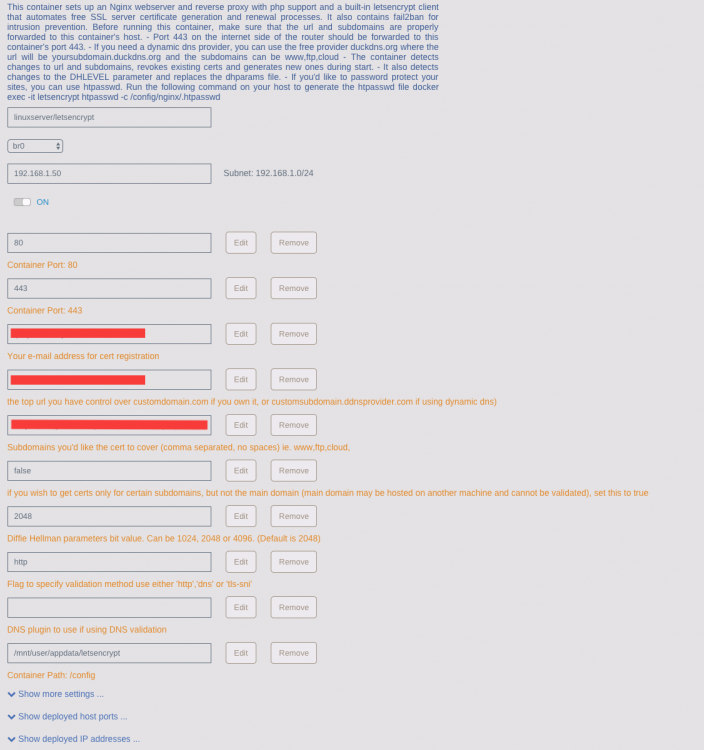
So I'm trying to migrate from a standalone instance of this container to the unraid container now that I can assign IP addresses directly to containers. I'm running into an issue where the container doesn't seem to be able to reach the host(where all the services being reverse-proxied live). The container can talk to other systems on the same network with no issue but not the unraid host it is running on. # letsencrypt container to an nzbget container on unRAID root@73977ce49f97:/root$ nc -vz 192.168.1.10 6789 nc: 192.168.1.10 (192.168.1.10:6789): Host is unreachable root@73977ce49f97:/root$ # nzbget container accessible from another system on my network nc -vz 192.168.1.10 6789 Connection to 192.168.1.10 6789 port [tcp/*] succeeded! # letsencrypt container can talk to systems that aren't unraid on the network root@73977ce49f97:/root$ nc -vz 192.168.1.11 5000 192.168.1.11 (192.168.1.11:5000) open root@73977ce49f97:/root$ Am I missing something in my configuration to make them able to talk to each other over the network? here is my container config in unraid
-
I am using an LSI 9207-8i
-
This is not feasible for me, and my HBA has previously supported TRIM prior to 6.4.0 with no issues. *edit* my HBA is a LSI 9207-8i
-
Since upgrading to 6.4.0 a couple days ago my trim job has failed every day with fstrim: /mnt/cache: FITRIM ioctl failed: Remote I/O error Did something change in the update? Plugin version is 2017.04.23a and has been since before the update. I received this error previously with the SSD's in my cache pool because my HBA didn't support some flag, I replaced the HBA with a newer version and TRIM worked just fine until I updated it. If it's relevant I haven't rebooted it since I installed the HBA until the update was installed.
-
For what it's worth, I just updated Fix Common Problems which caused it to re-run the scan and it did not find this issue again. Confirmed on the command line I was now able to ping github from this system. I'm not sure what changed.
-
At what point are you seeing this? Only at the initial array start or on all subsequent scans? I had some time and dug into this a little more. I saw in the code that it's running a ping check against github.com which is indeed failing from my unRAID machine. It does not fail from other systems on my network though and my unRAID box is still able to connect to github.com, just not over ICMP. root@mnemos:~/usr/local/emhttp/plugins/fix.common.problems# ping -c 2 github.com PING github.com (18.194.104.89) 56(84) bytes of data. --- github.com ping statistics --- 2 packets transmitted, 0 received, 100% packet loss, time 1005ms root@mnemos:~/usr/local/emhttp/plugins/fix.common.problems# telnet github.com 80 Trying 18.194.104.89... Connected to github.com. Escape character is '^]'. ^] telnet> quit Connection closed. root@mnemos:~/usr/local/emhttp/plugins/fix.common.problems# I don't see anything in iptables that would be blocking this(though I'm not the best with iptables so I could be missing something), and I am able to ping other public sites such as google and yahoo from the unraid host.
-
At what point are you seeing this? Only at the initial array start or on all subsequent scans? I continue to see the error if I rescan. I also haven't restarted my array since before this started. It showed up on my weekly scan on Sunday morning(~22 hours ago), and was not present the week before.
-
I'm seeing this same behavior. Fix Common Problems reports it's unable to communicate with github.com but all internet connectivity, including to github.com works from the host.
-
I already deleted the container from atribe, but it was all default settings with the exception of the password after switching over to your container. You're right though the only reference I could find to "node-jessie" was the documentation on this github page - https://github.com/hexparrot/mineos-docker - but I couldn't find anything indicating this repo was actually used for the builds. The dockerhub page indicates this repo - https://github.com/hexparrot/mineos-node - is the source repo. It does appear the docker file was migrated to there not too long ago though, and the build history of the docker hub page only shows builds going back that far. It seems atribe's config was for a previous build setup of mineos-node.


