





DigitalDivide
Members
-
Joined
-
Last visited
Everything posted by DigitalDivide
-
ok this might seem like a silly question but how does one share a folder. When I google sharing files or albums, there should be a share icon on the right...but I don't have one and can't seem to share anything. This seems to have started after I installed a few plugins such as Dynamix Cache Directories and CA Auto Turbo Write Mode
-
Success I modified all the lines from okavangonextcloud to okavangonextcloud.duckdns.org and that did the trick. Not usre if they should all be like that but it worked. I was able to login via internal webguie and externally array ( 0 => '192.168.1.138:444', 1 => 'okavangonextcloud.duckdns.org', ), 'dbtype' => 'mysql', 'version' => '19.0.0.12', 'overwrite.cli.url' => 'https://okavangonextcloud.duckdns.org', 'overwritehost' => 'okavangonextcloud.duckdns.org',
-
I thought it would automatically append the duckdns.org as it's the domain in let's encrypt. However, I made the chagne and it still doesn't work after restarting the dockers This site can’t be reached okavangonextcloud’s server IP address could not be found.
-
Honestly, I don't see any difference other than he's using his subdomain reverseproxy.me and I'm using the one I created with duckdns, okavangonextcloud
-
Yup, here you go nextcloud.subdomain.conf config.php
-
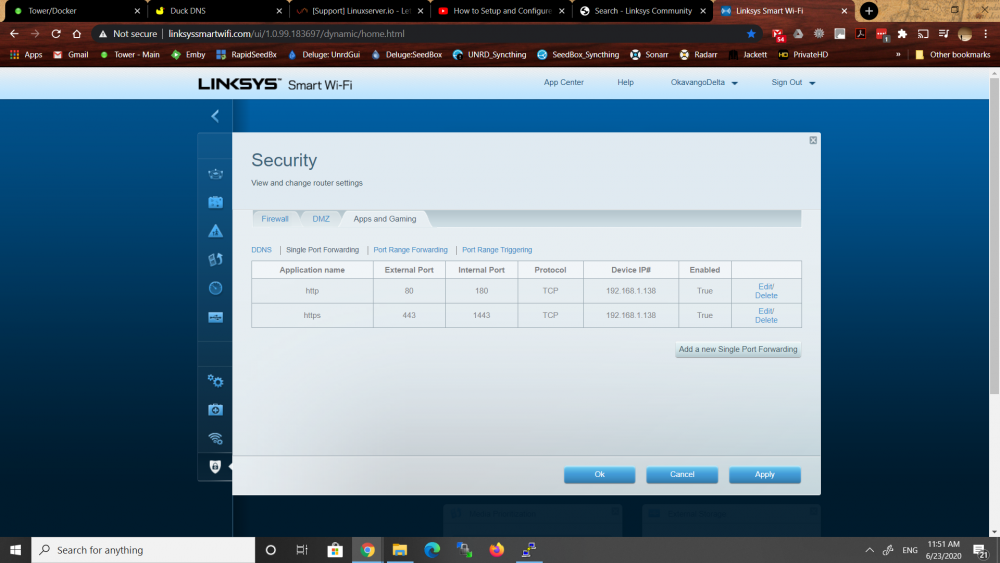
I've installed Nextcloud, Mariadb, Letsencrypt and following spaceinvaders video for installing with reverse proxy. I'm also using duckdns.org where I created okavangonextcloud Had some issues with letsencrypt failing but after logging into my provider's modem, forward port 80 and 443 for TCP to my router device, then in my router forwarding port 80 and 443 to 180 and 1443, this allowed letsencrypt to be successful. I set the external port as 80 and internal port as 180, then same for 443 Problem is after following the instructions to the very end, when I try to access nextcloud via the webgui link in unraid, it tells me the site can't be reached This site can’t be reached 192.168.1.138 refused to connect. ( I can see the ip in the browser shows as https://192.168.1.138:444/) I also tried connecting from using a vpn and get the same error. If in my router I set the external and internal port to 180 and 1443, I get a diff error when trying to access nextcloud via teh unraid webgui. I get This site can’t be reached okavangonextcloud’s server IP address could not be found. (url shows as https://okavangonextcloud/apps/files/) I went over spacerinvaders video 3 times and can't figure out where the problem lies. I was hoping to get some assistance....
-
Actually I figured it out. I had to login to my modem and do a forward on port 80 and 443 to my router. Then I did as you suggested for the external and internal port forward. That did the trick
-
Not sure how to use dns...any guidance?
-
If I go to http://okavangoserver.duckdns.org it goes to my webgui login of my modem.
-
Didn't work, Waiting for verification... Challenge failed for domain okavangonextcloud.duckdns.org Challenge failed for domain okavangoserver.duckdns.org http-01 challenge for okavangonextcloud.duckdns.org http-01 challenge for okavangoserver.duckdns.org Cleaning up challenges Some challenges have failed. IMPORTANT NOTES: - The following errors were reported by the server: Domain: okavangonextcloud.duckdns.org Type: connection Detail: Fetching http://okavangonextcloud.duckdns.org/.well-known/acme-challenge/aujXkgpsq114zWvcYW3AjEYCbqpoExXkV1GKpqFxawk: Timeout during connect (likely firewall problem) Domain: okavangoserver.duckdns.org Type: connection Detail: Fetching http://okavangoserver.duckdns.org/.well-known/acme-challenge/7omhOmbExgOh2o8fh7snrX6uzBcILok1p-kP6AEDk_8: Timeout during connect (likely firewall problem)
-
Hmmm at duckdns I have created the following okavangonextcloud pointing to my wan IP okavangoserver point to my wan ip
-
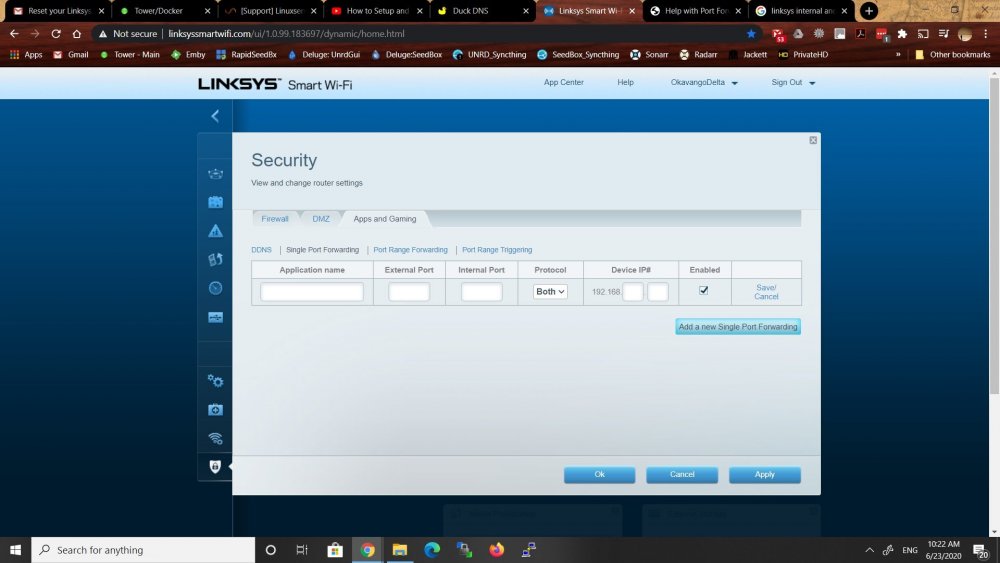
Hi, I'm hoping I can get some assistance. I'm following spaceinvaders instructions on How to Setup and Configure a Reverse Proxy on unRAID with LetsEncrypt & NGINX. The problem I'm having is with letsencrypt. It keeps coming up with Performing the following challenges: http-01 challenge for okavangonextcloud.duckdns.org http-01 challenge for okavangoserver.duckdns.org Waiting for verification... Challenge failed for domain okavangonextcloud.duckdns.org Challenge failed for domain okavangoserver.duckdns.org I'm pretty sure it's my something to do with my port forwarding. Problem is I don't know what. Is there anyone here familiar with a linksys router? I can't quite figure out how to forward port 80 to 180 and 443 to 1443. I tried a few diff things but none seem to work.
-
That worked! Geez I've been trying to figure that out for weeks..I feel sooooo stupid now...
-
LOL FInally I figured out what you meant. You meant click the Edit button next to /downloads and change container path in there. I just wasn't seeing what you meant. Ok got it...
-
I did and for the life of me still can't figure it out.
-
I'm having the same issue but not quite sure what I need to change to what...could I also get your assistance? I have the following Deluge VN config path = /mnt/user/appdata/binhex-delugevpn container path /data -> /mnt/disks/DELUGETorrents/Deluge/ beneath this I have a completed and downloads folder Radarr container path /downloads -> /mnt/disks/DELUGETorrents/Deluge/ container path /movies -> /mnt/disks/UNASSNDisk/Media/Movies/ I also tried changing radarrs /downloads to mnt/disks/DELUGETorrents/Deluge/ - didn't work mnt/disks/DELUGETorrents/Deluge/completed -didn't work /data/completed - didn't work /data - didn't work I always get Import failed, path does not exist or is not accessible by Radarr: /data/completed/lawrenceofarabia I just don't get it. I can see Radarr is looking for /data/completed...but just can't figure it out.
-
I think you may have missed what I typed above. The below did remove the folder. The issue is now with the MV command. I don't think it will overwrite an existing folder. I think I may just have to leave things as they are. rm '/mnt/disks/DELUGETorrents/Sonarr_Pickup/The 100 Season 3 [1080p] WEB-DL H264'
-
Ok that worked. So I know the folder can be removed. I think it just can't overwrite an existing folder when I use the mv command
-
When I do the remove command it tells me it can't because it's a directory. rm: cannot remove '/mnt/disks/DELUGETorrents/Sonarr_Pickup/The.100.S06.1080p.BluRay.x264-TURMOiL': Is a directory I tried with a file in it and with no files in the folder. Same message. Seems rm can't remove a folder...??
-
The problem is rscync is a copy that takes much longer. The pickup folder is being watched by Sonarr to copy the files to the final destination. If the file is still being written I have a feeling Sonarr might try to copy a partial file that rsync is still copying. Move is done instantly.
-
So I put back my orig script and just added the -f to see if it won't overwrite without prompting on giving an error. I got the arror below but it did move the files. Script location: /tmp/user.scripts/tmpScripts/SonarrCopy/script Note that closing this window will abort the execution of this script mv: cannot move '/mnt/disks/DELUGETorrents/Seedbox_Downloads/The 100 Season 3 [1080p] WEB-DL H264' to '/mnt/disks/DELUGETorrents/Sonarr_Pickup/The 100 Season 3 [1080p] WEB-DL H264': File exists So to my orig script below I changed it to read below and it doesn't do anything. I'm so confused at this point. mv -f /mnt/disks/DELUGETorrents/Seedbox_Downloads/!(*.tmp) /mnt/disks/DELUGETorrents/Sonarr_Pickup/ Orig script #!/bin/bash shopt -s extglob mv /mnt/disks/DELUGETorrents/Seedbox_Downloads/!(.sync*.*) /mnt/disks/DELUGETorrents/Sonarr_Pickup/
-
ok modified to #!/bin/bash shopt -s extglob mv -f mnt/disks/DELUGETorrents/Seedbox_Downloads/*.mkv /mnt/disks/DELUGETorrents/Sonarr_Pickup/ Got the exact same error. I double checked and there is a folder beneath seedbox_downloads with a bunch of mkv files. I wondering about something else as well. If the tv series folder in /seedbox_downloads/ is still being written to and the script runs, it can't actually move the folder can it? Does it mean that will just move the episodes that have completed and have a *.mkv extension. When they are being written to they have a *.tmp extension.
-
So I tried #!/bin/bash shopt -s extglob mv [-f]/mnt/disks/DELUGETorrents/Seedbox_Downloads/*.mkv /mnt/disks/DELUGETorrents/Sonarr_Pickup/ However that didn't work. I got the following errror now. I think that's because some files are in the folder /seedbox_downloads itself and some get dumped into folders beneath it and the script it just looking at the top folder which in this case has no files in it but the subfolders do...I'm guessing....I guess I need the script to copy all .mkv files in the top folder and any folders with .mkv files in it as well. Script location: /tmp/user.scripts/tmpScripts/SonarrCopy/script Note that closing this window will abort the execution of this script mv: cannot stat '[-f]/mnt/disks/DELUGETorrents/Seedbox_Downloads/*.mkv': No such file or directory
-
I'm getting the following error on m y move script Script location: /tmp/user.scripts/tmpScripts/SonarrCopy/script Note that closing this window will abort the execution of this script mv: cannot move '/mnt/disks/DELUGETorrents/Seedbox_Downloads/The 100 Season 3 [1080p] WEB-DL H264' to '/mnt/disks/DELUGETorrents/Sonarr_Pickup/The 100 Season 3 [1080p] WEB-DL H264': File exists mv: cannot move '/mnt/disks/DELUGETorrents/Seedbox_Downloads/The.100.S06.1080p.BluRay.x264-TURMOiL' to '/mnt/disks/DELUGETorrents/Sonarr_Pickup/The.100.S06.1080p.BluRay.x264-TURMOiL': File exists I suspect that when a folder is being moved that has 3 or 4 files in it but a copy is still copying the rest of the files there, when the script runs an hour later and sees an existing folder it won't overwrite it. Is there a way to have my script below overwrite an existing folder? #!/bin/bash shopt -s extglob mv /mnt/disks/DELUGETorrents/Seedbox_Downloads/!(.sync*.*) /mnt/disks/DELUGETorrents/Sonarr_Pickup/ Would this be correct? mv - f /mnt/disks/DELUGETorrents/Seedbox_Downloads/!(.sync*.*) /mnt/disks/DELUGETorrents/Sonarr_Pickup/ As well, if I want to change the above script to not copy files ending in a .tmp extension instead would it read mv - f /mnt/disks/DELUGETorrents/Seedbox_Downloads/!(*.tmp) /mnt/disks/DELUGETorrents/Sonarr_Pickup/ Edit: tried the -f but that didn't work...not sure if I have it in the wrong place or just have it wrong
-
Something going on with Sonarr today. No matter what show I search for to add a new series, I get There Was An Error Searching For xxxx - no matter what series I search for I get the same error. Edit: nevermind skyhook is down.


