






b3rrytech
Members
-
Joined
-
Last visited
Everything posted by b3rrytech
-
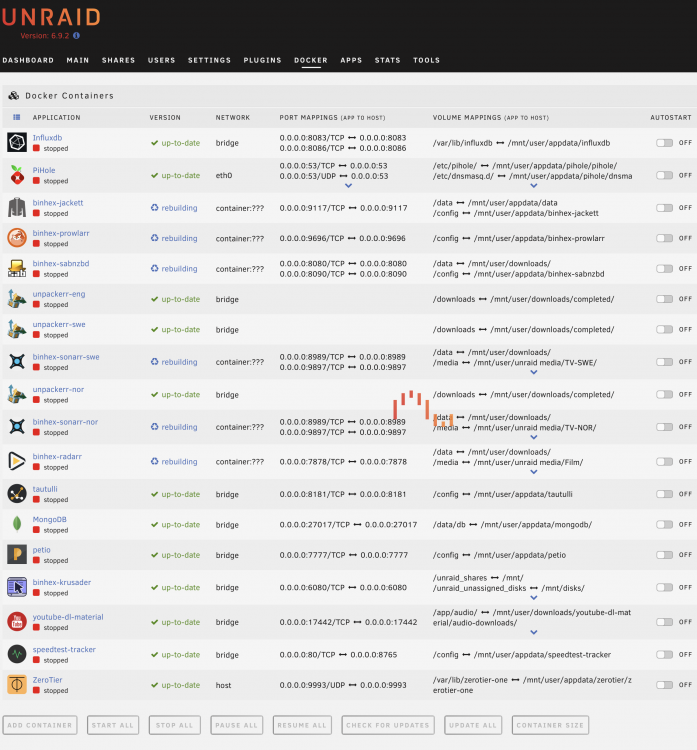
Hi! I did something stupid, I first tried to add VueTorrent-UI to binhex-qbittorrentVPN but failed somehow and got when trying to open the web-UI. Removed what files I added for VueTorrent to /appdata and thought I'd try to remove the container and re-add it. Here's when I f*cked up. I had a few other containers routed through binhex-qbittorrentVPN and now the Docker tab is stuck in a rebuilding loop. I can't add the container back either since the "add container" box is greyed out. Is there a way to kill the rebuild via terminal without having to nuke everything? Or anyone have any other way of solving this to return to normal so I could try out VueTorrent again?
-
Maybe you've solved this already @Nic4433, but have you tried following the setup like @SpaceInvaderOne does in this video? He's installing a second NIC but you already have it so you should be able to follow the setup. Only that you connect from your servers 2.5GbE NIC via your 2.5GbE switch to your PC, and not directly. Or did you manage to solve it any other way? I haven't got dual NICs yet, but the new mobo I'm getting also has 1GbE and 2.5GbE so I've done some reading in advance..
-
I've been wondering about this too, and after reading through the last 5-10 pages in the thread I believe it doesn't work with cache pools yet due to identification issues. I cross my fingers and hope for an update!
-
No luck I'm afraid. I added a variable with key: VPN_OUTPUT_PORTS and value: 32400 in binhex-qbittorrentvpn. Then I restarted both qBit and Sonarr for good measure. When trying to add a Connection in Sonarr to PMS I get "Unable to connect to Plex Server" when I try and test it. Auth with Plex.tv work ok. So I tried to use the Plex token from an XML file and it made no difference. Pulled down a completely new image of binhex-qbittorrentvpn and copy pasted my old values in, except for VPN_OUTPUT_PORTS that now was present so added 32400 there. No difference, still "Unable to connect to Plex Server". Logs on Sonarr say: This worked before the IP table tightening so I don't think there is anything I should change in PMS right? In PMS settings it is using 32400 as LAN port. PMS is on 192.168.1.7 Right now I'm routing Sonarr through qBitVPN, perhaps I should read up on proxy and how that work and use that instead? Would that help this? (not network savvy at all..)
-
First, thank you for taking the time to answer my questions! 😃 I'll try to add VPN_OUTPUT_PORTS tomorrow and get back to you. As for your questions. 1. I'd love to run it on my server but it's an good old HP Microserver N40L and it's just not powerful enough for my PMS needs... I'm working on building a new one in the near future, but she's a nice little server that's served me well many years. 2. I'm using the "Connection" feature in Sonarr and Radarr to communicate with PMS as to when changes and adds are made. PMS internal "sensing" of that doesn't seem to work that well over SMB,
-
@binhex sorry for asking again, but perhaps my question got lost amongst others. 😃 Is there any solution for this? So I'm back again. Gave up on the issue back in march but now I'm trying to solve it again. I've read through the Github issue thread, but I can't find VPN_OUTPUT_PORTS in the binhex-qbittorrentvpn container? Its on :latest and updated. I've also read your VPN Docker FAQ on Github but having problem seeing my solution. EDIT Sorry pressed send too early. I tried to add the PMS port 32400 to ADDITIONAL_PORTS also but with no luck. I'm not confident at all here so bare with me. My situation is that my PMS isn't on my unRAID machine, ie it has a different IP then my unRAID. My knowledge in networking is rather slim so maybe I'm missing something obvious here? IP for unRAID server: 192.168.1.4 binhex-qbittorrentvpn working (Container Variable: LAN_NETWORK 192.168.1.0/24) binhex-sonarr working over --net=container:binhex-qbittorrentvpn Plex Media Server on my iMac. IP:192.168.1.7 Port:32400 Edited April 21 by kim_sv pressed send too early
-
I would first create a separate share for Downloads (with "complete" and "incomplete" folders) and then map /data to that share (/Downloads) on both SABnzbds and Sonarrs containers. Right now your downloads will go into you appdata folder. Then you point /media in Sonarr to the folder on unRAID where you have your TV shows. Regarding your Sonarr config I don't use Remote Path Mappings so I can't give you answers there. But I don't think that is needed if you configure the rest correct?
-
So I'm back again. Gave up on the issue back in march but now I'm trying to solve it again. I've read through the Github issue thread, but I can't find VPN_OUTPUT_PORTS in the binhex-qbittorrentvpn container? Its on :latest and updated. I've also read your VPN Docker FAQ on Github but having problem seeing my solution. EDIT Sorry pressed send too early. I tried to add the PMS port 32400 to ADDITIONAL_PORTS also but with no luck. I'm not confident at all here so bare with me. My situation is that my PMS isn't on my unRAID machine, ie it has a different IP then my unRAID. My knowledge in networking is rather slim so maybe I'm missing something obvious here? IP for unRAID server: 192.168.1.4 binhex-qbittorrentvpn working (Container Variable: LAN_NETWORK 192.168.1.0/24) binhex-sonarr working over --net=container:binhex-qbittorrentvpn Plex Media Server on my iMac. IP:192.168.1.7 Port:32400
-
Yes, /data is where Sonarr handles the downloaded files from your download client. This path should ideally be the same in your download client container. /media is where your existing media is located. I just created a share called "downloads" to handle all my downloads from both qBit and sabNZBd. So my Host Path 2 is /mnt/user/downloads/ (same in binhex-qbittorrentvpn and binhex-sabnzbd).
-
I managed to fix the connection problems to the indexers etc I got with the new update, no problem there. But I can't for the life of me get the connection to Plex (within Sonarr/Radarr) to work again. The PMS is not on the unRAID machine so it should still use the PMS IP address? Any ideas? The authentication over Plex.tv works.
-
That was it! Thank you very much for you help!
-
Thank you ich777 for your very rapid response and for helping me! I did what you described: and unfortunately it gave me this when surfing to http://192.168.1.4:8082/vnc.html?autoconnect=true: and when I tried 8080 instead of 8082 in the URL it gave me a rolling loading icon for the VNC.
-
Hi, and thank you for your containers! I've downloaded Firefox and it worked perfect out of the box. But I tried to connect it to my binhex-qbittorrent-vpn container to put the browser behind VPN and couldn't get it to work. I've done some other containers this way so I thought it would work the same but no go. Since sabNZBd uses port 8080 I changed it to :8082 for Firefox (changed container port, host port and web-ui to :8082). Added extra parameter --net. Added port 8082 in binhex-qbittorrent-vpn But it still show that it uses port 8080 And I can only access it through http://192.168.1.4:8080/vnc.html?autoconnect=true not 8082. I can confirm that the browser uses the VPN, so it does work. But it clashes with sabNZBd that uses :8080. Why isn't it using port 8082? Is there any other way of doing this? I'm quite a noob so I have probably c*cked this up somehow... 😅
-
Can't access web-UI with VPN? Hi! Been using Speedtest-tracker now for a while and very pleased. Thank you! Figured yesterday that I would try to put it behind my VPN to see what speed I actually get. I have all my downloading containers mapped through binhex-qbittorrent-vpn, so I thought I would map a new speedtest-tracker container through qBit also. But can't get it to work. I'm fairly noob with this so I have probably just made a turd of everything 😁 This is how I tried to set it up: Mapped :8766 in qBittorrent for speedtest-tracker (named it "speedtest-tracker-vpn" to keep them apart) Added "--net=container:binhex-qbittorrentvpn" to 'Extra Parameters' but not sure if it's ok to just add that with a space after "--restart unless-stopped"? Changed 'Network Type' to "None". Also choose :8766 as port to not interfere with :8765 that the normal speedtest-tracker use. The container starts and seems to run but I can't access the web-UI? Any ideas?
-
I run my N40L with these containers: Sonarr Radarr sabNZBd qBittorrent Jackett Krusader ZeroTier speedtest-tracker Haven't tried any VM's, but I don't have the need either. Since it only have two cores I guess it's a bit over the top to run VM's.
-
Ok! I have never run WHS, I run mine with unRAID (this is a unraid forum 😜). The eSATA cable and the Molex to SATA splitter will probably work just fine. Where will you put the extra 3,5" HDD? If you ever want to run more disks like me I'd consider the PCIe card I linked above. I'm not sure if the eSATA is 3Gb/s or 6Gb/s but if you're only running standard HDDs it doesn't matter. I flashed my BIOS to be able to run HDDs with higher capacity then 3TB (🤔?) and use more then 5 SATA ports. Can't remember if this affects the eSATA. But there is tons of information out there, you just have to read up on it, here is a good start: https://n40l.fandom.com/wiki/Bios
-
That should work, but I don’t really understand why you think performance should be better? What OS at you running? Windows, unraid, Linux? I have a N40L with: 8GB RAM 6x3,5” HDD (4x in the original drive sleds, 2x mounted in the 5,25” slot with Nexus DoubleTwin) 1x2,5” SSD for cache in the space between the drive cage and the 5,25” slot. (Not screwed in) 1xPCIe 3.0 card - 5 port SATA III (for connecting 2x HDD and the SSD). I also have an external HDD enclosure with eSATA so I can run extra HDD with unassigned devices. Everything works really good with good temperatures (I removed the 5,25” cover and put in some mesh).
-
I'm running this in qBit: but it doesn't work if there is a season pack like you describe. I've just copy pasted the code from some thread in the forum. Does your code do anything else but extract the file to the same folder as the .rar files?
-
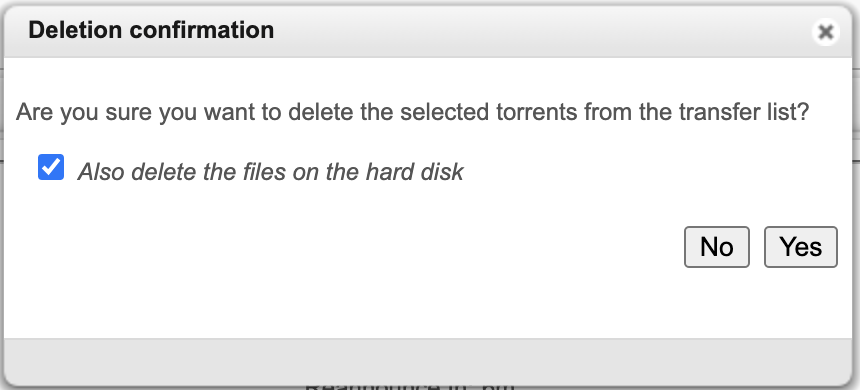
First of all, thank you for your amazing work Binhex! I'm doing some testing with qBit, Sonarr and Jacket (all Binhex). When downloading a torrent (<100%) and then choosing to delete it and have qBit also delete the files on the hard disk, it deletes the whole /data/incomplete folder. The folder will be recreated by qBit when I start a new torrent. Strange behaviour, I have the same settings on my desktop qBit and that keeps the /incomplete folder. Ideas? Also, I'm using this script in qBit: to automatically unpack .rar files that is being picked up on a private tracker by Sonarr/Radarr. It works, but after the seeding limits are met and Sonarr is deleting the files it doesn't delete the unpacked file. Anyone have any idea on how to modify the script to delete the unpacked file after Sonarr have copied it to the array?
-
Thank you! I tried it and it worked perfect after some trial and error on my part. I definitely need to learn how to navigate GitHub, Im terrible. I know v3 of Radarr is more beta then v3 for Sonarr, but is it possible to do this with binhex-radarr aswell?
-
Thank you! Tried downloading linuxservers Sonarr docker with :preview and that work ok. But I'll try your solution and use it with Binhex dockers to keep them unanimous. Is it on Github you find if you should add :preview or :latest in the repository?
-
I just got into dockers on my unraid and trying to setup Sonarr/Radarr/Jackett/qBit/Sab. I've run these on my Mac for years and it feels backwards downgrading to Sonarr v.2 with docker. How did you go about to change it? I like how the binhex dockers are working with the same mappings.
-
OK now I got it to work. When I disabled the SwiftKey keyboard on the iPhone and used the built in it worked. Weird!
-
Yes, no problem logging in as root to webUI. Just realized that its not possible to login to the webUI with other user than root. But still couldn't login to webUI using root in iOS safari over ZeroTier.
-
OK, but root didn't work either?!



