





Doublemyst
Members
-
Joined
-
Last visited
-
Hi, thanks for your templates, but it seems the templates under community applications are outdated for forgejo -> it is still showing the old versions, which are "hardcoded" in the template.
-
Yes PLEASE! This is the a thing I'm really missing in the app. Maybe, if it easier, give us the possibility to run / stop scripts, without the possibility to edit and add it later, if possible. But just being able to run scripts would be already a great help!
-
Hi, I'd like to do it also with HA (have several VM's i need to turn off / turn on, but i am an absolute beginner in HA. I have a few buttons from Ikea and would like to use those (only 2 buttons, but I'll try to toggle on/off with each button 1 VM - so 2 VMs toggeling with two buttons :). Did you make it with a guide, and if yes, could you give me the link, so I can copy the setup way?
-
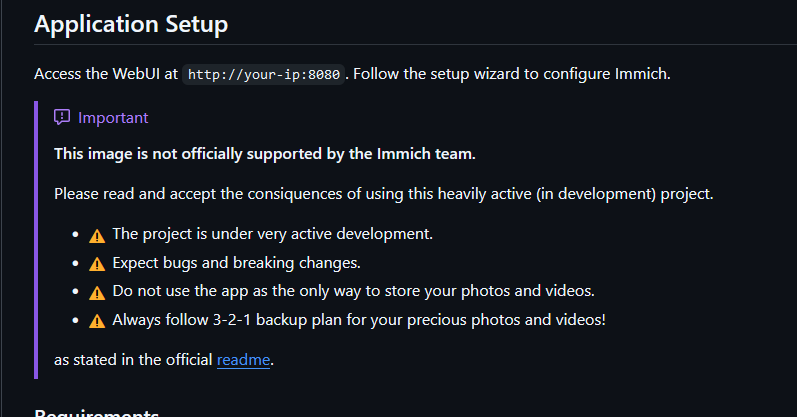
Hi all I am a beginner in those questions and just wanted to know, if the docker containers, which aren't pointing to the official github projects are legit or not? As far as I understand this is an all in one docker, but isn't the official docker not already a complete docker? The PostgreSQL is on the side anyways. Here as example the immich docker container: This docker was also used from spaceinvaderone in his video. According to their information, it is an image, which isn't officially supported by the immich team: So in the end, is there a possibility, that the docker, which we are pulling from the apps, is, or can be, a rogue one? Thanks!

-
Hi there, I have an issue with the binhex-qbittorentvpn docker. Basically, if you have to change all the ports, as they might be already occupied, or any other reason, the WebUI won't start. The only way to get the WebUI to work, is to delete the image (just changing the ports back to original values won't work) and leave all the port values at the original state. Are there some hidden ports, which aren't visible in the docker edit view, which have also to be changed?
-
I'm having the same issue. It goes to sleep during parity check. How did you solve it?
-
Hi there, I'm having an issue, my DelugeVPN Docker container stopped working! 2024-04-20 13:21:24,478 DEBG 'start-script' stdout output: 2024-04-20 13:21:24 read UDPv4 [ECONNREFUSED]: Connection refused (fd=3,code=111) 2024-04-20 13:21:26,712 DEBG 'start-script' stdout output: 2024-04-20 13:21:26 read UDPv4 [ECONNREFUSED]: Connection refused (fd=3,code=111) 2024-04-20 13:21:30,052 DEBG 'start-script' stdout output: 2024-04-20 13:21:30 read UDPv4 [ECONNREFUSED]: Connection refused (fd=3,code=111) 2024-04-20 13:21:38,806 DEBG 'start-script' stdout output: 2024-04-20 13:21:38 read UDPv4 [ECONNREFUSED]: Connection refused (fd=3,code=111) Same message, but the number before DEBG changes each time. Here it the error message I'm keep getting. Rebooting the server didn't solve the issue. I've looked online, and seen, that there was this issue a year ago, but there is no answer how to solve it... I have completely reinstalled the docker container, but the issue persists. Does anyone has an idea what to do?? I think it has something to do with read write permissions .. but I don't know what to change and how... Edit: Don't know if important, but today I've restarted the server (adding more RAM). And additionally I've increased the docker virtual disk. Edit2: Found a solution. In my case it seems that the VPN Provider Server, which was used for the past years, doesn't exist anymore. After reinstalling everything from scratch, I needed the new VPN Settings and found out, that my old server wasn't available anymore (couldn't find the .ovpn server file anymore). Cheers!
-
Hi, thanks for the reply. Is there a way to send a magic packet to another network. Eventually over the plugin I've installed on the server, on which also the wireguard is running? This server (which is in the same network as another) would act then as a relay?
-
Hi @jbrodriguez I've following issue in the app. When I am not at home and I connect to one of my unraid servers via Wireguard, I can see all the active servers in the app, but when I try to wakup the sleeping one, no wakeup signal is sent. When I send the wakeup signal in the same network (over WiFi), everything works fine. Do you know how to fix it? Cheers!
-
Hi, as far as I've read (just digging in now in this topic, as I need a BLE dongle for myself), this dongle isn't supported by HomeAssistant / Linux, as there are no drives. Here is a list of supported dongles: https://www.home-assistant.io/integrations/bluetooth/ The CM656 from this Ugreen 5.3 isn't listed. Or am I wrong and you did manage somehow to get it working? Cheers
-
Did you manage to solve this issue? If yes, how?
-
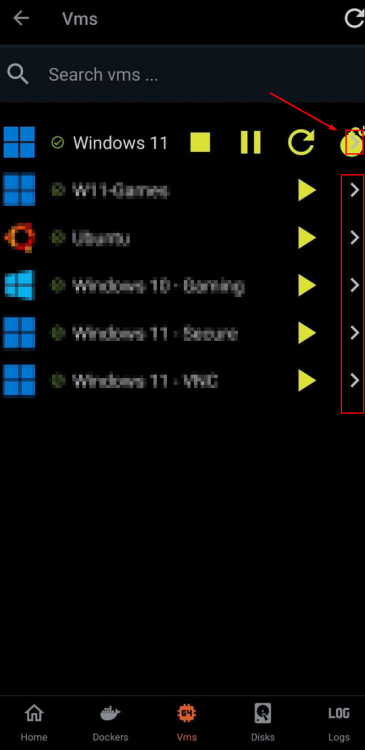
Hi, it has now been a few months, but the > is still there and I have issues with destroying VMs in the app. I do have to force stop my VMs as it often hangs after starting from unraid sleep state. When do you think can you remove this unnecessary coming soon arrow? Or maybe you can move the stop pause restart destroy buttons below the VM names? As the issue can also occur, when the VM name is too long. Cheers
-
Hi there I've got this error message. Does anyone know what is the reason for that? Diagnostics attached. Cheers borg-diagnostics-20230907-1425.zip
-
Hi @Squid Maybe you have an idea, if the error message I got is a bad one? Sorry for disturbing! Cheers
-
Hi @trurl Did you manage to see something fishy in this error message? Cheers!


