





Doublemyst
Members
-
Joined
-
Last visited
Everything posted by Doublemyst
-
Hi, thanks for your templates, but it seems the templates under community applications are outdated for forgejo -> it is still showing the old versions, which are "hardcoded" in the template.
-
Yes PLEASE! This is the a thing I'm really missing in the app. Maybe, if it easier, give us the possibility to run / stop scripts, without the possibility to edit and add it later, if possible. But just being able to run scripts would be already a great help!
-
Hi, I'd like to do it also with HA (have several VM's i need to turn off / turn on, but i am an absolute beginner in HA. I have a few buttons from Ikea and would like to use those (only 2 buttons, but I'll try to toggle on/off with each button 1 VM - so 2 VMs toggeling with two buttons :). Did you make it with a guide, and if yes, could you give me the link, so I can copy the setup way?
-
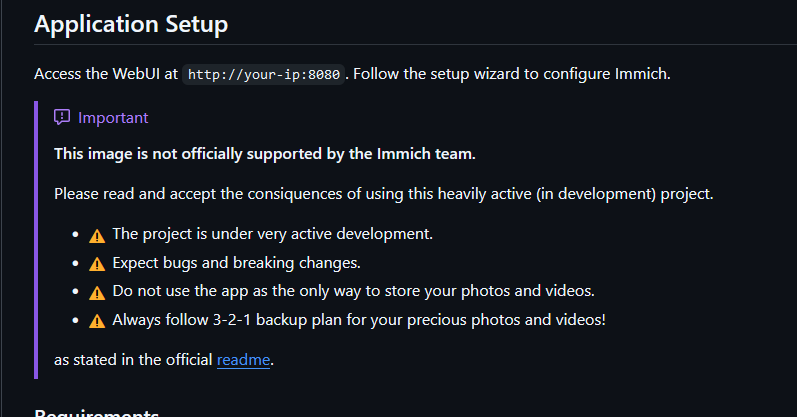
Hi all I am a beginner in those questions and just wanted to know, if the docker containers, which aren't pointing to the official github projects are legit or not? As far as I understand this is an all in one docker, but isn't the official docker not already a complete docker? The PostgreSQL is on the side anyways. Here as example the immich docker container: This docker was also used from spaceinvaderone in his video. According to their information, it is an image, which isn't officially supported by the immich team: So in the end, is there a possibility, that the docker, which we are pulling from the apps, is, or can be, a rogue one? Thanks!

-
Hi there, I have an issue with the binhex-qbittorentvpn docker. Basically, if you have to change all the ports, as they might be already occupied, or any other reason, the WebUI won't start. The only way to get the WebUI to work, is to delete the image (just changing the ports back to original values won't work) and leave all the port values at the original state. Are there some hidden ports, which aren't visible in the docker edit view, which have also to be changed?
-
I'm having the same issue. It goes to sleep during parity check. How did you solve it?
-
Hi there, I'm having an issue, my DelugeVPN Docker container stopped working! 2024-04-20 13:21:24,478 DEBG 'start-script' stdout output: 2024-04-20 13:21:24 read UDPv4 [ECONNREFUSED]: Connection refused (fd=3,code=111) 2024-04-20 13:21:26,712 DEBG 'start-script' stdout output: 2024-04-20 13:21:26 read UDPv4 [ECONNREFUSED]: Connection refused (fd=3,code=111) 2024-04-20 13:21:30,052 DEBG 'start-script' stdout output: 2024-04-20 13:21:30 read UDPv4 [ECONNREFUSED]: Connection refused (fd=3,code=111) 2024-04-20 13:21:38,806 DEBG 'start-script' stdout output: 2024-04-20 13:21:38 read UDPv4 [ECONNREFUSED]: Connection refused (fd=3,code=111) Same message, but the number before DEBG changes each time. Here it the error message I'm keep getting. Rebooting the server didn't solve the issue. I've looked online, and seen, that there was this issue a year ago, but there is no answer how to solve it... I have completely reinstalled the docker container, but the issue persists. Does anyone has an idea what to do?? I think it has something to do with read write permissions .. but I don't know what to change and how... Edit: Don't know if important, but today I've restarted the server (adding more RAM). And additionally I've increased the docker virtual disk. Edit2: Found a solution. In my case it seems that the VPN Provider Server, which was used for the past years, doesn't exist anymore. After reinstalling everything from scratch, I needed the new VPN Settings and found out, that my old server wasn't available anymore (couldn't find the .ovpn server file anymore). Cheers!
-
Hi, thanks for the reply. Is there a way to send a magic packet to another network. Eventually over the plugin I've installed on the server, on which also the wireguard is running? This server (which is in the same network as another) would act then as a relay?
-
Hi @jbrodriguez I've following issue in the app. When I am not at home and I connect to one of my unraid servers via Wireguard, I can see all the active servers in the app, but when I try to wakup the sleeping one, no wakeup signal is sent. When I send the wakeup signal in the same network (over WiFi), everything works fine. Do you know how to fix it? Cheers!
-
Hi, as far as I've read (just digging in now in this topic, as I need a BLE dongle for myself), this dongle isn't supported by HomeAssistant / Linux, as there are no drives. Here is a list of supported dongles: https://www.home-assistant.io/integrations/bluetooth/ The CM656 from this Ugreen 5.3 isn't listed. Or am I wrong and you did manage somehow to get it working? Cheers
-
Did you manage to solve this issue? If yes, how?
-
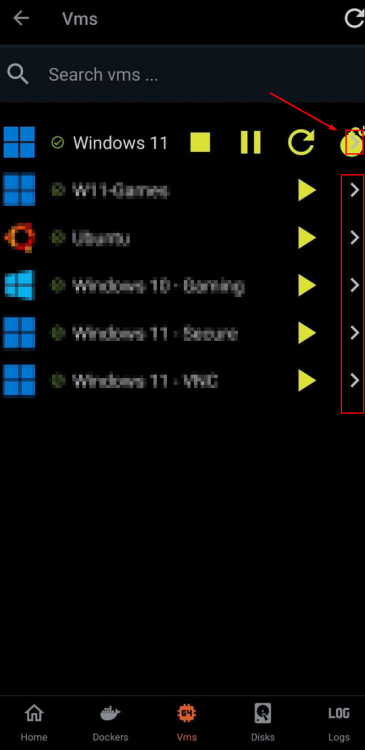
Hi, it has now been a few months, but the > is still there and I have issues with destroying VMs in the app. I do have to force stop my VMs as it often hangs after starting from unraid sleep state. When do you think can you remove this unnecessary coming soon arrow? Or maybe you can move the stop pause restart destroy buttons below the VM names? As the issue can also occur, when the VM name is too long. Cheers
-
Hi there I've got this error message. Does anyone know what is the reason for that? Diagnostics attached. Cheers borg-diagnostics-20230907-1425.zip
-
Hi @Squid Maybe you have an idea, if the error message I got is a bad one? Sorry for disturbing! Cheers
-
Hi @trurl Did you manage to see something fishy in this error message? Cheers!
-
Here the diagnostics (I hope it was anonymized) borg-diagnostics-20230823-0728.zip
-
Hi there Now I got this error .. In Syslogs I've got this: Aug 22 12:58:04 borg kernel: 9pnet: Installing 9P2000 support Aug 22 12:58:04 borg kernel: mce: [Hardware Error]: Machine check events logged Aug 22 12:58:04 borg kernel: mce: [Hardware Error]: CPU 0: Machine Check: 0 Bank 22: baa000000002010b Aug 22 12:58:04 borg kernel: mce: [Hardware Error]: TSC 0 MISC d012000100000000 SYND 4d000000 IPID 1813e17000 Aug 22 12:58:04 borg kernel: mce: [Hardware Error]: PROCESSOR 2:a20f10 TIME 1692701860 SOCKET 0 APIC 0 microcode a201016 Aug 22 12:58:04 borg kernel: mce: [Hardware Error]: Machine check events logged Aug 22 12:58:04 borg kernel: mce: [Hardware Error]: CPU 5: Machine Check: 0 Bank 5: bea0000001000108 Aug 22 12:58:04 borg kernel: mce: [Hardware Error]: TSC 0 ADDR fff80257f8be58 MISC d012000100000000 SYND 4d000000 IPID 500b000000000 Aug 22 12:58:04 borg kernel: mce: [Hardware Error]: PROCESSOR 2:a20f10 TIME 1692701860 SOCKET 0 APIC a microcode a201016 Aug 22 12:58:04 borg kernel: microcode: CPU0: patch_level=0x0a201016 Aug 22 12:58:04 borg kernel: microcode: CPU1: patch_level=0x0a201016 Aug 22 12:58:04 borg kernel: microcode: CPU2: patch_level=0x0a201016 Aug 22 12:58:04 borg kernel: microcode: CPU3: patch_level=0x0a201016 Aug 22 12:58:04 borg kernel: microcode: CPU4: patch_level=0x0a201016 Aug 22 12:58:04 borg kernel: microcode: CPU5: patch_level=0x0a201016 Aug 22 12:58:04 borg kernel: microcode: CPU6: patch_level=0x0a201016 Aug 22 12:58:04 borg kernel: microcode: CPU7: patch_level=0x0a201016 Aug 22 12:58:04 borg kernel: microcode: CPU8: patch_level=0x0a201016 Aug 22 12:58:04 borg kernel: microcode: CPU9: patch_level=0x0a201016 Aug 22 12:58:04 borg kernel: microcode: CPU10: patch_level=0x0a201016 Aug 22 12:58:04 borg kernel: microcode: CPU11: patch_level=0x0a201016 Aug 22 12:58:04 borg kernel: microcode: Microcode Update Driver: v2.2. Aug 22 12:58:04 borg kernel: IPI shorthand broadcast: enabled Aug 22 12:58:04 borg kernel: sched_clock: Marking stable (9307830493, 344892605)->(9774991219, -122268121) Anyone an idea, if this is bad?
-
Hi Alright, now it worked, I have tried with http, but it didn't work. Then, after your reply, used https and 443, and it worked.. Thanks! Btw. you have added the destroy button to VMs and it is working fine, thanks for that! Would it be possible to move the buttons to another line? As the destroy button and the button ">" for logs, which aren't implemented, are almost on the same spot and 2 out of 5 times, i click on "logs" instead of the destroy button. Or maybe remove the > button altogehter, as the VM logs aren't impelmented, and if they will, maybe you can start logs by clicking on VM name?
-
Hi, since the update, my servers, which were configured and working, aren't displayed anymore and I can't add them again. They are found in the auto-discovery, but even if I add the root user / password, no connection is established (endless loading symbol). Edit: Also the manual adding didn't work.
-
Did you figure it out? I am having issues setting up paperless-ngx ... Can't connect to the redis instance wrong username/password. I have tried admin, tee, leaving it empty ..
-
Hi Thank you for your response and the proposed solution! It's difficult for me to describe my feelings, but I experience a peculiar sensation akin to a mental itch whenever I need to execute this code 😅. Perhaps there is a possibility to incorporate a code-based verification to determine whether the device is currently mounted. If it isn't, we could then verify its availability before proceeding with the execution of the mount autoshares command. Or is it a task, which can't be easily accomplished? Thanks!
-
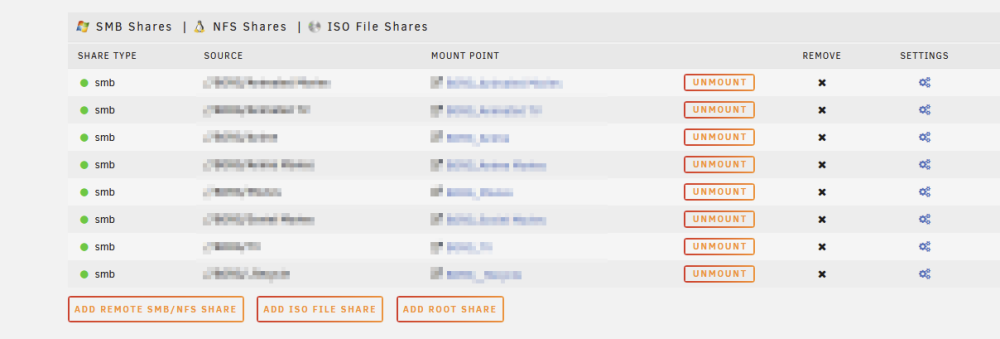
Hello guys I hope someone has a solution for following problem: I have to Servers (Server A and Server B). Server A has SMB shares setup to Server B (Server A -> Server B). When Server A and Server B are both online, and shares are mounted (automounting is on), everything works pretty well. Server B can go offline (sleep), and after waking up, the shares are still mounted. Now if the Server B is offline, and server A is restarted, it is trying to mount the shares from the Server B, but as the server B is offline, no shares are mounted. If the server B comes online, the shares are not mounted, and the system doesn't even try to mount them. How can I make sure, that when the Server B comes online, Server A will try to mount the shares?
-
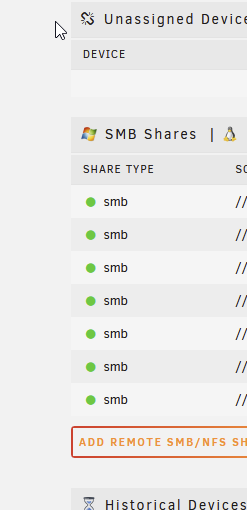
Hello guys I hope someone has a solution for following problem: I have to Servers (Server A and Server B). Server A has SMB shares setup to Server B (Server A -> Server B). When Server A and Server B are both online, and shares are mounted (automounting is on), everything works pretty well. Server B can go offline (sleep), and after waking up, the shares are still mounted. Now if the Server B is offline, and server A is restarted, it is trying to mount the shares from the Server B, but as the server B is offline, no shares are mounted. If the server B comes online, the shares are not mounted, and the system doesn't even try to mount them. How can I make sure, that when the Server B comes online, Server A will try to mount the shares? Thanks a lot for any help!
-
Hallo MasterPepe Nur zur Info, als ich bei Salt kündigte und zu Sunrise wechselte (beste Entscheidung, die ich nur hätte treffen können - Router zwar nicht der bester, aber, meiner Meinung nach, Admin-Mässig um Meilen besser als der von Salt), waren sie auf einmal sehr entgegenkommend und wollten mir das IPv4 kostenlos zur Verfügung stellen. Aber ich würde wirklich anraten sich mal die Angebote anzuschauen. Habe bei Sunrise über QoQa ein Abo gelöst für 35 Franken (10 GBit), inkl. IPv4 Adresse UND ich muss nicht mein Handy bei Salt haben für die 10 Franken Rabatt. Ich war ganz am Anfang ein Happy Salt Kunde, aber in der Zwischenzeit sehe ich wie weit unten in der Nahrungskette sie stehen.
-
Die you manage to solve this issue? I have the same issue. Did you contact directly the unraid support?



