Doublemyst
Members
-
Joined
-
Last visited
Everything posted by Doublemyst
-
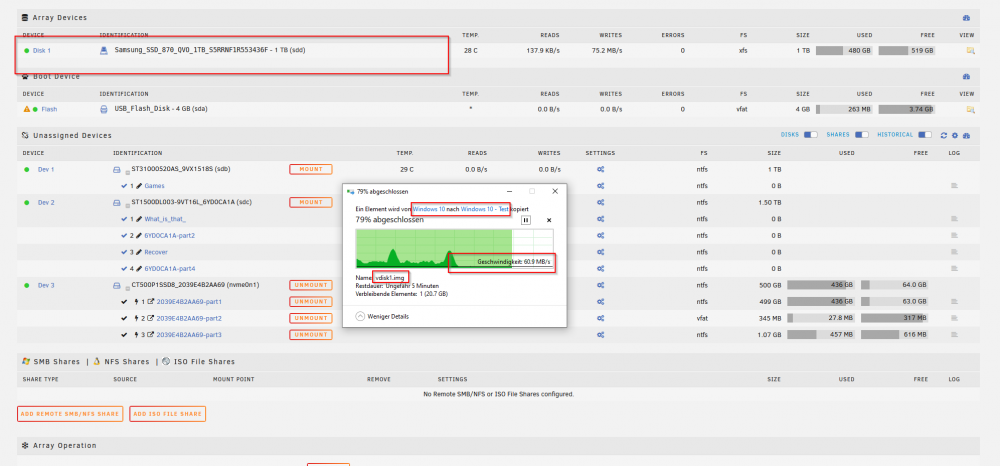
Hi, I have the issue, that my read / write speed is sort of slow. In order to test, if my setup "workspace on VM and my main computer will be my server" will work, I have created a new unraid instance. In this instance I only have 1 TB SSD drive. When I copy file inside Domains folder, the speed is pretty low. It is the same speed I have with my regular server and HDD disks with parity. Am I doing something wrong? What can be the reason for it? If it matter, my processor is AMD Ryzen 5 5600X 6-Core @ 3700 MHz. Edit: here a screenshot:
-
Thank you! It finally works! I was on the edge of giving up!
-
You're legend. Thank you!
-
Did you manage to find a solution? I have the same problems with my Nvidia GTX 1060 6GB. Here is a reddit thread (https://www.reddit.com/r/unRAID/comments/myup6h/gpu_passthrough_vm_no_display/) with a good explanation of all points "normally" needed to be done, but it didn't help in my case. I have tried to boot unraid in legacy and UEFI mode, but with no luck .. I am out of ideas right now. At the boot there is a screen output (right before unraid starts booting, than it hangs on the windows until VM autostart), but as soon as the VM starts, the screens turn black and goes into "sleep" mode.
-
Hi there I am planning to upgrade my server. At the moment I am running Intel® Core™ i7-2600 CPU and Nvidia GTX 550 TI. Unfortunately, I can't use this Nvidia card for transcoding, as it is not supported (I've tried it). As I would like to watch Plex not only over my local network (direct play), I need something which will support transcoding without buffering (at the moment my CPU can't handle it, not even only audio transcoding). I have a spare MSI MPG B550 (AMD Motherboard) and I'm thinking of buying AMD 5600G APU and not using any graphic cards. In addition I would like to play some games on a Windows VM (not AAA titles, but something an 5600G could handle - some easy epicgames freegames), as my Server is standing next to a TV with an Nvidia shield and I'd like to connect them and feeling the joy of playing on a TV . Does anyone has experience with it? Thanks for any advice. Cheers Edit: Why am I asking and not directly buying -> I've heared that there might be some gpu passtrough problems and I am not sure how it is really working (I'm a noob) and didn't find the right answer in google (maybe searched for wrong words).
-
Hi Squid, thanks again for the reply. Yeah, sorry that I didn't explain it well enough. Basically my exact the same problem was for the original post, that I don't have write access to folders (which is the case for my VM folders). In addition I have problems with dockers like Nextcloud, which needed permission reset on the share in order to be able to write on the share. I have checked now radarr app and it was indeed set under permission (chmod Folder) to 0755, I have changed it now to 0777. I guess there might be similar setting for all the apps somewhere. Thanks for the hint, I think this might be the reason, that the app is writing the file wrong and blocking folders. Cheers
-
Hi all I am a noob and have literally very little knowledge in this stuff. My goal is to make my hCaptcha from the Epicgames Freegames Node Docker available from everywhere and not just local WiFi. I have tried to find a solution with the information on the docker page Webserver setup Expose port 3000 in your Docker run config (e.g. -p 81:3000 maps the host machine's port 81 to the container's port 3000) If you want to access the Captcha solving page from outside your network, setup any port forwarding/reverse proxy/DNS Set the webPortalConfig.baseUrl in the config The web portal uses WebSocket to communicate. If you're using a reverse proxy, you may need additional configuration to enable WebSocket. This guide from Uptime Kuma covers most scenarios. The way I have tried it, didn't work. I am using SWAG as my reverse proxy (got it working today for nextcloud and deluge with some YouTube tutorials). Has anyone managed to make epicgames available from outside your local network with swag? What configuration files are you using? Here is what I have at the moment (have tried a lot of possible configurations with commenting out lines, which were generating problems .. I know I was just poking with the hope it will just work, but it didn't..). server { listen 443 ssl http2; server_name epic.*; include /config/nginx/ssl.conf; location / { # proxy_set_header X-Real-IP $remote_addr; # proxy_set_header X-Forwarded-For $proxy_add_x_forwarded_for; include /config/nginx/proxy.conf; include /config/nginx/resolver.conf; set $upstream_app XXXXX; <---- here is the local IP of my server (f.e. 192.168.1.100) set $upstream_port 3055; <---- This is the port of my Server set $upstream_proto http; proxy_pass $upstream_proto://$upstream_app:$upstream_port; # proxy_pass http://XXXXX:3055/; # proxy_http_version 1.1; proxy_set_header Upgrade $http_upgrade; proxy_set_header Connection "upgrade"; } } I'd be glad for any help, thanks! Cheers Edit: I've solved the problem Here is the domain config: ## Version 2021/05/18 # make sure that your dns has a cname set for epicgames and that your epicgames container is not using a base url server { listen 443 ssl http2; listen [::]:443 ssl; server_name epic.*; include /config/nginx/ssl.conf; client_max_body_size 0; location / { include /config/nginx/proxy.conf; include /config/nginx/resolver.conf; set $upstream_app XXX.XXX.XXX.XXX; # COMMENT: here is the local IP of my server (f.e. 192.168.1.100) set $upstream_port 3055; # COMMENT: this is the docker port from epicgames - yours may be different set $upstream_proto http; proxy_pass $upstream_proto://$upstream_app:$upstream_port; # proxy_set_header X-Real-IP $remote_addr; # proxy_set_header X-Forwarded-For $proxy_add_x_forwarded_for; # proxy_pass http://XXX.XXX.XXX.XXX:3055/; # proxy_http_version 1.1; # proxy_set_header Upgrade $http_upgrade; # proxy_set_header Connection "upgrade"; } } And very important, in the epicgames-freegames appdata you have to modify the webportalconfig -> BaseURL to the "base URL" -> for example "https://epicgames.myserver.com". VERY IMPORTANT - leave the https:// at the beginning, or try with http:// I don't know which one will work for you, but without the https:// part for me it wasn't even starting properly.
-
Hi Squid Thanks for your reply. I don't think this is a problem related to nextcloud, as I have the same problem with deluge downloaded files and even on a VM Share, on which i download YouTube videos with youtube-dl (now yt-dlp). The problem is going across dockers and system overall.
-
I have the exact same problem for all the time I am using Unraid. Even now, I have tried to use an older share for my Nextcloud setup. When the Nextcloud app tried to upload the photos, I got messages, that there was an issue .. Well, I knew it is again the shares problem and i've runned the new permissions on this folder and like expected, everything worked fine afterwards, but this won't hold for long. Does anyone how to fix this permanently? Cheers
-
Hey son_goolong and maybe spyd4r I don't know if this will help, but I had to set it up like this (in console of MariaDB) in order to let firefly access the firefly-SQL-DB: GRANT ALL privileges ON `FIREFLYDBNAME-HERE`.* TO 'YOURFIREFLYUSER-HERE'@'%'; As much as I undertand it, and I don't really, with this command your firefly-db-user will be able to access those fireflytables from any local network address. I think (not sure) it is because the firefly container has a different internal IP as the maria db and mariadb is blocking this request, as the IP is not the same as in marias container ... Maybe someone with actual knowledge can explain it better :D. But long story short, the "%" in the command is for any local IP. I hope this helps (I think it will help son_goolong, as I had similar errors, but not sure about spyd4r)
-
Hello, Thanks for the image and your work guys! I (kind of a newbie) managed to launch it. The only problem I have now, is that I can't change the date format from MM/DD/YYYY to DD/MM/YYYY. In the settings (inside firefly) it says that "For a language other than English to work properly, your operating system must be equipped with the correct locale-information. If these are not present, currency data, dates and amounts may be formatted wrong." I have really tried to make it work ... googled dozens of forums, but the solutions written there aren't working when I open the firefly console and try to use them. The solution, which should have worked is: RUN apt-get install -y locales locales-all ENV LC_ALL en_US.UTF-8 ENV LANG en_US.UTF-8 ENV LANGUAGE en_US.UTF-8 (Here I would just change the language I want for example en_GB.UTF-8, or de_DE but i get an error message when i run "apt-get install -y locales locales-all": Reading package lists... Done Building dependency tree Reading state information... Done Package locales-all is not available, but is referred to by another package. This may mean that the package is missing, has been obsoleted, or is only available from another source E: Package 'locales-all' has no installation candidate I've googled it, and the reason seems to be a missing universe repository. The command to activate it, doesn't really work: "add-apt-repository universe" sh: 9: add-apt-repository: not found At the moment I'm stuck at: Command: locale Output: LANG= LANGUAGE= LC_CTYPE="POSIX" LC_NUMERIC="POSIX" LC_TIME="POSIX" LC_COLLATE="POSIX" LC_MONETARY="POSIX" LC_MESSAGES="POSIX" LC_PAPER="POSIX" LC_NAME="POSIX" LC_ADDRESS="POSIX" LC_TELEPHONE="POSIX" LC_MEASUREMENT="POSIX" LC_IDENTIFICATION="POSIX" LC_ALL= and command: locale -a Result: C C.UTF-8 POSIX bg_BG.utf8 cs_CZ.utf8 de_DE.utf8 el_GR.utf8 en_GB.utf8 en_US.utf8 es_ES.utf8 fi_FI.utf8 fr_FR.utf8 hu_HU.utf8 it_IT.utf8 lt_LT.utf8 nb_NO.utf8 nl_NL.utf8 pl_PL.utf8 pt_BR.utf8 pt_PT.utf8 ro_RO.utf8 ru_RU.utf8 sk_SK.utf8 sv_SE.utf8 vi_VN.utf8 zh_CN.utf8 zh_TW.utf8 Which, as much as I've read on the internet, means, that no locale is set in this docker container. Can anyone help me out on this? Thanks
-
No idea what you mean by that, but thanks anyway! At least I know now the rule to have such stuff at the top
-
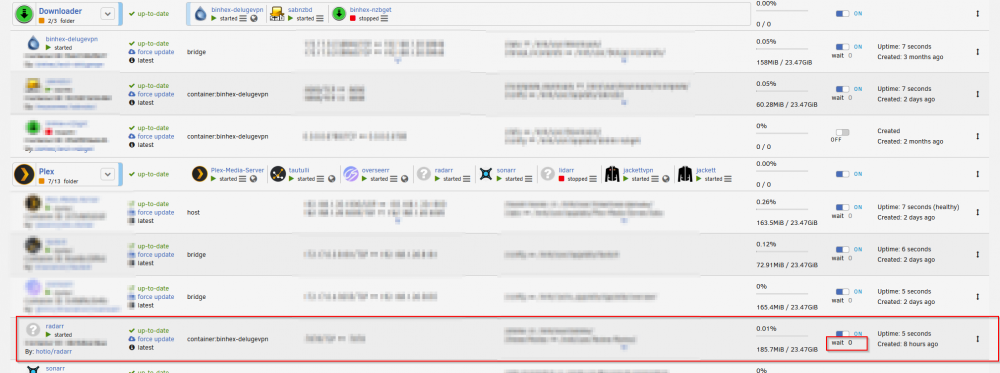
Woah, you are like a magician .. after I rearranged the docker folders, it worked ... so strange, as I thought that if I add a "wait" on the dockers itself, it would wait X seconds and then start, but rearranging did the trick for me (in this case I not only updated the SSD, but also added the docker folders, which caused the issues): Thanks for help Squid and Trurl
-
Hi trurl Here is the docker run from one of the dockers, which doesn't autostart (jackett): In addition, I have also tried to add a "wait" under advanced view for like 55-95 seconds. I thought that maybe they aren't autostarting because they are waiting for delugevpn to start, but it didn't help. Edit: But for example sabnzbd which is also going trough delugevpn is autostarting correctly. Edit2: If needed here are also the application logs after manual startup, which is working just fine: [s6-init] making user provided files available at /var/run/s6/etc...exited 0. [s6-init] ensuring user provided files have correct perms...exited 0. [fix-attrs.d] applying ownership & permissions fixes... [fix-attrs.d] done. [cont-init.d] executing container initialization scripts... [cont-init.d] 01-envfile: executing... [cont-init.d] 01-envfile: exited 0. [cont-init.d] 10-adduser: executing... usermod: no changes ------------------------------------- _ () | | ___ _ __ | | / __| | | / \ | | \__ \ | | | () | |_| |___/ |_| \__/ Brought to you by linuxserver.io ------------------------------------- To support LSIO projects visit: https://www.linuxserver.io/donate/ ------------------------------------- GID/UID ------------------------------------- User uid: 99 User gid: 100 ------------------------------------- [cont-init.d] 10-adduser: exited 0. [cont-init.d] 30-config: executing... [cont-init.d] 30-config: exited 0. [cont-init.d] 90-custom-folders: executing... [cont-init.d] 90-custom-folders: exited 0. [cont-init.d] 99-custom-scripts: executing... [custom-init] no custom files found exiting... [cont-init.d] 99-custom-scripts: exited 0. [cont-init.d] done. [services.d] starting services [services.d] done. 08-16 20:09:28 Info Starting Jackett v0.18.545 08-16 20:09:28 Info Environment version: 5.0.9 (/app/Jackett/) 08-16 20:09:28 Info OS version: Unix 5.10.28.0 (64bit OS) (64bit process) 08-16 20:09:28 Info Jackett variant: CoreLinuxAmdx64 08-16 20:09:28 Info File /etc/issue: Ubuntu 18.04.5 LTS \n \l 08-16 20:09:28 Info Running in Docker: Yes (image build: v0.18.545-ls39) 08-16 20:09:28 Info ThreadPool MaxThreads: 32767 workerThreads, 1000 completionPortThreads 08-16 20:09:28 Info App config/log directory: /config/Jackett 08-16 20:09:28 Info Using proxy: Disabled 08-16 20:09:28 Info Using FlareSolverr: No 08-16 20:09:28 Info Using HTTP Client: HttpWebClient2 08-16 20:09:28 Info Loading Native indexers ... 08-16 20:09:29 Info Loaded 99 Native indexers: abnormal, alpharatio, anidex, anidub, AniLibria, animebytes, Animedia, animetorrents, anthelion, avistaz, bakabt, bb, beyond-hd-api, bitcityreloaded, bithdtv, bjshare, broadcasthenet, brokenstones, cgpeers, cinecalidad, cinemaz, danishbytes, darmowetorenty, desitorrents, dicmusic, digitalcore, divxtotal, epublibre, erai-raws, exoticaz, filelist, funfile, fuzer, gazellegames, gimmepeers, hdbitsapi, hdspace, hdtorrents, hebits, immortalseed, internetarchive, iptorrents, libble, lostfilm, magnetico, mejortorrent, milkie, morethantv, myanonamouse, ncore, nebulance, newpct, norbits, oppaitime, orpheus, passthepopcorn, piratethenet, pixelhd, polishtracker, pornolab, pretome, privatehd, rarbg, redacted, retroflix, revolutiontt, rutracker, scenehd, scenetime, secretcinema, sharewoodapi, shazbat, ShizaProject, showrss, solidtorrents, speedapp, speedcd, subsplease, superbits, thepiratebay, toloka, torrentbytes, torrentday, torrentech, torrentheaven, torrentleech, torrentmafya, torrentnetwork, torrent-paradise-ml, torrentscsv, torrentseeds, torrentsyndikat, tvstore, tvvault, xspeeds, xthor-api, yts, zonaq, animetosho 08-16 20:09:29 Info Loading Cardigann indexers from: /config/cardigann/definitions/, /etc/xdg/cardigan/definitions/, /app/Jackett/Definitions 08-16 20:09:31 Info Loaded 448 Cardigann indexers: 0daykiev, 1337x, 1ptbar, 2fast4you, 3changtrai, 3dtorrents, 4thd, 52pt, 7torrents, Bittorrentfiles, Das-Unerwartete, abtorrents, acgrip, acgsou, acidlounge, acrossthetasman, aftershock, aidoruonline, aither, amigosshare, anaschcc, angietorrents, anime-free, animeclipse, animeworld, aniRena, anisource, arabafenice, arabp2p, arenabg, asiancinema, asiandvdclub, audiobookbay, audionews, aussierules, backups, badasstorrents, baibako, beitai, beyond-hd-oneurl, beyond-hd, bibliotik, bigfangroup, bigtorrent, bit-titan, bitded, bithorlo, bithumen, bitru, bitsearch, bitsexy, bitspyder, bitturk, bluebirdhd, blutopia, booktracker, bootytape, borgzelle, boxingtorrents, brasiltracker, broadcity, bt4g, btdigg, btetree, btnext, btschool, btsow, bwtorrents, byrutor, carpathians, carphunter, cartoonchaos, casatorrent, catorrent, ccfbits, ceskeforum, chdbits, chilebt, cilipro, cinemageddon, cinemamovies, cinematik, classix, coastalcrew, comicat, concen, concertos, cpasbien, cpasbienclone, crazyhd, crazyspirits, crnaberza, dariustracker, dark-shadow, darktracker, datascene, deildu, demonoid, desireleasers, diablotorrent, dimeadozen, divteam, dmhy, dragonworldreloaded, dxp, ebookparadijs, ebooks-shares, efectodoppler, ehentai, elitetorrent-biz, empornium, empornium2fa, eniahd, esharenet, estone, ettv, exkinoray, extratorrent-cd, extremebits, extremetorrents, extremlymtorrents, exttorrents, eztv, fanoin, fantasticheaven, fantastiko, feedurneed, femdomcult, filebase, film-paleis, finelite, finvip, firebit, fouducinema, frozenlayer, funkytorrents, gamestorrents, gay-torrents, gay-torrentsorg, gaytorrentru, generationfree, genesismovement, gfxpeers, gigatorrents, girotorrent, gktorrent, glodls, greekdiamond, greekteam, gtorrentpro, haidan, haitang, hamsterstudio, happyfappy, hd4fans, hdarea, hdatmos, hdbits, hdbitscom, hdc, hdcenter, hdchina, hdcity, hdcztorrent, hddolby, hdforever, hdhome, hdhouse, hdme, hdolimpo, hdonly, hdroute, hdsky, hdspain, hdtime, hdtorrentsit, hdturk, hdu, hdzone, hellastz, hqsource, huntorrent, hush, ibit, idope, ilcorsaroblu, ilcorsaronero, immortuos, insanetracker, isohunt2, itorrent, iv-torrents, jpopsuki, jptv, karagarga, keepfriends, kickasstorrents-to, kickasstorrents-ws, kinonavse100, kinorun, kinozal, lastfiles, latinop2p, learnflakes, legacyhd, legittorrents, lemonhd, lepornoinfo, lesaloon, libranet, limetorrents, linkomanija, linuxtracker, losslessclub, mactorrents, madsrevolution, magicheaven, magico, magnet4you, majomparade, marinetracker, mesevilag, metaltracker, microbit, mircrew, mixtapetorrent, mma-torrents, mnv, mononokebt, montorrent, mousebits, moviesdvdr, movietorrent, mteamtp, mteamtp2fa, muziekfabriek, mvgroupforum, mvgroupmain, mypornclub, myspleen, nbtorrents, nbytez, netcosmo, nethd, netlab, newretro, newstudio, newstudiol, nitro, nntt, noname-club, noname-clubl, nordicplus, nyaa-pantsu, nyaasi, oasis, obscure, omgwtftrackr, oncesearch, onejav, opencd, oshenpt, ourbits, oxtorrent, p2pbg, p2pelite, parnuxi, pctorrent, peerjunkies, peersfm, pier720, piratadigital, piratbit, piratbitl, pirateiro, pixelcove, pleasuredome, polishsource, pornbay, pornbits, pornforall, pornleech, pornolive, pornorip, pornotor, portugas, potuk, proaudiotorrents, proporno, prostylex, pterclub, ptfiles, pthome, ptmsg, ptsbao, pttime, puntotorrent, purovicio, pussytorrents, puurhollands, pwtorrents, r3vwtf, racing4everyone, racingforme, rainbowtracker, rapidzona, redbits, redstartorrent, resurrectthenet, rgfootball, rintor, rintornet, riperam, RockBox, romanianmetaltorrents, rptorrents, rus-media, rustorka, rutor, rutracker-ru, scenepalace, scenerush, sdbits, seedfile, selezen, sexypics, sharefiles, shareisland, sharewood, shokweb, siambit, sktorrent-org, sktorrent, snowpt, sosulki, soulvoice, speedmasterhd, speedtorrentreloaded, spiritofrevolution, sporthd, sportscult, springsunday, sugoimusic, sukebei-pantsu, sukebeinyaasi, swarmazon, tapochek, tasmanit, teamhd, teamos, tekno3d, tellytorrent, teracod, theaudioscene, theempire, thefallingangels, thegeeks, thehorrorcharnel, theleachzone, themixingbowl, theoccult, theplace, thesceneplace, theshinning, theshow, thespit, thevault, tjupt, tlfbits, tntfork, tokyotosho, torlock, toros, torrent-explosiv, torrent-pirat, torrent-turk, torrent4you, torrent9, torrent9clone, torrentbd, torrentccf, torrentdb, torrentdownload, torrentdownloads, torrentfunk, torrentgalaxy, torrenthr, torrenting, torrentkitty, torrentland, torrentleech-pl, torrentlt, torrentmax, torrentoyunindir, torrentparadise, torrentproject2, torrentqq, torrentsectorcrew, torrentsir, torrentslocal, torrentsurf, torrentv, torrentview, torrentwhiz, totallykids, totheglory, totheglorycookie, trackeros, trancetraffic, trezzor, tribalmixes, trupornolabs, ttsweb, turkseed, turktorrent, tvchaosuk, twilight, twilightszoom, u2, uhdbits, underverse, underversel, uniondht, unionfansub, uniongang, unlimitz, vizuk, vsthouse, vsttorrents, wdt, wihd, woot, xiteme, xbytesv2, xwtclassics, xwtorrents, xxxadulttorrent, xxxtor, xxxtorrents, ydypt, yggcookie, yggtorrent, yourbittorrent, zamundanet, zelkaorg, zetorrents, zooqle, ztracker 08-16 20:09:31 Info Loaded 547 indexers in total 08-16 20:09:31 Info Adding aggregate indexer ('all' indexer) ... 08-16 20:09:31 Info Adding filter indexer ('type:public' indexer) ... 08-16 20:09:31 Info Adding filter indexer ('type:private' indexer) ... 08-16 20:09:31 Info Adding filter indexer ('type:semi-public' indexer) ... 08-16 20:09:31 Info Jackett startup finished in 4.631 s Hosting environment: Production Content root path: /app/Jackett/Content Now listening on: http://[::]:9117 Application started. Press Ctrl+C to shut down.


-
Has anyone an idea why some dockers doesn't autostart after adding a new cache drive and renaming the "old" cache drive?
-
Hallo zusammen Falls jemand eine funktionierende Lösung mit Unraid und Salt hingekriegt hat, bitte kurz melden :). Ich verwende momentan eine "krüppel"-Lösung, indem ich den Zerotier Docker laufen lasse und sozusagen nur über VPN auf den Server zugreiffe. Es wäre schon cool eine IPv4 zu haben und endlich mal über eine URL auf z.B. Nextcloud zugreiffen zu können.
-
I've heared, that the MyServer Plugin might cause the disks to be spun up (was a problem before).
-
Here are the files. Edit: Removed the file, as it wasn't needet for the problem solving.
-
Hi @Squid, what exactly should I post, or where should I get it? I am kind of new to this stuff.. I have downloaded a ZIP File under Tools -> Diagnostics, do you need something from there specific?
-
Hi there I have a problem with my dockers since I added a new cache drive and renamed the old one. Before that, all my appdata were on "Cache" drive, but now this cache drive is renamed to "Cache_appdata". Some dockers are autostarting just fine, and if i start the dockers manually, they work perfectly, but after a reboot some dockers just doesn't autostart... I don't know what is the reason, but some dockers do autostart.. For example Plex-Docker is autostarting, but Radarr, Sonarr, Jackett aren't. Thanks for any help!
-
Doesn't look that this application forum page is often checked by developers / powerusers .. I had the same problem as you and didn't find a solution. I had to restart the docker.
-
Hi there, I can't input any cyrillyc letters. My search in Google has shown, that I have to set URIEncoding="UTF-8" for Guacamole, but I have no idea how to do so with this docker. Does anyone has a solution how to enter non ascii characters? Thanks
-
Thanks, the "Fit to window" fixed the issue. Is it possible, that a video is by default in the "Fit to window"-mode?
-
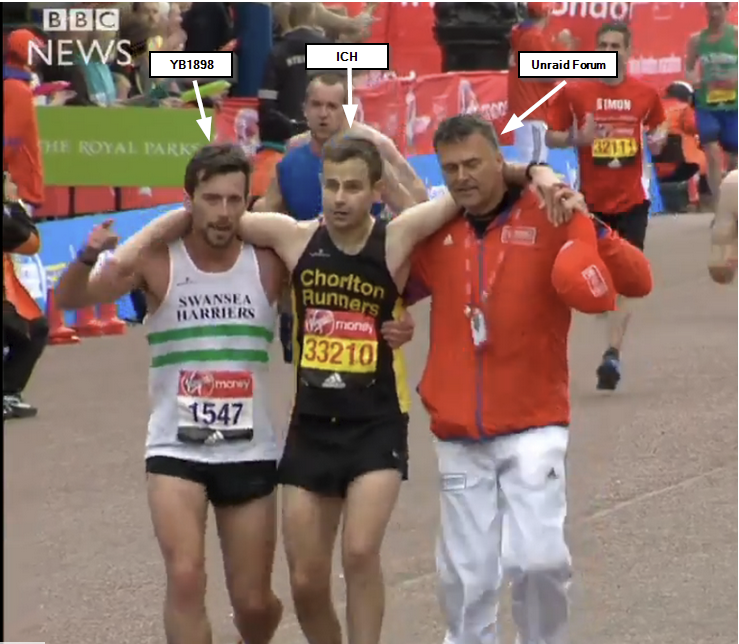
Hallo YB1898 Vielen Dank nochmals für deine Nachrichten, du hilfst mir hier wirklich enorm. Ich werde das ganze heute Abend genauer anschauen. Dieses Bild erklärt relativ gut was passiert ist, als ich aus Verzweiflung in dem Thema aufgegeben wollte:
-
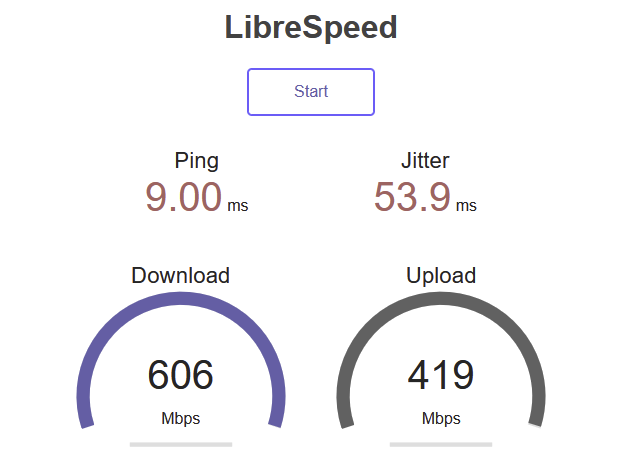
Hallo yb1898 Danke für die Infos. Unglaublich, aber genau das sind meine Probleme, die ich nicht lösen konnte. Im Internet ist in der Tat extreem wenig Informationen, respektive man muss sehr genau wissen wonach man sucht (wahrscheinlich war mein Fehler das ich es alles auf Englishen Foren suchte, keine Ahnung). Was bezahlst du monatlich für die Art, wie du es aufgesetzt hast? Ist es sehr kompliziert für jemanden der sich in dem ganzen nicht wirklich auskennt und eigentlich nur mit YouTube Anleitungen den Server aufsetzt? Braucht man wirklich eine Raspi um hier unterwegs zu sein um zumindest eine 1Gbit Verbindung zu erhatlen, oder gäbe es noch Möglichkeit das über einen Docker auf dem Unraid abzuwickeln (oder ist es nicht möglich, da der Schritt schon vorher passieren sollte)? Eventuell ist diese Fragen in deinem freundlicherweise zur Verfügung gestellten Link ersichtlich, aber mit meinem begrenzten technischen Wissen und schnellen überfliegen habe ich es noch nciht ganz verstanden :). Über den 1Gbit Port angeschlossen hat mein Server ca 400-600Mbps (mit dem nächsten Server-upgrade wollte ich zumindest ein 2.5Gbit Motherboard anschaffen).