Doublemyst
Members
-
Joined
-
Last visited
Everything posted by Doublemyst
-
For those, who stumble across this post. As Squid has written in the correct forum, linked by JorgeB, the "array" isn't correctly recognized, so you have to add your array disks as "disks outside array" in order for the plugin to work correctly.
-
Hi there I wanted to write in plugin specific topic, but the linked forum page on the APPS isn't available anymore. The sleep plugin is ignoring some settings like (Extra delay after array inactivity: 99) and when I stop watching plex movie and go grab some drinks (maybe 5-10 minutes), the server goes into sleep. How can this be debugged, or where can I see what exactly is happening, in order to resolve this issue? Or maybe someone has experienced it also (s3 sleep plugin putting server to sleep too early)? Cheers
-
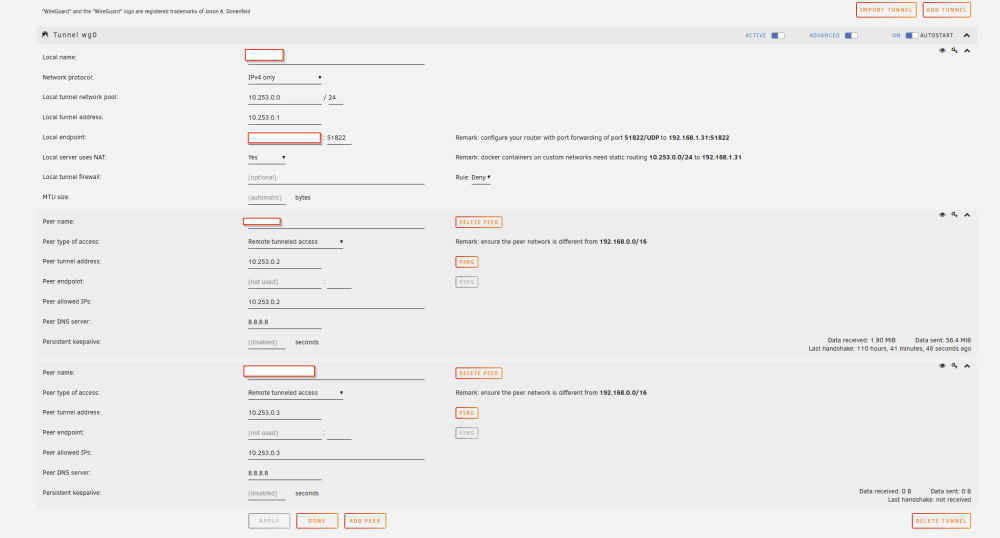
Hi @ljm42 Thanks for your help so far. At the moment being, I have managed, to get it working. What I did is setting everything up on the second server, and removed everything on the first. It didn't work at first, but after a few days, when I tried again, it just worked. Now I can start Wireguard on my server (tunneled access) and connect to it. I can access all Dockers and VM over the local IP, or with the ControlC application. But the problem is, when I activate Wireguard on my phone, I don't have internet access on my phone. Do you have any idea what the reason might be? I was thinking, that maybe the DNS Server isn't working correctly? On my home network I am using 192.168.1.50 on my router for DNS (local Adguard Home server). Here is the setup of my unraid wireguard: Thanks! Edit: Weird behaviour, but on my phone, websites browsing with started WireGuard doesn't work, but as I started WireGuard, while being connected to a MS Teams call, it did reconect - which means, the internet is there, but surfing (probably DNS issue?) doesn't work. On my Laptop, everything worked fine ... Must be a problem with my phone .. maybe the private DNS setting inside my phone.
-
Have you checked the comments on the previous pages? I have written few replies, maybe those would help - the docker container variables may be a bit different - saw a reply, that they changed naming of one.
-
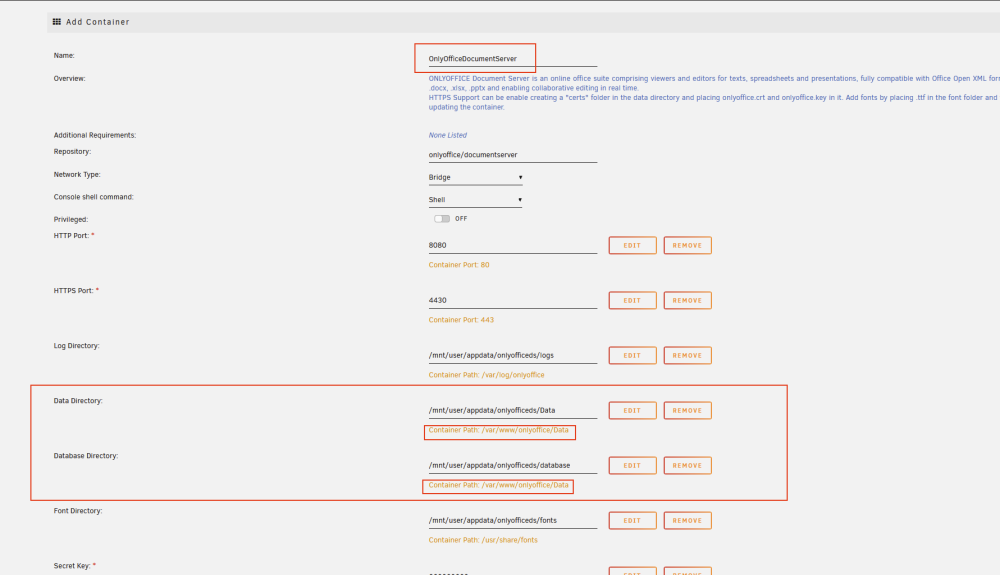
Hello This leads to issues when trying to install the container: Cheers!
-
Hi, are you planing to add postgres sql 15 (seems to be in stable now) as an app?
-
Thanks for the fix, now it is working without crashes!
-
Hi, thanks for the Update. I tried the force stop function for VM and the app crashes each time I press it. Here the automatic log report from crash: com.facebook.react.common.JavascriptException: TypeError: undefined is not a function, js engine: hermes, stack: anonymous@1:1760617 _performTransitionSideEffects@1:350396 _receiveSignal@1:349984 onResponderRelease@1:348798 invokeGuardedCallbackImpl@1:93556 invokeGuardedCallback@1:93613 invokeGuardedCallbackAndCatchFirstError@1:93645 executeDispatch@1:93777 executeDispatchesAndReleaseTopLevel@1:98028 forEachAccumulated@1:95275 anonymous@1:98380 batchedUpdatesImpl@1:157211 batchedUpdates@1:97948 _receiveRootNodeIDEvent@1:98221 receiveTouches@1:152046 __callFunction@1:81649 anonymous@1:80058 __guard@1:81008 callFunctionReturnFlushedQueue@1:80016 at com.facebook.react.modules.core.ExceptionsManagerModule.reportException(ExceptionsManagerModule.java:72) at java.lang.reflect.Method.invoke(Native Method) at com.facebook.react.bridge.JavaMethodWrapper.invoke(JavaMethodWrapper.java:372) at com.facebook.react.bridge.JavaModuleWrapper.invoke(JavaModuleWrapper.java:188) at com.facebook.jni.NativeRunnable.run(Native Method) at android.os.Handler.handleCallback(Handler.java:914) at android.os.Handler.dispatchMessage(Handler.java:100) at com.facebook.react.bridge.queue.MessageQueueThreadHandler.dispatchMessage(MessageQueueThreadHandler.java:27) at android.os.Looper.loop(Looper.java:224) at com.facebook.react.bridge.queue.MessageQueueThreadImpl$4.run(MessageQueueThreadImpl.java:228) at java.lang.Thread.run(Thread.java:919) Don't know what this Facebook is all about, I don't even have Facebook.
-
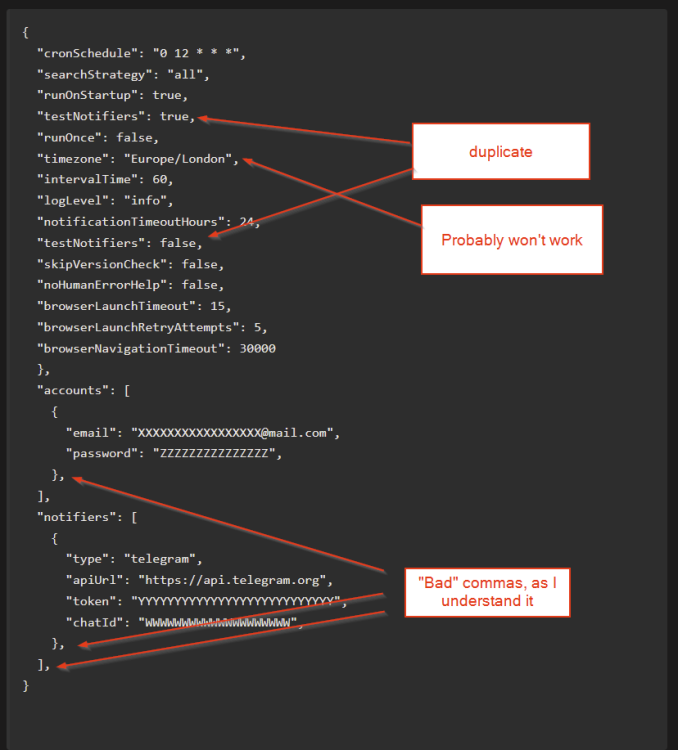
Just added my comment to this thread and saw your post. Actually, the Timezone isn't working (at least not for me), as this is set not on the config side, but (at least in our case) at the moment, when the docker is created (you can check my previdous message). Hi I actually just read your error messages, and the problem in your settings files are probably the commas "JSON5: invalid character ','" If you check how json files are created, you are not allowed to use commas at the last entry. Sorry I am also a noob and can't explain it any better - just found this out yesterday. Here is an example from your code, what I think is wrong: Edit: timezone attribute will work. Have written it wrong in my setup, as I was thinking, it will also be written in camel case timeZone - it is not. Here is a config file example, which is working for me: { "searchStrategy": "promotion", "runOnStartup": true, "cronSchedule": "0 9,12,15,18,21 * * *", "logLevel": "info", "hcaptchaAccessibilityUrl": "XXXXXX", "webPortalConfig": { "baseUrl": "https://XXXXX.XXXXXXX.com" }, "accounts": [ { "email": "[email protected]", "password": "XXXXXXXXX" } ], "notifiers": [ { "type": "email", "smtpHost": "mail.XXXXX.XXX", "smtpPort": XXX, "emailSenderAddress": "[email protected]", "emailSenderName": "Epic Games Captchas", "emailRecipientAddress": "[email protected]", "secure": false, "auth": { "user": "[email protected]", "pass": "XXXXXX" } }, { "type": "telegram", "token": "XXX:XXXXXXX", "chatId": "-XXXXXX" } ] } In my case I've set it so up, that it is checking for free games during the day a few times, then notifies me on E-Mail and Telegram for captcha to be solved. I'm using a webportal config, as I am accessing those captchas from internet - so I can add games whereever I currently am. I don't think that you need the "hcaptchaAccessibilityUrl" - this was added at the first stages of the docker, where it was possible to add games fully automatically without captchas. P.S. make sure, you are writing it correctly. The amount of spaces before your entries matters a lot. There are probably some online tools to check if your json format is written correctly. Hope it helps, Cheers
-
Hi In the docker epicgames-freegames the envirement variable "TZ" is set automatically to Los_Angeles. Is it possible to add this variable as a setting in the docker, instead of a fixed value? Otherwise the user Cron-Jobs are running on Los_Angeles times instead of (in my case) Europe. I've semi-fixed it, addint as extra paramenter "-e TZ=XXXXXX", so the docker is first starting -e TZ Los-Angeles, and then -e TZ XXXX, when building. I think this would be better for the community, if everyone could set the TZ as they please a bit easier. P.S. As a noob, I am pretty proud of myself, that I found this workaround, but I think that someone else might struggle more than me, as this kind of issue isn't an issue described on the github page of this docker. Can all be ignored. Actually, I just wrote the timezone wrong. Even as all other attributes are written in camel case, timezone has to be written as one word "timezone" and not timeZone.
-
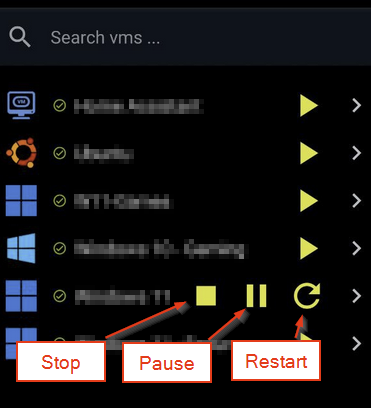
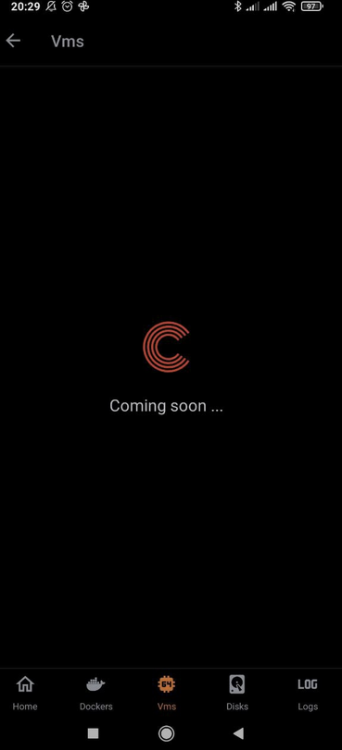
Hi Thanks for update and reply. Unfortunately I don't have neither destroy, nor force stop -> destroy would be fine too. I am using Android version. When I click on VM details, I got this message: P.S. If we are already doing the app better - is there a chance you could add the docker "check for Updates" and "update all containers" buttons? Would be awesome for remote updating your server.
-
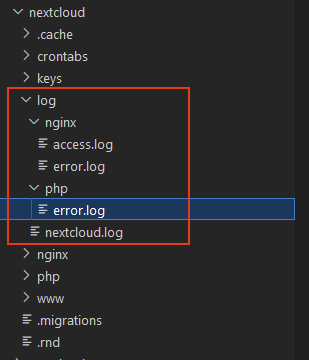
Hi @deadnote Those log folders are automatically created and I can't delete them, when the nextcloud container is running. When I stop it, delete the logs, they are recreated after a restart. Probably I need to install nextcloud completely from scratch, to get the newest version..
-
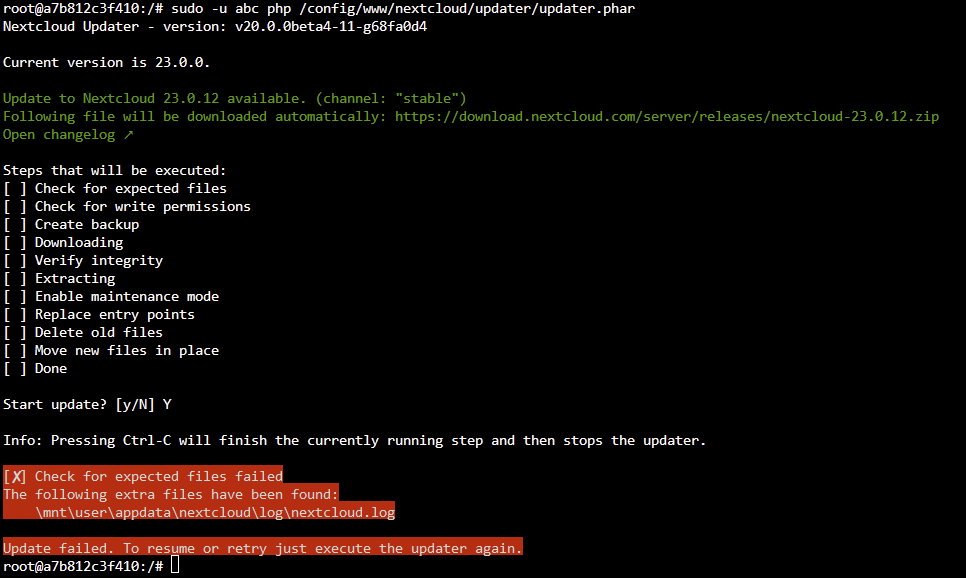
Hi @deadnote Thanks for your reply. The lscr.io/ in the beginning is deault repository of nextcloud (when you install it over Apps). I have tried to launch your command, but got following response: In the log files - i have deleted all the files, but the issue persisted. Then I thought, maybe it's a permission issue, and run following commands according to this post ( chown -cR nobody:users mnt/user/appdata/nextcloud chmod -cR ug+rw,ug+X,o-rwx /mnt/user/appdata/nextcloud But this didn't help neither...

-
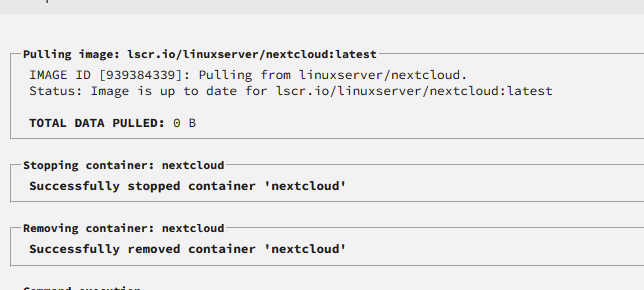
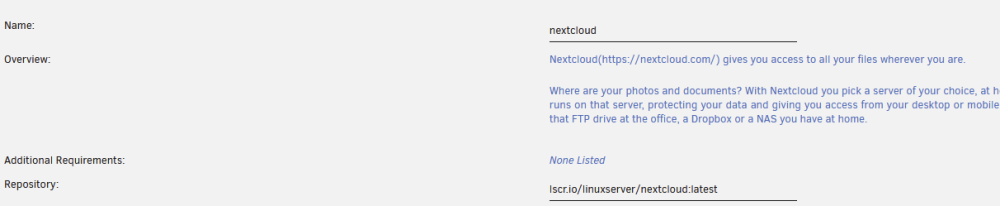
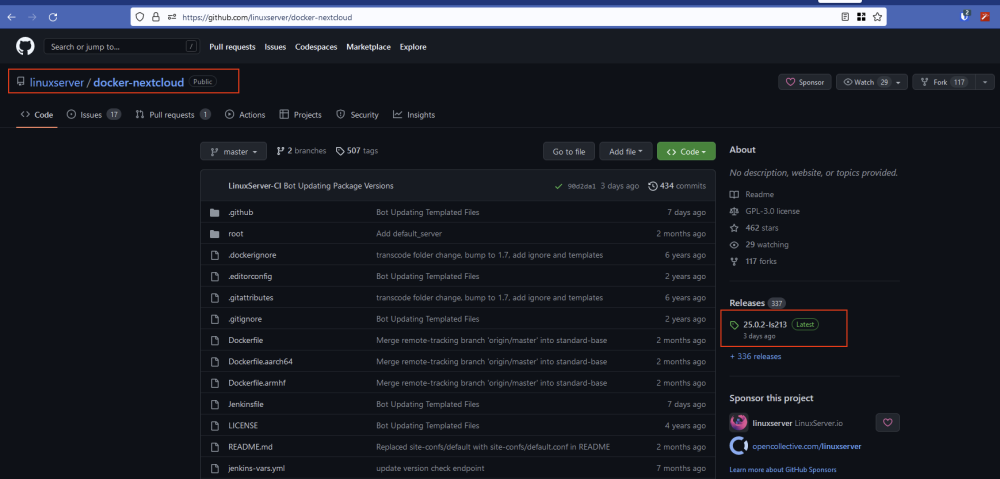
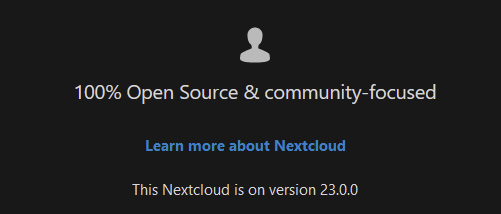
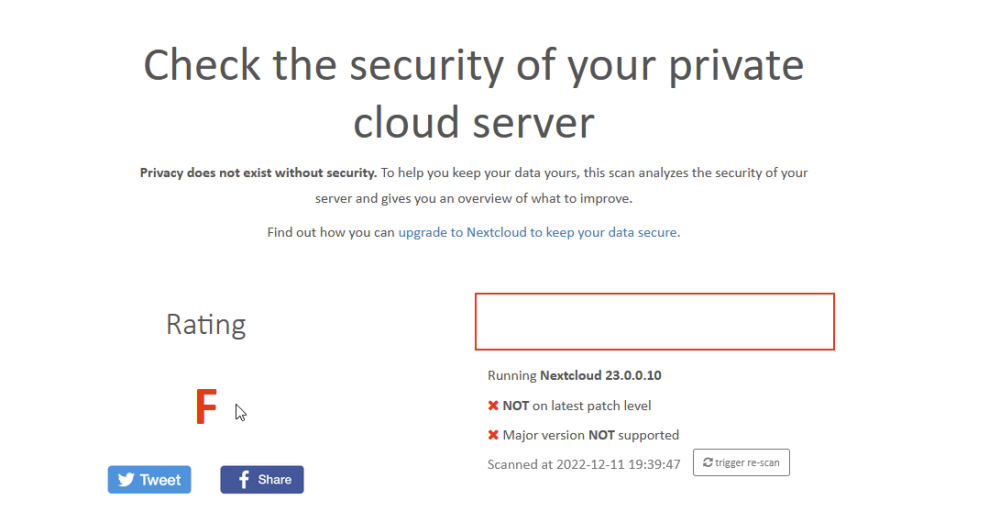
Hi there My nextcloud docker is on version 23.0.0 and I can't update it to the newest 25.X.X. I have checked the repository and pressed "force update" but it doesn't download anything new and is standing on the version 23.0.0. How can I update this docker? Here some screenshots from my setup: Edit: Here also nextcloud security check: On the support page, it says, that the latest version ist 25.X.X I have tried all I know, but didn't got it updated... I have also removed the ":latest", but it didn't help .. Thanks for any help! Cheers!
-
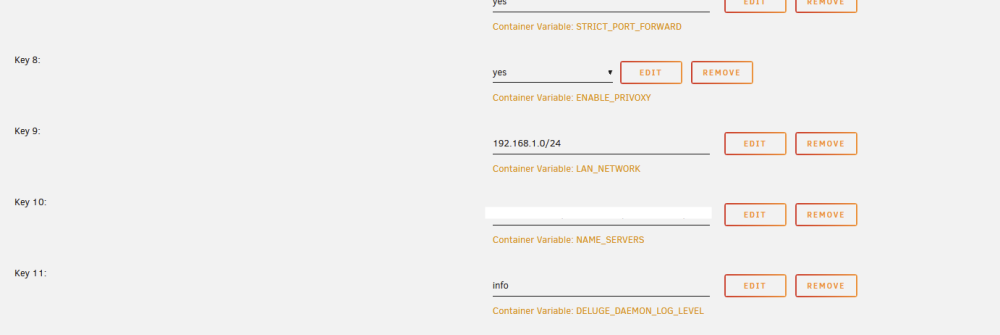
Hi there, I have a following issue → some dockers on my main server are not longer accessible. According to my noob-research the reason are the DNS requests. Here are some infos to my situation: My main server “A” has a VPN-Torrent client (delugeVPN) on a custom docker network. I have several other docker containers running through this VPN docker container (--net=container:binhex-delugevpn). Subnet: 172.19.0.0/16 Everything was running really smooth for a long time. Now I have installed a second unraid server “B” in my home network. On this Server “B” I have installed “Adguard Home” docker in br0. I have activated “DHCP Server” on it, as my home router doesn't allow the DNS requests being handled on something else. Now the DelugeVPN container doesn't even start and all the cointainers, which are routed through it, aren't working neither. When I change the DelugeVPN container to br0, it can be started, but it get's a “http://192.168.1.128:8112/” IP. My main server “A” is running under 192.168.1.20, and when running over the custom network, I was able to access it under “192.168.1.20:8112”. One of the DelugeVPN Settings is the “Container Variable: LAN_NETWORK”, so maybe that's why it was working before: I have tried to add under “Name_Servers” the IP of my Adguard Home, but it didn't work. Has anyone an Idea what happened and how I can fix it? Thanks for any help!
-
I had the same issue on my second server. I've added a new disk and moved the one with the appdata as a cache drive. All of sudden, all my adguard settings were vanished. Fortunately this is a rather new server with only a few dockers, so I just reconfigured everything again.
-
Hi @strike Did you manage to solve the issue? I too have massive VM Issues (windows 10, now windows 11), when I am running parity check. I've AMD Ryzen 5 5600X 6-Core and only the last 5 Cores (the first one are not in use by vm, so they are used only by the unraid server) and the overall load doesn't exceed 20-25%. I have lags every 10-15 seconds, which is making watching youtube or anything else impossible during the parity check. Maybe you have a working solution :). Evenually you modified the "md_sync_thresh"? I don't event know what it is at this point and don't think I'm going to change something, if it doesn't help in the first place
-
Ah great, yes it is in the webUI but not in the app. In this case I'll just wait for the next release.
-
Ah, thanks for the reply. This is changing the whole thing drasticly. Is there maybe a roadmap for new features? For example to force stop a VM (like my issue post today)?
-
Hi Rodriguez, Does this mean, that there will be support / updates for the app, or is it just a sale of a dying application?
-
Oh, so this application is abandoned? Dammit and I just bought it recently ...
-
Hello, How can I force stop a VM? I have an issue, that sometimes after sleep the VM doesn't shutdown (even thought it wasn't "really" started). On the WebUI of Unraid i can't stop the VM neither, the only solution is to force stop the VM and start it again. Cheers!
-
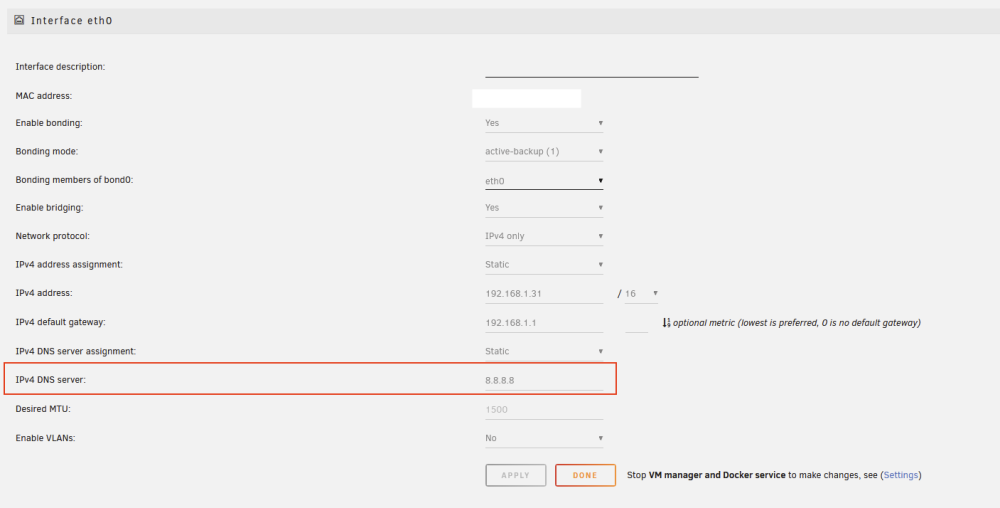
Update, after changing the google DNS Server on the first spot, the server started as expected fast. I have fully removed the adguard dns. Edit: For anyone, who might have the same issue and stumbles across this post, I've modified the Network settings in order for my server to get the static ip, as the DHCP resolver is a docker container on this server and it was behaving really weirdly otherwise. The first DNS server was the DNS of the docker container, which have caused the timeout. Luckily I had the 8.8.8.8 as second, I think it might be possible, that the server wouldn't even really startup, if there is no valid dns server resolver.
-
Hi Jorge Yes, I'll do it and let you know. I think you might be right, as the DHCP Server of Adguard is one of the dockers on this server and the first IP 192.168.1.50 is the adguard IP of this docker. Does it even make sense to use the DNS Server of a docker container on the server?
-
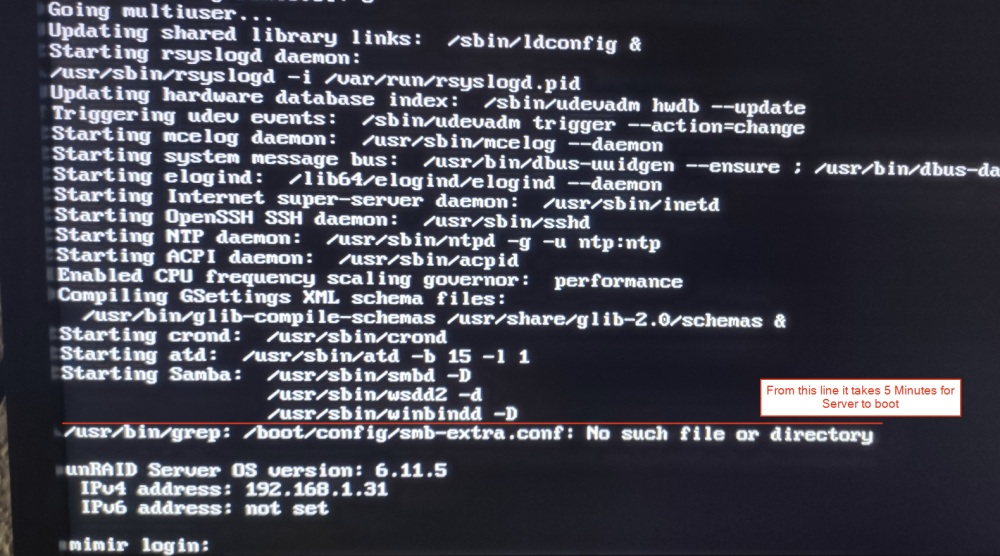
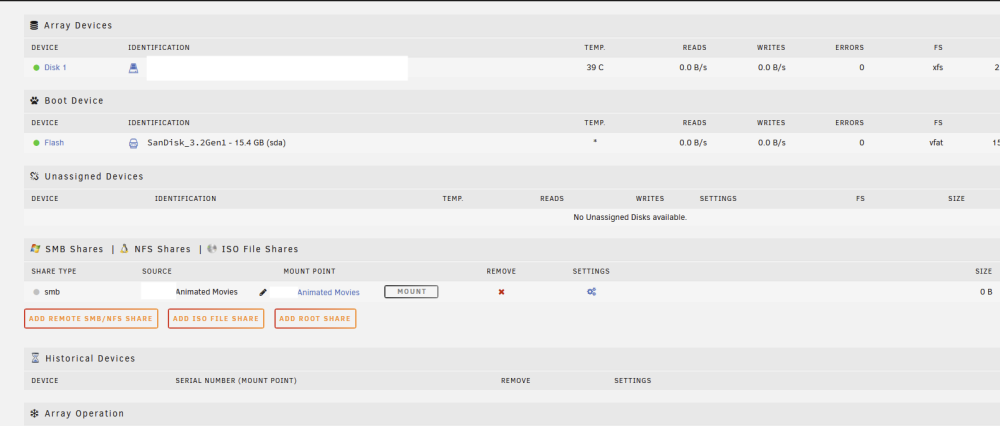
Hi there, I have the issue, that my Unraid server needs around 5.5-6 minutes for the startup. The beginning is quite fast, but then, after the Samba point, it takes 5 Minutes (I have stopped the time) for server to finally boot up and be accessable As it is speaking about SMB config - I indeed have a smb configured in order to add shares from another Unraid server to dockers on this one. In addition I'm also adding my diagnostic file after the boot: Edit: Diagnostic removed, as the issue was solved below. Thanks for any help! Cheers