





LFFPicard
Members
-
Joined
-
Last visited
Everything posted by LFFPicard
-
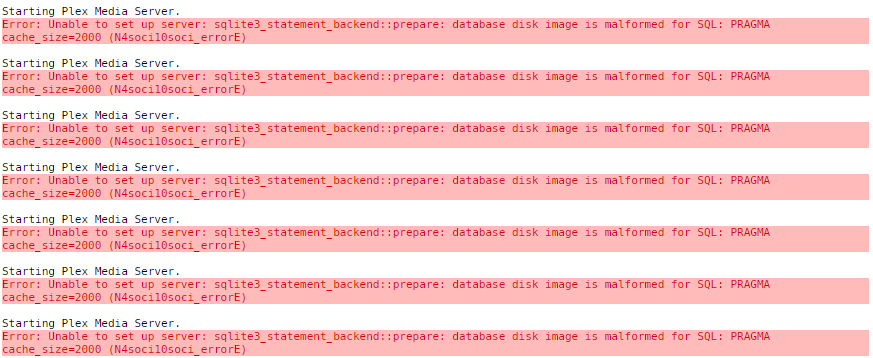
Update: An appdata restore made things worse... I now can not load Plex as I get the following:
-
Hi Hi, Right I am getting a not authorized message when trying to access my server and my plex settings simply show it as unavailable or not there at all. I have tried a few fixes and nothing has worked and I fear I am making things worse. First a quick background as to what led to this. I had a power cut today, a rather bad powercut. BUT I have a UPS and this kept the server running and performed a graceful shutdown before the battery ran out. Once I was back up and running I noticed I had an email saying someone had logged into my Plex account. So I went and changed my password and ticked the box "Log out all devices" - I also noticed I had some docker updates, including Plex so I updated all the dockers. Now nothing seems to be working. I have tried a couple things. - Complete shutdown and reboot again - removing preferences.xml to try a warm reboot. - I logged out of all accounts when doing this and have not been presented with a setup screen when logging back in. - Adding the Plex_Claim key to the docker and restarting it. I done this within the 4minutes but that achieved nothing. I am now in the process of restoring my backed up appdata to see if that fixes it. Any ideas would be much appreciated, it is almost 3am and I am pulling my hair out here.
-
Shame :~( Thanks for the reply though.
-
Any chance of a dedicated server for Wreckfest? Thanks!
-
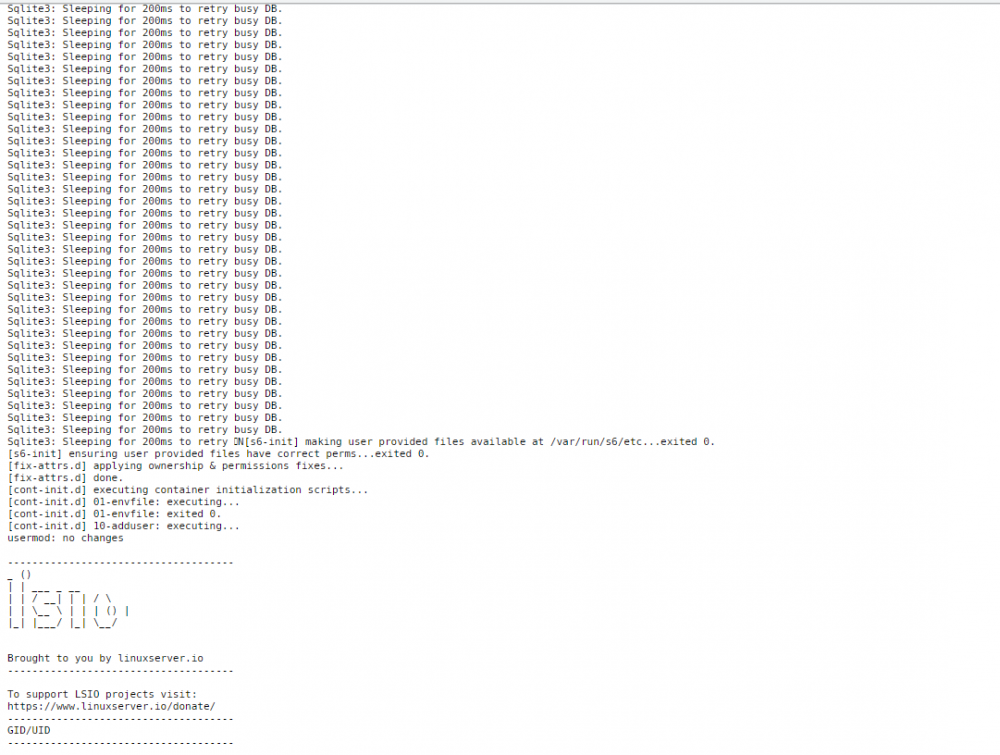
Any ideas on the below? I have googled a bit and it is suggested sqlite3 is not fit for large libraries, I am pretty sure mine is small in comparison to others. I also saw not much help or resolution on this. I have yet to try the increase default cache size suggestion but my configs/cache is running on a parity raid 1tb M.2 SSD setup so speed is not the issue. This happened a while ago but has been fine for a couple months, now I have had it twice in 2 days. I have optimised the db and turned of automatic library scan. Any other suggestions or an actual fix? My whole Unraid setup is only 6months old so I would like to think it is not an aging issue heh.
-
Hi Hi! You say in the docker description, limited intel support..... How limited? My friend has been trying to get it working with Tdarr with no success or help. Is this something you are willing to work and test as he may be interested in this.
-
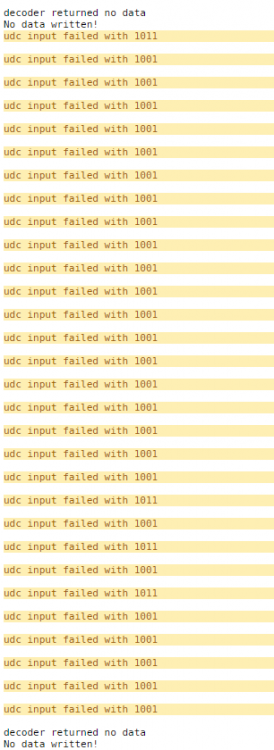
Anyone any ideas on this? I still get this very often.
-
Hi, Since updating to the latest version of Unraid 6.9.2 I have had a few issues with Plex. First it came up with a absolute ton of the below error, but since restarting the docker I have not see it since. Sqlite3: Sleeping for 200ms to retry busy DB And now for the second time I have the below. Now the only google result I found was someone saying it was a corrupt media file. But unless I go digging through all the logs for a time stamp and then cross reference it I wont easily find what one. But has anyone got any ideas if it is that or something else before I go digging?
-
Mine was mostly caused by Krusader when I was moving everything to my server. Funny enough even though external drives are mean tot be run as slave.. turning slave read/write off actually stopped the issue.
-
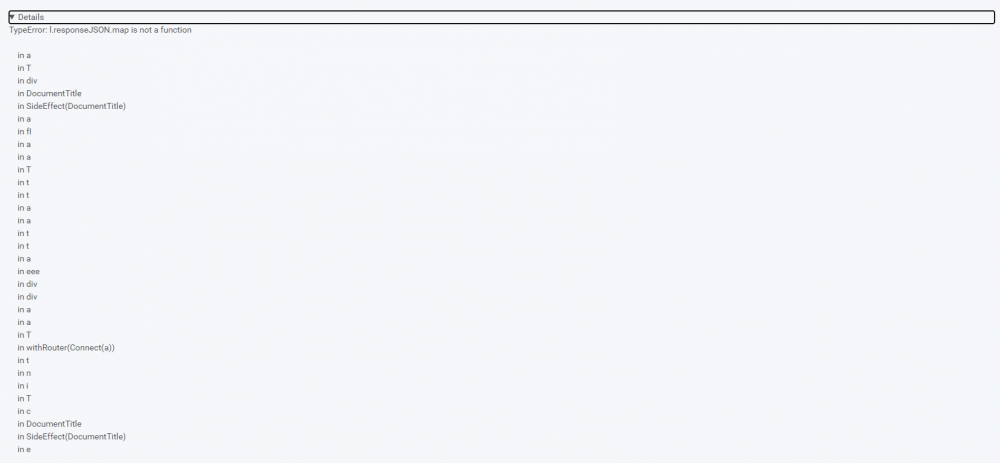
Hi, Trying to import my library and it keeps timing out with some sort of error. It is taking me about 6 try's to get anything done. Any ideas?
-
I ran a memtest last night. All passed. It ran 20 tests without fault. It was one of the most recommended things to do so I had that on my list.
-
^^ Thanks - I only had Open VPN so my friend can have a nose, he started his UNRaid server today so I can remove openvpn anyway.
-
Hi, On day 20 of my trial and so far really liking UNRaid. The only issue I have come across so far is as per the title. I have a very small setup at the moment as I am moving all my data around. Currently I have the following dockers binhex-krusader openvpn-as tdarr_aio I started with Tdarr so I could get the server converting all my stuff, openvpn is so my friend could log in and have a nose and help as he will be moving to UNRaid soon and Krusader was so I can move everything around. For some reason Krusader can be running fine for hours moving stuff around but then suddenly it would drop in transfer speed until it goes "stalled" and then my logs get filled with the below: Dec 19 12:30:22 UNRaid kernel: traps: lsof[28250] general protection fault ip:147990ad5a9e sp:70521520967b3017 error:0 in libc-2.30.so[147990ab6000+16b000] Dec 19 12:30:22 UNRaid kernel: traps: lsof[28147] general protection fault ip:1546c313ca9e sp:27c0cf3615393045 error:0 in libc-2.30.so[1546c311d000+16b000] Dec 19 12:31:16 UNRaid kernel: traps: lsof[28497] general protection fault ip:14c1e17e0a9e sp:26437c25fc82a91 error:0 in libc-2.30.so[14c1e17c1000+16b000] Dec 19 12:32:05 UNRaid kernel: traps: lsof[28778] general protection fault ip:14ea5b149a9e sp:823abd418e93c135 error:0 in libc-2.30.so[14ea5b12a000+16b000] Dec 19 12:33:26 UNRaid kernel: traps: lsof[29158] general protection fault ip:153f4d252a9e sp:cb994b192726ebc9 error:0 in libc-2.30.so[153f4d233000+16b000] Dec 19 12:34:49 UNRaid kernel: traps: lsof[29700] general protection fault ip:14daadc42a9e sp:e1280c59c3209f05 error:0 Dec 19 12:34:49 UNRaid kernel: traps: lsof[29622] general protection fault ip:14f18ec41a9e sp:f3e1dad01cd8d3b5 error:0 Dec 19 12:34:49 UNRaid kernel: in libc-2.30.so[14daadc23000+16b000] Dec 19 12:34:49 UNRaid kernel: in libc-2.30.so[14f18ec22000+16b000] Dec 19 12:35:43 UNRaid kernel: resource sanity check: requesting [mem 0x000c0000-0x000fffff], which spans more than PCI Bus 0000:00 [mem 0x000c0000-0x000dffff window] Dec 19 12:35:43 UNRaid kernel: caller _nv000709rm+0x1af/0x200 [nvidia] mapping multiple BARs Dec 19 12:36:18 UNRaid kernel: traps: lsof[30072] general protection fault ip:14a87df89a9e sp:6487236ff62c46fb error:0 Dec 19 12:36:18 UNRaid kernel: traps: lsof[30171] general protection fault ip:14b2dd19aa9e sp:3b89fdd7a96983be error:0 Dec 19 12:36:18 UNRaid kernel: in libc-2.30.so[14a87df6a000+16b000] Dec 19 12:36:18 UNRaid kernel: traps: lsof[29956] general protection fault ip:149869412a9e sp:8eb6f722b44d7b42 error:0 Dec 19 12:36:18 UNRaid kernel: in libc-2.30.so[14b2dd17b000+16b000] Dec 19 12:36:18 UNRaid kernel: in libc-2.30.so[1498693f3000+16b000] Dec 19 12:37:48 UNRaid kernel: traps: lsof[30635] general protection fault ip:14c570dffa9e sp:bbc1b091e259ee5a error:0 in libc-2.30.so[14c570de0000+16b000] Dec 19 12:37:48 UNRaid kernel: traps: lsof[30681] general protection fault ip:15245c524a9e sp:9381e506f0997a61 error:0 in libc-2.30.so[15245c505000+16b000] I have tried searching and have come across various posts from test your memory (Will be doing tonight) or switching from one docker type to another. But nothing to explain why this is happening so I know what the problem is to resolve it properly. Has anyone had this issue before or recommend steps I can take to try and narrow this down? Thanks in Adavnce.
-
Fixed it! I had the commands wrong, I followed the screenshot in the below reddit and it seems to be working now! https://www.reddit.com/r/Tdarr/comments/dtttjc/transcoding_on_gpu/
-
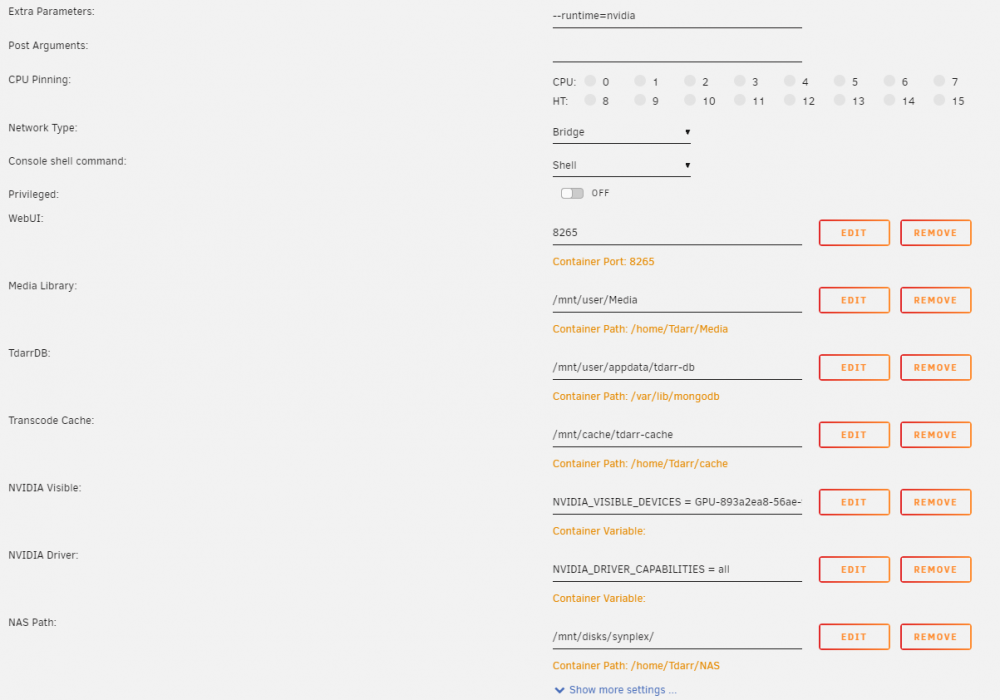
Starting to band my head a fair bit now.. See my settings, and then the end of the log from another failed transcode, still a permission issue. _STATISTICS_TAGS: BPS DURATION NUMBER_OF_FRAMES NUMBER_OF_BYTES _STATISTICS_TAGS-eng: BPS DURATION NUMBER_OF_FRAMES NUMBER_OF_BYTES [h264_cuvid @ 0x55a7c46e4180] Cannot load libnvcuvid.so.1 [h264_cuvid @ 0x55a7c46e4180] Failed loading nvcuvid. Stream mapping: Stream #0:0 -> #0:0 (h264 (h264_cuvid) -> hevc (hevc_nvenc)) Stream #0:1 -> #0:1 (copy) Stream #0:2 -> #0:2 (copy) Stream #0:3 -> #0:3 (copy) Stream #0:4 -> #0:4 (copy) Error while opening decoder for input stream #0:0 : Operation not permitted
-
Ok, I have now removed Tdarr. I have the extra paramaters that I can add the Nvidia tag to but there is no additional fields for adding the Nvidia device id etc. I have show more settings on where it would normally be but I do not see it. Am I missing anything obvious?
-
I may have to dump the container and start again as I do not have the options to pass through when I edit it. (I installed the nvidia drivers after Tdarr) I did try "unmanic" and that had the nvidia fields when I went to install it. So I assume it is because Tdarr was already installed. I will as I saw redo it and see what happened.
-
I feel a little stupid now, did not spot the "I" right over on the right... Just had a look before I posted, looks like a permission thing? Command: ffmpeg -c:v h264_cuvid -i '/home/Tdarr/NAS/Radarr Movies/Twins (1988)/Twins 1988 Bluray-1080p.mp4' -map 0 -c:v hevc_nvenc -rc:v vbr_hq -cq:v 19 -b:v 1301k -minrate 910k -maxrate 1691k -bufsize 2603k -spatial_aq:v 1 -rc-lookahead:v 32 -c:a copy -c:s copy -max_muxing_queue_size 9999 '/home/Tdarr/cache/Twins 1988 Bluray-1080p-TdarrCacheFile-Q79o3KYrE.mkv' Last 200 lines of CLI log: shellThread ffmpeg version 4.2 Copyright (c) 2000-2019 the FFmpeg developers built with gcc 9 (Ubuntu 9.3.0-10ubuntu2) configuration: --extra-cflags=-I/usr/local/cuda/include --extra-ldflags=-L/usr/local/cuda/lib64 --nvccflags='-gencode arch=compute_52,code=sm_52 -O2' --disable-debug --disable-doc --disable-ffplay --disable-static --enable-cuda-nvcc --enable-cuda-sdk --enable-cuvid --enable-ffprobe --enable-gpl --enable-libaom --enable-libass --enable-libfdk_aac --enable-libfreetype --enable-libkvazaar --enable-libmp3lame --enable-libnpp --enable-libopencore-amrnb --enable-libopenjpeg --enable-libopus --enable-libtheora --enable-libv4l2 --enable-libvidstab --enable-libvmaf --enable-libvorbis --enable-libvpx --enable-libx264 --enable-libx265 --enable-libxml2 --enable-libxvid --enable-nonfree --enable-nvdec --enable-nvenc --enable-openssl --enable-shared --enable-small --enable-stripping --enable-vaapi --enable-vdpau --enable-version3 libavutil 56. 31.100 / 56. 31.100 libavcodec 58. 54.100 / 58. 54.100 libavformat 58. 29.100 / 58. 29.100 libavdevice 58. 8.100 / 58. 8.100 libavfilter 7. 57.100 / 7. 57.100 libswscale 5. 5.100 / 5. 5.100 libswresample 3. 5.100 / 3. 5.100 libpostproc 55. 5.100 / 55. 5.100 Input #0, mov,mp4,m4a,3gp,3g2,mj2, from '/home/Tdarr/NAS/Radarr Movies/Twins (1988)/Twins 1988 Bluray-1080p.mp4': Metadata: major_brand : isom minor_version : 512 compatible_brands: isomiso2avc1mp41 encoder : Lavf53.21.1 Duration: 01:46:51.25, start: 0.000000, bitrate: 2729 kb/s Stream #0:0(und): Video: h264 (avc1 / 0x31637661), yuv420p, 1920x1040 [SAR 1:1 DAR 24:13], 2500 kb/s, 23.98 fps, 23.98 tbr, 2997 tbn, 47.95 tbc (default) Metadata: handler_name : VideoHandler Stream #0:1(eng): Audio: aac (mp4a / 0x6134706D), 48000 Hz, stereo, fltp, 223 kb/s (default) Metadata: handler_name : SoundHandler [h264_cuvid @ 0x55c71d44ac80] Cannot load libnvcuvid.so.1 [h264_cuvid @ 0x55c71d44ac80] Failed loading nvcuvid. Stream mapping: Stream #0:0 -> #0:0 (h264 (h264_cuvid) -> hevc (hevc_nvenc)) Stream #0:1 -> #0:1 (copy) Error while opening decoder for input stream #0:0 : Operation not permitted I am wondering if it is the nvidia driver thing? I added all that after Tdarr, do I need to dump the Tdarr container and re-add it? I tried editing the dicker image but could not see the nvidia fields. Just for reference, I switched to CPU profile as mentioned and it is currently transcoding 2 files. So it is not a Tdarr issue just my settings somewhere are wrong.
-
Ok, so this morning I turn my server on (As I am tinkering I turn it off at night) and oddly Tdarr starts a full scan and adds all 17200 items to the health check queue and transcode queue. I set a worker on the health check and away it goes, I notice they are still all going straight to health check error, see log extract below: And transcode still failes Going to try a CPU profile I think see how that goes.
-
Please forgive the naivety of my post/explanation I am usually the learn as I go type and been playing with unraid all day. After finally getting my NAS connected and playing around a bit I thought I would get Tdarr going and stress test my new server. Now I set up Tdarr and got it to read my NAS and create a list of 17200 files to process. I started with a single worker and watched it tick away and so increased it to 5 workers when I was happy, once Tdarr had gone through all my current 265 files it then got to files that actually needed transcoding... They all started failing. ^^ This was what it started doing. So after some more poking around it appeared it was HW transcoding was not working (That was the profile I chose) so..... after finding out "unraid nvidia" was no more I found nvidia-drivers, I updated Unraid to the latest beta, installed nvidia-drivers installed gpu statistics and thought I was all set to try again. Now, for some reason Tdarr just wont do a fresh scan, I tried setting up a new library, clearing the database and checking all my paths.. Nothing seems to work. I tell it to do a fresh scan, it asks me if I am sure and after I say yes it starts, stops and completes without finding a single file. I also noticed folder watcher was running (it was turned off...) and seems to have trouble actually getting the folder path correct as well. Short of deleting the whole docker and starting again I am running out of ideas.. Any clues? Apologies for the long post, I was trying to be as detailed as possible! Thanks in advance



