





slipstream
Members
-
Joined
-
Last visited
Everything posted by slipstream
-
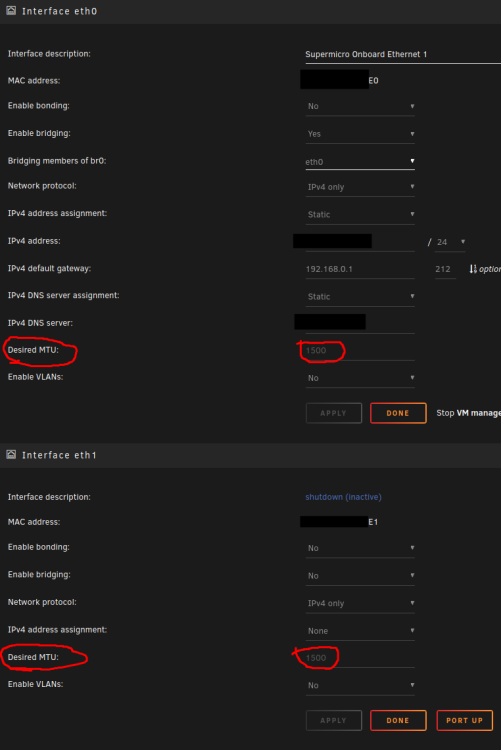
Hi All, I updated my OS to the latest 6.11 version and now my CA Fix Common Problems plugin app is prompting a Jumbo Frames Warning shown in the screen capture below. What makes no sense to me is I do not have a "eth2" interface. I only have the two ethernet interfaces shown below which are "eth0" and "eth1" (no "eth2" to be found). And I only use "eth0" and the "eth1" interface is disabled. Additionally, my "eth0" "Desired MTU" parameter is set to 1500 and not 9000. So why do I get this error? Before I click on the IGNORE WARNING button I would like to know what is causing this warning to appear. Any info welcome.

-
Squid, Thank you for your post. Your advice pointed me in the right direction to where I eventually was able to solve this problem. I looked at the Unassigned Devices GUI located in the MAIN tab. I clicked on the GEAR icon and found no mount parameter to where I could change the path. I also clicked on various other Unassigned Devices icons and the result was the same. I couldn't find any parameter where one is allowed to change the NVME path. So my focus changed to UnRaid's VM tab where it is possible to edit the Ubuntu template. In the Ubuntu template there is a parameter where I was able to make the change shown below: OLD PATH: /mnt/disks/WDC_WDS100T2B0C-0...._21146D8...../lnxdsk.img NEW PATH: /mnt/disks/21146D8...../lnxdsk.img After making this change my Linux Mint VM now fires up perfectly without any errors. Now the million dollar question I have is why did Unassigned Devices autonomously change the path to my NVME drive? I never got any notification of this change and I would have appreciated such a notification because it was a big head ache to fix this problem. Is there anything I could do that will lock my Unassigned Devices configuration to prevent such changes from being done in the future without my knowing about it? Any tips welcome and thank you for your time.
-
Hi All, The Execution Error started appearing out of no where. This error pops up anytime I try to launch either my Linux Mint VM or my Win10 VM which are mounted to a 1TB NVME stick as shown in the screen captures below. My NVME Win10 VM was successfully working for the longest time configured to the path below: /mnt/disks/WDC_WDS100T2B....._2114...../win10disk.img And my NVME Linux Mint VM was successfully working for the longest time configured to the path below: /mnt/disks/WDC_WDS100T2B....._2114...../lnxdsk.img In my Libvirt.txt Log Diagnostics file I downloaded it mentions a "virStorageFileReportBrokenChain:5178". I suspect it is a clue as to why I lost access to my VMs. Does anybody know what does a "virStorageFileReportBrokenChain:5178" mean? More Disk Log Information is shown in the screen capture below as well. I don't understand why it shows the word "DISCARD" in this line of code: discard '/dev/nvme0n1p1' Should I interpret this to mean my Unraid OS for some crazy reason has discarded my the NVME drive which contains the img files for both of my VMs? How can I confirm if this is really the case? Is there a logical troubleshooting work flow I can follow that will help get to the bottom of this problem? Any help will be tremendously appreciated. I would really like to know if this problem is fixable. I would hate to erase the NVME stick and start from scratch all over again building my two VMs. Thank you for your time.
-
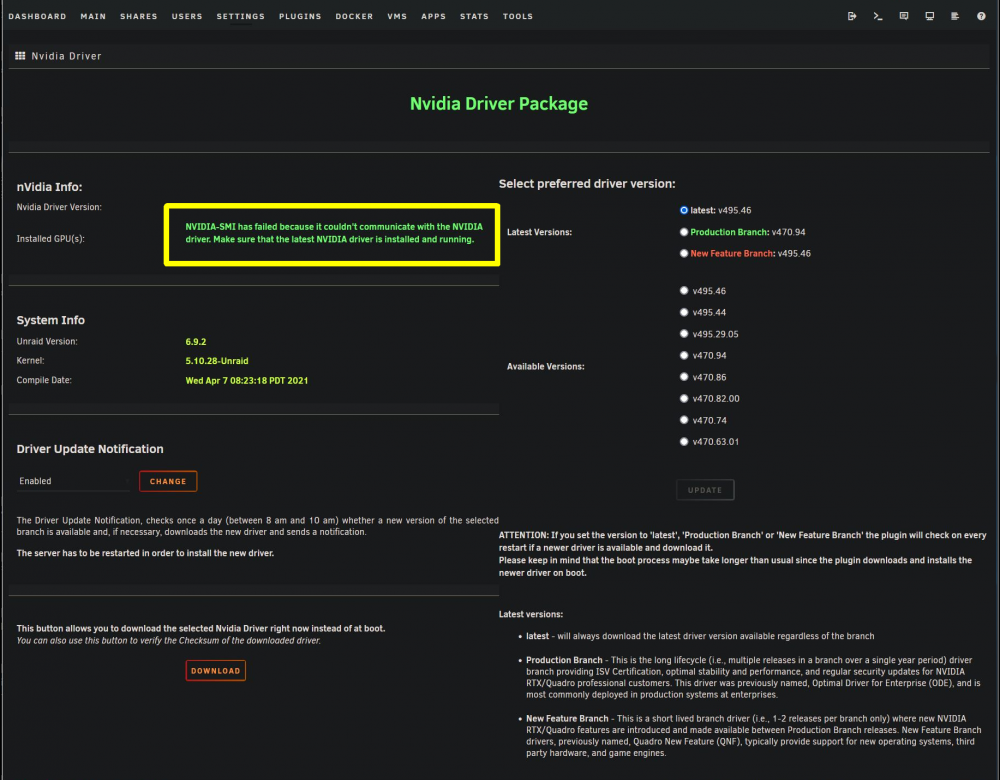
Squid, Thank you for the tip. I have my UnRaid box setup to bootup using the "UnRaid OS GUI Mode". Therefore, it did not cross my mind to reach the UnRaid webGUI from another system connected to my home network. In short, I was able to get access to the Plugins tab and the screen capture below shows the Nvidia plugin prompting a problem I have boxed in YELLOW: It has auto-upgraded itself to v495.46. So I changed it to Production Branch v470.94 and then rebooted the machine. That fixed the problem! Thank God everything got back to the way it was working 3-4 months ago which was the last time I fired up the machine. The lesson I learned here is to not have the Nvidia driver set to the LATEST option. I need to figure out how I can LOCK my Nvidia driver to the Production Branch option so it no longer auto updates. This way one can avoid such Nvidia driver headaches. Again, thanks a lot for your help.
-
Hi All, I powered up my UnRaid box after 3-4 months of having it powered down. While bootup I noticed plugins were updated. In short, the bootup process came to a dead stop after the error below appeared: Modprobe: Error: could not insert 'nvidia': no such device This is the first time I see this error. My theory is the Nvidia Plugin shown in the link below got updated during the bootup process to a new version which has caused this error to appear. https://forums.unraid.net/topic/98978-plugin-nvidia-driver/?tab=comments#comment-913250 Is my theory correct? Or incorrect? If correct, I would be grateful if somebody in the community helps me with any information that will help me fix this Nvidia Modprobe Error. RIght now I am unable to boot to the UnRaid GUI screen. I'm able to successfully login into the "Root@Tower:~#" prompt and type in UnRaid commands. What is the best UnRaid command I can type into the "Root@Tower:~#" prompt for the purpose of diagnosing this problem and ultimately fixing it? I'm using a 1030 Nvidia Graphics Card for VMs and a 710 NVidia Graphics Card for the UnRaid OS. What troubleshooting can I perform to determine which of the two Nvidia cards is causing this error to appear? Any advice or opinions welcome because my UnRaid box has essentially become bricked. Thank you for your time. Below is my configuration: UnRaid OS = v6.9.2 Supermicro X10SRH-CF Motherboard / XEON CPU 1030 Nvidia Graphics Card (VM Pass Through and dumped Vbios using SpaceInvaderOne dump script) 710 NVidia Graphics Card (For UnRAID OS) - It shows me the boot process but fails to show UnRaid GUI because Modprobe error appears. NVMe PCI-E Card with a 1TB stick to house Linux Mint OS and Windows10 OS VMs. USB Controller Card (Pass Through for VMs) Marvell SATA Controller Card (Pass Through for VMs)
-
Hi All, My UnRaid array stores thousands of video titles and it is setup with both a Linux Mint VM and a Windows10 VM. I need advice on which Video Manager app meets my needs on either a Linux Mint or Win10 platform? I need an app that will allow me to tag video titles to multiple custom categories of my choosing. For example, I got a 60 minute training video called "Keto Dieting". For this video I would like to assign tags to it such as "Diets", "Diabetes", "Cooking Recipes", "Health", and "Smoothies". What is the best app that allows you to assign such categories to a video using the most user friendly approach and not some complicated approach that takes a lot of time? In short, I want to spend the least amount of time possible assigning video titles to custom categories of my choosing. Any advice welcome.
-
Thanks to all for your postings. tjb_alt4 can you please clarify what you mean with PITA? Not familiar with this acronym. I will try what you advise. I'm going to go into the XML for the Windows10 VM and manually remove the 222:3061 then SAVE the change. Then disconnect the Vertical 2 mouse and plugin the Vertical 5 mouse followed by rebooting the Windows10 VM. Hopefully, this will fix my problem. Thanks again.
-
Hi All, I am using an old Evoluent Vertical 2 mouse in my Windows VM and it's identification number is: 2222:3061 as shown below. I now purchased a new Evoluent Vertical 5 Mouse and I honestly thought changing something as basic as a mouse in my Windows VM was going to be as easy as unplugging the old mouse and plugging in the new one. Nevertheless, UnRaid gives me an error message that reads "Can't find USB device 2222:3061 when I plug in the new Evoluent Vertical 5 Mouse. What is the correct way to perform a Mouse upgrade to my Windows VM so the 2222:3061 ID number changes to the correct new Mouse ID number? I have gone to my Windows 10 VM template and I do not see a place where I could update the Mouse identification number. I hope such a hardware change does not mean I have to reinstall my entire Windows 10 VM all over again from scratch because that would be a lot of work. Any advice will be greatly appreciated.

-
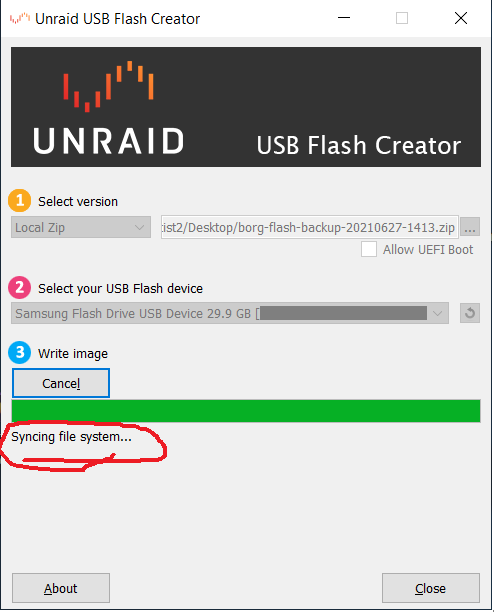
Hi All, After watching the SpaceInvader One video in the YouTube link below: https://www.youtube.com/watch?v=jjkaidlZmgs I orderered from Amazon the exact same Samsung 32GB flash drive he recommends in his YouTube video. I then followed the steps shown in the SpaceInvader One YouTube video in the link below to mount the ZIP backup to my new Samsung 32GB flash drive: https://www.youtube.com/watch?v=NEkgAhFI_GM Unfortunately, I hit a brick wall with the Unraid USB FLash Creator getting stuck at "Syncing file system" as shown in JPG below: Long story short, I had to spend a lot more time completing this simple task due to SpaceInvader One making no mention of this stuck on "Syncing file system" problem on any of his two YouTube videos shown in the two links above. I find such erroneous information from SpaceInvader One to be totally counter productive. Doesn't he test his videos? Fortunately, what ended up working for me is shown in the YouTube Video link below: https://www.youtube.com/watch?v=NEkgAhFI_GM Lastly, I wish LimeTech would update their USB Flash Creator app so it supports the 32GB USB Flash drive SpaceInvader One recommends upgrading to. Just my two cents.
-
Thank you to all for your posts. Hopefully, what I have learned in this thread will bulletproof my UnRaid data from any possible future ransomware attack and not have to go through the same hell the poor QNap user shown in the YouTube video below has gone through:
-
Hi All, I just learned QNap NAS users recently got hit with a ransomware attack. All their data got encrypted and now they have to pay in Bitcoin to get their data back. I have all of my shares set to PRIVATE. Is that safety measure strong enough to protect my data from any possible ransomware attack directed to the UnRaid OS in the future? Should I also disable the FTP and SSH features in my UnRaid OS for extra security? Any opinions welcome.
-
Hi ich777, I just created the post shown in the link below which relates to 4k resolution support when booting straight into UnRaid OS GUI mode before learning about your plugin: https://forums.unraid.net/topic/107169-boot-to-gui-mode-display-resolution-change/ In short, I have two Nvidia cards installed. My 710 card is dedicated to supporting my UnRaid OS booted into GUI mode. My second card is an Nvidia 1030 which is setup as a passthrough to support my Ubuntu VM. I hope you can clarify the following. My Ubuntu VM is working perfectly and I can see the OS in 4k resolution under my Nvidia 1030 card. However, this is not the case for my 710 card. I have no way to change my UnRaid OS GUI mode resolution to 4k. Will installing your Nviida Driver plugin allow me to see my UnRaid OS in GUI mode at a 4k resolution? And will it be conflict free with my Nvidia 1030 card which is used for my Ubuntu VM?
-
BUMP - Can somebody offer any help. I really need to know if my Supermicro MB and Nvide 1030 card are compatible with this SpaceInvader One vBIOS dump script. This problem is seriously kicking my butt. I need help and I hope Limetech or somebody in the community can send some tips my way .
-
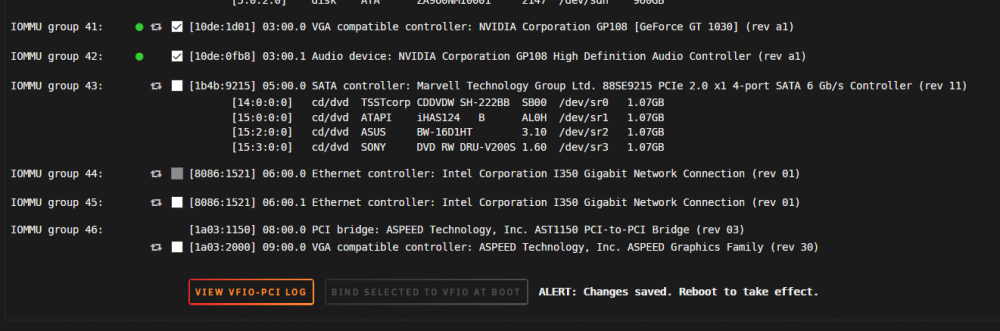
Hi All,I have hit a brick wall and I am kindly requesting help from anybody in the community that may know anything about the error I am getting shown below after I run the SpaceInvaderOne vBIOS dump script. Okay dumping vbios file named 1030fanless.rom to the location /mnt/user/isos/vbios/ cat: rom: Input/output error Um.... somethings gone wrong and I couldn't dump the vbios for some reason Sometimes when this happens all we need to do to fix this is 'stub' or 'bind to the vfio' the gpu and reboot the server This can be done in Unraid 6.8.3 with the use of the vfio config plugin or if you are on Unraid 6.9 or above it can be done directly from the gui in Tools/System Devices .....So please do this and run the script again Additionally, I get the same error even after I perform the fix SpaceInvaderOne mentions in the video link below relating to binding to the Nvidia VFIO which the screen capture below shows I followed: https://www.youtube.com/watch?v=FWn6OCWl63o I am running 6.9.1. My motherboard is a Supermicro X10SRH-CF. My CPU is XEON and my GPU is an Nvidia GT 1030. The script does not fix my Nvidia passthrough problem and the recommendation to bind to the VFIO and then reboot does not work. Has anybody out there in the community successfully passed through an Nvidia GT 1030 card? I am beginning to think I should return this card to Amazon and buy some other card. However, not sure which one to buy. Any tips welcome. Does anybody out there have any suggestions on what else I can try to get this script to work correctly? Lastly, if anybody in the community can email SpaceInvader One the link to this post it will be much appreciated. I would like to know what additioanal troubleshooting I can perform so I can get this script to work successfully. Thank you.
-
Hi All, I am moving forward with applying the Nvidia vBIOS Dump Script he shares in the YouTube video link below: https://www.youtube.com/watch?v=FWn6OCWl63o But before I apply the script I have the two questions below: My UnRaid server is built on a X10SRH-CF SuperMicro MB setup with a XEON CPU. My primary GPU is an Nvidia Geforce 1030 which is plugged into SLOT6 PCI-E 3.0 X8 (IN X16). Is this vBIOS dump script compatible with this configuration? SpaceInvaderOne does not mention what IOMMU state your UnRaid system needs to be in before applying the vBIOS Dump script. In its origianal state my Nvidia IOMMU VGA and Audio are grouped together under Group 41 when I have my "PCIEe ACS override" set to "NONE" as shown in screen capture below: However, if I have my "PCIEe ACS override" set to "Multifunctional" my Nvidia IOMMU VGA and Audio get split to Group 41 and Group 42 as shown in screen capture below: My question is simple. Which of the two Nvidia IOMMU configurations shown above is the preferred one to use so that SpaceInvaderOne's vBIOS Dump Script has the best chance of working successfully without any error? Thank you for your time.


-
Hi Jonp, Do you have any information on how to passthrough an Asmedia SATA Controller PCI card with two CD/DVD Optical Drives connected to it? I successfully see the Asmedia devices on my Linux Mint VM profile but the optical drives remain invisible to my Linux Mint OS. Any tips you may have will be welcomed a lot.
-
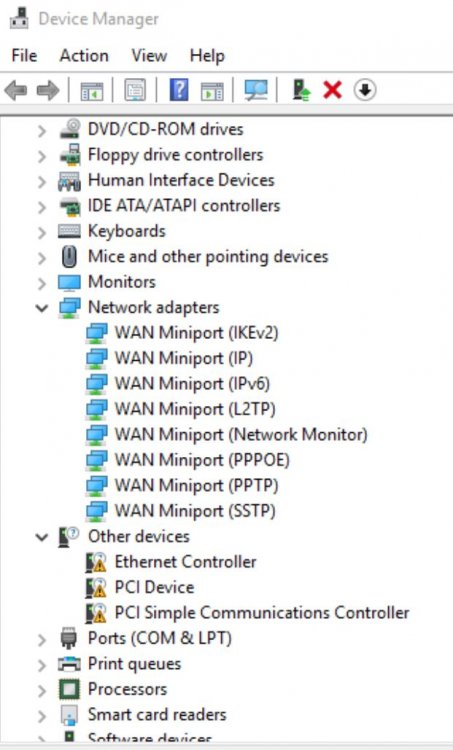
Hoopster, Thank you for your post. It helped me a lot. After taking a close look at the Device Manager tree I noticed it was showing some missing drivers in the "OTHER DEVICES" node on the tree as shown in the JPG below. As you advised I just did an "Update Driver" selection and then I pointed to the "virtio-win-0.1.1" CD Drive and it automatically installed the missing drivers. I have to say that setting up a VM for the first time is a great learning experience. Again thanks for your help.
-
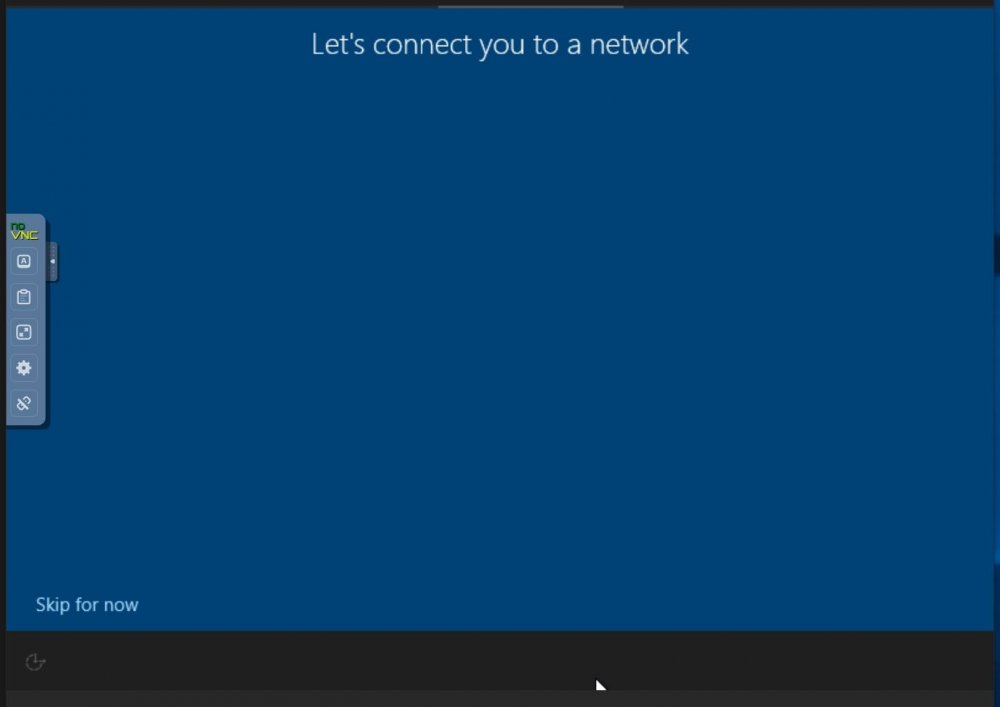
Hi All, I encountered a problem SpaceInvader One does not cover in his Windows 10 VM setup YouTube video. In short, I have no Network connection capability in my Win10 VM. And when I was setting it up I had no way of adding Network capability to my Win10 installation. All I saw was the JPG shown below. The only option I had to choose was the "Skip For Now" option. So I skipped it and finished my Win10 installation. In short, now that I have my Win10 VM setup how do I go back and install network connectivity? I cannot do it from within my Win10 OS network settings window so where do I go to to add my Win10 VM network connectivity? How do I add the special VM drivers to activate Network connectivity? Any help will be greatly appreciated.
-
Dlandon, Thank you for your post. Just as a hypothetical idea. What if I buy a portable optical drive that connects via a USB 3.0 male connector to the female USB 3.0 port on my UnRaid NAS, will Unassigned Devices work with such a USB 3.0 connection? My hunch is UD might look at the portable optical drive as if it were an external hard drive or thumb drive connected to the USB 3.0 port. You mention dockers. Could you please name a docker app that supports an Optical Drive ? As for virtual machines, that is my last option because it seems to be the most complicated one.
-
Hi All, I am new to the UnRaid OS. I installed the Community Addon and this was followed by installing the Unassigned Devices app. I have two Samsung optical drives. Each one is connected directly to the motherboard SATA ports. When I insert a 4.36GB DVD disk into the optical drive tray and close it my Unassigned Devices app does not recognize the data on the 4.36GB DVD disk. It's as though the optical drive is invisible to my Unassigned Devices app. Can someone please confirm to me if the Unassigned Devices app is designed to support Optical Drives? Currently, on my system it seems Unassigned Devices only recognizes a Thumb Drive Stick or a MyBook external hard drive if either one is connected to the USB 3.0 port. I would be very grateful if anybody in the community could give me some advice on how I can get my Unassigned Devices app to recognize my Samsung Optical drive connected to my motherboard SATA port. Thank you for your time.



