





007craft
Members
-
Joined
-
Last visited
Everything posted by 007craft
-
I'm having trouble getting the ftp motion trigger to work. There were some people asking a few pages back but nobody answered. 2 problems. 1 is the trigger events and the other is the FTP connection. Problem 1: trigger events not working. I have everything setup correctly but when I add a file into the dropInEvent/groupid/monitorid folder, nothing happens in shinobi. I dont get a trigger on the Camera Problem 2: Aside from problem one, which is being tested by manually dropping a file into the folder, I cant get FTP working. When I do an ftp test to the folder or trigger a motion event, shinobi creates the folders, but no files. I think it may be a permissions issue but I have no way of knowing. I cant seem to find any shinobi ftp logs.
-
Thanks for the input. In regards to this, I keep hearing Appdata Backup != (is not) flash Backup, but why is that? It backs up my entire flash drive to a folder on the array once a week, and then instantly syncs it to my remote computer (With syncthing as mentioned before). Is that not a backup? If my drive fails wouldn't I just take my backup on my remote computer and put it onto a new USB stick? This is the main functionality of this plugin that I'm wondering about but not sure how splitting up my appdata and flash backup duties into 2 separate plugins is supposed to be a good thing that everywhere I read is recommending to do it that way?
-
I'm wondering if there is any reason for me to need this plugin? Im wondering because the Appdata backup app is talking about how you should use this for USB backup. But to touch on the 4 things this plugin does: Secure Remote Access I hardly ever need to access my Unraid server directly and when I do, I just visit rdp into my home computer (setup securily with a reverse proxy and guacamole) and open a tab to unraid. Online Flash Backup I'm not sure why I need this because the appdata backup plugin already does this (As well as backing up the appdata folder). Syncthing is setup and copies those backups up to my remote site. Real-time Monitoring Do I need this? Dont I already have that from the unraid dashboard? License Management Can I not do all this already on the unraid website? Its not like its something that needs to be done very often.
-
I was wondering if somebody could help me out with a problem with Swag not working on a particular subnet. My network is Vlan 2 (192.168.1.x) where my unraid and Swag lives and I also have vlan 3 (192.168.3.x) where my wifi connections live. So when in on the wan on some public IP, or on my computer on the 192.168.1.x network, which is the same as my unraid and swag containers, everything works fine. When I use my cell phone however, which is on the 192.168.3.x network, I get an error. Something about RFC1918 to public server address rejected. my router is set to allow 100% vlan communication over the local lan. I can easily access all my dockers from my 192.168.3.x network if I type the local ips, Like 192.168.1.102:8080 for example. So why is it that when I access via my domain, which Has the reverse proxy and Swag forwards the domain over to 192.168.1.102:8080, it does not work if trying from the 192.168.3.x network? I imagine this is because I need to somehow add 192.168.3.x Vlan to the "proxynet" bridge Im using in Unraid. So add it to the unraid route table, but I am unsure how to do this.
-
So its advised not to use this anymore for a flash backup.... but how exactly does one restore all the docker images without a flash backup? Arent all the Docker templates stored on the flash drive? Also, just to confirm, even if you had a flash backup, with all your unraid templates, You would still need to manually reinstall/rerun all those templates and this app does not actually backup any docker container files correct? Like for example, I edit a couple files in my jellyfins docker container, to customize the app.......but thats not backed up is it? Just the jellyfin app data folder is backed up, and if I had the template backed up and re-added the jellyfin docker from my template, its just gonna pull fresh files from the repository and my modified container files will be lost right?
-
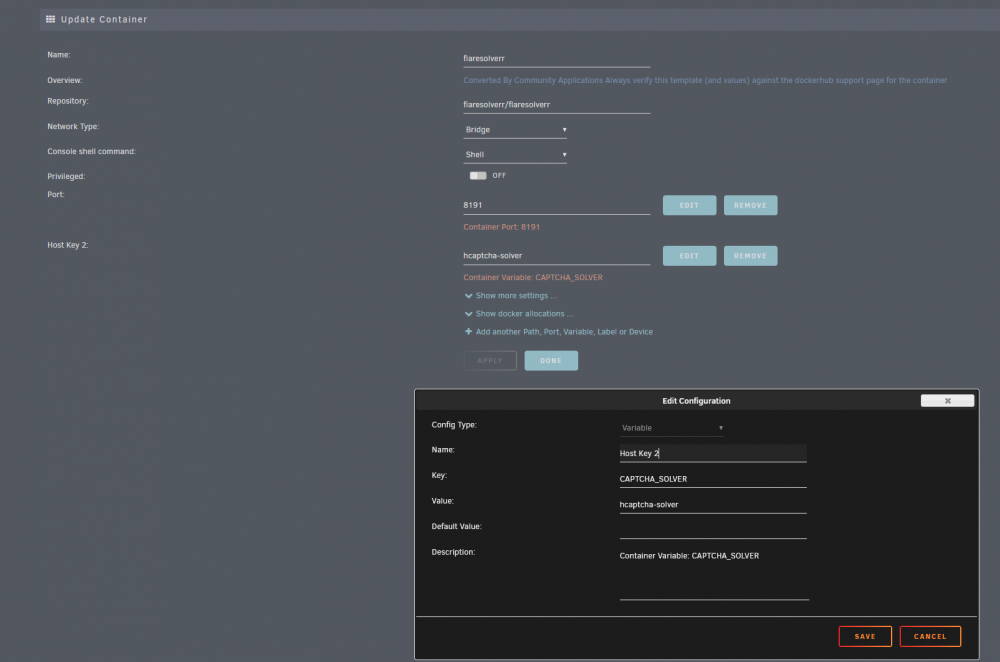
You need to configure a capture solver for flaresolverr. As per the git page, there are currently 2 which you can use, but don't work all that great. Edit your flaresolverr Unraid template to look like this: Now take note of this line in the flaresolverr github: So basically it may or may not work. But the error message will be gone now and hopefully the hcaptcha-solver will eventually work and let you in.
-
I'm also having some trouble with this. I assumed exact pathing would be how youre supposed to do it but typing /mnt/user/files/downloads for exclude doesnt see, to work. I typed just: Downloads And that works.... but I have other "downloads" folders elsewhere on my shares and I don't want to exclude those folders.
-
Did a re-install and ran into Apple ID problems again. "could not communicate with server" came up. I had to enable the Ethernet controller to be "built in" as shown by hackintool. All info in this post from page 54:
-
Turns out Turns out I was using the Jellyfin/jellyfin official template which was not updated for some reason. I have now switched after having to do a clean install. It was working but once I added the collections plugin, it broke. The main page just loads and loads. I was reading on the git for this and I think its a permission issue perhaps? I cant see any of the metadata if I click the metadata tab. I'm gonna switch back to somebody elses docker cause Until this is fixed
-
Jellyfin 10.7.0 was released a couple days ago but Unraid is not prompting for an update and Jellyfin is still on 10.6.4
-
I think the temperature monitoring notifications are broken for Unassigned device plugin. I am constantly getting notificaitons for my unassigned NVME drive reaching temperatures over 45 degrees, but Ive changed it to only notify at 50 or higher. This behavior does NOT happen with any of the drives in the array. They all notify me properly at 50c or higher after I changed their values.
-
I bought yet another drive and tried it again. Failed again at post read Here is the log: Mar 7 17:08:17 UnRAID preclear_disk_9LG7SS1A[11901]: Zeroing: progress - 90% zeroed @ 115 MB/s Mar 7 20:40:42 UnRAID preclear_disk_9LG7SS1A[11901]: Pause (smartctl run time: 25s) Mar 7 20:40:42 UnRAID preclear_disk_9LG7SS1A[11901]: Paused Mar 7 20:40:54 UnRAID preclear_disk_9LG7SS1A[11901]: killing smartctl with pid 24018 - probably stalled... Mar 7 20:41:03 UnRAID rc.diskinfo[9412]: SIGHUP received, forcing refresh of disks info. Mar 7 20:41:06 UnRAID preclear_disk_9LG7SS1A[11901]: Resumed Mar 7 20:41:08 UnRAID preclear_disk_9LG7SS1A[11901]: Zeroing: dd - wrote 14000519643136 of 14000519643136 (0). Mar 7 20:41:08 UnRAID preclear_disk_9LG7SS1A[11901]: Zeroing: elapsed time - 47:13:31 Mar 7 20:41:08 UnRAID preclear_disk_9LG7SS1A[11901]: Zeroing: dd exit code - 0 Mar 7 20:41:08 UnRAID preclear_disk_9LG7SS1A[11901]: Zeroing: zeroing the disk completed! Mar 7 20:41:09 UnRAID preclear_disk_9LG7SS1A[11901]: Signature: writing signature: 0 0 2 0 0 255 255 255 1 0 0 0 255 255 255 255 Mar 7 20:41:09 UnRAID rc.diskinfo[9412]: SIGHUP received, forcing refresh of disks info. Mar 7 20:41:09 UnRAID preclear_disk_9LG7SS1A[11901]: Signature: verifying unRAID's signature on the MBR ... Mar 7 20:41:09 UnRAID preclear_disk_9LG7SS1A[11901]: Signature: Unraid preclear signature is valid! Mar 7 20:41:09 UnRAID preclear_disk_9LG7SS1A[11901]: Post-Read: post-read verification started (1/5).... Mar 7 20:41:10 UnRAID preclear_disk_9LG7SS1A[11901]: Post-Read: verifying the beginning of the disk. Mar 7 20:41:10 UnRAID preclear_disk_9LG7SS1A[11901]: Post-Read: cmp /tmp/.preclear/sdd/fifo /dev/zero Mar 7 20:41:10 UnRAID preclear_disk_9LG7SS1A[11901]: Post-Read: dd if=/dev/sdd of=/tmp/.preclear/sdd/fifo count=2096640 skip=512 iflag=nocache,count_bytes,skip_bytes Mar 7 20:41:11 UnRAID preclear_disk_9LG7SS1A[11901]: Post-Read: verifying the rest of the disk. Mar 7 20:41:11 UnRAID preclear_disk_9LG7SS1A[11901]: Post-Read: cmp /tmp/.preclear/sdd/fifo /dev/zero Mar 7 20:41:11 UnRAID preclear_disk_9LG7SS1A[11901]: Post-Read: dd if=/dev/sdd of=/tmp/.preclear/sdd/fifo bs=2097152 skip=2097152 count=14000517545984 iflag=nocache,count_bytes,skip_bytes Mar 7 20:42:53 UnRAID preclear_disk_9LG7SS1A[11901]: size: 32824832, available: 5199112, free: 15% Mar 7 20:42:53 UnRAID preclear_disk_9LG7SS1A[11901]: Filesystem 1K-blocks Used Available Use% Mounted on Mar 7 20:42:53 UnRAID preclear_disk_9LG7SS1A[11901]: rootfs 32824832 27627768 5197064 85% / Mar 7 20:42:53 UnRAID preclear_disk_9LG7SS1A[11901]: devtmpfs 32824840 0 32824840 0% /dev Mar 7 20:42:53 UnRAID preclear_disk_9LG7SS1A[11901]: tmpfs 32931576 0 32931576 0% /dev/shm Mar 7 20:42:53 UnRAID preclear_disk_9LG7SS1A[11901]: cgroup_root 8192 0 8192 0% /sys/fs/cgroup Mar 7 20:42:53 UnRAID preclear_disk_9LG7SS1A[11901]: tmpfs 131072 2164 128908 2% /var/log Mar 7 20:42:53 UnRAID preclear_disk_9LG7SS1A[11901]: /dev/sda1 30202944 464704 29738240 2% /boot Mar 7 20:42:53 UnRAID preclear_disk_9LG7SS1A[11901]: overlay 32824832 27627768 5197064 85% /lib/modules Mar 7 20:42:53 UnRAID preclear_disk_9LG7SS1A[11901]: overlay 32824832 27627768 5197064 85% /lib/firmware Mar 7 20:42:53 UnRAID preclear_disk_9LG7SS1A[11901]: tmpfs 1024 0 1024 0% /mnt/disks Mar 7 20:42:53 UnRAID preclear_disk_9LG7SS1A[11901]: tmpfs 1024 0 1024 0% /mnt/remotes Mar 7 20:42:53 UnRAID preclear_disk_9LG7SS1A[11901]: /dev/nvme0n1p1 999715228 877905540 121809688 88% /mnt/disks/NVME Mar 7 20:42:53 UnRAID preclear_disk_9LG7SS1A[11901]: /dev/md1 4881683620 4836461832 45221788 100% /mnt/disk1 Mar 7 20:42:53 UnRAID preclear_disk_9LG7SS1A[11901]: /dev/md2 4881683620 4837057604 44626016 100% /mnt/disk2 Mar 7 20:42:53 UnRAID preclear_disk_9LG7SS1A[11901]: /dev/md3 3905110812 3862115484 42995328 99% /mnt/disk3 Mar 7 20:42:53 UnRAID preclear_disk_9LG7SS1A[11901]: /dev/md4 11716798412 11584165276 132633136 99% /mnt/disk4 Mar 7 20:42:53 UnRAID preclear_disk_9LG7SS1A[11901]: /dev/sde1 976284628 839029464 137255164 86% /mnt/cache Mar 7 20:42:53 UnRAID preclear_disk_9LG7SS1A[11901]: shfs 25385276464 25119800196 265476268 99% /mnt/user0 Mar 7 20:42:53 UnRAID preclear_disk_9LG7SS1A[11901]: shfs 25385276464 25119800196 265476268 99% /mnt/user Mar 7 20:42:53 UnRAID preclear_disk_9LG7SS1A[11901]: Google:Unraid_Backup 15728640 6037744 9690896 39% /mnt/disks/Unraid_Backup Mar 7 20:42:53 UnRAID preclear_disk_9LG7SS1A[11901]: /dev/loop2 20961280 11925896 9035384 57% /var/lib/docker Mar 7 20:42:53 UnRAID preclear_disk_9LG7SS1A[11901]: overlay 20961280 11925896 9035384 57% /var/lib/docker/overlay2/1508e11bff76a50aa6db7c550a6fc3b76c7023f60e3b52fb90b75b9945815581/merged Mar 7 20:42:53 UnRAID preclear_disk_9LG7SS1A[11901]: /dev/loop3 1048576 4524 925524 1% /etc/libvirt Mar 7 20:42:53 UnRAID preclear_disk_9LG7SS1A[11901]: overlay 20961280 11925896 9035384 57% /var/lib/docker/overlay2/45f100b9e24e461f896332ed14bbe093116abec7f2c3d82524e9e811e56795b6/merged Mar 7 20:42:53 UnRAID preclear_disk_9LG7SS1A[11901]: overlay 20961280 11925896 9035384 57% /var/lib/docker/overlay2/de352440f6c47a3536b0e3d901c0435d7944ca85430df7e307ad7c046447b747/merged Mar 7 20:42:53 UnRAID preclear_disk_9LG7SS1A[11901]: overlay 20961280 11925896 9035384 57% /var/lib/docker/overlay2/8aad0448a3057d43ad9ef5085d76dd0a6c812164e5e225f1f6e720a3d377c3ca/merged Mar 7 20:42:53 UnRAID preclear_disk_9LG7SS1A[11901]: overlay 20961280 11925896 9035384 57% /var/lib/docker/overlay2/222f57029490f6cd06de8c95e0ca0ffc80a48fd6c6f64dbb359528a3a26ddfb3/merged Mar 7 20:42:53 UnRAID preclear_disk_9LG7SS1A[11901]: overlay 20961280 11925896 9035384 57% /var/lib/docker/overlay2/9ba6cc3f545ce1faae3556bd86033193a41a5a85ffd7b1aae03c71f939e5c123/merged Mar 7 20:42:53 UnRAID preclear_disk_9LG7SS1A[11901]: overlay 20961280 11925896 9035384 57% /var/lib/docker/overlay2/bd38ba8c809b49eb7b02c9057019d847efa911342e3b983dc3febab8f1c540d4/merged Mar 7 20:42:53 UnRAID preclear_disk_9LG7SS1A[11901]: overlay 20961280 11925896 9035384 57% /var/lib/docker/overlay2/8c3b5c2401f6c02a0a342bf55af4de8da14d27e7a805c778ecf13c9857e915f7/merged Mar 7 20:42:53 UnRAID preclear_disk_9LG7SS1A[11901]: overlay 20961280 11925896 9035384 57% /var/lib/docker/overlay2/0b81ddc17859b5fab267404f03f939e1b1f33fd1ca315679216eb0e7e4972e04/merged Mar 7 20:42:53 UnRAID preclear_disk_9LG7SS1A[11901]: overlay 20961280 11925896 9035384 57% /var/lib/docker/overlay2/b21a366d4c9b6e8e549e44e97ca70918de9d848964ea0f9e0c762eaed48d02fe/merged Mar 7 20:42:53 UnRAID preclear_disk_9LG7SS1A[11901]: overlay 20961280 11925896 9035384 57% /var/lib/docker/overlay2/7fe642a1bf32a5ae8a0b7f781fd60a75c0ee771c33bf01af73b735a0088b769d/merged Mar 7 20:42:53 UnRAID preclear_disk_9LG7SS1A[11901]: overlay 20961280 11925896 9035384 57% /var/lib/docker/overlay2/80fe5f6a60a61d0f8ea5cb66617cce38c366002bde1a05832212b8ec9f3b6d68/merged Mar 7 20:42:53 UnRAID preclear_disk_9LG7SS1A[11901]: overlay 20961280 11925896 9035384 57% /var/lib/docker/overlay2/423b8544d034b72de42757e45870f808e21f82984a24962a4ce9aa85f426c3ae/merged Mar 7 20:42:53 UnRAID preclear_disk_9LG7SS1A[11901]: Low memory detected, aborting... Mar 7 20:42:53 UnRAID preclear_disk_9LG7SS1A[11901]: Post-Read: post-read verification failed! Mar 7 20:42:53 UnRAID preclear_disk_9LG7SS1A[11901]: cat: /tmp/.preclear/sdd/smart_cycle_initial_start: No such file or directory Mar 7 20:42:53 UnRAID preclear_disk_9LG7SS1A[11901]: cat: /tmp/.preclear/sdd/smart_cycle_initial_start: No such file or directory Mar 7 20:42:53 UnRAID preclear_disk_9LG7SS1A[11901]: cat: /tmp/.preclear/sdd/smart_cycle_initial_start: No such file or directory Mar 7 20:42:53 UnRAID preclear_disk_9LG7SS1A[11901]: cat: /tmp/.preclear/sdd/smart_cycle_initial_start: No such file or directory Mar 7 20:42:53 UnRAID preclear_disk_9LG7SS1A[11901]: cat: /tmp/.preclear/sdd/smart_cycle_initial_start: No such file or directory Mar 7 20:42:53 UnRAID preclear_disk_9LG7SS1A[11901]: cat: /tmp/.preclear/sdd/smart_cycle_initial_start: No such file or directory Mar 7 20:42:53 UnRAID preclear_disk_9LG7SS1A[11901]: cat: /tmp/.preclear/sdd/smart_cycle_initial_start: No such file or directory Mar 7 20:42:53 UnRAID preclear_disk_9LG7SS1A[11901]: cat: /tmp/.preclear/sdd/smart_cycle_initial_start: No such file or directory Mar 7 20:42:54 UnRAID preclear_disk_9LG7SS1A[11901]: /usr/local/emhttp/plugins/preclear.disk/script/preclear_disk.sh: line 1702: let: diff=( - ): syntax error: operand expected (error token is ")") Mar 7 20:42:54 UnRAID preclear_disk_9LG7SS1A[11901]: /usr/local/emhttp/plugins/preclear.disk/script/preclear_disk.sh: line 1702: let: diff=( - ): syntax error: operand expected (error token is ")") Mar 7 20:42:54 UnRAID preclear_disk_9LG7SS1A[11901]: /usr/local/emhttp/plugins/preclear.disk/script/preclear_disk.sh: line 1702: let: diff=( - ): syntax error: operand expected (error token is ")") Mar 7 20:42:54 UnRAID preclear_disk_9LG7SS1A[11901]: /usr/local/emhttp/plugins/preclear.disk/script/preclear_disk.sh: line 1702: let: diff=( - ): syntax error: operand expected (error token is ")") Mar 7 20:42:54 UnRAID preclear_disk_9LG7SS1A[11901]: /usr/local/emhttp/plugins/preclear.disk/script/preclear_disk.sh: line 1702: let: diff=( - ): syntax error: operand expected (error token is ")") Mar 7 20:42:54 UnRAID preclear_disk_9LG7SS1A[11901]: /usr/local/emhttp/plugins/preclear.disk/script/preclear_disk.sh: line 1702: let: diff=( - ): syntax error: operand expected (error token is ")") Mar 7 20:42:54 UnRAID preclear_disk_9LG7SS1A[11901]: /usr/local/emhttp/plugins/preclear.disk/script/preclear_disk.sh: line 1702: let: diff=( - ): syntax error: operand expected (error token is ")") Mar 7 20:42:54 UnRAID preclear_disk_9LG7SS1A[11901]: S.M.A.R.T.: Error: Mar 7 20:42:54 UnRAID preclear_disk_9LG7SS1A[11901]: S.M.A.R.T.: Mar 7 20:42:54 UnRAID preclear_disk_9LG7SS1A[11901]: S.M.A.R.T.: ATTRIBUTE INITIAL NOW STATUS Mar 7 20:42:54 UnRAID preclear_disk_9LG7SS1A[11901]: S.M.A.R.T.: Reallocated_Sector_Ct - Mar 7 20:42:54 UnRAID preclear_disk_9LG7SS1A[11901]: S.M.A.R.T.: Power_On_Hours - Mar 7 20:42:54 UnRAID preclear_disk_9LG7SS1A[11901]: S.M.A.R.T.: Temperature_Celsius - Mar 7 20:42:54 UnRAID preclear_disk_9LG7SS1A[11901]: S.M.A.R.T.: Reallocated_Event_Count - Mar 7 20:42:54 UnRAID preclear_disk_9LG7SS1A[11901]: S.M.A.R.T.: Current_Pending_Sector - Mar 7 20:42:54 UnRAID preclear_disk_9LG7SS1A[11901]: S.M.A.R.T.: Offline_Uncorrectable - Mar 7 20:42:54 UnRAID preclear_disk_9LG7SS1A[11901]: S.M.A.R.T.: UDMA_CRC_Error_Count - Mar 7 20:42:54 UnRAID preclear_disk_9LG7SS1A[11901]: S.M.A.R.T.: SMART overall-health self-assessment test result: PASSED Mar 7 20:42:54 UnRAID preclear_disk_9LG7SS1A[11901]: error encountered, exiting...
-
Thanks. I put the stick in my windows PC and deleted the file. It worked. I hope this doesn't happen every time I reboot if using a VM with a graphics passthrough.
-
So Suddenly my unraid server became unreachable. I turned on the monitor connected to the tower and there was no display so I pushed the power button on the tower. It shut down after 5 minutes (Hopefully cleanly) and I restarted. Now when I start it it gets stuck on loading (In both regular and safe mode) at this line: vfio-pci 0000:08:00.0 vgaarb: changed VGA decodes: olddecodes=io+mem,decodes=io+mem:owns=io+mem I do have a VM with video card passthrough enabled, but It was turned off, and its also set to off on autoboot (I hardly use it). What can I do to recover and get back into Unraid?
-
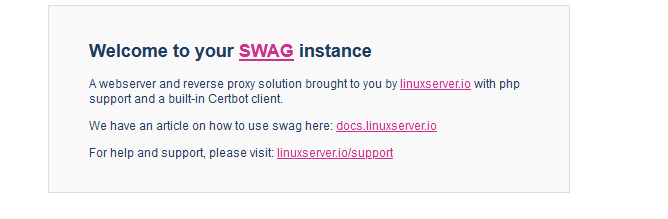
Most of my subdomains are setup and working with swag. But how do I setup the main domain? In the unraid template I set "only subdomains" to false and this seems to ahve worked because going to www.mydomain.com gives me an ssl cert, but right into this screen I assume I need to edit the file "default" in the site-confs folder but I tried that, replacing this text location ~ \.php$ { fastcgi_split_path_info ^(.+\.php)(/.+)$; fastcgi_pass 192.168.1.102:8096; fastcgi_index index.php; include /etc/nginx/fastcgi_params; } With this which is used in my subdomain file (which works): location / { include /config/nginx/proxy.conf; resolver 127.0.0.11 valid=30s; set $upstream_app jellyfin; set $upstream_port 8096; set $upstream_proto http; proxy_pass $upstream_proto://$upstream_app:$upstream_port; proxy_set_header Range $http_range; proxy_set_header If-Range $http_if_range; } location ~ (/jellyfin)?/socket { include /config/nginx/proxy.conf; resolver 127.0.0.11 valid=30s; set $upstream_app jellyfin; set $upstream_port 8096; set $upstream_proto http; proxy_pass $upstream_proto://$upstream_app:$upstream_port; } but it doesnt work. The setup video only mentions setting up the reverse proxy for sub domains, not the main domain.
-
I guess it looks like the service is running in the background, but the client side doesnt start automatically
-
I have created a fail2ban tutorial below to get you setup to 100% working order. Tutorial: fail2ban does start automatically with swag, but the client side doesnt, so for testing purposes, lets start it. You need to goto swags console and type fail2ban-client start Next you need to edit your jail.local file to create a jail for a particular service. In my example I will do Guacamole. Enter the following text into jail.local file, located in your appdata/swag/fail2ban folder [guacamole] enabled = true filter = guacamole_custom port = http,https logpath = /appdata/ApacheGuacamole/log/tomcat9/catalina.out Your logpath should be pointing to where your services log files are located. It this particular case, I am pointing to /appdata/ApacheGuacamole/log/tomcat9/catalina.out because that is where the log files for Guacamole are kept on my server (Dont forget to define your appdata path in the Swag Unraid Template) Next you must create a filter file. Goto the appdata/swag/fail2ban/filter.d folder and create a new file. Now in this particular case, Guacamole already has a guacamole.conf, except It appears to be using formatting for an old version of guacamoles logs. This can be a problem using the prebuilt .conf files because all these apps are constantly updating and the log files for these apps sometimes change locations or text formatting. In this case, "nWARNING" is text that guacamole no longer uses when describing a failed login attempt in its logs. To make matters worse, every time you restart your swag container, these .conf files will be overwritten, so you cant make any changes to them. So to get around this, I'm going to create my own new .conf file. I'll call it guacamole_custom.conf. You'll also notice that I have "filter = guacamole_custom" in the jail.local file as shown above. This is to make sure my jail is pointing to the correct filter. Now inside the guacamole_custom.conf file, we need to define the regex that will match the log file. This is basically reading the log files that guacamole produces, and matching the line for when a person enter incorrect credentials and then grabbing the ip. For this part its best to get help by googleing around for a fail2ban regex for your service that youre trying to set this up for. in Guacamoles case, as of Feburary 2021, The below code is confirmed to be working: [Definition] failregex = Authentication attempt from <HOST> for user "[^"]*" failed\.$ ignoreregex = # "maxlines" is number of log lines to buffer for multi-line regex searches maxlines = 2 datepattern = ^%%b %%d, %%ExY %%I:%%M:%%S %%p ^WARNING:()** {^LN-BEG} To be honest, you might not even need most of that, just the failregex line is important. Now when somebody makes a filed attempt to login, fail2ban will read guacamoles log file, and find the failed attempt. I can test the filter to make sure it works by typing this command fail2ban-regex /appdata/ApacheGuacamole/log/tomcat9/catalina.out /config/fail2ban/filter.d/guacamole_custom.conf Doing this I get: Running tests ============= Use failregex filter file : guacamole_custom, basedir: /config/fail2ban Use maxlines : 2 Use datepattern : Default Detectors Use log file : /appdata/ApacheGuacamole/log/tomcat9/catalina.out Use encoding : UTF-8 Results ======= Failregex: 27 total |- #) [# of hits] regular expression | 1) [27] Authentication attempt from <HOST> for user "[^"]*" failed\.$ `- Ignoreregex: 0 total Date template hits: |- [# of hits] date format | [468] {^LN-BEG}24hour:Minute:Second | [25] ^WARNING:()** `- Lines: 1455 lines, 0 ignored, 27 matched, 1428 missed [processed in 0.09 sec] Missed line(s): too many to print. Use --print-all-missed to print all 1428 lines You can see its working, because it found 27 matches currently in the log file. So now restart Swag (Restarting fail2ban appears to fail, restart the entire swag docker). After the swag container is restarted, start fail2ban again from the swag console with fail2ban-client start Now I can check my jail status with this command fail2ban-client status guacamole Status for the jail: guacamole |- Filter | |- Currently failed: 0 | |- Total failed: 0 | `- File list: /appdata/ApacheGuacamole/log/tomcat9/catalina.out `- Actions |- Currently banned: 0 |- Total banned: 0 `- Banned IP list: Now lets try logging in 5 times incorrectly and getting our IP banned. Now I get this Status for the jail: guacamole |- Filter | |- Currently failed: 0 | |- Total failed: 5 | `- File list: /appdata/ApacheGuacamole/log/tomcat9/catalina.out `- Actions |- Currently banned: 1 |- Total banned: 1 `- Banned IP list: My_IP EDIT: This should all be setup and working now. You wont need to start the fail2ban-client everytime swag starts for it to work as it will run as a service. The hardest part of getting fail2ban working is the Regex for the particular app youre using. Its not exactly easy to figure out the coding and often you will have to rely on somebody else to provide it. Im still trying to hunt down regex for OMBI. (Nginx proxy manager is a swag alternative which is GUI based and MUCH easier to setup and use than SWAG. It does not include fail2ban however. fail2ban also has a GUI for it called fail2web so perhaps one day that will be implemented and we can easily set rules for log matching rather than doing everything through command line and regex code). If you need fail2ban today, struggle with it in SWAG. If not, I recommend you just use Nginx proxy manager. Its so easy you don't even need a guide to figure it out. its also available for unraid!)
-
Ok I have passthroughed my GPU somewhat successfully, except the resolution is stuck at 800x 600. If I goto "about this mac" Under Graphics is see Graphics: "Dispaly 2 mb". I should be seeing GTX 1050ti. What is going on here?
-
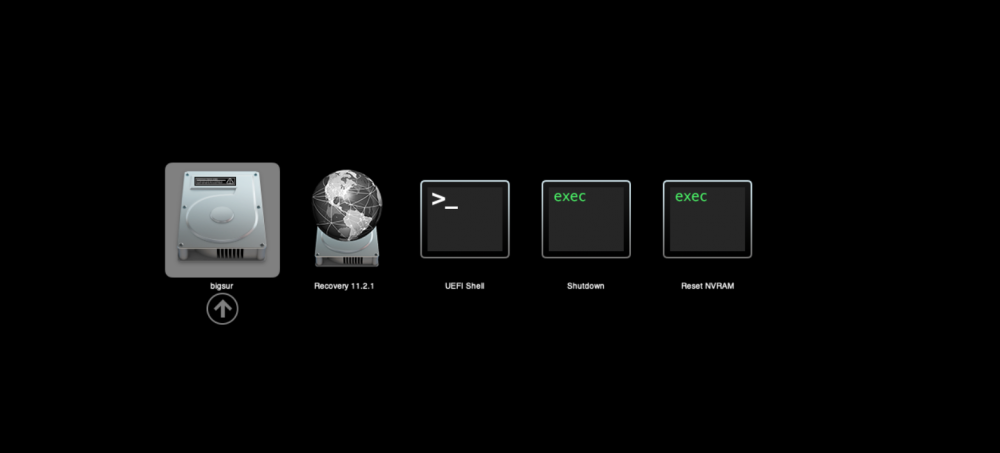
Thanks, but how do I boot into the mac automatically when the VM starts? For instance if I wanted to use teamviewer to remote in, I could set that up but it need to load the OS for that to be available. Starting the VM just goes to the volume select screen and you need to hit enter first before the OS loads. See screenshot:
-
Hi. Was the preclear plugin updated and stopped working in the new version for some reason? I just went to preclear a disk Pre-read - Done Zeroing - Done And thats it. Post read never occurss and plugin is just back to asking me if I want to pre-read. here is the log. eb 14 17:41:44 UnRAID preclear_disk_5PJHBRLE[18094]: Zeroing: dd if=/dev/zero of=/dev/sdg bs=2097152 seek=2097152 count=12000136527872 conv=notrunc iflag=count_bytes,nocache,fullblock oflag=seek_bytes Feb 15 05:20:38 UnRAID preclear_disk_5PJHBRLE[18094]: /usr/local/emhttp/plugins/preclear.disk/script/preclear_disk.sh: line 475: /tmp/.preclear/sdg/dd_output_complete: No such file or directory Feb 15 15:42:54 UnRAID preclear_disk_5PJHBRLE[18094]: Post-Read: cmp /tmp/.preclear/sdg/fifo /dev/zero Feb 15 15:42:54 UnRAID preclear_disk_5PJHBRLE[18094]: Post-Read: dd if=/dev/sdg of=/tmp/.preclear/sdg/fifo count=2096640 skip=512 iflag=nocache,count_bytes,skip_bytes Feb 15 15:42:55 UnRAID preclear_disk_5PJHBRLE[18094]: Post-Read: cmp /tmp/.preclear/sdg/fifo /dev/zero Feb 15 15:42:55 UnRAID preclear_disk_5PJHBRLE[18094]: Post-Read: dd if=/dev/sdg of=/tmp/.preclear/sdg/fifo bs=2097152 skip=2097152 count=12000136527872 iflag=nocache,count_bytes,skip_bytes Feb 15 15:44:41 UnRAID preclear_disk_5PJHBRLE[18094]: cat: /tmp/.preclear/sdg/smart_cycle_initial_start: No such file or directory Feb 15 15:44:41 UnRAID preclear_disk_5PJHBRLE[18094]: cat: /tmp/.preclear/sdg/smart_cycle_initial_start: No such file or directory Feb 15 15:44:41 UnRAID preclear_disk_5PJHBRLE[18094]: cat: /tmp/.preclear/sdg/smart_cycle_initial_start: No such file or directory Feb 15 15:44:41 UnRAID preclear_disk_5PJHBRLE[18094]: cat: /tmp/.preclear/sdg/smart_cycle_initial_start: No such file or directory Feb 15 15:44:41 UnRAID preclear_disk_5PJHBRLE[18094]: cat: /tmp/.preclear/sdg/smart_cycle_initial_start: No such file or directory Feb 15 15:44:41 UnRAID preclear_disk_5PJHBRLE[18094]: cat: /tmp/.preclear/sdg/smart_cycle_initial_start: No such file or directory Feb 15 15:44:41 UnRAID preclear_disk_5PJHBRLE[18094]: cat: /tmp/.preclear/sdg/smart_cycle_initial_start: No such file or directory Feb 15 15:44:41 UnRAID preclear_disk_5PJHBRLE[18094]: cat: /tmp/.preclear/sdg/smart_cycle_initial_start: No such file or directory /tmp/.preclear/sdg/smart_cycle_initial_start does in fact exist. Why is it saying no such file exists?
-
Agreed that it is unreasonable to expect OP to respond further in this thread. As it is also not reasonable to expect people to read through dozens of pages hoping to find somebody with the same issue as them. 2 solutions which cant be expected but would be preferred. Basically just don't get mad when people end up creating a new topic right away or asking the same questions over and over again. You have to change the system if you want things to change, not try and change user behavior, because that's always a losing battle. But back to the original question myself and 3 other people had on the page before... How does one remote into their VM once they switch over to hardware graphics passthrough and no longer have VNC?
-
Can anybody explain Fail2ban to me please. I have guacamole setup and access granted through a nxginx reverse proxy using swag. How exactly do I enable fail2ban? I read that fail2ban is already setup with the swag install for nxginx. Is this enough, or do I need to add another jail for guacamole or any other container I use? Also, when I run "fail2ban status" in the terminal for swag, it says fail2ban not found. How can I check if fail2ban is on and working?
-
It will be quicker, but FAR more time consuming. To be fair this is a 73 page thread with 25 posts per page. Searching through 1875 posts for the information you need, especially when this forum does not have the best search abilities can be very difficult. The OP should edit the first post with common questions\answers. This is common practice on other software support forums. And even better method would be that each docker container having its own FORUM, not just its own thread. I'm not sure if this "Invision Community" software that the unraid support forums use is easily capable of this or not, but there certainly is other forum platforms that can easily do such a task. Unraid is the type of platform that could benefit from such a setup. I'm new to unraid and just feel over the past 3 weeks its a bit difficult to find support for specific problems when each major docker I setup has all the support condensed into a single multi thousand post long topic. Maybe the Unraid team can look into a support forum overhaul?
-
Try editing the current one. If it doesnt work you need to delete and remake.
-
Is there a guide I can follow to setup fail2ban with Guacamole? I was hoping for a nice GUI docker like Nxginx proxy manager but it doesnt look like theres anything. I have swag installed and working, just need to know what to change for fail2ban. Theres a few guides online but not UNRAID specific.



