




.png.a98a80c78b81d2e8f977d9bb26103ff9.png)
DesertCookie
Members
-
Joined
-
Last visited
Everything posted by DesertCookie
-
Id didn't fix the issue in my case. My 11400's iGPU hasn't been working ever since upgrading to 6.12.
-
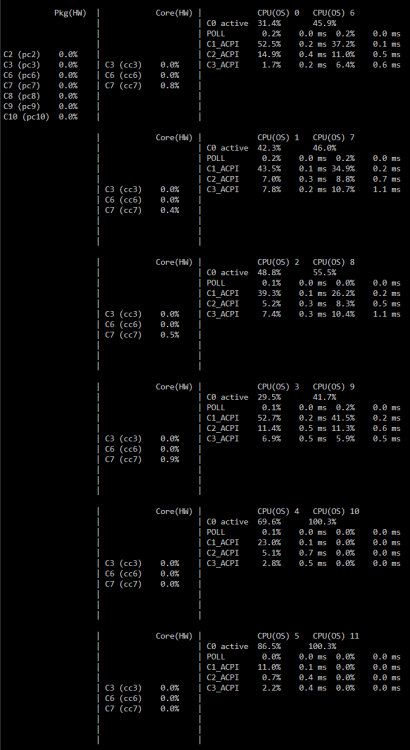
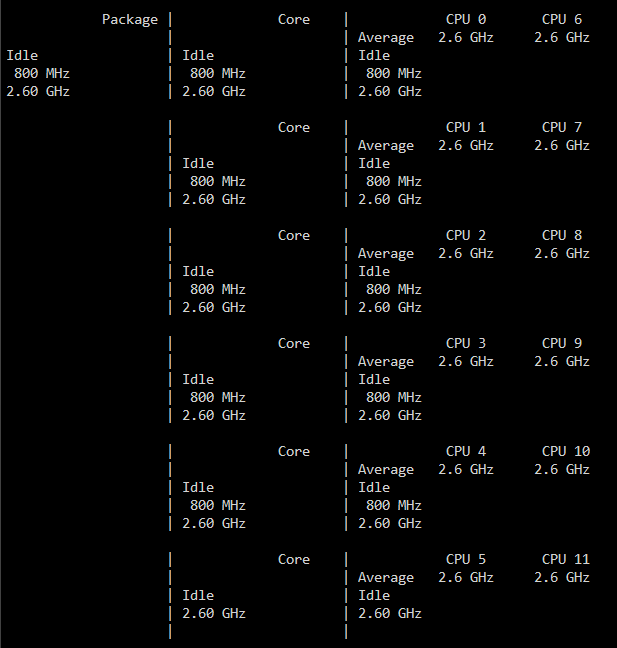
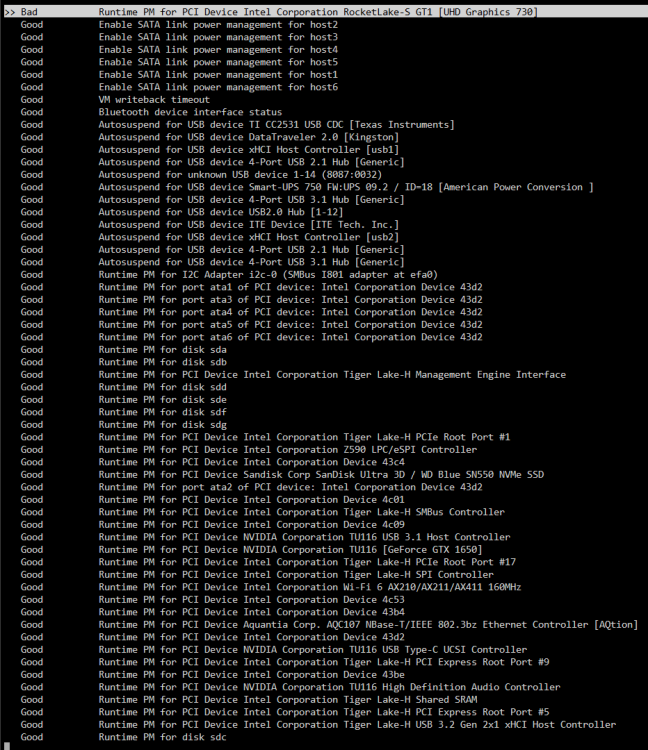
I have. However, there's not change in power consumption. I did fix the iGPU to show up as `Good` now. Furthermore, I made sure to definetely enable all C-states in my UEFI. Edit: Disabling turbo boost, I dropped the idle consumption to 105W with the peak being around 150W. Removing my GTX 1650 drops that to 90W. 45W seems to be the lowest I can get with all HDDs disconnected. The CPU finally drops down to C7 on all cores (though not on the package).
-
I'm a little stumped as to how to get my i5 11400 to behave. The system idles at around 100-120W with 7 HDDs, the iGPU enabled, a GTX 1650 in a VM, about 30 Docker containers, yet only an average CPU utilization of 20-30%.
-
I recently made a fresh USB to update to 6.12.6 after having issues with plugins when upgrading from 6.11. Ever since, I've been unable to get my iGPU to work. Before, I had it shared between three Docker containers without any issues. I've made sure to have it enabled in BIOS. It is present in System Devices. However, there's no `/dev/dri` that I could pass through with `--device='/dev/dri/card0' --device='/dev/dri/renderD128'`. Modprobe doesn't return anything; it simply blocks the terminal indefinetely. I do have the Intel TOP plugin installed. Thank you very much for any pointers. stower24-diagnostics-20240304-1316.zip
-
I found an issue with my UPS. I'll change its battery and observe if there are any more crashes the coming weeks. Thanks for looking into the logs for me.
-
I am encountering this issue without even using VNC on my Windows 11 gaming VM.
-
I cannot confirm that it rebooted itself this time around. The last two times it locked up and shut off, then automatically restarted, as I've configured it to do in the UEFI. I can only assume it was the same this time around. I don't know where to start with hardware or power, sadly. This system has been running perfectly the past year and a half. I had more issues with the Threadripper 1900 system I had before. I'd say both the UPS and the power supply, which still has seven years of warranty, are above any doubt and it probably is hardware, if anything. I might try to upgrade to 6.12 once again and see if that fixes it; the last three times I tried it would get hung up on an i915 driver issue and not boot any further. I had to hard reset and rebuild the thumb drive to 6.11.5.
-
I finally (heh) encountered another random crash that I only got wind of by my Telegram agent informing me of an unclean shutdown. I've appended all the logs and diagnostics that surround the crash. It took place on the 21st of Jan. at roughly 15:30 to 15:40. stower20-diagnostics-20240121-1545.zip syslog-1704572223 syslog-1705483734
-
Shucks, I totally thought I had it enabled already and it was in the diagnostics. I must have disabled some time in the last two years. Will do as soon as available.
-
Eleven days ago I experienced my first unexpected crash with unRAID. Today, there was a second crash. I'd appreciate some help pointing me into the right direction. The syslog shows some warnings about `READ FPDMA QUEUED` and subsequent IO and Buffer Errors which are new to me. It's been a long time though, since I've last checked for warnings and errors in the syslog and these could have been there for a while. The only meaningful thing I can remember to have changed was adding a VM running PiHole and setting that as my DNS on my router. That also came with enabling IPv6 for the server and Docker. After some issues with the unRAID app store, I whitelisted the server. That was AFTER the first crash, though, I think. One drive (sdb) has been slowly throwing UDMCA CRC errors. According to my Telegram agent, it stood at 19 immediately after the first crash, then increased to 30 as of today; most errors were thrown during the 30h-long parity check after the first crash. The drive throwing READ FPDMA QUEUED warnings is a known bad drive mounted via Unassigned Devices. I keep it and another drive for non-important data. A few months back I attempted to upgrade to 6.12 twice. Both times I had issues, first with the Nvidia plugin, then with the i915 drivers and ultimately had to roll back to 6.11.5 by making a fresh USB and copying over my configs. Edit: Funnily enough, this second crash, within 60 seconds also corresponds to when the lights went out at a few buildings at my university, about 2km away. Though I doubt this power-ripple made it to my server, as it runs off an UPS. stower20-diagnostics-20231218-1615.zip
-
I too am not seeing any issues after having upgraded virtio and using Q35.
-
My Windows 10 VM has recently started crashing after anywhere from 15 minutes to hours after having started up. I remember having to reboot unRAID in safe-mode once to remove a plugin that was causing issues after a restart. The VM is an always-on Windows 11 gaming VM with a GTX 1650 passed through and a dedicated drive mounted for games. I cannot figure out why and before I go on and make a fresh VM, I wanted to ask for someone to look over the config and log. -device '{"driver":"ide-cd","bus":"ide.0","unit":1,"drive":"libvirt-1-format","id":"ide0-0-1"}' \ -netdev tap,fd=37,id=hostnet0 \ -device '{"driver":"virtio-net","netdev":"hostnet0","id":"net0","mac":"52:54:00:1c:5e:6b","bus":"pci.0","addr":"0x2"}' \ -chardev pty,id=charserial0 \ -device '{"driver":"isa-serial","chardev":"charserial0","id":"serial0","index":0}' \ -chardev socket,id=charchannel0,fd=35,server=on,wait=off \ -device '{"driver":"virtserialport","bus":"virtio-serial0.0","nr":1,"chardev":"charchannel0","id":"channel0","name":"org.qemu.guest_agent.0"}' \ -chardev socket,id=chrtpm,path=/run/libvirt/qemu/swtpm/11-SpieleVM-W11-swtpm.sock \ -tpmdev emulator,id=tpm-tpm0,chardev=chrtpm \ -device '{"driver":"tpm-tis","tpmdev":"tpm-tpm0","id":"tpm0"}' \ -device '{"driver":"usb-tablet","id":"input0","bus":"usb.0","port":"1"}' \ -audiodev '{"id":"audio1","driver":"none"}' \ -device '{"driver":"vfio-pci","host":"0000:01:00.0","id":"hostdev0","bus":"pci.0","addr":"0x6","romfile":"/mnt/user/isos/vbios/Palit.GTX1650.4096.190221.rom"}' \ -device '{"driver":"vfio-pci","host":"0000:01:00.1","id":"hostdev1","bus":"pci.0","addr":"0x8"}' \ -device '{"driver":"vfio-pci","host":"0000:01:00.2","id":"hostdev2","bus":"pci.0","addr":"0x9"}' \ -device '{"driver":"vfio-pci","host":"0000:01:00.3","id":"hostdev3","bus":"pci.0","addr":"0xa"}' \ -sandbox on,obsolete=deny,elevateprivileges=deny,spawn=deny,resourcecontrol=deny \ -msg timestamp=on char device redirected to /dev/pts/0 (label charserial0) 2023-05-11 15:53:23.091+0000: shutting down, reason=failed 2023-05-11 18:18:44.601+0000: Starting external device: TPM Emulator /usr/bin/swtpm socket --ctrl type=unixio,path=/run/libvirt/qemu/swtpm/12-SpieleVM-W11-swtpm.sock,mode=0600 --tpmstate dir=/var/lib/libvirt/swtpm/534aba57-a06b-a252-9c61-1200865b94ce/tpm2,mode=0600 --log file=/var/log/swtpm/libvirt/qemu/SpieleVM-W11-swtpm.log --terminate --tpm2 2023-05-11 18:18:44.630+0000: starting up libvirt version: 8.7.0, qemu version: 7.1.0, kernel: 5.19.17-Unraid, hostname: Tower LC_ALL=C \ PATH=/bin:/sbin:/usr/bin:/usr/sbin \ HOME=/var/lib/libvirt/qemu/domain-12-SpieleVM-W11 \ XDG_DATA_HOME=/var/lib/libvirt/qemu/domain-12-SpieleVM-W11/.local/share \ XDG_CACHE_HOME=/var/lib/libvirt/qemu/domain-12-SpieleVM-W11/.cache \ XDG_CONFIG_HOME=/var/lib/libvirt/qemu/domain-12-SpieleVM-W11/.config \ /usr/local/sbin/qemu \ -name guest=SpieleVM-W11,debug-threads=on \ -S \ -object '{"qom-type":"secret","id":"masterKey0","format":"raw","file":"/var/lib/libvirt/qemu/domain-12-SpieleVM-W11/master-key.aes"}' \ -blockdev '{"driver":"file","filename":"/usr/share/qemu/ovmf-x64/OVMF_CODE-pure-efi-tpm.fd","node-name":"libvirt-pflash0-storage","auto-read-only":true,"discard":"unmap"}' \ -blockdev '{"node-name":"libvirt-pflash0-format","read-only":true,"driver":"raw","file":"libvirt-pflash0-storage"}' \ -blockdev '{"driver":"file","filename":"/etc/libvirt/qemu/nvram/534aba57-a06b-a252-9c61-1200865b94ce_VARS-pure-efi-tpm.fd","node-name":"libvirt-pflash1-storage","auto-read-only":true,"discard":"unmap"}' \ -blockdev '{"node-name":"libvirt-pflash1-format","read-only":false,"driver":"raw","file":"libvirt-pflash1-storage"}' \ -machine pc-i440fx-6.2,usb=off,dump-guest-core=off,mem-merge=off,memory-backend=pc.ram,pflash0=libvirt-pflash0-format,pflash1=libvirt-pflash1-format \ -accel kvm \ -cpu host,migratable=on,hv-time=on,hv-relaxed=on,hv-vapic=on,hv-spinlocks=0x1fff,hv-vendor-id=none,host-cache-info=on,l3-cache=off \ -m 12288 \ -object '{"qom-type":"memory-backend-ram","id":"pc.ram","size":12884901888}' \ -overcommit mem-lock=off \ -smp 8,sockets=1,dies=1,cores=4,threads=2 \ -uuid 534aba57-a06b-a252-9c61-1200865b94ce \ -display none \ -no-user-config \ -nodefaults \ -chardev socket,id=charmonitor,fd=36,server=on,wait=off \ -mon chardev=charmonitor,id=monitor,mode=control \ -rtc base=localtime \ -no-hpet \ -no-shutdown \ -boot strict=on \ -device '{"driver":"ich9-usb-ehci1","id":"usb","bus":"pci.0","addr":"0x7.0x7"}' \ -device '{"driver":"ich9-usb-uhci1","masterbus":"usb.0","firstport":0,"bus":"pci.0","multifunction":true,"addr":"0x7"}' \ -device '{"driver":"ich9-usb-uhci2","masterbus":"usb.0","firstport":2,"bus":"pci.0","addr":"0x7.0x1"}' \ -device '{"driver":"ich9-usb-uhci3","masterbus":"usb.0","firstport":4,"bus":"pci.0","addr":"0x7.0x2"}' \ -device '{"driver":"virtio-serial-pci","id":"virtio-serial0","bus":"pci.0","addr":"0x3"}' \ -blockdev '{"driver":"file","filename":"/mnt/user/domains/SpieleVM-W11/vdisk1.img","node-name":"libvirt-4-storage","cache":{"direct":false,"no-flush":false},"auto-read-only":true,"discard":"unmap"}' \ -blockdev '{"node-name":"libvirt-4-format","read-only":false,"cache":{"direct":false,"no-flush":false},"driver":"raw","file":"libvirt-4-storage"}' \ -device '{"driver":"virtio-blk-pci","bus":"pci.0","addr":"0x4","drive":"libvirt-4-format","id":"virtio-disk2","bootindex":1,"write-cache":"on"}' \ -blockdev '{"driver":"file","filename":"/mnt/disks/Spiele/SpieleVM22/vdisk2.img","node-name":"libvirt-3-storage","cache":{"direct":false,"no-flush":false},"auto-read-only":true,"discard":"unmap"}' \ -blockdev '{"node-name":"libvirt-3-format","read-only":false,"cache":{"direct":false,"no-flush":false},"driver":"raw","file":"libvirt-3-storage"}' \ -device '{"driver":"virtio-blk-pci","bus":"pci.0","addr":"0x5","drive":"libvirt-3-format","id":"virtio-disk3","write-cache":"on"}' \ -blockdev '{"driver":"file","filename":"/mnt/user/isos/Win11_German_x64v1.iso","node-name":"libvirt-2-storage","auto-read-only":true,"discard":"unmap"}' \ -blockdev '{"node-name":"libvirt-2-format","read-only":true,"driver":"raw","file":"libvirt-2-storage"}' \ -device '{"driver":"ide-cd","bus":"ide.0","unit":0,"drive":"libvirt-2-format","id":"ide0-0-0","bootindex":2}' \ -blockdev '{"driver":"file","filename":"/mnt/user/isos/virtio-win-0.1.221-1.iso","node-name":"libvirt-1-storage","auto-read-only":true,"discard":"unmap"}' \ -blockdev '{"node-name":"libvirt-1-format","read-only":true,"driver":"raw","file":"libvirt-1-storage"}' \ -device '{"driver":"ide-cd","bus":"ide.0","unit":1,"drive":"libvirt-1-format","id":"ide0-0-1"}' \ -netdev tap,fd=37,id=hostnet0 \ -device '{"driver":"virtio-net","netdev":"hostnet0","id":"net0","mac":"52:54:00:1c:5e:6b","bus":"pci.0","addr":"0x2"}' \ -chardev pty,id=charserial0 \ -device '{"driver":"isa-serial","chardev":"charserial0","id":"serial0","index":0}' \ -chardev socket,id=charchannel0,fd=35,server=on,wait=off \ -device '{"driver":"virtserialport","bus":"virtio-serial0.0","nr":1,"chardev":"charchannel0","id":"channel0","name":"org.qemu.guest_agent.0"}' \ -chardev socket,id=chrtpm,path=/run/libvirt/qemu/swtpm/12-SpieleVM-W11-swtpm.sock \ -tpmdev emulator,id=tpm-tpm0,chardev=chrtpm \ -device '{"driver":"tpm-tis","tpmdev":"tpm-tpm0","id":"tpm0"}' \ -device '{"driver":"usb-tablet","id":"input0","bus":"usb.0","port":"1"}' \ -audiodev '{"id":"audio1","driver":"none"}' \ -device '{"driver":"vfio-pci","host":"0000:01:00.0","id":"hostdev0","bus":"pci.0","addr":"0x6","romfile":"/mnt/user/isos/vbios/Palit.GTX1650.4096.190221.rom"}' \ -device '{"driver":"vfio-pci","host":"0000:01:00.1","id":"hostdev1","bus":"pci.0","addr":"0x8"}' \ -device '{"driver":"vfio-pci","host":"0000:01:00.2","id":"hostdev2","bus":"pci.0","addr":"0x9"}' \ -device '{"driver":"vfio-pci","host":"0000:01:00.3","id":"hostdev3","bus":"pci.0","addr":"0xa"}' \ -sandbox on,obsolete=deny,elevateprivileges=deny,spawn=deny,resourcecontrol=deny \ -msg timestamp=on char device redirected to /dev/pts/3 (label charserial0) 2023-05-11 18:28:18.822+0000: shutting down, reason=crashed <?xml version='1.0' encoding='UTF-8'?> <domain type='kvm'> <name>SpieleVM-W11</name> <uuid>534aba57-a06b-a252-9c61-1200865b94ce</uuid> <metadata> <vmtemplate xmlns="unraid" name="Windows 11" icon="windows11.png" os="windowstpm"/> </metadata> <memory unit='KiB'>12582912</memory> <currentMemory unit='KiB'>8388608</currentMemory> <memoryBacking> <nosharepages/> </memoryBacking> <vcpu placement='static'>8</vcpu> <cputune> <vcpupin vcpu='0' cpuset='2'/> <vcpupin vcpu='1' cpuset='8'/> <vcpupin vcpu='2' cpuset='3'/> <vcpupin vcpu='3' cpuset='9'/> <vcpupin vcpu='4' cpuset='4'/> <vcpupin vcpu='5' cpuset='10'/> <vcpupin vcpu='6' cpuset='5'/> <vcpupin vcpu='7' cpuset='11'/> </cputune> <os> <type arch='x86_64' machine='pc-i440fx-6.2'>hvm</type> <loader readonly='yes' type='pflash'>/usr/share/qemu/ovmf-x64/OVMF_CODE-pure-efi-tpm.fd</loader> <nvram>/etc/libvirt/qemu/nvram/534aba57-a06b-a252-9c61-1200865b94ce_VARS-pure-efi-tpm.fd</nvram> </os> <features> <acpi/> <apic/> <hyperv mode='custom'> <relaxed state='on'/> <vapic state='on'/> <spinlocks state='on' retries='8191'/> <vendor_id state='on' value='none'/> </hyperv> </features> <cpu mode='host-passthrough' check='none' migratable='on'> <topology sockets='1' dies='1' cores='4' threads='2'/> <cache mode='passthrough'/> </cpu> <clock offset='localtime'> <timer name='hypervclock' present='yes'/> <timer name='hpet' present='no'/> </clock> <on_poweroff>destroy</on_poweroff> <on_reboot>restart</on_reboot> <on_crash>restart</on_crash> <devices> <emulator>/usr/local/sbin/qemu</emulator> <disk type='file' device='disk'> <driver name='qemu' type='raw' cache='writeback'/> <source file='/mnt/user/domains/SpieleVM-W11/vdisk1.img'/> <target dev='hdc' bus='virtio'/> <boot order='1'/> <address type='pci' domain='0x0000' bus='0x00' slot='0x04' function='0x0'/> </disk> <disk type='file' device='disk'> <driver name='qemu' type='raw' cache='writeback'/> <source file='/mnt/disks/Spiele/SpieleVM22/vdisk2.img'/> <target dev='hdd' bus='virtio'/> <address type='pci' domain='0x0000' bus='0x00' slot='0x05' function='0x0'/> </disk> <disk type='file' device='cdrom'> <driver name='qemu' type='raw'/> <source file='/mnt/user/isos/Win11_German_x64v1.iso'/> <target dev='hda' bus='ide'/> <readonly/> <boot order='2'/> <address type='drive' controller='0' bus='0' target='0' unit='0'/> </disk> <disk type='file' device='cdrom'> <driver name='qemu' type='raw'/> <source file='/mnt/user/isos/virtio-win-0.1.221-1.iso'/> <target dev='hdb' bus='ide'/> <readonly/> <address type='drive' controller='0' bus='0' target='0' unit='1'/> </disk> <controller type='pci' index='0' model='pci-root'/> <controller type='ide' index='0'> <address type='pci' domain='0x0000' bus='0x00' slot='0x01' function='0x1'/> </controller> <controller type='virtio-serial' index='0'> <address type='pci' domain='0x0000' bus='0x00' slot='0x03' function='0x0'/> </controller> <controller type='usb' index='0' model='ich9-ehci1'> <address type='pci' domain='0x0000' bus='0x00' slot='0x07' function='0x7'/> </controller> <controller type='usb' index='0' model='ich9-uhci1'> <master startport='0'/> <address type='pci' domain='0x0000' bus='0x00' slot='0x07' function='0x0' multifunction='on'/> </controller> <controller type='usb' index='0' model='ich9-uhci2'> <master startport='2'/> <address type='pci' domain='0x0000' bus='0x00' slot='0x07' function='0x1'/> </controller> <controller type='usb' index='0' model='ich9-uhci3'> <master startport='4'/> <address type='pci' domain='0x0000' bus='0x00' slot='0x07' function='0x2'/> </controller> <interface type='bridge'> <mac address='52:54:00:1c:5e:6b'/> <source bridge='br0'/> <model type='virtio-net'/> <address type='pci' domain='0x0000' bus='0x00' slot='0x02' function='0x0'/> </interface> <serial type='pty'> <target type='isa-serial' port='0'> <model name='isa-serial'/> </target> </serial> <console type='pty'> <target type='serial' port='0'/> </console> <channel type='unix'> <target type='virtio' name='org.qemu.guest_agent.0'/> <address type='virtio-serial' controller='0' bus='0' port='1'/> </channel> <input type='tablet' bus='usb'> <address type='usb' bus='0' port='1'/> </input> <input type='mouse' bus='ps2'/> <input type='keyboard' bus='ps2'/> <tpm model='tpm-tis'> <backend type='emulator' version='2.0' persistent_state='yes'/> </tpm> <audio id='1' type='none'/> <hostdev mode='subsystem' type='pci' managed='yes'> <driver name='vfio'/> <source> <address domain='0x0000' bus='0x01' slot='0x00' function='0x0'/> </source> <rom file='/mnt/user/isos/vbios/Palit.GTX1650.4096.190221.rom'/> <address type='pci' domain='0x0000' bus='0x00' slot='0x06' function='0x0'/> </hostdev> <hostdev mode='subsystem' type='pci' managed='yes'> <driver name='vfio'/> <source> <address domain='0x0000' bus='0x01' slot='0x00' function='0x1'/> </source> <address type='pci' domain='0x0000' bus='0x00' slot='0x08' function='0x0'/> </hostdev> <hostdev mode='subsystem' type='pci' managed='yes'> <driver name='vfio'/> <source> <address domain='0x0000' bus='0x01' slot='0x00' function='0x2'/> </source> <address type='pci' domain='0x0000' bus='0x00' slot='0x09' function='0x0'/> </hostdev> <hostdev mode='subsystem' type='pci' managed='yes'> <driver name='vfio'/> <source> <address domain='0x0000' bus='0x01' slot='0x00' function='0x3'/> </source> <address type='pci' domain='0x0000' bus='0x00' slot='0x0a' function='0x0'/> </hostdev> <memballoon model='none'/> </devices> </domain>
-
Has been interesting reading this. I've not been able to solve a similar issue that causes my 11600K to be utilized to around 70% while basically doing nothing, causing write speed and web UI speed to drop. Hope this somehow gets resolved for you.
-
@JorgeB So far so good but I've noticed something changing from macvlan to ipvlan: While before containers would appear as separate computers in my home network, allowing me, for example, to prioritize them in my router without having to prioritize the entire traffic to my server, these containers no longer appear. They do work as they are reachable under their assigned IP address; but my Fritz!Box doesn't pick them up as separate entities anymore, not allowing me to prioritize them, which was the whole reason I did forego the host and bridge network types.
-
Thank you. I'll try this. I use Docker containers with fixed IPs for containers like PiHole and Jellyfin that I want to prioritize in my router. Otherwise they get really slow, for instance, when Duplicacy is eating up bandwidth.
-
Finally got a crash again, @JorgeB. Since I am unsure in which log it'll be, I've uploaded both of the past few days. syslog-1665646066 syslog-1666178969
-
For about a month now I've been experiencing periodic freezing of unRAID where the web UI and any services become totally unresponsive or not reachable, the computer itself stays turned on though. Even SSH doesn't reach and my only course is to hard-reset the server by power-cycling it. I can't think of any changes in my setup apart from re-seating the GPU and re-creating a VM after I've been experiencing a 127 error. This was ultimately fixed by updating to 6.11.1 a week ago. Since the update I've had the longest uptime of over a week but experienced a freeze again just now. I have also removed a 50mV undervolt on my CPU at the same time thinking it might be related but this newest crash tells me it may not have been. I've attached today's diagnostics and one older one from around the time the problem started happening. I've also enabled the syslog server (sadly, had it misconfigured before so it didn't catch the old crashes) and am waiting for the next crah(es). --- This system was an upgrade from my last AMD 1900X system and it being 11th gen I expected there to be some issues but it's literally been bug-hunting for me every other month since my upgrade in January (latest find was an issue with correctly passing through the iGPU). The system: Intel 11600K (UHD 750 passed through to linuxserver/Jellyfin) 2x16 GB DDR4 ECC GTX 1650 (in W11 gaming VM, ACS override enabled) 3x 12TB in array 1TB cache SSD 4TB and 2TB unassigned devices (known bad sectors, just used for game storage and other unimportant media) tower-diagnostics-20221013-1043.zip tower-diagnostics-20221009-0314.zip
-
How did you manage to uninstall NerdPack? I cannot even access the web UI and only have access via SSH now. Edit: Somehow the install created a cookie that gave me a 400 error with nginx. I had to delete the cookies; that was a first...
-
Similar situation: unRAID, Docker, Intel 11th-gen iGPU, second dGPU (Nvidia though). I resolved my issue this way: 1. `/dev/dri` wouldn't show up in the docker container. Transcodes would either not start at all or error out with: `Failed to set value 'vaapi=va:,driver=iHD,kernel_driver=i915' for option 'init_hw_device': Generic error in an external library`. 2. By running the container in privileged mode the iGPU would show up in the container with the correct permissions (same as in unRAID as checked with `ls -l /dev/dri`; in my case: `crwxrwxrwx 1 root video 226, 128 Sep 18 12:52 renderD128` - the `128` has to match, as far as I understand). 3. Running `/usr/lib/jellyfin-ffmpeg/vainfo` in the container gave me the expected output and thus confirmed VAAPI capabilities (and QSV too as a fork of VAAPI). 4. Setting transcoding in Jellyfin to QSV successfully resulted in transcodes of SDR-sources. HDR sources however would throw an error: `Failed to set value 'opencl=ocl@va' for option 'init_hw_device': No such device`. 5. Ultimately, I switched to VAAPI instead of QSV and enabled VPP-Tonemapping. Now both SDR to SDR and HDR to HDR transcoding would work as expected. However, QSV with VPP-Tonemapping still resulted in the above error and as of currently doesn't work. See here on GitHub.
-
This happens with my Nvidia GTX 1650 too.
-
As I am unsure which of your plugins might be the culprit - if at all, I'm asking here. I am unable to view my system log via the Tools tab. Even in the diagnostics it's empty and there only is a syslog1.log. This is the error I'm seeing: Fatal error: Allowed memory size of 134217728 bytes exhausted (tried to allocate 394580000 bytes) in /usr/local/emhttp/plugins/dynamix/include/Syslog.php on line 18 I'm running unRAID 6.10.3 with nearly all of your plugins. This has been an issue for at least a couple of weeks now - so possibly on of the latest updates?
-
I managed to fix the issue by deleting the VM's log files. It seems like they cannot be written to after I forcefully stopped the VM. I deleted: /var/log/libvirt/qemu/LOG_NAME
-
It seems to have been a temperature issue. The 11600K (60-70°C) runs a lot hotter than the previous 1900X (50-60°C) while consuming the same amount of power. I had left the RPM of my Noctua NF-A14s at the same 600RPM I used in the old Threadripper system and had removed the second NH-D15 fan. Adding the second fan back in and increasing the fan speed to 700RPM seems to have fixed the issue.
-
I enabled it as otherwise I could see /dev/dri for use in Jellyfin; the iGPU was the whole reason for my upgrade. I will try disabling it for now to see if that fixes the issue. Edit: Blacklisting the driver did not change my situation. I now am further investigating the possibility of a hardware failure.
-
My system started randomly crashing three days ago. After 5-30 minutes it would crash. Updating my UEFI yielded me one night of continuous operation before it went back to the old behavior. I switched from an AMD X399 1st-gen to an Intel Z590 11th-gen system two weeks ago and upgraded from 6.9 to 6.10 at the same tune; it was running without issues to this point. In the instanced where unRAID would still start the array, the log was saved to the flash drive. I added the last log I have from when the server was still running fine and a few of the past days (some of them are 385MB in size!). I also managed to export diagnostics when I actually once made it to the web UI. Current system: Gigabyte Z590 Aorus Master i5 11600K GTX 1650 2x16GB DDR4-3200 10GbE SFP+ Card 3x12TB HDD, 2TB HDD, 4TB HDD, 1TB M.2 SSD Enermax PSU (unlikely the culprit) APC UPS I already tried: UEFI update unRAID update (6.10.2 to 6.10.3) removing GPU, drives (except M.2), and SFP+-card different RAM reseating all power and data connections unRAID safe-mode fresh unRAID boot stick (wasn't recognized by the UEFI until I copied all original data to it again) running without UPS I am already suspecting a hardware error somewhere but cannot believe this new system would outright fail after two weeks (though that would be exactly my luck with tech). 20.06.22-1_syslog-1655701321 20.06.22-2_syslog-1655727397 06.06.22_syslog-20220603-181331.txt tower-diagnostics-20220620-0922.zip
.thumb.png.cd783b56e03ecb7dd3cde237dc340538.png)



