




.png.a98a80c78b81d2e8f977d9bb26103ff9.png)
DesertCookie
Members
-
Joined
-
Last visited
Everything posted by DesertCookie
-
I have an 11600K sitting in my system right now and just realized I can't use GVT-g. I'm really interested in this too.
-
Not his diagnostics, but I am encountering this exact problem. I usually have to restart the entire server to stop the array as it only stops in a timely manner within the first few minutes after (re-)stating. stower20-diagnostics-20220530-1231.zip
-
After replacing two 4TB drives with a single 12TB drive I just had started rebuilding parity when I noticed Docker would not start: Warning: stream_socket_client(): unable to connect to unix:///var/run/docker.sock (No such file or directory) in /usr/local/emhttp/plugins/dynamix.docker.manager/include/DockerClient.php on line 682 Couldn't create socket: [2] No such file or directory Warning: Invalid argument supplied for foreach() in /usr/local/emhttp/plugins/dynamix.docker.manager/include/DockerClient.php on line 866 I had restarted the server after stopping the array took longer than 20 minutes; an occurrence I have noticed to happen about 50% of the time in my case. What to do in this situation? stower20-diagnostics-20220516-2122.zip
-
What chmod would I have to do? What are the default owner permissions for this/a container? Thanks, again.
-
I accidentally messed up my installation by, presumably, using the `New Permissions` tool of unRAID. I ran this over appdata to fix an issue I had with a different container, only realizing now, weeks later, when trying to install plugins or upload files to my Wordpress site that it does seem to have permission issues. It keeps asking for connection information to the storage via FTP. Is there an easy fix, eg. using `chown` on the folder?
-
How'd I go about redirecting traffic to the local server instead of it having to take a round-trip through Cloudflare? I've tried to mess with the Zones but cannot get it to forwards all traffic for "mydomain.de" and subdomains to my server's IP which exposes a reverse proxy. Edit: I think I figured it out. Now I finally have a ping of <2ms (5-10ms via WiFi) instead of 20-35ms. Go to Zones and click Add Zone. Use your domain name as zone name, creating the primary zone with Add. Add A/AAAA records pointing to your server. Add CNAMe records for your subdomains (basically mirroring the setup on Cloudflare).
-
I tried this but it does not seem to work. The container is not pingable via its IPv6 address. I noticed there apparently are two different IPv6 ranges. The one displayed when editing the container and the range from the Docker settings differ (censored parts that match): XXXX:XXXX:5520:e500::/64 -- Container Settings XXXX:XXXX:555e:a600::/64 -- Docker Settings When I use "XXXX:XXXX:5520:e500::105" the container starts but is not pingable. When I use the base from the Docker settings the container doesn't start with an "error code 403". I am using a custom bridge to make the container appear as its own device on my local network.
-
Is there a way to have Appdata Backup create multiple backup archives? I am experiencing an issue with my backup which is an 11GB tar.gz file. Most of that is my Jellyfin appdata with >5GB. When trying to open the tar.gz in Midnight Commander I always get an out of space error, even though I have TB of space. I'd like to create a separate backup of my Jellyfin appdata if possible to get two more manageable files.
-
From trying it out it doesn't. I may have not implemented this solution correctly though. It somehow messes with how the log gets saved to the flash drive spitting out this error: rsyslogd: file '/boot/logs/syslog'[6] write error - see https://www.rsyslog.com/solving-rsyslog-write-errors/ for help OS error: File too large [v8.2002.0 try https://www.rsyslog.com/e/2027 ] rsyslogd: action 'action-1-builtin:omfile' (module 'builtin:omfile') message lost, could not be processed. Check for additional error messages before this one. [v8.2002.0 try https://www.rsyslog.com/e/2027 ]
-
Having the same issue. My server spits out a lot of these but nothing else in the log: rsyslogd: file '/boot/logs/syslog'[6] write error - see https://www.rsyslog.com/solving-rsyslog-write-errors/ for help OS error: File too large [v8.2002.0 try https://www.rsyslog.com/e/2027 ] rsyslogd: action 'action-1-builtin:omfile' (module 'builtin:omfile') message lost, could not be processed. Check for additional error messages before this one. [v8.2002.0 try https://www.rsyslog.com/e/2027 ]
-
I'll try disabling this setting for the moment. I have misunderstood the option based on the description; I assumed it would move all data when only 5% space were remaining. Maybe it would make more sense to inverse the sorting of this list so that the more recommended options are at the top. Edit: It still moves JPG and JPEG files. Edit 2: Finally got some logs to share. Here it logs the moving of the image files I keep placing on the cache for testing purposes: Feb 26 21:07:40 STOWER20 move: move: file /mnt/cache/Jellyfin/Serien/EN/Adam Ruins Everything (2015-2019)/Staffel 1 (2015-2016)/folder.jpg Feb 26 21:07:40 STOWER20 move: move: file /mnt/cache/Jellyfin/Serien/EN/Adam Ruins Everything (2015-2019)/Staffel 2 (2017-2018)/folder.jpg Feb 26 21:07:41 STOWER20 move: move: file /mnt/cache/Jellyfin/Serien/EN/Adam Ruins Everything (2015-2019)/Staffel 3 (2019)/folder.jpg Feb 26 21:07:41 STOWER20 move: move: file /mnt/cache/Jellyfin/Serien/EN/Adam Ruins Everything (2015-2019)/Specials (2016)/folder.jpg Feb 26 21:07:41 STOWER20 move: move: file /mnt/cache/Jellyfin/Serien/EN/Adam Ruins Everything (2015-2019)/folder.jpg
-
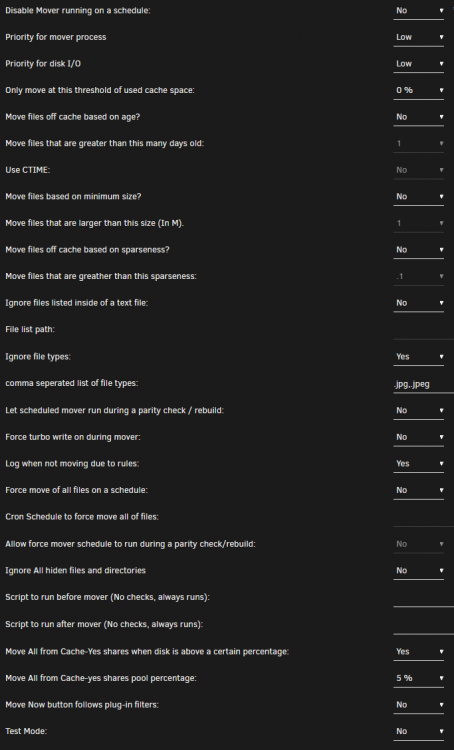
Ignored file types are not working. I see this has been an issue before and was seemingly fixed. I am experiencing this issue again though. I've tried both ".jpg,.jpeg" and "jpg,jpeg" for the rule. Sadly, I cannot add a syslog as my syslog is spitting out write permission errors; the log partition seems to be 0KB in size; sadly, I was unable to resolve this with any of the posts of people having similar issues. rsyslogd: file '/boot/logs/syslog'[6] write error - see https://www.rsyslog.com/solving-rsyslog-write-errors/ for help OS error: File too large [v8.2002.0 try https://www.rsyslog.com/e/2027 ] rsyslogd: action 'action-1-builtin:omfile' (module 'builtin:omfile') message lost, could not be processed. Check for additional error messages before this one. [v8.2002.0 try https://www.rsyslog.com/e/2027 ] I have included my plugin settings. Running Unraid 6.9.2 with the plugin version 2021.11.28.
-
Thanks for letting me know :).
-
Attempting to set up the My Servers plugin in get this error message: We have detected a mismatch in URLs – this could be due to a reverse proxy. In your webGUI go to Settings > Management Access > "Extra Origins" field – Add your Reverse Proxy URL > Apply. Following the error I went to my "Management Access" page. On it there is no "Extra Origins" field. Running Unraid 6.9.2.
-
Hi, thank you very much for this plugin. Is there a way to accomplish what I am trying to do? I have two VMs. Both are used for gaming. It'd be really nice to have the games on the same drive for both VMs. The issue with adding it to both as a network drive (instead of passing it through to the VM(s)) is that Origin, Epic GL, and Uplay have huge issues with installing to network drives and really only accept native drives. I'm currently passing through the game drive to one VM and am sharing it within Windows. This seems to at least work for Origin most of the time. Thanks.
-
How I just solves this issue: I first tried using Unassigned Devices (Plus) which did not mount in Read-Write mode. Looking at the Disk Log Information on the Main tab it told me: ntfs-3g[60028]: Mounted /dev/sdf1 (Read-Only, label "MY-LABEL", NTFS 3.1) Attempting to manually mount the partition following this guide I was able to get some more information on why RW failed and it defaulted to Read-Only: The disk contains an unclean file system (0, 0). Metadata kept in Windows cache, refused to mount. Falling back to read-only mount because the NTFS partition is in an unsafe state. Please resume and shutdown Windows fully (no hibernation or fast restarting.) Following a suggestion from here I attempted to repair the file system using ntfsfix. Using it looked like this in my case: root@MYSERVER: ~# ntfsfix /dev/sdc1 Mounting volume... The disk contains an unclean file system (0, 0). Metadata kept in Windows cache, refused to mount. FAILED Attempting to correct errors... Processing $MFT and $MFTMirr... Reading $MFT... OK Reading $MFTMirr... OK Comparing $MFTMirr to $MFT... OK Processing of $MFT and $MFTMirr completed successfully. Setting required flags on partition... OK Going to empty the journal ($LogFile)... OK Checking the alternate boot sector... OK NTFS volume version is 3.1. NTFS partition /dev/sdc1 was processed successfully. After that I could successfully mount the partition with Unassigned Devices. Hope this helps anyone finding this in the future.
-
As far as I can tell Unraid can write to the thumb drive. What permissions should all of the folders have by default? Maybe some folders work while others don't and I keep testing the wrong ones.
-
I'll try to remove the drive. It's an M.2 NVMe SSD. This can't be the only reason though as this has been happening far longer than the drive is installed.
-
Here it is. Thanks for pointing that option out to me. stower20-diagnostics-20210924-1640.zip
-
I've been having the issue of Unraid starting a parity sync every time I restart my server - which I had to do multiple times lately because my USB acted up. I've read through this post on the topic but it didn't help me out very much. Could someone point me to the place in my log that tells me what exactly is going wrong so I can learn how to read the log and troubleshoot on my own in the future, please? My config: TR 1900X MSI X99 Taichi 2x 16GB DDR4-3200 ECC 1TB WD Blue NVMe SSD (cache) 256GB WD Black NVMe SSD (cache 2) 2x 12TB WD White (parity, array) 2x 4TB WD Se (array, array) 1TB Seagate (unassigned devices - location of games for VM) 32GB Samsung flash drive stower20-syslog-20210924-1339.zip
.thumb.png.cd783b56e03ecb7dd3cde237dc340538.png)


