





Hawkins12
Members
-
Joined
-
Last visited
Everything posted by Hawkins12
-
Thanks. I'll mess with it tomorrow. I am using the most updated docker so it's kind of confusing as it seemed an update (in 2020) fixed the issue. I'll check it out. Appreciate your time helping me
-
It looks like I have issues similar to this but I'll be honest, I don't follow how to fix. From what I read, I need to clear the cache or "grant permissions" via chmod however, I am not necessarily a programming guru and not following how to make this all happen. What commands in the docker did you use to grant the permissions? Any way you could spell it out for a poor newbie like myself? Thanks in advance. Appreciate you providing the above feedback!
-
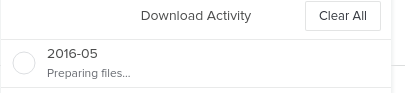
So I believe my Crashplan is saving/backing up my data correctly. Seems to be working fine. I am at a point now where I need to recover some data and I am struggling big time. Here's what I am seeing: I seem to be hard stuck here: . Been hours with no movement. I logged on via a browser and Crash plan seems to be online. Any ideas what would cause this?
-
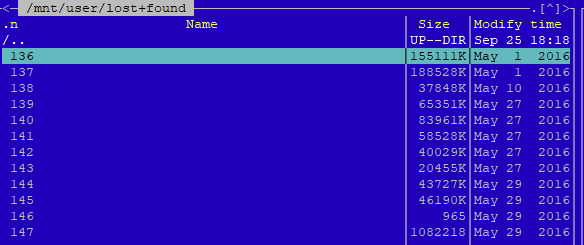
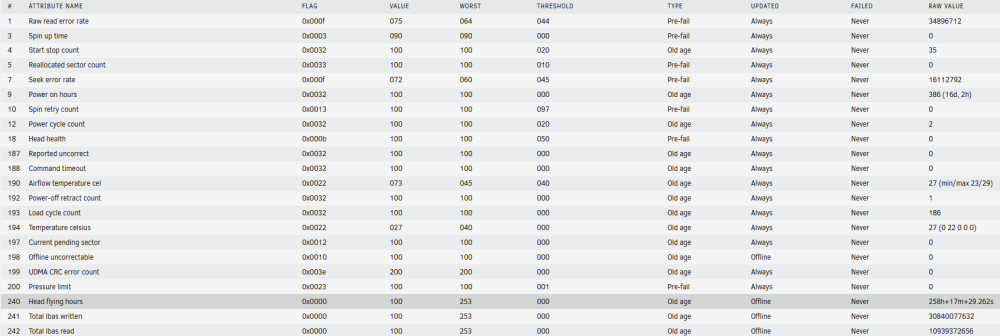
Hello, running 6.10.3. I had a power outage today (everything on battery backup) and so i preventatively shut down Unraid as I wanted to conserve the backup. Upon rebooting, i noted that my "Disk 7" drive was "unmountable". I searched out, found some forum threads and ultimately ended on SpaceInvader's video on corrupt file systems. I was able to start the array in maintenance mode, run the "Check Filesystem Status" and it found and corrected some errors that occurred. Upon restarting the array after the filesystem check, ALL data was in "Lost & Found" folder. Most of it was distinguishable and because of some cloud backups, I was able to mimick the exact file/folder structure I had before. There are thousands of files so I wasn't able to spot check everything but I think it recovered everything. Now onto the root of my questions surrounding this: 1) I do have some risidual files in "Lost & Found" which appear to have lost their file names, etc. See below: Is there any way/program out there that will allow me to distinguish what these files actually are (ie. word, pdf, jpg, etc). If the "modified time" is correct, I'd have no idea what these items are given their age. 2) The hard drive that this occured on is a Seagate 14TB Exos drive. I just "installed" it into the server about 2-3 weeks ago. Should I be concerned that the file system was corrupt on a newly installed HDD (and brand new HDD). There are no smart errors that are triggering: 3) Once I figure all this out, I am going to re-run the parity check. I presume it'll be riddled with errors but can assume right now my parities are effectively useless. Not a question but just seeing if there is anything I am missing here. 4) Any other things to note regarding this? Obviously it isn't something I want to happen again but is there a way to test filesystems without loss of data? Any other things I should check?
-
So I followed SpaceInvader One's nextcloud setup and am using Nextcloud with mariadb/swag/duckdns. It was working flawlessly for several months and then something happened (not nextcloud related) and I had to adjust some network settings. I reverted everything back to the original; however, for some reason, whenever I try to load the nexcloud gui, I get an "unable to connect" message. Everything is running fine and I have ports forwarded appropriately, etc. Is there some easy docker commands which might help me highlight the issue. Without nuking everything above and start over, I am at a loss for how to troubleshoot this issue. As mentioned, it ran just fine for many months until I was trying to set up Remote Support for Unraid. I ended up deciding against this (after adjusting various settings) and believe I reverted everything back. Port Forwarding appears to be fine and as originally set up. Thanks in advance. Happy to answer any questions about the setup if needed.
-
Question on the Restore - Is there a way to restore the "Appdata" folder for just one docker. I ran into an issue with one of my dockers and feel this may be the best way to handle; however, I don't want to restore every docker/file --- just the ones specific to the docker that had an issue. Thanks!
-
Thanks I'll give this a shot. Currently my DNS Server is set to my Router (192.168.1.1). I agree that they are already anonymized; however, I believe it doesn't "redact" all the things that I wish to be redacted. I thought I recalled some of my shares being named in the files and given the nature of what my shares are named, it takes away from the anonymity of me (not sure if that makes sense). I cant recall the issue exactly since its been a long time since I've run diag.; however, i just recall as I was scanning through the files in the .zip, I didn't like some of the information that wasn't redacted.
-
Thanks for your help. I was able to get it Lastly - I am also getting another error. Is there any "quick fixes" here. While I know i can upload Diagnostics, I've found there are several things I need to go in to the outputs and further "anonymize" before uploading. Note that I saw this may be related to Pihole -- however, I am not running pihole on the network

-
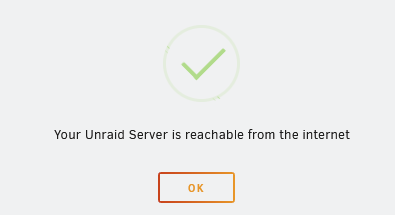
Hello. So I had an issue with MyServers and saw I needed to "Provision" the SSL. I went to Management Access and see the following: So I went to my router and set the following: After doing this, I still get the server is unreachable. Any thoughts?

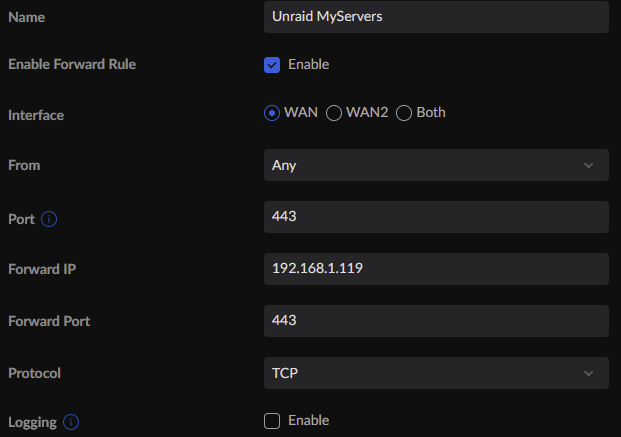
-
I fixed it. User error on my end. I had a router setting that was throwing plex off completely. Had nothing to do Plex Announcer. Apparently, one of my country restrictions for IDS/IPS wasn't playing nicely with plex. Once I fixed this, it seemed to fix the PA issue. Thanks for offering the assistance!
-
I guess I have to stop updating my docker when it works fine 😁 I am having issues again after the recent update. No change in settings, updated docker, and now, no issues are pushing through to discord. Any thoughts? I went back and looked at some of my errors in the past and don't see them replicated. Thanks
-
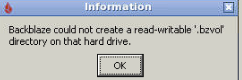
I am testing this however, i must have a permission issue. When I go to test a backup of my file, I get an error Not sure how to remedy
-
Thanks it works. It works with "media" but i'll update to server. I think it was that before and I tried re-doing the link and must have grabbed the wrong one.
-
Just updated. Still same "Invalid plex server url" My plex server url is this" https://app.plex.tv/desktop/#!/media/7NUMBERSANDLETTERS2/
-
Just using the standard Unraid env. variables. Changed nothing with the config, just ran the update. Then noticed it wasn't starting up and wen to the logs.
-
1) What are the changes? and 2) after installing update, I keep getting "Invalid plex server url" in the logs.
-
Was there a recent change to Discord/Plex/PA with respect to the service. My PA was working perfectly for months and on March 3rd, it stopped updating in discord. No changes to settings in PA, Discord, or Plex. I tried to re-config (start from scratch) and nothing is causing it to work again.
-
I am not sure -- i suspected it might be that as well but it certainly isn't running the backup still. I don't auto-run "Mover" so it's whenever I feel the need to hit the button. Usually its later in the day (12+ hrs after Appdata backup) so it def. is still not writing. I even tried the next day (and the next) and still same issue. That being said -- I have Crashplan running on unraid and it's set to auto backup the folder which this .tar is stored in. Perhaps it is uploading this to Crashplan which is limiting the ability to backup? I ran mover on Thursday and got the same "skip" notification. I ran mover last night and it actually moved it....odd....
-
So every Tuesday morning, I have "Appdata Backup/Restore v2" run a backup of my appdata (among other) folders. The initial backup is saved on my nvme/cache drive until it gets moved during the the day after successful completion. Then, when I go to run Mover, it successfully creates the shell folder (ie. the appdata folder titled with the date of the backup) on an available array disk (with sufficient space) however, for some reason, the .tar file doesn't actually get moved. The last few weeks, i've had to go in and move manually via MC which I'd rather not have to do. My question is why would this be occurring? The .tar file is about 465 gb and I have 8 drives on the array with available space that can store this (anywhere from 627 gb to 2.42 TB of available space on each of the 8 drives). I was able to copy the log here when mover ran: mvlogger: Log Level: 1 mvlogger: *********************************MOVER -SHARE- START******************************* mvlogger: Wed Feb 23 01:41:27 EST 2022 mvlogger: Share supplied backups Sharecfg: /boot/config/shares/backups.cfg mvlogger: Cache Pool Name: cache_nvme mvlogger: Share Path: /mnt/cache_nvme/backups mvlogger: Complete Mover Command: find "/mnt/cache_nvme/backups" -depth | /usr/local/sbin/move -d 1 Feb 23 01:41:27 HawkinsUnraid move: move: skip /mnt/cache_nvme/backups/appdata backup/[email protected]/CA_backup.tar mvlogger: Wed Feb 23 01:41:27 EST 2022 mvlogger: ********************************Mover Finished***************************** What would be causing the skip? i assume it has something to do with the Mover command directly above the skip command; however, I cannot discern why it wouldn't move. In this particular case, mover created the shell folder "2022-02-22@05:00" on my disk 27 which has 2.42TB of space remaining; however, it doesn't actually move the .tar file associated with that folder. Thanks!
-
So every Tuesday morning, I have "Appdata Backup/Restore v2" run a backup of my appdata (among other) folders. The initial backup is saved on my nvme/cache drive until it gets moved during the the day after successful completion. Then, when I go to run Mover, it successfully creates the shell folder (ie. the appdata folder titled with the date of the backup) on an available array disk (with sufficient space) however, for some reason, the .tar file doesn't actually get moved. The last few weeks, i've had to go in and move manually via MC which I'd rather not have to do. My question is why would this be occurring? The .tar file is about 465 gb and I have 8 drives on the array with available space that can store this (anywhere from 627 gb to 2.42 TB of available space on each of the 8 drives). I was able to copy the log here when mover ran: mvlogger: Log Level: 1 mvlogger: *********************************MOVER -SHARE- START******************************* mvlogger: Wed Feb 23 01:41:27 EST 2022 mvlogger: Share supplied backups Sharecfg: /boot/config/shares/backups.cfg mvlogger: Cache Pool Name: cache_nvme mvlogger: Share Path: /mnt/cache_nvme/backups mvlogger: Complete Mover Command: find "/mnt/cache_nvme/backups" -depth | /usr/local/sbin/move -d 1 Feb 23 01:41:27 HawkinsUnraid move: move: skip /mnt/cache_nvme/backups/appdata backup/[email protected]/CA_backup.tar mvlogger: Wed Feb 23 01:41:27 EST 2022 mvlogger: ********************************Mover Finished***************************** What would be causing the skip? i assume it has something to do with the Mover command directly above the skip command; however, I cannot discern why it wouldn't move. In this particular case, mover created the shell folder "2022-02-22@05:00" on my disk 27 which has 2.42TB of space remaining; however, it doesn't actually move the .tar file associated with that folder. Thanks!
-
Question on this and sorry for my delay, I got busy and didn't get a chance to fully explore. So I assume you run this in the "Console" of Unraid to make it work. And based on the backup settings, I assume it'll continue to run indefinitely. How do you end this? How do you modify this? Also, on the echo commands, that's the message displaying Successful or Failed -- does that come through as an Unraid notification? I've familiarized myself with the script itself; however, just a little confused on execution since I am so used to Dockers/Apps. Thanks!
-
Thanks all for the comments. Makes me feel better. I think I'll upgrade like this. This seems to make most sense. Eventually the 8tb will be redeployed as data disks but would be nice to have them as backup in case parity messes up I think this is a case of bad terminology on my end. I guess I thought I was doing a parity swap but really just upgrading. I guess I confused what I wanted to do vs. what the instructions provided. Thanks all for your input!
-
Running Unraid 6.9.2 and had a question on the parity swap procedure. Currently, I have dual parity drives in place -- 2 - 8tb drives. I am looking to replace both of these to 14tb drives for future proofing, etc. I was able to find the instructions at the link below however had a couple questions regarding the process as the process only addresses one parity drive swap and not a scenario where I already have dual parity https://wiki.unraid.net/The_parity_swap_procedure 1) Are the instructions still valid for 6.9.2. The concern I have is around the downtime of the array -- I assume will take 2 days as thats the length of my last parity check (8tb). I'd like to avoid server downtime if possible and wasn't sure if there was a way to do this given I have dual parity 2) Are the procedures the same for each parity drive? Do I do one first, then the other? (means 4 days of total downtime potentially). 3) any tips or suggestions?
-
So I am still testing this but I did not mess with bios settings just yet. I did plug another ethernet cord from the 2nd LAN spot to the switch and it seemed to have made a difference. I havent had the issue for two days. Perhaps i have a bad NIC?
-
Thanks so much for these. Def. going to try these when i get home from business travel. Appreciate your help and time!



