





Hawkins12
Members
-
Joined
-
Last visited
Everything posted by Hawkins12
-
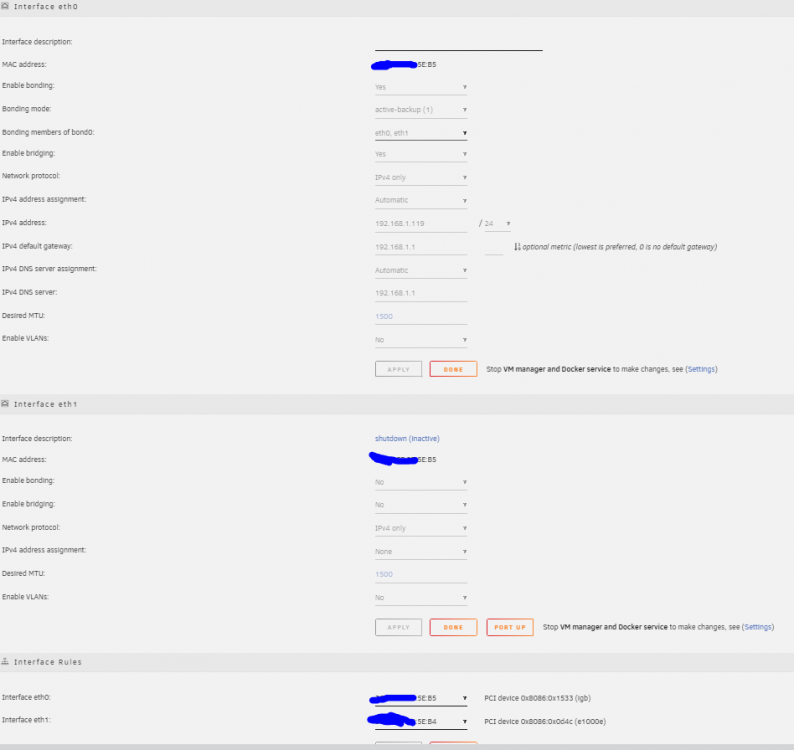
Thanks. I guess I'll check out Board BIOS settings. I'll note that this is not an external card. All NIC's would be integrated with the mobo. I have no separate cards. For reference the Mobo is a Supermicro X12SCZ-F. I know there is a bios update out there for it -- i'll contact Supermicro to see if it relates to the NIC's. I'm always hesitant on the bios updates. Also, I didn't know I had two NIC's. I took a quick look at the Mobo specs and guess you are right. It shows: Network Controllers: Single LAN with Intel® PHY I219LM LAN controller Single LAN with Intel® Ethernet Controller I210-AT Which actually makes sense because I have 3 network ports in the rear i/o: IPMI (Supermicro), LAN2, and LAN1. I am currently only using the LAN2 port. Would you also suggest switching to the LAN1 port and using that? Or wiring both up to the switch? Like i said, I am horrible with my knowledge of networking and am amateur at best :). Thanks for your help and time in responding! Note that LAN2 seems to be linked to the 5E:B5 mac address in my picture above. LAN1 is linked to 5E:B4 which again is not wired into my network switch.
-
I also figured it might be beneficial to show my Unraid network settings. See picture: I'll note I am confused why I have two Interfaces? I am in no way a technical expert with networking (equipment) but confused on why I have eth0 and eth1 that use the same MAC address. I did "Port Down" the eth1 interface as reflected in the image; however, I still got the issue noted above after that change.
-
So I have been having problems with running Live TV through Plex and would swear up and down it was a Plex issue. I would check logs of Plex and constantly encounter issues where Live TV (communication between Plex and HD Homerun device) would stutter. I was believing this was a Plex/HD Homerun device but then I started thinking about my server dropping my mapped network drives among other "odd" occurances like when using PuTTy where it just seems to have trouble on the network. I decided to run Live TV while monitoring server logs and the second my live tv started stuttering, there are the logs that appear in Unraid. I am starting to believe this isn't a plex issue but some sort of network issue related to either Unraid or my hardware. I know this isn't the typical format of providing logs but I wanted to provide the specifics that occurs to the issue. I can provide additional diagnostics if necessary but wasn't sure if something stood out from the below. For reference, server ip is 192.168.1.119 (which I am sure is clear below). Thanks in advance fro your help. Oct 20 11:56:57 HawkinsUnraid kernel: pcieport 0000:00:1c.5: AER: Uncorrected (Non-Fatal) error received: 0000:04:00.0 Oct 20 11:56:57 HawkinsUnraid kernel: igb 0000:04:00.0: PCIe Bus Error: severity=Uncorrected (Non-Fatal), type=Transaction Layer, (Requester ID) Oct 20 11:56:57 HawkinsUnraid kernel: igb 0000:04:00.0: device [8086:1533] error status/mask=00004000/00000000 Oct 20 11:56:57 HawkinsUnraid kernel: igb 0000:04:00.0: [14] CmpltTO Oct 20 11:56:57 HawkinsUnraid kernel: bond0: (slave eth0): link status definitely down, disabling slave Oct 20 11:56:57 HawkinsUnraid kernel: device eth0 left promiscuous mode Oct 20 11:56:57 HawkinsUnraid kernel: bond0: now running without any active interface! Oct 20 11:56:57 HawkinsUnraid kernel: br0: port 1(bond0) entered disabled state Oct 20 11:56:57 HawkinsUnraid kernel: pcieport 0000:00:1c.5: AER: device recovery successful Oct 20 11:56:58 HawkinsUnraid dhcpcd[2125]: br0: carrier lost Oct 20 11:56:58 HawkinsUnraid avahi-daemon[12196]: Withdrawing address record for 192.168.1.119 on br0. Oct 20 11:56:58 HawkinsUnraid avahi-daemon[12196]: Leaving mDNS multicast group on interface br0.IPv4 with address 192.168.1.119. Oct 20 11:56:58 HawkinsUnraid avahi-daemon[12196]: Interface br0.IPv4 no longer relevant for mDNS. Oct 20 11:56:58 HawkinsUnraid dhcpcd[2125]: br0: deleting route to 192.168.1.0/24 Oct 20 11:56:58 HawkinsUnraid dhcpcd[2125]: br0: deleting default route via 192.168.1.1 Oct 20 11:56:58 HawkinsUnraid dnsmasq[15575]: no servers found in /etc/resolv.conf, will retry Oct 20 11:56:59 HawkinsUnraid ntpd[2200]: Deleting interface #4820 br0, 192.168.1.119#123, interface stats: received=28, sent=28, dropped=0, active_time=229 secs Oct 20 11:56:59 HawkinsUnraid ntpd[2200]: 216.239.35.0 local addr 192.168.1.119 -> <null> Oct 20 11:56:59 HawkinsUnraid ntpd[2200]: 216.239.35.4 local addr 192.168.1.119 -> <null> Oct 20 11:56:59 HawkinsUnraid ntpd[2200]: 216.239.35.8 local addr 192.168.1.119 -> <null> Oct 20 11:56:59 HawkinsUnraid ntpd[2200]: 216.239.35.12 local addr 192.168.1.119 -> <null> Oct 20 11:57:01 HawkinsUnraid kernel: igb 0000:04:00.0 eth0: igb: eth0 NIC Link is Up 1000 Mbps Full Duplex, Flow Control: RX Oct 20 11:57:01 HawkinsUnraid kernel: bond0: (slave eth0): link status definitely up, 1000 Mbps full duplex Oct 20 11:57:01 HawkinsUnraid kernel: bond0: (slave eth0): making interface the new active one Oct 20 11:57:01 HawkinsUnraid kernel: device eth0 entered promiscuous mode Oct 20 11:57:01 HawkinsUnraid dhcpcd[2125]: br0: carrier acquired Oct 20 11:57:01 HawkinsUnraid kernel: bond0: active interface up! Oct 20 11:57:01 HawkinsUnraid kernel: br0: port 1(bond0) entered blocking state Oct 20 11:57:01 HawkinsUnraid kernel: br0: port 1(bond0) entered forwarding state Oct 20 11:57:02 HawkinsUnraid dhcpcd[2125]: br0: rebinding lease of 192.168.1.119 Oct 20 11:57:06 HawkinsUnraid dhcpcd[2125]: br0: probing address 192.168.1.119/24 Oct 20 11:57:11 HawkinsUnraid dhcpcd[2125]: br0: leased 192.168.1.119 for 86400 seconds Oct 20 11:57:11 HawkinsUnraid dhcpcd[2125]: br0: adding route to 192.168.1.0/24 Oct 20 11:57:11 HawkinsUnraid dhcpcd[2125]: br0: adding default route via 192.168.1.1 Oct 20 11:57:11 HawkinsUnraid avahi-daemon[12196]: Joining mDNS multicast group on interface br0.IPv4 with address 192.168.1.119. Oct 20 11:57:11 HawkinsUnraid avahi-daemon[12196]: New relevant interface br0.IPv4 for mDNS. Oct 20 11:57:11 HawkinsUnraid avahi-daemon[12196]: Registering new address record for 192.168.1.119 on br0.IPv4. Oct 20 11:57:11 HawkinsUnraid dnsmasq[15575]: reading /etc/resolv.conf Oct 20 11:57:11 HawkinsUnraid dnsmasq[15575]: using nameserver 192.168.1.1#53 Oct 20 11:57:12 HawkinsUnraid ntpd[2200]: Listen normally on 4821 br0 192.168.1.119:123 Oct 20 11:57:12 HawkinsUnraid ntpd[2200]: new interface(s) found: waking up resolver
-
So I keep getting warning messages because my Docker Image file is getting full. The culprit appears to be NordVPN: How do I keep NordVPN from writing to my docker img?

-
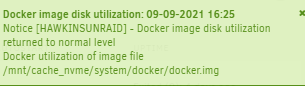
Thanks - I just did this and got the message -- there was about 7 orphaned dockers there that I removed.
-
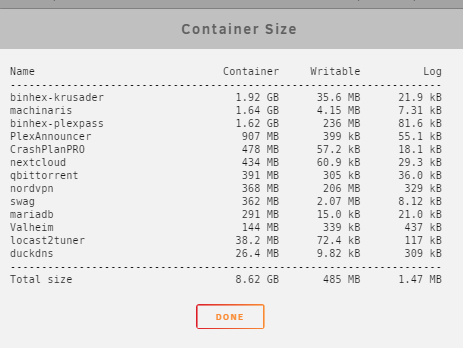
Odd that it runs up to 90% full when this shows only 8.6GB. I honeslty didn't even pay attention to this button to check container size. Maybe I'll check it when I get the notification again. I am trying to recall what I was doing when i received the 90% full warning but can't remember off-hand. Also, i am not sure whats going on with Disk 7. Right now, it has a docker.img file in it at 21.5GB. Perhaps at one point my Docker.img got too big and moved there? There is an isos folder in there as well but no files that I can see.
-
Thanks!
-
So I've tried researching this issue but I think something has changed with the newer unraid versions. I keep getting the messages similar to: Docker image disk utilization of 96% Description: Docker utilization of image file /mnt/cache_nvme/system/docker/docker.img My Cache_nvme is 2TB and no where near full. Some of the previous issues are from a couple years ago and it indicates you could stop the docker, go to advanced view, and increase size there; however, that doesn't appear to work any longer. How do I settle this message and allocate more space to the docker.img?
-
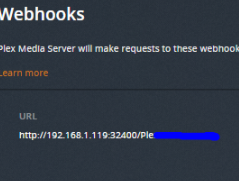
Ok, disregard, I checked the logs of the PlexAnnouncer container and I did get the result you posted And in the process, I think I figured out the issue. In Plex Settings, I added: I think this needs to read :32500 and not :32400. I just need to test it.


-
Looks like something's amiss. Here is the results -- I ran twice for good measure. I did replace the IP with my internal IP for the plex container (and webhook) as well.
-
I just added a new TV series to my TV Series folder. Nothing came through to discord. Is there generally a delay? I also added a new movie too. Still didn't report to discord
-
Oh thanks, I'll try to find something new to add and report back. Thanks for this!
-
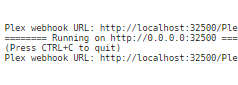
I left it run all night, checked this morning and logs show: This seems to be an improvement from yesterday; however, I removed and re-added a video and still didn't show up in discord. Total loss at this
-
Ok I am at a loss. I feel like I have everything set up correctly but not getting push notifications in Discord channels. Here's what I got: So I think I have my Plex settings right. Here's my docker settings: And of course the Discord Webhook URL matches the "copy webhook URL" from discord. Finally, checking the logs of PlexAnnouncer, it is running and I see: --- That's it. I added a couple shows to one of my libraries in Plex and nothing showed up in Discord. What did I do wrong?






-
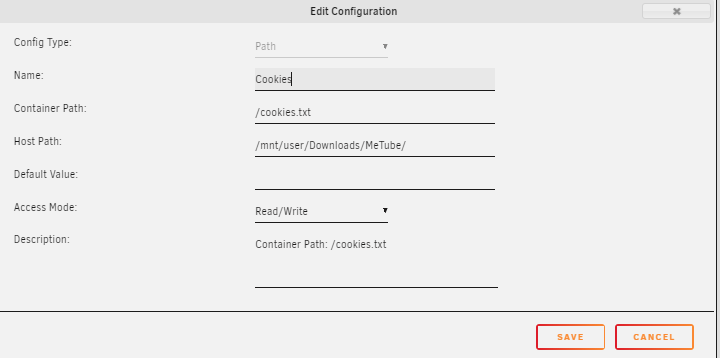
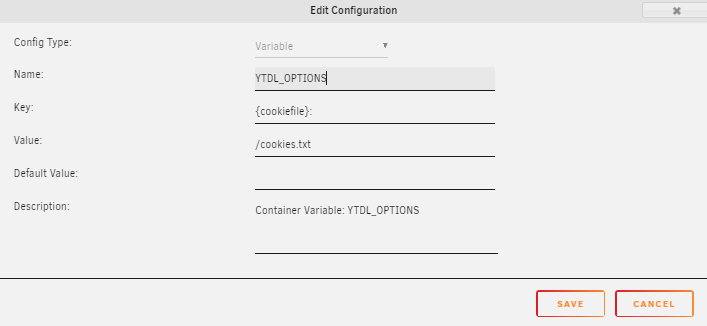
Requesting assistance from anyone familiar with how to set up environment variables for Metube. Here's what I am trying to accomplish. I need to "mount" a cookies.txt file so Metube knows how to properly pull the cookies file when retrieving video. I have a cookies.txt file generated I just need to set an environment variable to recognize it. Below are instructions from the Dev but I am lost on a couple points. I am not sure how to set up the environment variable to recognize the cookies file since Metube doesn't have an appdata folder, etc. Any assistance would be helpful. Based on the above, I mounted the path as follows (note the cookies.txt file is in the "/downloads/Metube/ directory: And here is what I have for Env. Variable...What am I doing wrong??
-
Thanks for help. I deleted the big backup set and broke it into 3 or 4 different backup sets (based on type of data). Seems to be workign fine but as you said, VERY SLOW.
-
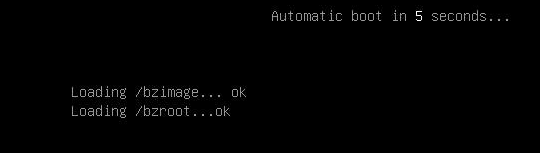
Been running Unraid just fine for several months. Last night, I had a power outage. My UPS picked up as expected and did a shutdown also as expected. Received the email below: Event: Unraid Server Alert Subject: UPS Alert Description: Remaining battery runtime below limit on UPS HawkinsUnraid. Doing shutdown. Importance: alert So I wake up this morning and boot up the server and now I am stuck at Won't do anythign else? What's the problem? I know previously I read this can be a RAM issue but given I've had months on the server with restarts and starts and that didn't seem to be the issue. Another thing I read was UEFi and my motherboard is set to run in UEFI. What else can i try>?
-
Haha i wish i had your brains. Thanks for this. I am still studying the script and trying to understand. Appreciate your help!
-
Thanks I'll have to look at this. Your statement is exactly what I need. My issue is Crashplan won't store windows backups because it's excluded file type so i need to .tar it so it can be "included". haha. I just need to digest the script as I am a "newbie" when it comes to this.
-
I have a network share where, every week, my Windows PC will perform a backup and store all the files in an Unraid network Share. For various reasons, once my windows pc backup completes, I'd like to see if I can automatically .tar the contents of this directory. I am also fine if it deletes the original data and curious to see if there would be a way to delete the .tar's after like 2 weeks or so (no more than 2 stored). Is there an unraid feature, docker, code that can do something like this? TIA!
-
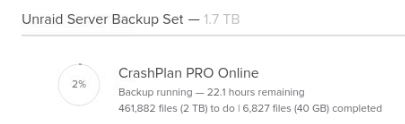
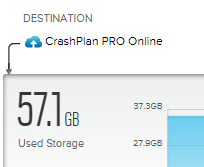
On top of my post above, I seem to have a lot of trouble with the docker and connecting to the GUI. My chrome is updated and when I go to the GUI port, I get this: The GUI does open in Edge but that is not my preferred browser (if I can help it). The other oddity I noticed is that when I log on to Crashplan from the GUI, I see this: However, when I log onto my crash plan account via a web browser, it shows me this: which indicates a lot more stored data vs. what the gui shows. Are these issues unique to me?

-
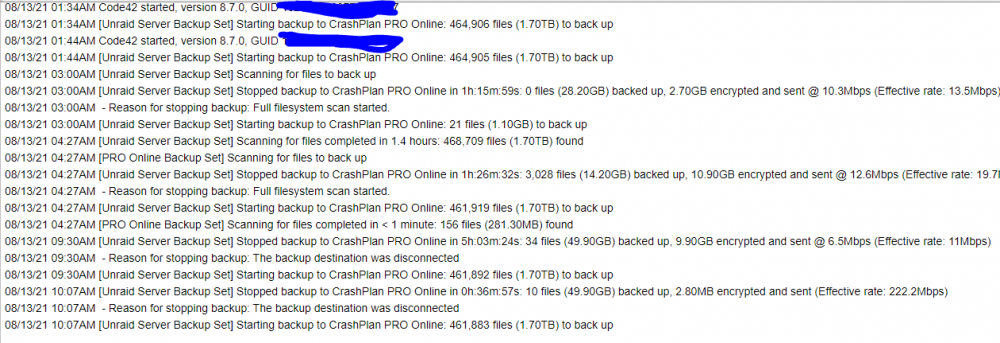
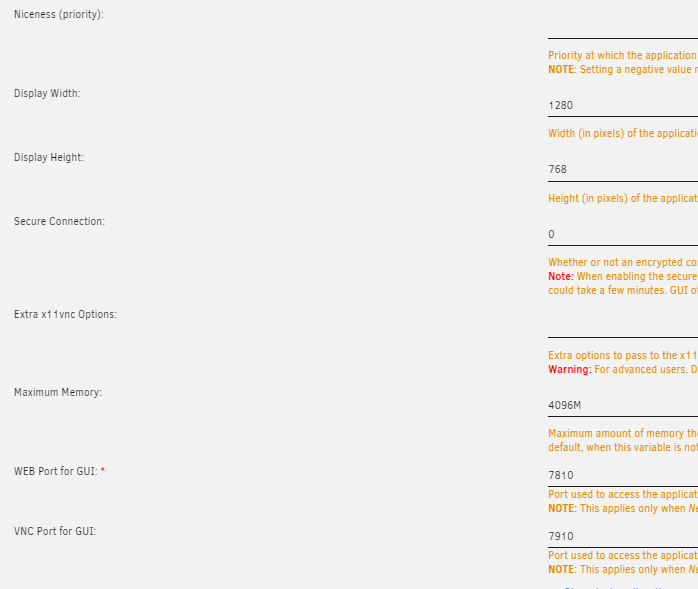
So I left it running all night while I slept. Looks like some progress was made but at these rates, it'll take a month to upload 1.6TB. Here is a history of the last 8.5 hrs. You can see I had a pretty good clip there (222 mbps) but outside of that, it has been a slow go. Also, below are my settings -- it seems I am allocating enough RAM to it for the size/storage space I am trying to back up
-
Crashplan help necessary. I just got the Crashplan Pro 30 day trial and installed the docker. Able to access the docker fine (most of the time) and the scan revealed about 1.6 TB of data to back up (this is accurate). Backup starts but then stops randomly and without warning or notification. When I log on to crashplan (via my account on Chrome), it shows my Unraid Server as "offline". I restart the docker, server then shows up as online and begins transferring data again. After some random period of time (generally less than an hour), it'll show up as "Offline" again. When this happens, I often cannot log into the Docker GUI either. What causes the server to keep going offline sporadically? I didnt change any docker settings form the defaults. I just added the maximum memory to be 4GB's (something I didnt do before). Could this be the issue? It's going to take forever to upload my 1.6TB at this rate. I noticed in my logs that I keep getting things like this -- have no idea why it keeps randomly "disconnecting" from backup destination: 08/12/21 10:55PM [Unraid Server Backup Set] Starting backup to CrashPlan PRO Online: 464,907 files (1.70TB) to back up 08/13/21 12:22AM [Unraid Server Backup Set] Stopped backup to CrashPlan PRO Online in 1h:26m:31s: 2 files (19.60GB) backed up, 3.60GB encrypted and sent @ 4.7Mbps (Effective rate: 13Mbps) 08/13/21 12:22AM - Reason for stopping backup: The backup destination was disconnected 08/13/21 12:43AM [Unraid Server Backup Set] Stopped backup to CrashPlan PRO Online in 0h:20m:28s: 1 file (20.20GB) backed up, 303.90MB encrypted and sent @ 9.4Mbps (Effective rate: 13.8Mbps) 08/13/21 12:43AM - Reason for stopping backup: The backup destination was disconnected Thanks in advance!
-
So things were cooking along, and I noticed it happened again. I captured this immediately after it happenedsyslog.txt You can see from my post above that at 4:42 it was functioning correctly Notice the gap between 4:37 and 4:58. Then around 5:05, I caught the error and it shows in the logs. It looks to be a PCIe Bus Error? Is that it? What could cause that? Note that as far as hardware, I do have a PCI-e card which holds an M.2. It's this one to be exact. https://www.microcenter.com/product/612048/micro-connectors-m2-nvme-m2-sata-80mm-ssd-pcie-x4-adapter-with-heat-sink-model-pcie-m20802hs. Is that what is causing the issue? Note that my m.2 drive where the "transfer" is occuring from my PC to Unraid Network share is going to the m.2 on this PCI-e card.
-
So I've been battling this issue all day and finally biting the bullet and asking for assistance. All day I've been "transferring" files from my PC to Unraid server via a mapped network drive. At random points throughout the day (and occuring very frequently), my PC will disconnect/reconnect to the network shares. Doing so creates issues with this transfer and causes me to restart the transfer. I thought it was a windows issue so I went through a slew of troubleshooting, turned off auto disconnect, etc. before I started to think it was an unraid issue. Now fast forward a few hours, and I started trying to test the issue to see if it really was an unraid issue. I installed NordVPN, Qbittorrent and successfully routed Qbit through NordVPN. My console tests were reflecting that it was all set up. curl ifconfig.io Then I started "transferring" files from Qbit to my cache drive. As I was watching the download speeds, I'd be doing good then it would slowly eek down to 0 kbs. I noticed at this time, when I ran the "curl" code mentioned above, it took a very long time and often returned nothing. At the same time, my "transfer" from my PC to Network share also encountered issue. So given I isolated and noted the problem with just unraid dockers, I now realize the issue with an unraid issue. You can note the log file attached. . The error occured once at 4:30 and against around 4:33. As I type this (4:42 currently), the error has not occurred again but no doubted will in due time. What am I missing here? I tried reading through the log but can't quite figure out the issue. What's causing Unraid to drop network for a very brief/momentary time? Thanks in Advance!syslog.txt


