





samsausages
Members
-
Joined
-
Last visited
Everything posted by samsausages
-
I'm not able to disable the ARC for pools/datasets. For example, when I create a dataset with: zfs create -o primarycache=none -o secondarycache=none -o atime=off -o compression=off pool/test doesn't disable ARC caching in my testing. Am I overlooking something or is this expected behavior?
-
@itimpi Thanks for that, that makes sense! I already backup the USB to local storage and then to a server I have at work, offsite. But I don't have any type of cloud storage that isn't in my circle and I avoid that. The benefit I see of this is that should something happen to the physical boot USB, I already have a USB with all my config files ready to go, only needing me to activate the license. And I already have a USB that I sync some critical files to, with the purpose that I can pull it in an emergency and take it with me. So adding a usb backup to that would only take me a few more lines of code.
-
So I had this thought. Can I just: 1. add another USB drive 2. Format FAT32, mount/automount 3. Write a script that copies/rsyncs boot usb to backup usb 4. Profit Anything I'm missing? Feels too simple, haha. Will probably try this out this weekend.
-
@Iker the caching is a welcome addition! Now it's operating exactly how I would have expected! Good releases, thanks!
-
@Iker Wow! I think you did it! I thought my ZFS Master plugin was uninstalled when I didn't see it load this morning, but then noticed you updated it! Haven't used it much yet, but it looks like it keeps from spinning my disks up now! I and my disks thank you! Donation inbound! Thanks!
-
Ah, that makes sense. The config reload is no issue, now that I know what it's doing! I can confirm that it works great when the main page stays open, my disks stay spun down as long as I keep the main page open! I like the little "last updated" notification. Unfortunately it still spins up when I visit or refresh the page, or when my computer wakes up from sleep. So that still results in spin ups for me.
-
Thanks for the update! Some nice UI changes in there! I'm in the same boat as @Laov It still seems to query zfs on page refresh/load, so results in spinning up the disks when I visit or refresh the page and doesn't really solve my problem. I would expect it to only refresh/query when I click the refresh icon. But maybe there is another issue and it's not working as expected. Because I have the "main" page open right now, and it's still refreshing itself with no user input, about ever 30 seconds. Having the pool/dataset info available from the last refresh is still welcome, as I want to see the actual dataset info from the last refresh. But I don't want ZFS Master to query zfs, or the disks, until I actually push the refresh button.
-
I wish I could but I'm probably on that page 20x a day.
-
This has been a great app for me and I do love it, thanks! But one issue keeps nagging me and that is that ZFS Master causes my ZFS Formatted Array disks to stay spun up and never spin down. We touched on this some time ago and looks like it's related to ZFS Master refreshing info, especially when refreshing the "main" page. Due to this I find myself uninstalling the plugin and only re-installing it when I need it... a bit clunky. I was wondering if you would consider a setting/button that allows the option for manual update only. That way I can keep the plugin installed, but it only accesses my disks, and spins them back up, when I actually need them to. It would help me save power and wear on my disks, as I really only access these 1-2x a day when a backup runs. Right now it's spun up pretty much all day.
-
That's what I thought, thanks for confirming! Wasn't sure if there was something I'm overlooking.
-
Title says it all. Any reason I have to download the entire USB for my backups? Can I just rsync and backup incrementally?
-
I did get it working, but I'm not using the cloudflare cert. I'm using a letsencrypt certificate. I use ACME on pfsense to automatically generate it, then I use RSYNC once a month to copy that to my unraid server. (Could also have it generated on your server using various methods) From there I have the certs installed on unraid using this script I made: https://github.com/samssausages/unraid-install-sslcert/tree/main If you don't end up using unraid-install-sslcert.sh I made, you should still get some ideas from it as far as where they need to copied to and how they need to be named.
-
Hi, I think I might have found a bug related to how the plugin handles the "Extra Files" section and Unriads new "Exclusive Shares" I have a share called share1 that is an exclusive share under /mnt/user/share1 I added that path to the "extra files" section long ago and it always worked as expected. But now I'm on 6.12 with Exclusive Shares enabled and when I went to restore from a backup today I found out that the files are no longer being backed up. Looks like because of the symbolic link. Containers that use exclusive shares are backing up correctly, this seems to be limited to the "Extra Files" section. I'm assuming I can work around that by using /mnt/poolname/share1 but I wanted to report the behavior as it looks like files for people using exclusive shares probably aren't backing up as expected and no error/warning is triggered.
-
EDIT: Almost all gone, only have 1TB and 2TB HDD's left. Would sell them for $5 & $10 each plus shipping cost. I have them on reddit right now, but sure someone here may be interested. The HDD's were barely used as they were in my backup server that only spun up at night for backups. Some of the disks never even spun up and only have 4 days of spin up time on them, from when I pre-cleared them: SSD's: HDD's:
-
You need to configure that, part of the config is in Samba. Instructions are here: https://forum.level1techs.com/t/zfs-on-unraid-lets-do-it-bonus-shadowcopy-setup-guide-project/148764 I didn't add anything to my script that would deal with shadowcopies on windows. But it may still work for that purpose, I haven't reviewed that article in a few years. But if I recall the change is mainly about the naming convention the script uses matching the Samba settings, so you would most likely only need to make that part match. EDIT: I recently did this config for windows and it's all done in the SMB config file on unraid. After proper config in that file, it will show shadow copies when browsing that share.
-
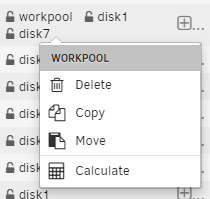
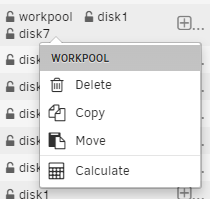
So I did a little test. I didn't test delete because I need to setup some empty disks and don't have time for that right now. But I figure Move would have a similar result and I'm experiencing similar confusing behavior, at the share level. Meaning that when I'm in any folder inside of a share, and I click on a disk in the "location" column, it doesn't just affect the folder/file that I'm clicking on, it affects the entire share on that disk. That is confusing to me and puts the ability to move/delete the entire share on each and every line item of the file browser, more prevalent than the actual action that applies to the folder, since that action is hidden behind a context menu. So I guess it works as expected, but I do find it quite confusing. I think I cleared my disk because I wrongly assumed the "location" action applies to the line item that I'm clicking on, not seeing that there is a hidden context menu that expands, that actually applies to just that line item.
-
Not sure how I ended up with two empty disks then, specifically the two disks I ran this action on. Affected all shares on those disks. I guess I'll try to recreate it, but don't have time to set that up in a way I won't lose more data right now.
-
WARNING - CONFUSING & TOO EZ TO DELETE ENTIRE DISK, DELETED 28TB IN 5 SECONDS & 6 CLICKS So I recently deleted 2 full 14TB drives, in error, using Dynamix File Manager. In 5 seconds, with 6 clicks and before realizing what I was doing. I didn't realize that the action affected the whole disk/pool, not only the specific folder that I clicked on. I know, it's my fault and luckily I have a good backup strategy. But I don't understand why the ability to delete the entire disk/pool is literally on every single line item of the file browser, with no explicit warning that you are deleting the entire disk/pool. Even now knowing what it does, it's evne more frustrating how easy it is to delete your entire disk/pool, and that it is present on every single line item of the file manager. Due to the high data loss potential, I don't understand why it's so prevalent. Specifics: So I was organizing some files and saw that the "location" column shows the disks the folder is living on. Cool! So I clicked on it and saw that you could "Delete" "Copy" and "Move". Awesome! I thought. I could use this to organize my files on the specific disks. I could "Copy" the folder from one disk to another. Or I could delete a folder from only one disk! Nope, when you do this it deletes the ENTIRE disk and the ENTIRE Pool. I don't get why someone would want to "Copy" the entire disk, while clicking on a specific folder. It's very confusing So learn from me! Because I did this on two "folders", with 6 clicks, in 5 seconds, and then noticed 2 of my 14TB drives were completely empty.

-
So I recently deleted 2 full 14TB drives, in error, using Dynamix File Manager. In 5 seconds, with 6 clicks and before realizing what I was doing. I didn't realize that the action affected the whole disk/pool, not only the specific folder that I clicked on. I know, it's my fault and luckily I have a good backup strategy. But I don't understand why the ability to delete the entire disk/pool is literally on every single line item of the file browser, with no explicit warning that you are deleting the entire disk/pool. Even now knowing what it does, it's even more frustrating how easy it is to delete your entire disk/pool, and that it is present on every single line item of the file manager. Due to the high data loss potential, I don't understand why it's so prevalent. Specifics: So I was organizing some files and saw that the "location" column shows the disks the folder is living on. Cool! So I clicked on it and saw that you could "Delete" "Copy" and "Move". Awesome! I thought. I could use this to organize my files on the specific disks. I could "Copy" the folder from one disk to another. Or I could delete a folder from only one disk! Nope, when you do this it deletes the ENTIRE disk and the ENTIRE Pool. I don't get why someone would want to "Copy" the entire disk, while clicking on a specific folder. It's very confusing So learn from me! Because I did this on two "folders", with 6 clicks, in 5 seconds, and then noticed 2 of my 14TB drives were completely empty.

-
I haven't tested that, I just know every time I look they are spun up. Haven't tried to correlate it with going to the "main" page. I can't test for that right now, I don't have any ZFS formatted drives that aren't utilized & set to spin down, in the array right now. Might have to make a pool with some spare disks next time I stop the array.
-
it's for synchronous writes. Always = every write operation will wait until the data is committed to stable storage before acknowledging the write as complete. More latency but better data consistency. Disabled = ZFS acknowledges the write operation as complete as soon as the data is written to the ZFS Intent Log (ZIL) Faster but vulnerable to power loss / system failure.
-
It refers to the cache used for storing frequently accessed data and metadata in memory. All stores Metadata & data in the cache Metadata only stores metadata in the cache (used for listing directories/file lookups) None stores none in the memory
-
So I have run into a few other people with the same spin-up issue and it goes away removing the ZFS Master Plug-in. I confirmed that one of those people also uses an LSI 9300-16i, like me. That is what I'm starting to see as the culprit. example where others are solving it by removing the ZFS-Master plugin:
-
The SMART message you get is simply something that happens when they spin up, and unrelated. I had a similar issue and it was the ZFS Master Plugin and only affected my ZFS formatted disks.
-
Noticing that Unraid enables atime by default on zfs pools/datasets. Most of my workloads do not need atime on, so I usually disable it on my datasets. I have a feeling you all have already had this discussion, but I couldn't find any posts referencing atime, so I thought I'd bring it up. I would like to be able to default it to off, or have a way to disable it. Right now I just send the command via CLI, but this doesn't work well for folders/datasets that are cached, as they are created and destroyed depending on usage. (would also be nice to do the same for recordsize, but I have read that will be introduced at some point)





